Of course! The term "python encode ignore" most commonly refers to a specific error-handling mechanism used when encoding strings into bytes. Let's break it down in detail.

The Core Concept: errors='ignore'
In Python, when you convert a string (a sequence of Unicode characters) to bytes, you need to specify an encoding (like 'utf-8', 'ascii', etc.). This encoding maps characters to byte values.
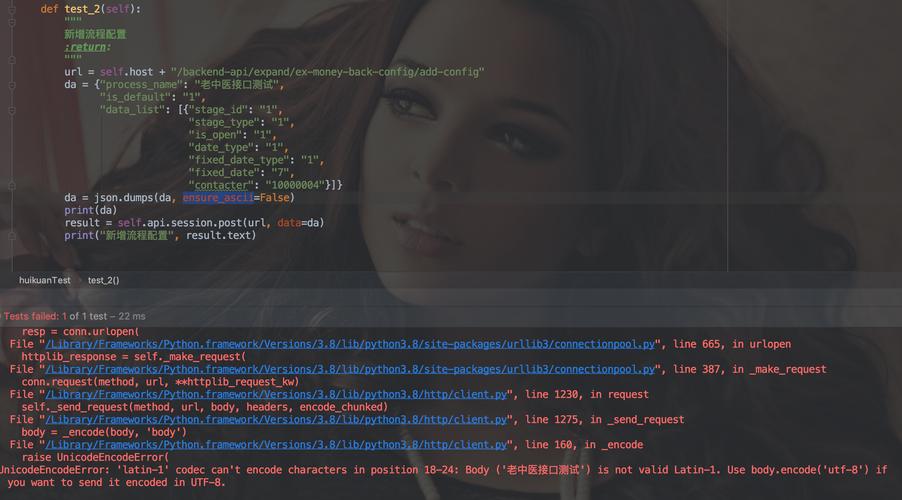
The problem arises when your string contains a character that the chosen encoding cannot represent. For example, trying to encode the character using the 'ascii' encoding will fail because is not part of the ASCII character set.
This is where the errors parameter in encoding methods comes in. It tells Python what to do when it encounters such an unencodable character.
The errors='ignore' option tells Python: "If you encounter a character you can't encode, just skip it and move on to the next one. Do not include it in the final byte string."
The Practical Example: str.encode()
Let's see errors='ignore' in action with the most common method, str.encode().
Scenario: We have a string with standard English letters and a special character like (copyright symbol). We'll try to encode it using 'ascii', which cannot represent .
# Our original string
my_string = "Hello, World! This is a copyright symbol: ©"
# --- Case 1: Default Behavior (errors='strict') ---
# This will raise a UnicodeEncodeError because '©' cannot be encoded in ASCII.
try:
    # This line will fail
    my_string.encode('ascii')
except UnicodeEncodeError as e:
    print("--- Using default 'strict' error handling ---")
    print(f"Error Type: {e.__class__.__name__}")
    print(f"Error Message: {e}")
    print("-" * 20)
# --- Case 2: Using 'ignore' ---
# This will successfully encode the string, but the '©' symbol will be gone.
encoded_bytes_ignore = my_string.encode('ascii', errors='ignore')
print("\n--- Using 'ignore' error handling ---")
print(f"Original string: '{my_string}'")
print(f"Encoded bytes:   {encoded_bytes_ignore}")
print(f"Decoded back:    '{encoded_bytes_ignore.decode('ascii')}'") # Note the missing symbol
print("-" * 20)
Output:
--- Using default 'strict' error handling ---
Error Type: UnicodeEncodeError
Error Message: 'ascii' codec can't encode character '\xa9' in position 38: ordinal not in range(128)
--------------------
--- Using 'ignore' error handling ---
Original string: 'Hello, World! This is a copyright symbol: ©'
Encoded bytes:   b'Hello, World! This is a copyright symbol: '
Decoded back:    'Hello, World! This is a copyright symbol: '
--------------------
As you can see, the symbol was simply omitted from the final byte string to avoid an error.
Other Common errors Options
For context, it's helpful to know what other options are available for the errors parameter.
| Error Handler | Description | Example |
|---|---|---|
'strict' |
(Default) Raises a UnicodeEncodeError when an unencodable character is found. |
'café'.encode('ascii') -> Error |
'ignore' |
Silently ignores the unencodable character. | 'café'.encode('ascii', 'ignore') -> b'caf' |
'replace' |
Replaces the unencodable character with a placeholder (usually ). | 'café'.encode('ascii', 'replace') -> b'caf?' |
'xmlcharrefreplace' |
Replaces the character with its XML/HTML numeric entity (e.g., ©). |
'©'.encode('ascii', 'xmlcharrefreplace') -> b'©' |
'backslashreplace' |
Replaces the character with a Python-style backslash escape sequence. | 'café'.encode('ascii', 'backslashreplace') -> b'caf\\xe9' |
The Reverse: bytes.decode()
The errors parameter is also available when decoding bytes back into a string. The logic is similar: what to do if a byte sequence is invalid for the specified decoding.
errors='ignore' in this context means: "If you encounter an invalid byte sequence, skip those bytes and continue decoding."
# A byte string that was encoded with UTF-8 but is now being decoded as ASCII.
# The byte for 'é' in UTF-8 is two bytes: \xc3\xa9.
# This sequence is invalid in single-byte ASCII.
byte_data = b'Hello, this is an invalid byte: \xc3\xa9 symbol.'
# --- Case 1: Default Behavior (errors='strict') ---
try:
    byte_data.decode('ascii')
except UnicodeDecodeError as e:
    print("--- Using default 'strict' error handling (decoding) ---")
    print(f"Error Type: {e.__class__.__name__}")
    print(f"Error Message: {e}")
    print("-" * 20)
# --- Case 2: Using 'ignore' ---
decoded_string_ignore = byte_data.decode('ascii', errors='ignore')
print("\n--- Using 'ignore' error handling (decoding) ---")
print(f"Original bytes: {byte_data}")
print(f"Decoded string: '{decoded_string_ignore}'") # Note the part after the invalid bytes is gone
print("-" * 20)
Output:
--- Using default 'strict' error handling (decoding) ---
Error Type: UnicodeDecodeError
Error Message: 'ascii' codec can't decode byte 0xc3 in position 25: ordinal not in range(128)
--------------------
--- Using 'ignore' error handling (decoding) ---
Original bytes: b'Hello, this is an invalid byte: \xc3\xa9 symbol.'
Decoded string: 'Hello, this is an invalid byte:  symbol.'
--------------------
In this decoding example, the invalid byte sequence \xc3\xa9 was completely skipped, and the decoding continued with the following bytes (symbol.).
Summary: When to Use errors='ignore'
| Use Case | Pros | Cons |
|---|---|---|
| Data Cleaning / Sanitization | Simple way to remove unwanted or malformed characters from text before processing or storing it. | You silently lose data. This can be dangerous if you're not sure what you're removing. |
| Legacy System Integration | When you must send data to an old system that only supports a limited character set (like ASCII) and you'd rather lose some data than have the entire transmission fail. | Data loss can lead to incorrect information being processed by the legacy system. |
| Quick-and-Dirty Scripts | A fast way to get a script to run without crashing on encoding issues, especially for logging or non-critical output. | Not robust. Hides underlying problems that should probably be addressed. |
Best Practice: Use errors='ignore' when you are intentionally and knowingly discarding characters that you know are problematic for your target encoding. For most modern applications, UTF-8 is the recommended encoding, as it can represent every character in the Unicode standard, making errors like this much less likely. If you do encounter an error with UTF-8, it often indicates a more serious data corruption issue that shouldn't be silently ignored.