Of course! In Java, "JSON encoding" is the process of converting a Java object into a JSON string. This is also known as serialization.
There are several popular libraries for this in Java. I'll cover the three most common ones, starting with the modern standard and then moving to other popular options.
Using jakarta.json (The Modern Standard - Java EE / Jakarta EE)
This is the standard API for JSON processing in modern Java (as of Java EE 8 and Jakarta EE). It's built into many application servers and is available in standard Java 11+ as a separate module. The key class is jakarta.json.JsonObjectBuilder.
Key Classes:
jakarta.json.JsonObjectBuilder: To build a JSON object.jakarta.json.JsonArrayBuilder: To build a JSON array.jakarta.json.JsonWriter: To write the JSON object to a string or output stream.
Example: Building a JSON String from Scratch
This is the most common use case for simple, manual encoding.
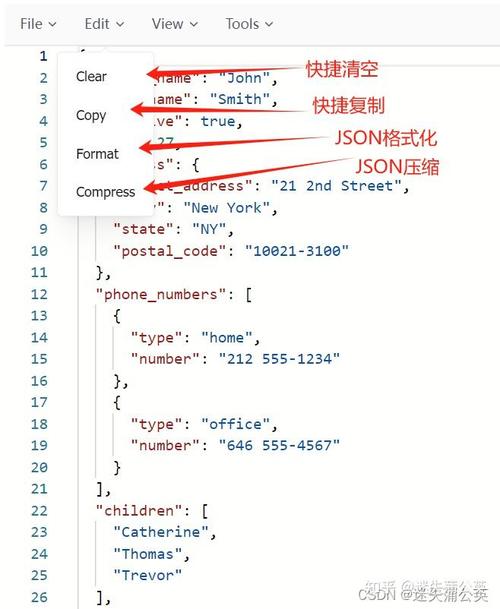
import jakarta.json.Json;
import jakarta.json.JsonObject;
import jakarta.json.JsonWriter;
import java.io.StringWriter;
import java.util.HashMap;
import java.util.Map;
public class JakartaJsonEncoder {
    public static void main(String[] args) {
        // Create a JsonObjectBuilder
        JsonObjectBuilder builder = Json.createObjectBuilder();
        // Add key-value pairs
        builder.add("name", "John Doe");
        builder.add("age", 30);
        builder.add("isStudent", false);
        builder.add("courses", Json.createArrayBuilder()
                .add("History")
                .add("Math")
                .add("Science"));
        // Build the final JsonObject
        JsonObject jsonObject = builder.build();
        // Write the JsonObject to a String
        StringWriter stringWriter = new StringWriter();
        try (JsonWriter jsonWriter = Json.createWriter(stringWriter)) {
            jsonWriter.write(jsonObject);
        }
        String jsonString = stringWriter.toString();
        System.out.println(jsonString);
    }
}
Output:
{"name":"John Doe","age":30,"isStudent":false,"courses":["History","Math","Science"]}
Using Jackson (The De Facto Standard - Most Popular)
Jackson is the most widely used JSON library in the Java ecosystem. It's extremely powerful, flexible, and performant. It can serialize both simple POJOs (Plain Old Java Objects) and complex data structures.
First, you need to add the Jackson dependency to your project.
Maven (pom.xml):
<dependency>
    <groupId>com.fasterxml.jackson.core</groupId>
    <artifactId>jackson-databind</artifactId>
    <version>2.15.2</version> <!-- Use the latest version -->
</dependency>
Gradle (build.gradle):
implementation 'com.fasterxml.jackson.core:jackson-databind:2.15.2' // Use the latest version
Example: Serializing a POJO (Java Object)
This is Jackson's primary strength. You just create a Java class and Jackson converts it to JSON.
import com.fasterxml.jackson.core.JsonProcessingException;
import com.fasterxml.jackson.databind.ObjectMapper;
// 1. Define a simple Java class (POJO)
class User {
    private String name;
    private int age;
    private boolean isStudent;
    private String[] courses;
    // Jackson requires a no-arg constructor
    public User() {
    }
    // Getters and Setters are required
    public String getName() { return name; }
    public void setName(String name) { this.name = name; }
    public int getAge() { return age; }
    public void setAge(int age) { this.age = age; }
    public boolean isStudent() { return isStudent; }
    public void setStudent(boolean student) { isStudent = student; }
    public String[] getCourses() { return courses; }
    public void setCourses(String[] courses) { this.courses = courses; }
    @Override
    public String toString() {
        return "User{" +
                "name='" + name + '\'' +
                ", age=" + age +
                ", isStudent=" + isStudent +
                ", courses=" + java.util.Arrays.toString(courses) +
                '}';
    }
}
public class JacksonJsonEncoder {
    public static void main(String[] args) {
        // 2. Create an instance of the ObjectMapper
        ObjectMapper objectMapper = new ObjectMapper();
        // 3. Create an object of your POJO
        User user = new User();
        user.setName("Jane Doe");
        user.setAge(25);
        user.setStudent(true);
        user.setCourses(new String[]{"Art", "Programming"});
        try {
            // 4. Use the mapper to convert the object to a JSON string
            // The 'true' argument makes the output human-readable (pretty-printed)
            String jsonString = objectMapper.writerWithDefaultPrettyPrinter().writeValueAsString(user);
            System.out.println(jsonString);
        } catch (JsonProcessingException e) {
            e.printStackTrace();
        }
    }
}
Output (Pretty-Printed):
{
  "name" : "Jane Doe",
  "age" : 25,
  "isStudent" : true,
  "courses" : [ "Art", "Programming" ]
}
Using Gson (Google's Library)
Gson is another very popular and robust library from Google. It's similar in concept to Jackson, with a slightly different API.
First, add the Gson dependency.
Maven (pom.xml):
<dependency>
    <groupId>com.google.code.gson</groupId>
    <artifactId>gson</artifactId>
    <version>2.10.1</version> <!-- Use the latest version -->
</dependency>
Gradle (build.gradle):
implementation 'com.google.code.gson:gson:2.10.1' // Use the latest version
Example: Serializing a POJO with Gson
The API is very straightforward. You create a Gson instance and call toJson().
import com.google.gson.Gson;
import com.google.gson.GsonBuilder;
// Use the same User class as in the Jackson example
class User { /* ... same User class as above ... */ }
public class GsonJsonEncoder {
    public static void main(String[] args) {
        // 1. Create a Gson instance
        // GsonBuilder allows for configuration, like pretty printing
        Gson gson = new GsonBuilder().setPrettyPrinting().create();
        // 2. Create an object of your POJO
        User user = new User();
        user.setName("Peter Jones");
        user.setAge(42);
        user.setStudent(false);
        user.setCourses(new String[]{"Economics", "Philosophy"});
        // 3. Use the gson object to serialize the Java object to a JSON string
        String jsonString = gson.toJson(user);
        System.out.println(jsonString);
    }
}
Output (Pretty-Printed):
{
  "name": "Peter Jones",
  "age": 42,
  "isStudent": false,
  "courses": [
    "Economics",
    "Philosophy"
  ]
}
Comparison and Recommendation
| Feature | jakarta.json (Standard API) |
Jackson | Gson |
|---|---|---|---|
| Ease of Use (POJOs) | Manual, verbose. | Excellent. Automatic with getters/setters. | Excellent. Automatic with getters/setters. |
| Performance | Good for simple cases. | Excellent. Generally the fastest. | Very Good. Slightly slower than Jackson. |
| Flexibility | Basic. | Excellent. Massive feature set (annotations, modules). | Excellent. Good feature set. |
| Annotations | No. | Yes. @JsonProperty, @JsonIgnore, etc. |
Yes. @SerializedName, @Expose, etc. |
| Best For | Simple, one-off JSON construction where you don't want a third-party dependency. | Most production applications. REST APIs, complex data models, high performance needs. | Simplicity and ease of use, especially if you're already in a Google ecosystem. |
Summary: Which one should I use?
- For new projects, especially REST APIs or complex applications: Use Jackson. It's the industry standard for a reason. It's powerful, fast, and has a huge community.
- If you need a simple, dependency-free solution for a small task: Use the
jakarta.jsonAPI. It's built-in and perfectly fine for basic object creation. - If you prefer a simpler API or are working in a project that already uses it: Use Gson. It's a fantastic library and a very close competitor to Jackson.