Of course! Working with bytes in Java sockets is a fundamental and crucial skill. It's the most efficient way to handle network communication, especially for protocols, binary data, or performance-critical applications.
Here’s a comprehensive guide covering the concepts, common pitfalls, and best practices.
Why Use Bytes with Sockets?
You might wonder, "Why not just use PrintWriter and BufferedReader with strings?" While convenient for text-based protocols (like HTTP), using bytes has significant advantages:
- Performance: Bytes are the native data type for network I/O. Converting to and from strings (e.g., using UTF-8) adds overhead.
- Binary Data: Many protocols (like DNS, gRPC, custom game protocols) are inherently binary. You cannot represent them as strings.
- Control: You have precise control over the exact bytes sent and received, which is essential for low-level protocol implementation.
The Core Java I/O Classes for Sockets
When you work with bytes, you'll primarily use classes from the java.io package.
| Class | Purpose | Key Methods |
|---|---|---|
InputStream |
Abstract class representing a stream of bytes. | int read(), int read(byte[] b), void close() |
OutputStream |
Abstract class for writing a stream of bytes. | void write(int b), void write(byte[] b), void close() |
Socket |
The endpoint for communication. | InputStream getInputStream(), OutputStream getOutputStream() |
ServerSocket |
Listens for incoming connections. | Socket accept() |
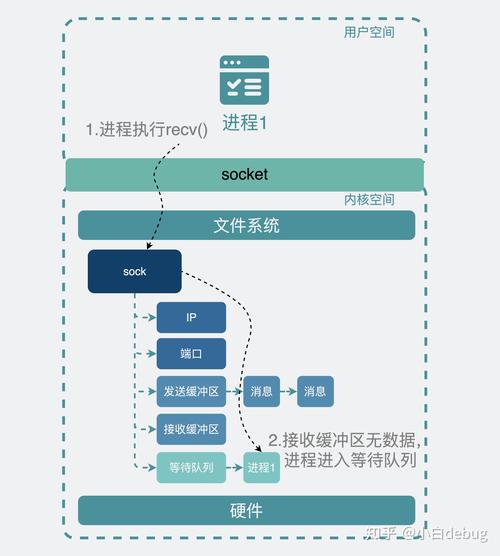
The key is to get the InputStream and OutputStream from your Socket object.
A Simple Example: Echo Server & Client
Let's build a classic "echo server" that sends back any byte data it receives. This is the best way to understand the basics.
The Echo Server
This server listens for a connection, reads all the bytes sent by the client, and sends them back.
import java.io.IOException;
import java.io.InputStream;
import java.io.OutputStream;
import java.net.ServerSocket;
import java.net.Socket;
public class ByteEchoServer {
    public static void main(String[] args) {
        // Use a port number > 1024 to avoid needing root/admin privileges
        int port = 6789;
        try (ServerSocket serverSocket = new ServerSocket(port)) {
            System.out.println("Server is listening on port " + port);
            // The accept() method blocks until a client connects
            try (Socket clientSocket = serverSocket.accept();
                 InputStream in = clientSocket.getInputStream();
                 OutputStream out = clientSocket.getOutputStream()) {
                System.out.println("Client connected: " + clientSocket.getInetAddress());
                // Create a buffer to read data into
                byte[] buffer = new byte[1024];
                int bytesRead;
                // Keep reading from the input stream until the client closes the connection
                // (read() returns -1 when the stream is closed)
                while ((bytesRead = in.read(buffer)) != -1) {
                    // Echo the received data back to the client
                    out.write(buffer, 0, bytesRead);
                    System.out.println("Echoed " + bytesRead + " bytes back to client.");
                }
                System.out.println("Client disconnected.");
            }
        } catch (IOException e) {
            System.err.println("Server exception: " + e.getMessage());
            e.printStackTrace();
        }
    }
}
The Echo Client
This client connects to the server, sends a message as bytes, reads the echoed response, and prints it.
import java.io.IOException;
import java.io.InputStream;
import java.io.OutputStream;
import java.net.Socket;
import java.nio.charset.StandardCharsets;
public class ByteEchoClient {
    public static void main(String[] args) {
        String host = "localhost";
        int port = 6789;
        try (Socket socket = new Socket(host, port);
             OutputStream out = socket.getOutputStream();
             InputStream in = socket.getInputStream()) {
            System.out.println("Connected to server.");
            // 1. Prepare data to send (a string converted to bytes)
            String message = "Hello from the byte client!";
            byte[] sendData = message.getBytes(StandardCharsets.UTF_8);
            // 2. Send the data
            out.write(sendData);
            System.out.println("Sent: " + message);
            // 3. Prepare to receive the echoed data
            byte[] receiveBuffer = new byte[1024];
            int totalBytesRead = 0;
            int bytesRead;
            // Keep reading until we have read all the echoed bytes
            // This is a simple approach; a robust solution is shown later.
            while ((bytesRead = in.read(receiveBuffer)) != -1) {
                totalBytesRead += bytesRead;
                // If we've read as much as we sent, we're done for this example.
                if (totalBytesRead >= sendData.length) {
                    break;
                }
            }
            // 4. Convert the received bytes back to a string and print
            String echoedMessage = new String(receiveBuffer, 0, totalBytesRead, StandardCharsets.UTF_8);
            System.out.println("Received: " + echoedMessage);
        } catch (IOException e) {
            System.err.println("Client exception: " + e.getMessage());
            e.printStackTrace();
        }
    }
}
How to Run:
- Run the
ByteEchoServerclass first. - Run the
ByteEchoClientclass in a separate terminal or IDE. - You will see the server and client logs showing the communication.
Common Pitfall and How to Solve It: The Message Boundary Problem
The client example above works for this simple case but has a critical flaw: How do you know when one message ends and the next begins?
The read() method does not guarantee that it will read all the bytes you ask for in one call. It can return any number of bytes from 1 up to the size of your buffer, even if more data is on the way. This is called a partial read.
The Problematic Scenario
Imagine your server sends two messages back-to-back: "Msg1" and "Msg2". A client might read them in a single read() call, resulting in garbled data: "Msg1Msg2".
Solution 1: Fixed-Length Messages
If you know every message is exactly, for example, 128 bytes, you can read in a loop until you have all 128.
// In the client
byte[] message = new byte[128];
int totalRead = 0;
while (totalRead < message.length) {
    int bytesRead = in.read(message, totalRead, message.length - totalRead);
    if (bytesRead == -1) throw new IOException("Connection lost");
    totalRead += bytesRead;
}
// Now 'message' contains exactly 128 bytes.
Solution 2: Delimiter-Based Messages
This is more common. You send a special byte (or sequence of bytes) to mark the end of a message. For example, a newline character (\n).
// In the server's writer (conceptual)
String msg = "This is a message\n";
out.write(msg.getBytes(StandardCharsets.UTF_8));
// In the client's reader (conceptual)
ByteArrayOutputStream baos = new ByteArrayOutputStream();
byte[] buffer = new byte[1024];
int bytesRead;
while ((bytesRead = in.read(buffer)) != -1) {
    baos.write(buffer, 0, bytesRead);
    // Check if the last byte is the delimiter
    if (baos.size() > 0 && baos.toByteArray()[baos.size() - 1] == '\n') {
        break; // End of message found
    }
}
byte[] receivedBytes = baos.toByteArray();
// Remove the delimiter before processing
String finalMessage = new String(receivedBytes, 0, receivedBytes.length - 1, StandardCharsets.UTF_8);
Solution 3: Prefix-Length Messages (Most Robust)
This is the most common and robust approach for binary protocols. You send the length of the message before the message itself.
- Client sends:
[4-byte length][message data] - Server reads:
a. Read exactly 4 bytes to get the length
N. b. ReadNbytes to get the full message data.
Example:
// --- SENDER (Client or Server) ---
String message = "This is a message with a length prefix.";
byte[] data = message.getBytes(StandardCharsets.UTF_8);
// 1. Get the length of the data (e.g., as an int)
int length = data.length;
// 2. Write the length (as 4 bytes) to the stream
// IMPORTANT: Use network byte order (Big-Endian)
out.write((length >> 24) & 0xFF);
out.write((length >> 16) & 0xFF);
out.write((length >> 8) & 0xFF);
out.write(length & 0xFF);
// 3. Write the actual data
out.write(data);
// --- RECEIVER (Client or Server) ---
// 1. Read the 4-byte length
byte[] lengthBytes = new byte[4];
in.read(lengthBytes); // Assumes you will get all 4 bytes
int length = ((lengthBytes[0] & 0xFF) << 24) |
             ((lengthBytes[1] & 0xFF) << 16) |
             ((lengthBytes[2] & 0xFF) << 8)  |
             (lengthBytes[3] & 0xFF);
// 2. Read the message data
byte[] data = new byte[length];
int totalRead = 0;
while (totalRead < length) {
    int bytesRead = in.read(data, totalRead, length - totalRead);
    if (bytesRead == -1) throw new IOException("Connection lost");
    totalRead += bytesRead;
}
// 3. Process the data
String receivedMessage = new String(data, StandardCharsets.UTF_8);
Best Practices and Improvements
-
Use
try-with-resources: Always wrap your sockets, streams, and readers/writers intry-with-resourcesblocks to ensure they are automatically closed, preventing resource leaks. -
Use Buffered Streams: For performance, wrap your raw
InputStreamandOutputStreamin buffered versions.new BufferedInputStream(socket.getInputStream())new BufferedOutputStream(socket.getOutputStream())This reduces the number of actual system calls for I/O, which is much more efficient.
-
Handle
SocketTimeoutException: If a client is unresponsive, yourread()call can block forever. Usesocket.setSoTimeout(timeoutMillis)to makeread()throw aSocketTimeoutExceptionafter a specified time. -
NIO (
java.nio.channels): For high-performance, scalable servers (handling thousands of connections), the traditional blocking I/O (java.io) is not suitable. Look into Java NIO (New I/O) withSelectors,Channels, andByteBuffers. It's more complex but allows for non-blocking I/O on a single thread.
Summary
| Task | java.io Approach |
Key Consideration |
|---|---|---|
| Get Stream | socket.getInputStream() / socket.getOutputStream() |
This is your gateway to byte-level communication. |
| Read Data | in.read(byte[] buffer) |
Partial reads are common! You must loop until you have all the data you need. |
| Write Data | out.write(byte[] data) |
The data is sent, but not necessarily received yet. TCP provides reliable, ordered delivery. |
| Define Message | Use length-prefixing or delimiters. | This is the most critical design decision for a robust protocol. |