
Of course! Let's dive into creating a Python Kafka client. This guide will cover everything from the basics to a complete, runnable example.
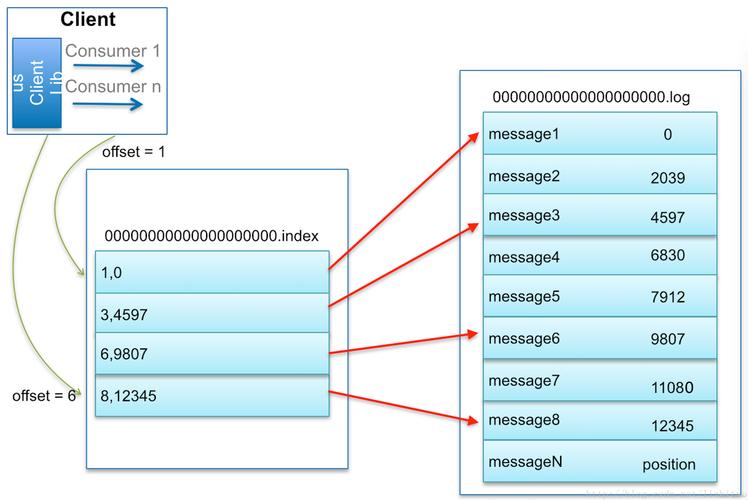
What is a Kafka Client?
A Kafka client is a program that interacts with a Kafka cluster. It can be a producer (writes/sends messages) or a consumer (reads/receives messages). The most popular and feature-rich library for this in Python is confluent-kafka, which is a C library wrapper for high performance. We'll focus on this one.
Prerequisites
Before you start, you need a running Kafka instance. The easiest way to get one for development is using Docker.
Running Kafka with Docker (Single Node):
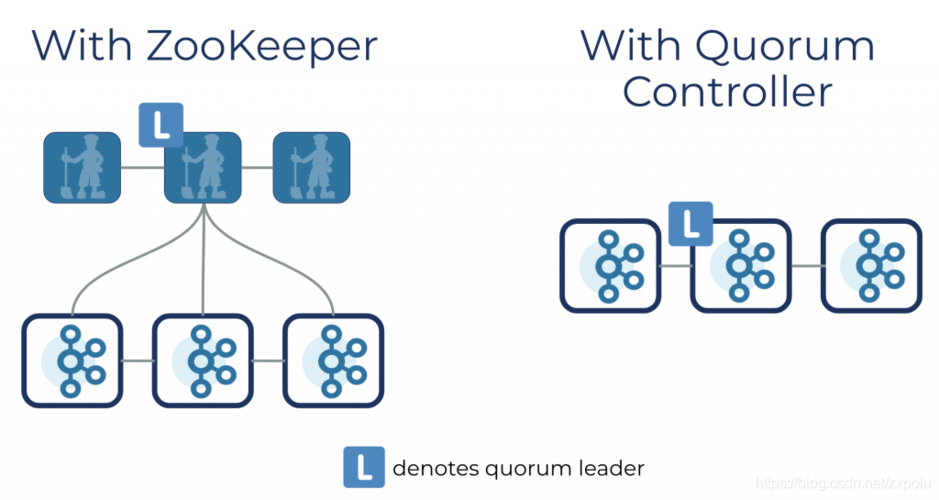
Open your terminal and run this command. It will download and start a Kafka broker and a Zookeeper instance (Kafka's dependency).

docker run -d --name kafka -p 9092:9092 \
  -e KAFKA_BROKER_ID=1 \
  -e KAFKA_ZOOKEEPER_CONNECT=zookeeper:2181 \
  -e KAFKA_ADVERTISED_LISTENERS=PLAINTEXT://localhost:9092 \
  -e KAFKA_OFFSETS_TOPIC_REPLICATION_FACTOR=1 \
  -e KAFKA_AUTO_CREATE_TOPICS_ENABLE=true \
  confluentinc/cp-kafka:latest
You can verify it's running by checking the Docker Desktop application or with docker ps.
Installation
First, you need to install the confluent-kafka library.
pip install confluent-kafka
The Core Concepts
- Producer: An application that publishes (writes) messages to a Kafka topic.
- Consumer: An application that subscribes to (reads) messages from one or more Kafka topics.
- Topic: A category or feed name to which records are published. Think of it like a folder or a channel.
- Broker: A single Kafka server. A cluster consists of multiple brokers.
- Consumer Group: A collection of consumers that work together to consume a topic. Each message in a partition is delivered to only one consumer in the group, allowing for parallel processing.
- Partition: Topics are split into partitions. This allows for data to be distributed across multiple brokers and for parallel consumption.
Step-by-Step Example: Producer and Consumer
We'll create two simple Python scripts: one for the producer and one for the consumer.
A. The Producer (producer.py)
This script will connect to Kafka and send a few messages to a topic named my-first-topic.
# producer.py
import time
import confluent_kafka as kafka
import json
import random
# --- Configuration ---
# You need to know the address of your Kafka broker(s).
# 'localhost:9092' works if you're running Kafka on your local machine.
KAFKA_BROKER = 'localhost:9092'
TOPIC_NAME = 'my-first-topic'
# --- Create a Producer ---
# The configuration dictionary is the main way to configure the client.
producer_conf = {
    'bootstrap.servers': KAFKA_BROKER,
    # 'security.protocol': 'SASL_SSL', # Uncomment for secure connections
    # 'sasl.mechanisms': 'PLAIN',      # Uncomment for secure connections
    # 'sasl.username': 'your-username', # Uncomment for secure connections
    # 'sasl.password': 'your-password'  # Uncomment for secure connections
}
# The Producer object is created with the configuration.
producer = kafka.Producer(producer_conf)
# --- Helper Function to Delivery Callback ---
# This function is called once the message has been successfully sent or failed.
def delivery_callback(err, msg):
    if err:
        print(f'ERROR: Message failed delivery: {err}')
    else:
        print(f'SUCCESS: Message delivered to topic {msg.topic()} [{msg.partition()}] at offset {msg.offset()}')
# --- Produce and Send Messages ---
print(f"Producing messages to topic '{TOPIC_NAME}'...")
# Create some sample data
products = ["Laptop", "Smartphone", "Headphones", "Monitor", "Keyboard"]
for i in range(10): # Send 10 messages
    # Create a message payload (can be any bytes-like object)
    # Using JSON is a common practice.
    product = random.choice(products)
    message_value = json.dumps({
        'product_id': i,
        'product_name': product,
        'timestamp': time.time()
    }).encode('utf-8')
    # Produce the message
    # The `produce` method is asynchronous. It sends the message to a buffer
    # and returns immediately. The actual sending happens in the background.
    producer.produce(TOPIC_NAME, value=message_value, callback=delivery_callback)
    # The `poll` method flushes the message buffer and calls the delivery callbacks.
    # It's good practice to call it periodically.
    producer.poll(0)
    time.sleep(1) # Wait for 1 second between messages
# --- Flush and Close ---
# `flush` waits for all messages in the buffer to be delivered.
# It's crucial to call this before exiting to ensure no messages are lost.
print("\nFlushing producer...")
producer.flush()
print("Producer finished.")
B. The Consumer (consumer.py)
This script will connect to Kafka, subscribe to my-first-topic, and print out any messages it receives.
# consumer.py
import confluent_kafka as kafka
import json
# --- Configuration ---
KAFKA_BROKER = 'localhost:9092'
TOPIC_NAME = 'my-first-topic'
GROUP_ID = 'my-first-consumer-group'
# --- Create a Consumer ---
consumer_conf = {
    'bootstrap.servers': KAFKA_BROKER,
    'group.id': GROUP_ID,
    # 'auto.offset.reset': 'earliest', # Start reading from the beginning of the topic if no offset is stored
    # 'security.protocol': 'SASL_SSL', # Uncomment for secure connections
    # 'sasl.mechanisms': 'PLAIN',      # Uncomment for secure connections
    # 'sasl.username': 'your-username', # Uncomment for secure connections
    # 'sasl.password': 'your-password'  # Uncomment for secure connections
}
consumer = kafka.Consumer(consumer_conf)
# --- Subscribe to a Topic ---
# You can subscribe to a list of topics.
# The consumer will automatically balance partitions among members of the group.
consumer.subscribe([TOPIC_NAME])
print(f"Consuming messages from topic '{TOPIC_NAME}'...")
# --- Consume Messages ---
try:
    while True:
        # `poll` is a blocking call that waits for messages.
        # It returns a Kafka Message object or None if the timeout is reached.
        # A timeout of 1.0 second is a good practice.
        msg = consumer.poll(1.0)
        if msg is None:
            # No message received in the last second.
            continue
        if msg.error():
            # If there's an error, print it and continue.
            print(f"Consumer error: {msg.error()}")
            continue
        # If we get here, we have a valid message.
        print(f"RECEIVED Message: {msg.value().decode('utf-8')}")
except KeyboardInterrupt:
    print("Consumer interrupted.")
finally:
    # --- Close the Consumer ---
    # This is important to commit offsets and release resources.
    print("Closing consumer...")
    consumer.close()
    print("Consumer closed.")
How to Run the Example
-
Make sure your Kafka Docker container is running.
-
Open two separate terminal windows.
-
In Terminal 1, run the consumer script. It will wait for messages.
python consumer.py
You should see:
Consuming messages from topic 'my-first-topic'... -
In Terminal 2, run the producer script. It will start sending messages.
python producer.py
You will see output like this in the producer terminal:
Producing messages to topic 'my-first-topic'... SUCCESS: Message delivered to topic my-first-topic [0] at offset 0 SUCCESS: Message delivered to topic my-first-topic [0] at offset 1 ... Flushing producer... Producer finished. -
Switch back to Terminal 1. You will see the messages being printed as they are consumed:
RECEIVED Message: {"product_id": 0, "product_name": "Laptop", "timestamp": 167...}
RECEIVED Message: {"product_id": 1, "product_name": "Headphones", "timestamp": 167...}
...
Important Configuration Options
| Configuration Key | Description |
|---|---|
bootstrap.servers |
Comma-separated list of host:port pairs for the initial connection to the Kafka cluster. |
group.id |
A unique string that identifies the consumer group this consumer belongs to. Essential for consumer groups. |
auto.offset.reset |
What to do when there is no initial offset in Kafka or if the current offset no longer exists on the server. earliest (from beginning) or latest (from new messages) are common. |
enable.auto.commit |
If True, the consumer's offset will be periodically committed automatically. False gives you more control to commit manually after processing a message, which is safer but requires more code. |
session.timeout.ms |
The timeout used to detect consumer failures. If the consumer does not heartbeat within this interval, it is considered dead and its partitions are reassigned. |
Alternative Library: kafka-python
While confluent-kafka is generally recommended for its performance, kafka-python is another popular, pure-Python option.
Installation:
pip install kafka-python
Quick Example (kafka-python):
# producer_kafkapython.py
from kafka import KafkaProducer
import json
producer = KafkaProducer(
    bootstrap_servers='localhost:9092',
    value_serializer=lambda v: json.dumps(v).encode('utf-8')
)
for i in range(5):
    producer.send('my-first-topic', {'key': f'key-{i}', 'value': f'value-{i}'})
producer.flush()
Summary
| Feature | confluent-kafka |
kafka-python |
|---|---|---|
| Performance | Excellent (C library) | Good (Pure Python) |
| Features | Most comprehensive (exactly mirrors librdkafka) | Very good, but may lag behind new Kafka features |
| Ease of Use | Good, but C-level concepts can leak through | Often considered more "Pythonic" |
| Best For | Production systems, high-throughput applications | Development, learning, simpler use cases |
For any serious application, start with confluent-kafka. This guide should give you a solid foundation for building powerful and resilient Python applications with Apache Kafka.











