
Of course! The term "Python six windows" can refer to two distinct but related topics:
- The
sixlibrary: A crucial Python 2 and 3 compatibility library. - Windows as an operating system: Running Python code on Windows.
Let's break down both, starting with the most common interpretation.
The six Library for Python 2/3 Compatibility
The six library is a Python 2 and 3 compatibility library. It was created to make it easier to write code that works on both Python 2 and Python 3 without major changes or complex if/else blocks.
Why is six needed?
When Python 3 was released, it introduced significant changes to the language. The most impactful was how it handled strings and byte streams:
- Python 2: Had a single
strtype that was a sequence of bytes, and a separateunicodetype for text. - Python 3: Renamed
unicodetostr(for text) and introduced a newbytestype for raw byte data.
This caused a massive headache for developers trying to maintain codebases that had to run on both versions. six provides a consistent layer to abstract away these differences.

Key Features and Use Cases of six
Here are some of the most common uses of six with examples.
a) six.StringIO
This is one of the most frequent use cases. It provides a unified way to handle in-memory text streams.
- Python 2:
from StringIO import StringIO - Python 3:
from io import StringIO
With six, you can do this:
import six
# This works in both Python 2 and 3
output_stream = six.StringIO()
output_stream.write("Hello, world!")
output_stream.write(" This is a test.")
# Get the value from the stream
content = output_stream.getvalue()
print(content)  # Output: Hello, world! This is a test.
output_stream.close()
b) six.integer_types
In Python 2, there were two integer types: int (for smaller numbers) and long (for arbitrarily large numbers). In Python 3, int was unified to handle all integer sizes.

six provides a way to check for integer types in a version-agnostic way.
import six
def is_large_number(n):
    # In Python 2, this checks for both int and long.
    # In Python 3, this only checks for int, which is what we want.
    return isinstance(n, six.integer_types)
# --- Testing ---
# Python 2
# print(is_large_number(10**20))      # True (it's a long)
# print(is_large_number(100))         # True (it's an int)
# Python 3
print(is_large_number(10**20))      # True (it's an int)
print(is_large_number(100))         # True (it's an int)
c) six.moves
This is a brilliant feature. The standard library was reorganized between Python 2 and 3. For example, the module for URL parsing moved from urlparse (Python 2) to urllib.parse (Python 3).
six.moves provides a single, consistent import path for these modules.
import six.moves.urllib.parse as urlparse
url = "http://www.example.com/path/to/page?query=1&data=hello"
# Parse the URL
parsed_url = urlparse.urlparse(url)
print(parsed_url.scheme)   # Output: http
print(parsed_url.netloc)   # Output: www.example.com
print(parsed_url.path)     # Output: /path/to/page
print(parsed_url.query)    # Output: query=1&data=hello
# You can also use other functions from the same module
new_query_params = {'user': 'alice', 'lang': 'en'}
new_url = urlparse.urlunparse((
    parsed_url.scheme,
    parsed_url.netloc,
    parsed_url.path,
    parsed_url.params,
    six.moves.urllib.parse.urlencode(new_query_params), # urlencode is also here
    parsed_url.fragment
))
print(new_url)
# Output: http://www.example.com/path/to/page?user=alice&lang=en
d) six.iteritems(), six.iterkeys(), six.itervalues()
In Python 2, dictionary methods like .keys(), .values(), and .items() returned lists. This could be memory-intensive for large dictionaries. Python 3 changed these methods to return "dictionary view objects" which are iterators for memory efficiency.
six provides the iter* versions to get the iterator behavior on both Python 2 and 3.
import six
my_dict = {'a': 1, 'b': 2, 'c': 3}
# This is memory-efficient in both Python 2 and 3
for key, value in six.iteritems(my_dict):
    print(f"Key: {key}, Value: {value}")
# Output:
# Key: a, Value: 1
# Key: b, Value: 2
# Key: c, Value: 3
How to Install and Use six
Installation is simple via pip:
pip install six
You then import six in your files. Modern best practice is to use six for compatibility but to eventually migrate your code to be Python 3-only. Once your entire codebase is on Python 3, you can (and should) remove six and use the native Python 3 syntax.
Python on Windows (The Operating System)
This refers to running Python scripts and applications on a Windows computer.
a) Installing Python on Windows
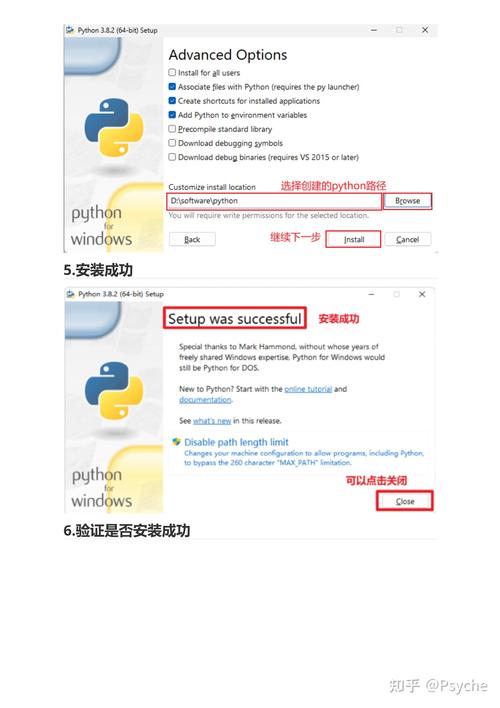
The standard way to get Python on Windows is to download the official installer from the Python website.
Crucial Tip: During installation, make sure to check the box that says "Add Python to PATH". This will allow you to run python from the command line (Command Prompt or PowerShell) without having to type the full path to the executable.
b) Running Python Scripts from the Windows Command Line
Once installed, you can run Python scripts in several ways.
-
Using the
pythoncommand: Open Command Prompt or PowerShell, navigate to your folder, and run:# This uses the default python.exe python my_script.py # If you have both Python 2 and 3, you might need to be specific python my_script.py # For Python 3 py -2 my_script.py # For Python 2
-
Using the
pylauncher: Modern Windows installations come with thepylauncher, which is the recommended way. It can automatically detect which Python version to use.# Runs with the latest Python 3 version py my_script.py # Runs with a specific version py -3.9 my_script.py py -2 my_script.py
-
Double-clicking the file: If you associate
.pyfiles with Python, you can simply double-click the file. However, this will open a console window that flashes and closes immediately if your script finishes quickly. This is not ideal for interactive scripts or scripts that produce output.
c) Windows-Specific Considerations
-
Paths: Windows uses backslashes (
\) for file paths, while Unix-like systems (Linux, macOS) use forward slashes (). Python'sosmodule helps with this.import os # This works on Windows, Linux, and macOS my_path = os.path.join("C:", "Users", "YourName", "Documents", "file.txt") print(my_path) # Output: C:\Users\YourName\Documents\file.txt -
Shebang Line: The line at the top of a script (e.g.,
#!/usr/bin/env python3) is used on Unix-like systems to tell the OS which interpreter to use. It is ignored by Windows. Thepylauncher is the Windows equivalent. -
Subprocess Module: When calling external commands, you might need to use
shell=Trueon Windows, especially for built-in commands likedir.import subprocess # Works on both subprocess.run(["ls", "-l"]) # May fail on Windows if ls is not found # Works on Windows subprocess.run("dir", shell=True, check=True)
Summary
| Topic | Key Idea | Common Use Case |
|---|---|---|
six Library |
A compatibility shim to write code that works on Python 2 and 3. | Abstracting away differences in print, StringIO, import statements, and string/bytes handling. |
| Python on Windows | Running Python scripts on the Windows OS. | Installing Python, using the py launcher, handling backslashes in paths, and using shell=True in subprocess. |


