
Of course! This is a fundamental topic in Java. Let's break down Java errors and exceptions in a clear, structured way.
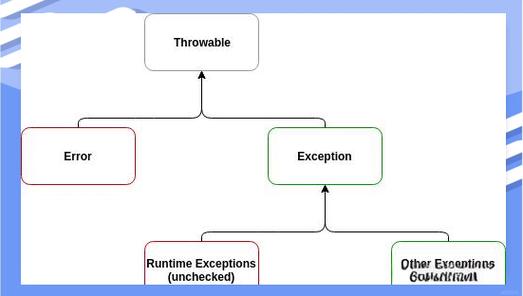
The Big Picture: The Error and Exception Hierarchy
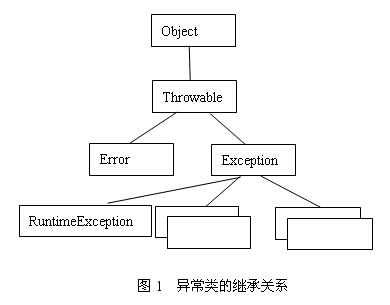
In Java, errors and exceptions are both subclasses of the java.lang.Throwable class. This is the root of the entire error-handling hierarchy.
java.lang.Object
       java.lang.Throwable
             java.lang.Error
             java.lang.Exception
                  java.lang.RuntimeException
                  (and other subclasses that are NOT RuntimeExceptions)
This hierarchy is the key to understanding everything.
What is the Difference Between an Error and an Exception?
This is the most important distinction to make.
| Feature | Error |
Exception |
|---|---|---|
| Source | Usually caused by severe failures from which the application cannot recover. | Caused by external factors or programming mistakes from which the application might recover. |
| Handling | Should NOT be caught or handled in your code. It's best to let the program terminate. | Should be caught and handled using try-catch blocks to prevent the program from crashing. |
| Examples | OutOfMemoryError, StackOverflowError, VirtualMachineError. |
NullPointerException, ArrayIndexOutOfBoundsException, IOException. |
| Analogy | A house collapsing. You can't fix it while you're inside; you must get out safely. | A flat tire on a road trip. You can pull over, change the tire, and continue your journey. |
In short: You don't handle Errors. You design your code to handle Exceptions.
The Two Main Types of Exception
All exceptions are subclasses of Exception. They are broadly divided into two categories:
A) Checked Exceptions (Compile-Time Exceptions)
These are exceptions that the Java compiler forces you to handle. They represent conditions that a well-written application should anticipate and recover from.
- How the compiler enforces it: If you call a method that throws a checked exception, you must either:
- Wrap the call in a
try-catchblock, or - Declare that your own method
throwsthat exception.
- Wrap the call in a
- The Rule: You are contractually obligated to deal with them.
- Location in Hierarchy: All subclasses of
ExceptionexceptRuntimeException.
Common Examples:
IOException: Thrown when an I/O operation (like reading a file) fails.SQLException: Thrown when a database access error occurs.FileNotFoundException: A specific type ofIOExceptionwhen a file path doesn't exist.ClassNotFoundException: Thrown when an application tries to load a class through its string name but no definition for the class with the specified name could be found.
Example of a Checked Exception:
import java.io.FileInputStream;
import java.io.FileNotFoundException;
public class CheckedExceptionExample {
    public static void main(String[] args) {
        // This line will cause a COMPILE-TIME ERROR
        // because readFromFile() throws a checked FileNotFoundException.
        // FileInputStream fis = new FileInputStream("non_existent_file.txt");
        // To fix it, we MUST use a try-catch block
        try {
            FileInputStream fis = new FileInputStream("non_existent_file.txt");
            System.out.println("File opened successfully!");
        } catch (FileNotFoundException e) {
            // This block will execute if the file is not found
            System.err.println("Error: The file was not found.");
            e.printStackTrace(); // Prints the full error trace to the console
        }
        System.out.println("Program continues running after handling the exception.");
    }
}
B) Unchecked Exceptions (Runtime Exceptions)
These exceptions are not checked by the compiler at compile-time. They usually indicate programming bugs, logical errors, or improper use of an API.
- How the compiler enforces it: It doesn't. The compiler trusts you to write correct code.
- The Rule: You can handle them, but you are not forced to. Often, the best fix is to correct the code that caused the exception rather than catching it.
- Location in Hierarchy: All subclasses of
RuntimeException.
Common Examples:
NullPointerException: You tried to use a reference that points tonullas if it were pointing to an object.ArrayIndexOutOfBoundsException: You tried to access an array element with an invalid index (e.g.,myArray[10]on an array of size 10).ArithmeticException: You tried to perform an invalid arithmetic operation, like dividing by zero (int x = 10 / 0;).IllegalArgumentException: You passed an illegal argument to a method (e.g., negative value where a positive one is expected).
Example of an Unchecked Exception:
public class UncheckedExceptionExample {
    public static void main(String[] args) {
        String text = null;
        // This line will compile fine but will THROW a NullPointerException
        // at RUNTIME when the program tries to execute it.
        int length = text.length(); // Throws NullPointerException
        System.out.println("This line will never be reached.");
    }
}
Output:
Exception in thread "main" java.lang.NullPointerException: Cannot invoke "String.length()" because "text" is null
    at UncheckedExceptionExample.main(UncheckedExceptionExample.java:7)
How to Handle Exceptions: The try-catch-finally Block
This is the primary mechanism for gracefully handling exceptions.
try-catch
You place code that might throw an exception inside a try block. If an exception occurs, the program immediately jumps to the corresponding catch block.
try {
    // Code that might throw an exception
    int[] numbers = {1, 2, 3};
    System.out.println(numbers[5]); // Will throw ArrayIndexOutOfBoundsException
} catch (ArrayIndexOutOfBoundsException e) {
    // Code to handle the exception
    System.out.println("Caught an exception: " + e.getMessage());
    // e.getMessage() gives a brief description of the error
}
System.out.println("Program continues running.");
finally
The finally block contains code that will always be executed, whether an exception was thrown or not. It's typically used for cleanup actions like closing files or database connections.
import java.io.FileWriter;
import java.io.IOException;
public class FinallyExample {
    public static void main(String[] args) {
        FileWriter writer = null;
        try {
            writer = new FileWriter("output.txt");
            writer.write("Hello, world!");
            // Simulate an error
            int x = 10 / 0; // This will cause an ArithmeticException
        } catch (IOException e) {
            System.out.println("An IOException occurred: " + e.getMessage());
        } catch (ArithmeticException e) {
            System.out.println("An ArithmeticException occurred: " + e.getMessage());
        } finally {
            // This block will ALWAYS run
            System.out.println("Executing finally block to clean up resources.");
            try {
                if (writer != null) {
                    writer.close(); // Important: close the file
                }
            } catch (IOException e) {
                System.out.println("Failed to close the writer.");
            }
        }
        System.out.println("Program finished.");
    }
}
Best Practices for Exception Handling
-
Be Specific: Catch the most specific exception possible. Don't just catch
Exceptionif you're only expecting anIOException.// Good try { // ... } catch (FileNotFoundException e) { ... } catch (IOException e) { ... } // Bad - Catches everything, making it hard to diagnose specific problems try { // ... } catch (Exception e) { ... } -
Don't Swallow Exceptions: Avoid empty
catchblocks or just printing the stack trace without doing anything. This hides errors and makes debugging impossible.// Bad try { // risky code } catch (Exception e) { // Do nothing. The error is silently ignored. } // Better try { // risky code } catch (Exception e) { // Log the error for later review logger.error("An unexpected error occurred", e); // Or re-throw it as a runtime exception if you can't handle it here throw new RuntimeException("A critical error occurred", e); } -
Use
finallyfor Resource Cleanup: Always usefinallyor the newer "try-with-resources" statement to ensure resources like files, database connections, and sockets are closed. -
Prefer Try-With-Resources (Java 7+): This is the modern, cleaner way to handle resources that need to be closed. It automatically closes the resource when the
tryblock exits.// Old way (finally block) BufferedReader br = null; try { br = new BufferedReader(new FileReader("file.txt")); // ... read from br ... } finally {











