Of course! Choosing the right Java IDE for Java EE (now more commonly known as Jakarta EE) is crucial for productivity. The landscape has evolved, but the top contenders remain strong.
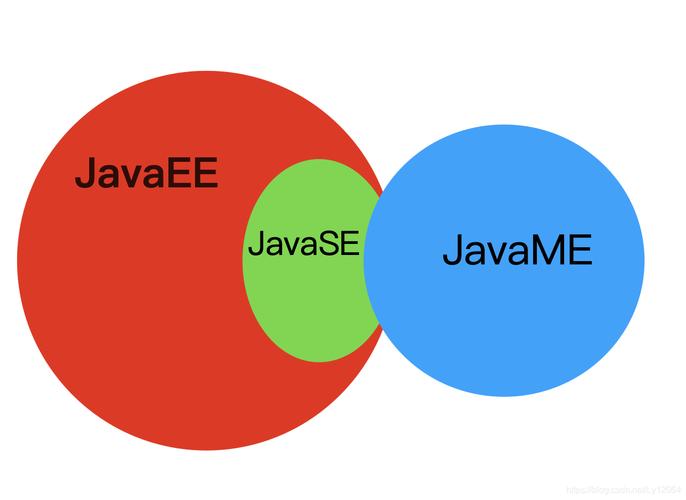
Here’s a detailed breakdown of the best Java IDEs for Java EE development, categorized to help you choose the one that fits your needs.
The Short Answer: The Top 3
| IDE | Best For | Key Strengths | Pricing Model |
|---|---|---|---|
| IntelliJ IDEA | All-around best, enterprise & large projects | Unmatched code analysis, intelligent refactoring, deep integration with all Java EE/Jakarta EE specs, Spring, and Maven/Gradle. | Freemium (Ultimate Edition is paid) |
| Eclipse IDE | Legacy projects, customization, and community plugins | Extremely flexible and customizable, massive plugin ecosystem (including JBoss Tools), industry standard for many large corporations. | Free (Open Source) |
| VS Code | Modern, lightweight, and cloud-native development | Excellent performance, great extensions (Spring Boot Extension Pack), integrates well with GitHub and DevOps tools. | Free (Open Source) |
In-Depth Review of Each IDE
IntelliJ IDEA (The Gold Standard)
IntelliJ IDEA, from JetBrains, is widely considered the most intelligent Java IDE. It has two editions: Community (free) and Ultimate (paid).
Why it's great for Java EE/Jakarta EE:
- Ultimate Edition is the King: The Ultimate edition is purpose-built for enterprise development. It has first-class, out-of-the-box support for:
- Jakarta EE & Java EE: Full support for Jakarta EE 10, 9, and 8. This includes deep integration with:
- Jakarta EE Specifications: Servlets, JSP, JSF, EJB, JPA, JMS, JAX-RS, CDI, and more.
- Servers: One-click deployment and configuration for Tomcat, WildFly, JBoss, WebLogic, and WebSphere.
- Build Tools: Seamless integration with Maven and Gradle. It understands your
pom.xmlorbuild.gradlefiles and provides intelligent navigation, dependency management, and conflict resolution.
- Superior Code Analysis: Its static analysis is second to none. It catches potential bugs, suggests improvements, and helps you write cleaner code before you even compile it.
- Intelligent Refactoring: Renaming a method or extracting a method is safe and reliable. It understands the entire codebase and updates all references correctly.
- Database Tools: A powerful built-in database client that lets you query, edit, and version-control your database schema directly from the IDE.
- Spring Integration: While not strictly Java EE, its support for the Spring Framework is legendary, making it a favorite for modern microservices that often run on a Jakarta EE server.
- Jakarta EE & Java EE: Full support for Jakarta EE 10, 9, and 8. This includes deep integration with:
Who should use it?
- Professional developers and teams.
- Anyone working on complex, large-scale enterprise applications.
- Developers who value top-tier intelligence, refactoring, and deep tooling.
Pricing:
- Community Edition: Free. Supports basic Java, Maven, Gradle, and Tomcat. It's great for learning and smaller projects but lacks advanced Java EE and web development features.
- Ultimate Edition: Commercial subscription (with a free trial). This is the version you need for serious Jakarta EE development.
Verdict: If you can afford it, IntelliJ IDEA Ultimate is the best choice for Java EE development today. The time it saves you through intelligent features and deep integration pays for itself many times over.
Eclipse IDE (The Classic Workhorse)
Eclipse is the long-standing, open-source giant. It's a highly customizable platform that you build upon with plugins.
Why it's great for Java EE/Jakarta EE:
- Massive Plugin Ecosystem: The heart of Eclipse's power is its plugins. For Java EE, the most important is the Eclipse IDE for Enterprise Java and Web Developers package, which includes:
- JBoss Tools: A comprehensive suite of plugins for developing with WildFly, JBoss, and other application servers. It provides tools for REST services, EJBs, CDI, and more.
- Eclipse Web Tools Platform (WTP): Provides core support for HTML, CSS, JavaScript, and server deployment.
- Maven/Gradle Integration: Excellent support for both build tools.
- Customization: You can tailor the IDE to your exact needs. Don't like a certain view or perspective? You can change it or remove it. This flexibility is a huge plus for many developers.
- Industry Standard: It's been the go-to IDE in many large corporations for over a decade, so you'll find a lot of legacy codebases and corporate standards built around it.
- Free and Open Source: No cost, ever.
Who should use it?
- Developers working on legacy Java EE projects.
- Teams that have standardized on Eclipse in their organization.
- Developers who love to customize their tools and use a wide array of different plugins.
Pricing:
- Free (Open Source).
Verdict: Eclipse is a powerful, free, and flexible option. It can do everything IntelliJ can, but often requires more setup and configuration. If you're joining a company that uses Eclipse or need to work on an old project, it's an excellent choice. For starting a new project, IntelliJ's out-of-the-box experience is generally smoother.
Visual Studio Code (The Modern Challenger)
VS Code is a lightweight, free, open-source code editor from Microsoft that has exploded in popularity, especially for cloud-native and Spring Boot development.
Why it's great for Java EE/Jakarta EE:
- Lightning Fast Performance: It starts quickly and uses minimal resources compared to the heavier IDEs.
- Excellent Extensions: The Java ecosystem on VS Code is incredibly robust. The key is to install the right extensions:
- Extension Pack for Java: This bundle includes the core Java support (from Red Hat), which provides IntelliSense, debugging, testing, Maven/Gradle support, and project management.
- Spring Boot Extension Pack: If you're using Spring Boot, this is a must-have. It dramatically simplifies working with Spring.
- Tomcat for VS Code: An extension that allows you to easily run and debug Tomcat directly from the editor.
- Integrated Terminal: The terminal is a first-class citizen, making it seamless to run shell commands, scripts, or Docker commands alongside your code.
- Git and GitHub Integration: Unparalleled integration with version control and GitHub, making it a favorite for open-source and DevOps-centric teams.
Who should use it?
- Developers who prefer a lightweight editor over a full-featured IDE.
- Spring Boot and microservices developers.
- Teams focused on cloud-native development and DevOps workflows.
- Anyone who values speed and a clean, minimal interface.
Pricing:
- Free (Open Source).
Verdict: VS Code is a fantastic, modern choice. While it may not have the same level of deep, all-encompassing Java EE integration as IntelliJ Ultimate out of the box, the extensions are incredibly powerful and make it a very competitive option. It's the future for many developers, especially those in the cloud space.
Summary Table & How to Choose
| Feature | IntelliJ IDEA (Ultimate) | Eclipse IDE | VS Code + Java Extensions |
|---|---|---|---|
| Java EE/Jakarta EE Support | Excellent (Built-in) | Excellent (via Plugins) | Good (via Extensions) |
| Ease of Use | Excellent (Intelligent) | Good (Can be complex) | Excellent (Simple) |
| Performance | Good (Can be heavy) | Fair to Good | Excellent (Lightweight) |
| Refactoring | Best-in-Class | Very Good | Good |
| Customization | Good | Excellent (Unlimited) | Good (via Extensions) |
| Price | Paid | Free | Free |
How to Choose the Right IDE for You
-
Choose IntelliJ IDEA Ultimate if: Your budget allows, you work on complex enterprise applications, and you want the most powerful, intelligent, and productive tool available. It's the safe, professional choice.
-
Choose Eclipse IDE if: You need a free, powerful, and highly customizable tool, especially for working on legacy codebases or in environments where Eclipse is the standard. It's a battle-tested workhorse.
-
Choose VS Code if: You prioritize speed and a lightweight editor, you're primarily working with Spring Boot or microservices, and you love a modern, terminal-first workflow. It's the modern, agile choice.