
Of course! Let's break down how to work with FTP using Java Sockets. This is a fantastic way to understand the underlying protocols, as FTP is one of the oldest and most well-documented application-layer protocols.
We'll cover three main approaches:
- The "Hard Way" (Using Raw Java Sockets): This is the educational approach. We'll manually send FTP commands and parse the server's responses. This teaches you the FTP protocol itself.
- The "Easy Way" (Using
Apache Commons Net): This is the practical, real-world approach. You'll use a robust, third-party library that handles all the low-level details for you. - The "Modern Way" (Using
Java NIO): A more advanced, non-blocking approach suitable for high-performance applications.
Approach 1: The "Hard Way" with Raw Java Sockets
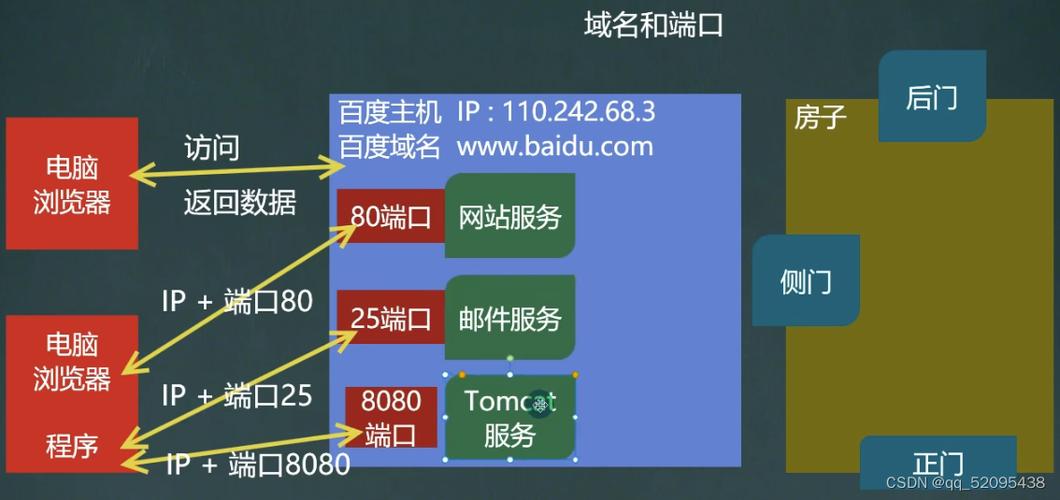
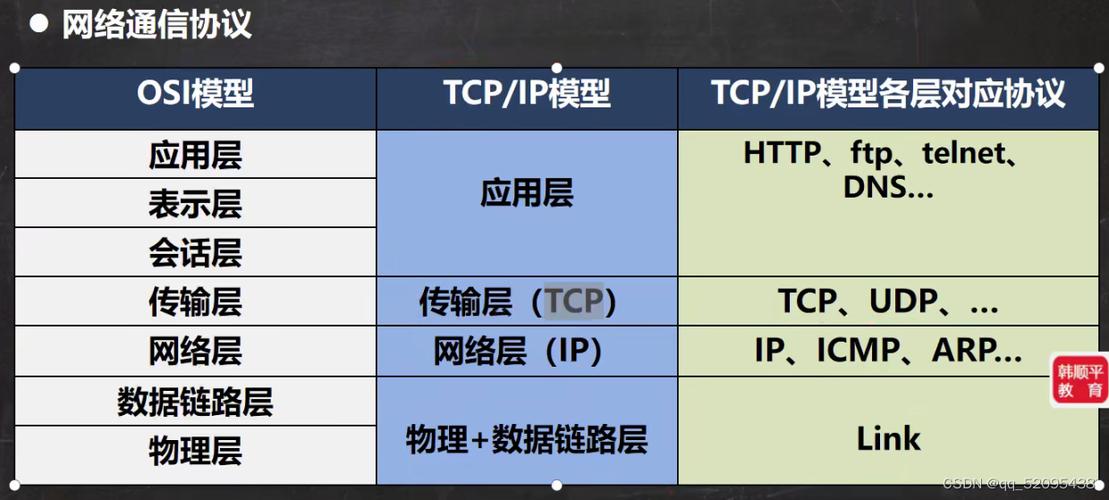
FTP uses two TCP connections:
- Control Connection: A persistent connection on port 21 for sending commands (e.g.,
USER,PASS,LIST) and receiving server replies. - Data Connection: A temporary connection used for transferring files and directory listings. It's created on demand and closed after the transfer.
The data connection can be established in two modes:
- Active Mode: The client opens a port and tells the server to connect to it. (Less common due to firewalls).
- Passive Mode (PASV): The client tells the server to open a port and then connects to that port. (More common and firewall-friendly).
We will implement Passive Mode, as it's the standard for most client applications.
Key FTP Commands and Replies
| Command | Description | Example Reply |
|---|---|---|
USER <username> |
Send username | 331 Username ok, need password |
PASS <password> |
Send password | 230 User logged in |
PASV |
Enter passive mode | 227 Entering Passive Mode (h1,h2,h3,h4,p1,p2) |
LIST |
List files in current dir | 150 Opening data connection |
RETR <filename> |
Retrieve a file | 150 Opening data connection |
STOR <filename> |
Store a file on server | 150 Opening data connection |
QUIT |
Logout and close connection | 221 Goodbye |
Step-by-Step Code Example
This example will connect to an FTP server, log in, list the files, and download a file.
import java.io.*;
import java.net.*;
import java.util.Scanner;
public class RawFtpClient {
    private static final String SERVER = "ftp.dlptest.com";
    private static final int PORT = 21;
    private static final String USER = "dlpuser";
    private static final String PASS = "rNrKYTX9g7z3RgJR";
    public static void main(String[] args) {
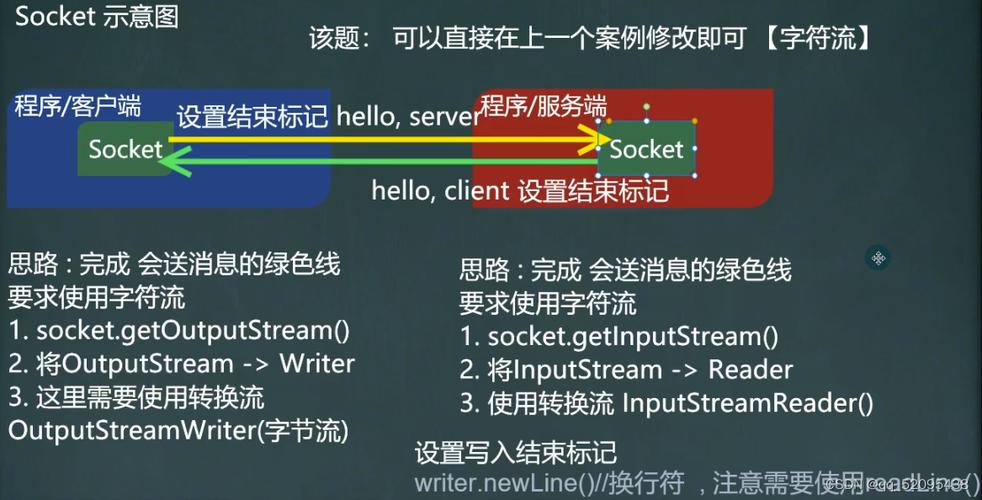
        try (Socket controlSocket = new Socket(SERVER, PORT);
             BufferedReader reader = new BufferedReader(new InputStreamReader(controlSocket.getInputStream()));
             PrintWriter writer = new PrintWriter(new OutputStreamWriter(controlSocket.getOutputStream()), true);
             Scanner consoleScanner = new Scanner(System.in)) {
            System.out.println("Connected to FTP server.");
            printServerResponse(reader);
            // --- Authentication ---
            sendCommand(writer, "USER " + USER);
            printServerResponse(reader);
            sendCommand(writer, "PASS " + PASS);
            printServerResponse(reader);
            // --- Enter Passive Mode ---
            sendCommand(writer, "PASV");
            String pasvResponse = printServerResponse(reader); // We need the response for the port
            if (!pasvResponse.startsWith("227")) {
                System.err.println("Failed to enter passive mode.");
                return;
            }
            // --- Parse PASV response to get data port ---
            int dataPort = parsePasvResponse(pasvResponse);
            if (dataPort == -1) {
                System.err.println("Could not parse PASV response.");
                return;
            }
            System.out.println("Data port: " + dataPort);
            // --- List Files ---
            System.out.println("\n--- Listing Files ---");
            try (Socket dataSocket = new Socket(SERVER, dataPort);
                 BufferedReader dataReader = new BufferedReader(new InputStreamReader(dataSocket.getInputStream()))) {
                sendCommand(writer, "LIST");
                String listResponse = printServerResponse(reader); // Read 150 Opening message
                if (!listResponse.startsWith("150")) {
                    System.err.println("Failed to start LIST transfer.");
                    return;
                }
                System.out.println("Server response: " + listResponse);
                System.out.println("File listing:");
                String dataLine;
                while ((dataLine = dataReader.readLine()) != null) {
                    System.out.println(dataLine);
                }
                // The control connection will receive the "226 Transfer complete" message after dataSocket closes.
                printServerResponse(reader);
            }
            // --- Download a File ---
            System.out.println("\n--- Downloading File ---");
            String filenameToDownload = "README.txt";
            try (Socket dataSocket = new Socket(SERVER, dataPort);
                 InputStream dataInputStream = dataSocket.getInputStream();
                 FileOutputStream fileOutputStream = new FileOutputStream(filenameToDownload)) {
                sendCommand(writer, "RETR " + filenameToDownload);
                String retrResponse = printServerResponse(reader);
                if (!retrResponse.startsWith("150")) {
                    System.err.println("Failed to start RETR transfer.");
                    return;
                }
                System.out.println("Downloading " + filenameToDownload + "...");
                byte[] buffer = new byte[4096];
                int bytesRead;
                while ((bytesRead = dataInputStream.read(buffer)) != -1) {
                    fileOutputStream.write(buffer, 0, bytesRead);
                }
                System.out.println("Download complete.");
                // Read "226 Transfer complete" from control connection
                printServerResponse(reader);
            }
            // --- Logout ---
            sendCommand(writer, "QUIT");
            printServerResponse(reader);
        } catch (UnknownHostException e) {
            System.err.println("Don't know about host: " + SERVER);
        } catch (IOException e) {
            System.err.println("Couldn't get I/O for the connection to " + SERVER);
            e.printStackTrace();
        }
    }
    private static void sendCommand(PrintWriter writer, String command) {
        System.out.println("C: " + command);
        writer.println(command);
    }
    private static String printServerResponse(BufferedReader reader) throws IOException {
        String response = reader.readLine();
        System.out.println("S: " + response);
        return response;
    }
    /**
     * Parses the PASV response to get the data port number.
     * Example response: "227 Entering Passive Mode (192,168,1,100,12,34)"
     * The port is calculated as (p1 * 256) + p2.
     */
    private static int parsePasvResponse(String response) {
        try {
            int start = response.indexOf('(') + 1;
            int end = response.indexOf(')');
            String[] parts = response.substring(start, end).split(",");
            if (parts.length != 6) {
                return -1;
            }
            String ip = parts[0] + "." + parts[1] + "." + parts[2] + "." + parts[3];
            int p1 = Integer.parseInt(parts[4]);
            int p2 = Integer.parseInt(parts[5]);
            return p1 * 256 + p2;
        } catch (Exception e) {
            e.printStackTrace();
            return -1;
        }
    }
}
Approach 2: The "Easy Way" with Apache Commons Net
For any real application, you should use a library. It's more reliable, less error-prone, and much easier to read.
Add the Dependency
If you're using Maven, add this to your pom.xml:
<dependency>
    <groupId>commons-net</groupId>
    <artifactId>commons-net</artifactId>
    <version>3.9.0</version> <!-- Check for the latest version -->
</dependency>
Code Example
The same operations as above, but much cleaner.
import org.apache.commons.net.ftp.FTP;
import org.apache.commons.net.ftp.FTPClient;
import org.apache.commons.net.ftp.FTPReply;
import java.io.FileOutputStream;
import java.io.IOException;
public class CommonsNetFtpClient {
    private static final String SERVER = "ftp.dlptest.com";
    private static final int PORT = 21;
    private static final String USER = "dlpuser";
    private static final String PASS = "rNrKYTX9g7z3RgJR";
    public static void main(String[] args) {
        FTPClient ftpClient = new FTPClient();
        try {
            // 1. Connect to the server
            System.out.println("Connecting to " + SERVER);
            ftpClient.connect(SERVER, PORT);
            System.out.println("Connected to " + ftpClient.getRemoteAddress().getHostAddress());
            // 2. Check the reply code to ensure successful connection
            int reply = ftpClient.getReplyCode();
            if (!FTPReply.isPositiveCompletion(reply)) {
                System.out.println("FTP server refused connection.");
                return;
            }
            // 3. Login
            if (!ftpClient.login(USER, PASS)) {
                System.out.println("Login failed.");
                ftpClient.logout();
                return;
            }
            System.out.println("Login successful.");
            // 4. Set file type to binary (crucial for file transfers)
            ftpClient.setFileType(FTP.BINARY_FILE_TYPE);
            // 5. Enter passive mode
            ftpClient.enterLocalPassiveMode();
            // 6. List files
            System.out.println("\n--- Listing Files ---");
            String[] files = ftpClient.listNames();
            if (files != null) {
                for (String file : files) {
                    System.out.println(file);
                }
            }
            // 7. Download a file
            System.out.println("\n--- Downloading File ---");
            String remoteFile = "README.txt";
            String localFile = "README CommonsNet.txt";
            try (FileOutputStream outputStream = new FileOutputStream(localFile)) {
                boolean success = ftpClient.retrieveFile(remoteFile, outputStream);
                if (success) {
                    System.out.println("File '" + remoteFile + "' downloaded successfully.");
                } else {
                    System.out.println("File download failed.");
                }
            }
        } catch (IOException e) {
            e.printStackTrace();
        } finally {
            try {
                // 8. Logout and disconnect
                if (ftpClient.isConnected()) {
                    ftpClient.logout();
                    ftpClient.disconnect();
                }
            } catch (IOException e) {
                e.printStackTrace();
            }
        }
    }
}
As you can see, the library handles the PASV command, data connection creation, and stream management automatically.
Approach 3: The "Modern Way" with Java NIO
Java NIO (New I/O) provides a non-blocking, channel-based API. This is more complex to set up but offers superior performance for handling many concurrent connections. Implementing a full FTP client with NIO is a significant undertaking, but here's the conceptual difference.
- Blocking I/O (Socket/Stream): A thread is blocked (waits) while reading from or writing to a stream. For each FTP client, you typically need one thread.
- Non-blocking I/O (NIO/Channel/Selector): A single thread can manage multiple channels. It registers interest in "read events" or "write events" and is only woken up when one of those events occurs. This is much more scalable.
You would still need to implement the FTP protocol logic manually (like in Approach 1), but you'd use SocketChannel, Selector, and ByteBuffer instead of Socket and streams.
Conceptual NIO Flow:
- Create a
Selectorand a non-blockingSocketChannelfor the control connection. - Register the channel with the
SelectorforOP_CONNECT. - In a loop, call
selector.select(). This blocks until a registered channel is ready. - For each ready channel, perform the appropriate operation (finish connection, read data, write data).
- Parse the FTP responses and commands just like in the raw socket example, but reading from
ByteBuffers.
This approach is generally overkill for a simple FTP client but is the right choice for high-performance servers or complex networking applications.
Summary: Which Approach to Choose?
| Approach | Pros | Cons | Best For |
|---|---|---|---|
| Raw Sockets | - Deep understanding of FTP - No external dependencies |
- Very verbose and complex - Prone to bugs - Reinventing the wheel |
Learning and education. Understanding how protocols work under the hood. |
| Apache Commons Net | - Simple, high-level API - Robust and well-tested - Handles all edge cases |
- Adds an external dependency to your project | Almost all practical applications. This is the standard, recommended way. |
| Java NIO | - High performance and scalability - Efficient for many concurrent connections |
- Extremely complex to implement - Steep learning curve |
High-performance servers or applications needing to manage thousands of network connections efficiently. |


