
Here is a complete guide on how to use Sockets to build an FTP (File Transfer Protocol) client in Java.
(图片来源网络,侵删)
While 99% of developers use libraries like Apache Commons Net for this, building an FTP client from scratch using raw Java Sockets is the best way to understand how the protocol actually works under the hood.
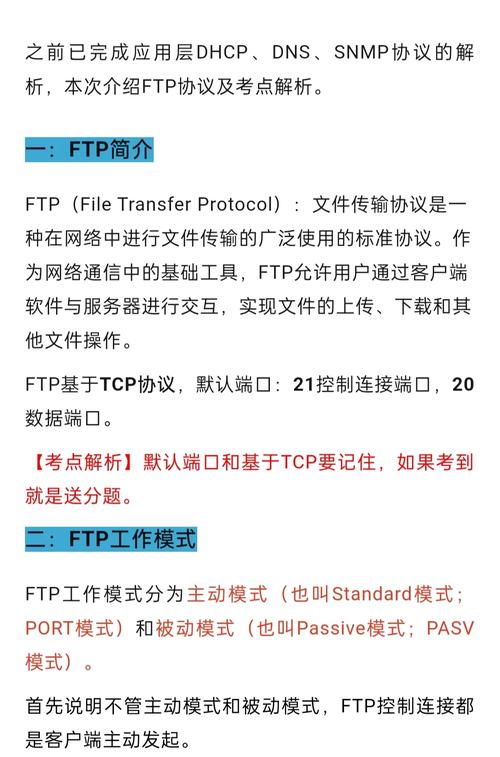
How FTP Works (The Two-Connection Model)
To build an FTP client, you must understand that FTP uses two socket connections:
- Control Connection (Port 21): Stays open the entire time. Used for sending commands (
USER,PASS,RETR) and receiving text responses (e.g.,200 OK). - Data Connection: Opened temporarily only when files need to be transferred or directory listings are fetched.
The Java Socket Implementation
Here is a complete, raw Java Socket implementation of an FTP client that connects, logs in, retrieves a directory listing, and downloads a file.
import java.io.*;
import java.net.Socket;
import java.util.Scanner;
public class RawFtpClient {
    private Socket controlSocket;
    private BufferedReader controlReader;
    private PrintWriter controlWriter;
    // Connect to the FTP Server
    public void connect(String server, int port) throws IOException {
        controlSocket = new Socket(server, port);
        controlReader = new BufferedReader(new InputStreamReader(controlSocket.getInputStream()));
        controlWriter = new PrintWriter(controlSocket.getOutputStream(), true);
        // Read the initial connection response (usually 220 Welcome)
        System.out.println(readResponse());
    }
    // Log in with username and password
    public void login(String username, String password) throws IOException {
        sendCommand("USER " + username);
        sendCommand("PASS " + password);
    }
    // Get the current directory file listing
    public void listFiles() throws IOException {
        // 1. Enter Passive Mode (PASV) so we don't have to open a ServerSocket locally
        String response = sendCommand("PASV");
        // 2. Parse the IP and Port from the PASV response (e.g., 227 Entering Passive Mode (192,168,1,5,123,45))
        String[] parts = response.split("\\(")[1].split("\\)")[0].split(",");
        String ipAddress = parts[0] + "." + parts[1] + "." + parts[2] + "." + parts[3];
        int port = (Integer.parseInt(parts[4]) << 8) + Integer.parseInt(parts[5]);
        // 3. Open the Data Socket
        Socket dataSocket = new Socket(ipAddress, port);
        BufferedReader dataReader = new BufferedReader(new InputStreamReader(dataSocket.getInputStream()));
        // 4. Send the LIST command
        sendCommand("LIST");
        // 5. Read the file listing from the Data Socket
        System.out.println("--- Directory Listing ---");
        String line;
        while ((line = dataReader.readLine()) != null) {
            System.out.println(line);
        }
        System.out.println("------------------------");
        // 6. Close data socket and read the final "Transfer complete" message on Control Socket
        dataSocket.close();
        System.out.println(readResponse()); // Expect 226 Transfer complete
    }
    // Download a file
    public void downloadFile(String remoteFile, String localFile) throws IOException {
        // 1. Enter Passive Mode
        String response = sendCommand("PASV");
        String[] parts = response.split("\\(")[1].split("\\)")[0].split(",");
        String ipAddress = parts[0] + "." + parts[1] + "." + parts[2] + "." + parts[3];
        int port = (Integer.parseInt(parts[4]) << 8) + Integer.parseInt(parts[5]);
        // 2. Open Data Socket
        Socket dataSocket = new Socket(ipAddress, port);
        // 3. Send RETR command
        sendCommand("RETR " + remoteFile);
        // 4. Read binary data from Data Socket and save to local file
        try (InputStream in = dataSocket.getInputStream();
             FileOutputStream out = new FileOutputStream(localFile)) {
            byte[] buffer = new byte[4096];
            int bytesRead;
            while ((bytesRead = in.read(buffer)) != -1) {
                out.write(buffer, 0, bytesRead);
            }
        }
        dataSocket.close();
        System.out.println(readResponse()); // Expect 226 Transfer complete
    }
    // Disconnect gracefully
    public void disconnect() throws IOException {
        sendCommand("QUIT");
        controlSocket.close();
    }
    // --- Helper Methods ---
    private String sendCommand(String command) throws IOException {
        controlWriter.println(command);
        return readResponse();
    }
    private String readResponse() throws IOException {
        String line;
        // FTP responses can be multiple lines. The last line has a space after the status code.
        while ((line = controlReader.readLine()) != null) {
            System.out.println("Server: " + line);
            if (line.length() >= 4 && line.charAt(3) == ' ') {
                return line;
            }
        }
        return null;
    }
    // --- Main Method to Test ---
    public static void main(String[] args) {
        // Using a public test FTP server (speedtest.tele2.net)
        RawFtpClient ftp = new RawFtpClient();
        try {
            System.out.println("Connecting...");
            ftp.connect("speedtest.tele2.net", 21);
            System.out.println("Logging in...");
            ftp.login("anonymous", "anonymous@test.com");
            System.out.println("Fetching directory listing...");
            ftp.listFiles();
            System.out.println("Downloading a test file...");
            // 1MB test file available on this server
            ftp.downloadFile("1MB.zip", "downloaded_1MB.zip");
            System.out.println("Disconnecting...");
            ftp.disconnect();
        } catch (IOException e) {
            e.printStackTrace();
        }
    }
}
Key Concepts Explained in the Code:
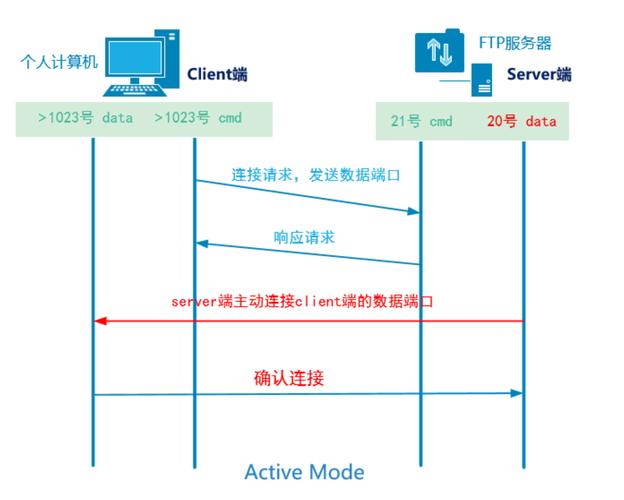
- Passive Mode (
PASV): By default, FTP uses "Active Mode", which requires the client to open a port and the server to connect to it. This almost always fails nowadays due to Firewalls and NATs. By sending thePASVcommand, we tell the server: "Hey, I'm behind a firewall. You open a port and tell me the IP/Port, and I will connect to you." - Parsing the PASV Response:
The server replies with something like
227 Entering Passive Mode (192,168,1,5,12,34). The first four numbers are the IP address. The 5th and 6th numbers are the port. Because a port is 16-bit (max 65535) and the numbers are 8-bit (max 255), the formula to calculate the port is:(Part5 * 256) + Part6. - Reading Responses:
FTP servers send status codes (e.g.,
220,331,230,226). A multi-line response will have a hyphen after the code (e.g.,230-). ThereadResponse()method loops until it finds a space after the 3-digit code, indicating the final line of the server's reply.
Production Recommendation
While writing this from scratch is great for learning, do not use this code in a production environment. It lacks support for:
(图片来源网络,侵删)
- Security: Explicit/Implicit TLS/SSL encryption (FTPS).
- Binary vs ASCII mode: File corruption can occur on certain OS architectures if the transfer mode isn't set correctly.
- Timeouts: Network drops will cause the sockets to hang indefinitely.
For production apps, always use Apache Commons Net:
<!-- Maven Dependency -->
<dependency>
    <groupId>commons-net</groupId>
    <artifactId>commons-net</artifactId>
    <version>3.9.0</version>
</dependency>
Example using Apache Commons:
FTPClient ftpClient = new FTPClient();
ftpClient.connect("server.com", 21);
ftpClient.login("user", "pass");
ftpClient.enterLocalPassiveMode();
InputStream in = ftpClient.retrieveFileStream("myFile.txt");
// Read input stream...
ftpClient.logout();
ftpClient.disconnect();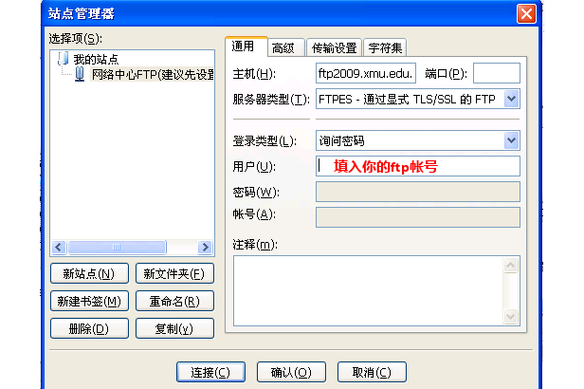
(图片来源网络,侵删)


