Of course. The phrase "Java close wait" can refer to a few different but related concepts in Java programming. The most common meaning is waiting for a thread to finish its execution before proceeding, which is often done to ensure resources are properly cleaned up.
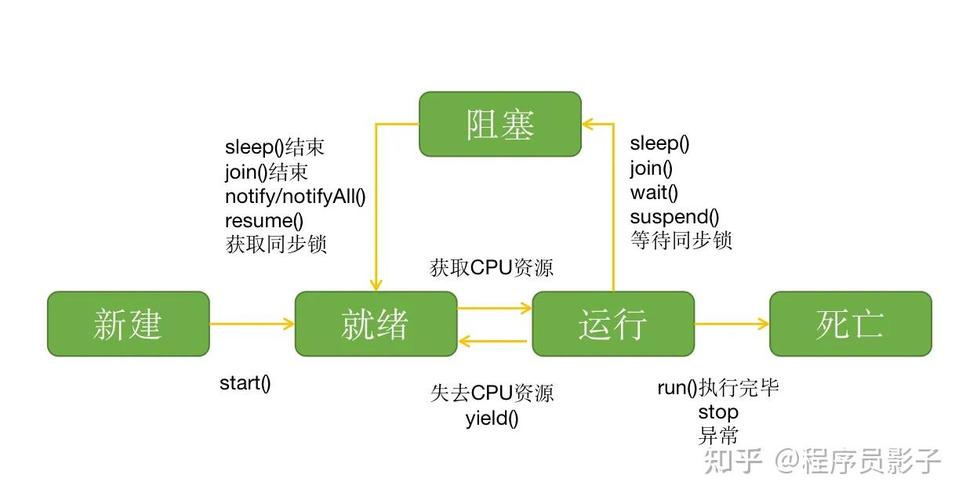
Let's break down the most common scenarios.
Scenario 1: Waiting for a Thread to Finish (The Classic join())
This is the most direct interpretation of "wait for a thread to close". When you start a thread, your main program (the main thread) can continue executing immediately. Sometimes, you need the main program to wait until the other thread has completed its task. The Thread.join() method is designed for this.
How it Works
The join() method pauses the execution of the calling thread until the thread it's called on has terminated.
Example
class MyTask implements Runnable {
    @Override
    public void run() {
        System.out.println("Task started. Thread: " + Thread.currentThread().getName());
        try {
            // Simulate a long-running task
            Thread.sleep(3000); // Sleep for 3 seconds
        } catch (InterruptedException e) {
            System.out.println("Task was interrupted.");
            Thread.currentThread().interrupt(); // Restore the interrupted status
            return;
        }
        System.out.println("Task finished. Thread: " + Thread.currentThread().getName());
    }
}
public class ThreadJoinExample {
    public static void main(String[] args) {
        System.out.println("Main thread started.");
        Thread workerThread = new Thread(new MyTask(), "Worker-1");
        workerThread.start();
        System.out.println("Main thread is doing other work...");
        // This is the "wait" part. The main thread will pause here
        // until workerThread is completely finished.
        try {
            System.out.println("Main thread is now waiting for the worker thread to finish...");
            workerThread.join(); // <--- THE KEY METHOD
        } catch (InterruptedException e) {
            System.out.println("Main thread was interrupted while waiting.");
            Thread.currentThread().interrupt();
        }
        System.out.println("Main thread finished. It waited for the worker.");
    }
}
Output:
Main thread started.
Main thread is doing other work...
Main thread is now waiting for the worker thread to finish...
Task started. Thread: Worker-1
// (3-second pause here)
Task finished. Thread: Worker-1
Main thread finished. It waited for the worker.
Scenario 2: Waiting for a Resource to be Closed (e.g., ExecutorService)
In modern Java, you often use ExecutorService instead of raw threads. When you're done with an ExecutorService, you need to shut it down gracefully. shutdown() stops accepting new tasks, but existing tasks continue running. To wait for those tasks to complete, you use awaitTermination().
How it Works
executorService.shutdown(): Initiates an orderly shutdown.executorService.awaitTermination(long timeout, TimeUnit unit): Blocks until all tasks have completed execution after a shutdown request, or the timeout occurs, or the current thread is interrupted.
Example
import java.util.concurrent.ExecutorService;
import java.util.concurrent.Executors;
import java.util.concurrent.TimeUnit;
import java.util.concurrent.atomic.AtomicInteger;
public class ExecutorServiceAwaitExample {
    public static void main(String[] args) throws InterruptedException {
        System.out.println("Main thread started.");
        ExecutorService executor = Executors.newFixedThreadPool(3);
        AtomicInteger counter = new AtomicInteger(0);
        // Submit 5 tasks to the executor
        for (int i = 0; i < 5; i++) {
            final int taskId = i;
            executor.submit(() -> {
                System.out.println("Task " + taskId + " started by " + Thread.currentThread().getName());
                try {
                    // Simulate work of varying duration
                    Thread.sleep((long) (Math.random() * 2000));
                } catch (InterruptedException e) {
                    Thread.currentThread().interrupt();
                }
                System.out.println("Task " + taskId + " finished.");
                counter.incrementAndGet();
            });
        }
        System.out.println("All tasks submitted. Main thread will now shut down the executor and wait.");
        // 1. Shutdown the executor, no new tasks will be accepted
        executor.shutdown();
        // 2. Wait for the executor to terminate (this is the "wait" part)
        //    This will block until all tasks are done or 10 seconds pass.
        try {
            boolean finished = executor.awaitTermination(10, TimeUnit.SECONDS);
            if (finished) {
                System.out.println("All tasks completed successfully!");
            } else {
                System.out.println("Timeout reached. Some tasks may still be running. Forcing shutdown.");
                // Force shutdown of currently running tasks
                executor.shutdownNow();
            }
        } catch (InterruptedException e) {
            System.out.println("Main thread was interrupted while waiting for termination.");
            executor.shutdownNow(); // Cancel even if currently running
            Thread.currentThread().interrupt(); // Preserve interrupt status
        }
        System.out.println("Main thread finished. Counter value: " + counter.get());
    }
}
Scenario 3: Waiting for an External Process (e.g., Process.waitFor())
Sometimes your Java application needs to launch an external program (like another .jar or a system command) and wait for it to finish before continuing. The Process class handles this.
How it Works
The Process.waitFor() method causes the current thread to wait until the process represented by this Process object has terminated.
Example
import java.io.IOException;
public class ProcessWaitExample {
    public static void main(String[] args) {
        System.out.println("Main thread: Launching a process.");
        try {
            // Command to print "Hello from sleep" and wait for 5 seconds on Linux/macOS
            // For Windows, use "ping -n 5 127.0.0.1 > nul"
            Process process = Runtime.getRuntime().exec(new String[]{"sleep", "5"});
            // The main thread will block here until the 'sleep' command finishes.
            System.out.println("Main thread: Waiting for the process to complete...");
            int exitCode = process.waitFor(); // <--- THE KEY METHOD
            System.out.println("Main thread: Process finished with exit code: " + exitCode);
        } catch (IOException e) {
            System.err.println("Error executing the process: " + e.getMessage());
        } catch (InterruptedException e) {
            System.err.println("Main thread was interrupted while waiting for the process.");
            Thread.currentThread().interrupt();
        }
    }
}
Summary: Which "Wait" to Use?
| Your Goal | The Java Solution | Key Method |
|---|---|---|
Wait for a specific Thread to finish. |
Use thread.join() on the target thread. |
Thread.join() |
Wait for all tasks in an ExecutorService to finish after shutdown. |
Use executorService.awaitTermination(). |
ExecutorService.awaitTermination() |
| Wait for an external OS-level process to finish. | Use process.waitFor() on the Process object. |
Process.waitFor() |
| Wait for a background task to complete (modern approach). | Use CompletableFuture.thenRun() or .get(). |
CompletableFuture |
In most modern, high-level applications, you'll be dealing with ExecutorService or CompletableFuture rather than raw Thread objects. However, understanding Thread.join() is fundamental to concurrency in Java.