
Of course! The for in range structure is one of the most fundamental and frequently used loops in Python. Let's break it down from the basics to more advanced usage.
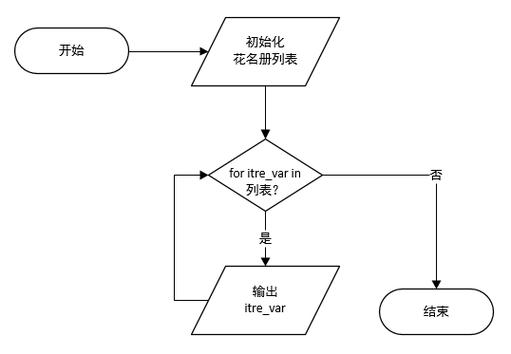
The Core Idea: What does for in range do?
It allows you to repeat a block of code a specific number of times. The range() function generates a sequence of numbers, and the for loop iterates (goes through) each number in that sequence.
Part 1: The range() Function
First, you need to understand what range() does on its own. It creates a sequence of numbers, but it doesn't store them all in memory at once (it's memory-efficient). The most common way to use it is with one, two, or three arguments.
range(stop): One Argument
This generates numbers starting from 0 up to (but not including) stop.
Syntax: range(stop)
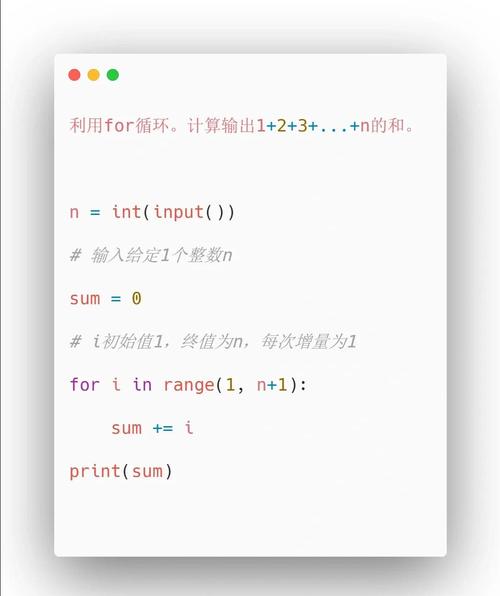
Example: range(5) generates the sequence 0, 1, 2, 3, 4.
# This will loop 5 times, with 'i' taking the values 0, 1, 2, 3, and 4.
for i in range(5):
    print(f"Loop number: {i}")
Output:
Loop number: 0
Loop number: 1
Loop number: 2
Loop number: 3
Loop number: 4
range(start, stop): Two Arguments
This generates numbers starting from start up to (but not including) stop.
Syntax: range(start, stop)
Example: range(2, 6) generates the sequence 2, 3, 4, 5.
# Loop from 2 up to (but not including) 6
for i in range(2, 6):
    print(f"Current number: {i}")
Output:
Current number: 2
Current number: 3
Current number: 4
Current number: 5
range(start, stop, step): Three Arguments
This generates numbers starting from start, up to (but not including) stop, incrementing by step.
Syntax: range(start, stop, step)
Example 1: Positive Step (Counting by 2s)
range(0, 10, 2) generates 0, 2, 4, 6, 8.
for i in range(0, 10, 2):
    print(i)
Output:
0
2
4
6
8
Example 2: Negative Step (Counting Down)
If you provide a negative step, you must make sure start is greater than stop.
range(10, 0, -2) generates 10, 8, 6, 4, 2.
for i in range(10, 0, -2):
    print(i)
Output:
10
8
6
4
2
Part 2: The for Loop
Now let's put it all together with the for loop.
Basic Syntax
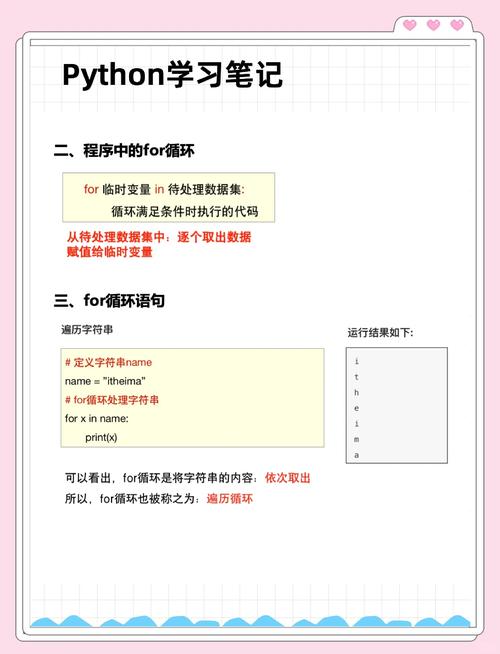
for variable_name in range(start, stop, step):
    # Code to be repeated in each iteration
    # This is called the "loop body"
    # Indentation is crucial!
variable_name: A name you choose (e.g.,i,num,x). It will hold the current number from therangein each iteration.in: A keyword that links the loop variable to the sequence.range(...): The sequence of numbers to loop through.- The colon at the end of the line is mandatory.
- Indentation: All the code you want to repeat must be indented (usually 4 spaces). This defines the "loop body".
Common Use Cases and Examples
Simple Repetition (Counting Up)
Loop 3 times to perform an action.
print("Starting a 3-second countdown...")
for i in range(3, 0, -1):
    print(i)
print("Go!")
Output:
Starting a 3-second countdown...
3
2
1
Go!
Processing a List by Index
You can use range with len() to get the index of each item in a list.
fruits = ["apple", "banana", "cherry"]
# Loop through the indices of the list
for i in range(len(fruits)):
    print(f"Index {i}: {fruits[i]}")
Output:
Index 0: apple
Index 1: banana
Index 2: cherry
Note: While this works, Python offers a more "Pythonic" way to do this with direct iteration, which we'll cover next.
Summing Numbers
Calculate the sum of the first 10 integers.
total = 0
for i in range(1, 11):  # Numbers from 1 to 10
    total = total + i  # or use the shorthand: total += i
print(f"The sum of numbers from 1 to 10 is: {total}")
Output:
The sum of numbers from 1 to 10 is: 55Part 3: for in range vs. for in (Direct Iteration)
This is a very important concept for writing clean, readable Python code.
for in range (The "C-style" way)
You use this when you specifically need the index of an item.
fruits = ["apple", "banana", "cherry"]
for i in range(len(fruits)):
    print(f"I like the fruit at index {i}: {fruits[i]}")
for in (The "Pythonic" way)
You use this when you just need the items themselves. This is simpler and more direct.
fruits = ["apple", "banana", "cherry"]
for fruit in fruits:
    print(f"I like the fruit: {fruit}")
Which one should you use?
- Use
for item in my_list:99% of the time. It's cleaner and easier to read. - Use
for i in range(len(my_list)):only if you absolutely need the indexiinside the loop (e.g., to modify an item at that specific index or to compare an item with the next one).
Part 4: Advanced Usage
Using break to Exit a Loop
Stops the loop immediately.
for i in range(10):
    if i == 5:
        print("Found 5, stopping the loop.")
        break  # Exits the loop entirely
    print(i)
Output:
0
1
2
3
4
Found 5, stopping the loop.
Using continue to Skip an Iteration
Skips the rest of the code in the current loop and jumps to the next iteration.
for i in range(10):
    if i % 2 == 0:  # If the number is even
        continue    # Skip this iteration and go to the next number
    print(i)
Output:
1
3
5
7
9
The else Clause with a for Loop
The else block runs only if the loop completes without being interrupted by a break.
# Example 1: Loop completes normally
for i in range(5):
    print(i)
else:
    print("The loop finished successfully!") # This will run
print("-" * 20)
# Example 2: Loop is interrupted by a break
for i in range(5):
    if i == 3:
        print("Breaking the loop!")
        break
    print(i)
else:
    print("This will NOT be printed.") # This is skipped
Output:
0
1
2
3
4
The loop finished successfully!
--------------------
0
1
2
Breaking the loop!
Summary
| Feature | Description | Example |
|---|---|---|
range(stop) |
Generates numbers from 0 to stop-1. |
for i in range(5): |
range(start, stop) |
Generates numbers from start to stop-1. |
for i in range(2, 6): |
range(start, stop, step) |
Generates numbers from start to stop-1, by step. |
for i in range(0, 10, 2): |
break |
Exits the loop immediately. | if condition: break |
continue |
Skips the rest of the current iteration. | if condition: continue |
else |
Runs after the loop completes (if not broken). | for ...: ... else: ... |
| Pythonic Way | Use for item in list: to iterate over items directly. |
for fruit in fruits: |











