Python for 循环
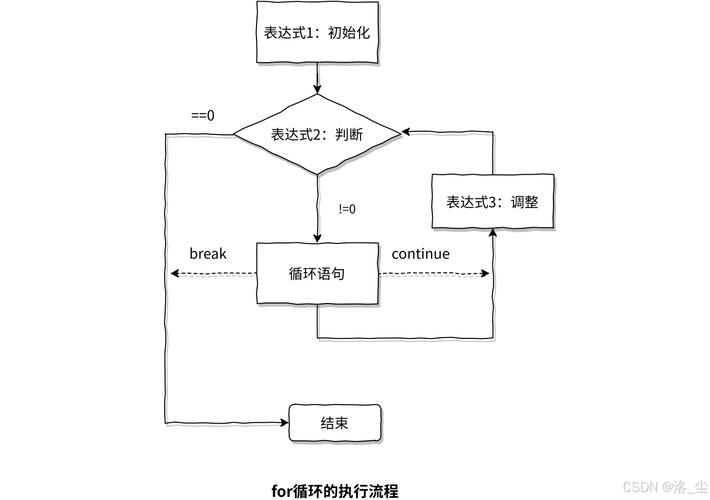
for 循环是 Python 中最常用的循环结构之一,它的主要作用是遍历任何可迭代对象(例如列表、元组、字符串、字典、集合等),并对每个元素执行一段代码。
(图片来源网络,侵删)
基本语法
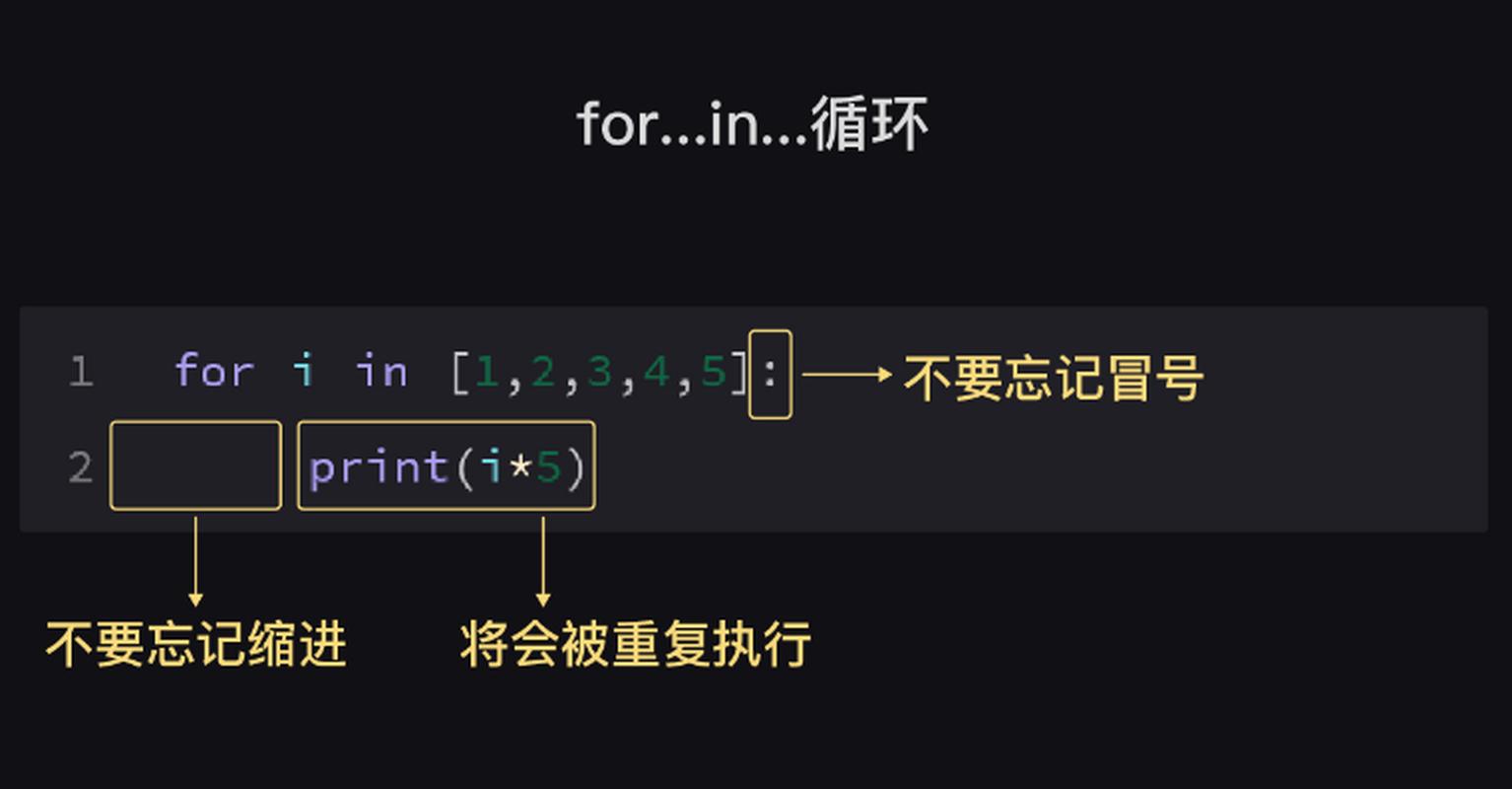
for variable in iterable:
    # 要执行的代码块
    # 这里的代码会针对 iterable 中的每一个元素执行一次
variable:一个临时变量,用于在每次循环中接收当前遍历到的元素。in:关键字,用于指定要遍历的可迭代对象。iterable:任何可以逐个取出元素的对象,比如列表[1, 2, 3]或字符串"hello"。- 冒号,表示代码块的开始。
- 代码块:必须缩进的语句,这是 Python 语法强制要求的,它定义了循环体。
for 循环的详细示例
示例 1:遍历列表
这是最常见的用法。
# 创建一个水果列表
fruits = ["apple", "banana", "cherry"]
# 遍历列表中的每一个水果
for fruit in fruits:
    print(f"I like to eat {fruit}.")
输出:
I like to eat apple.
I like to eat banana.
I like to eat cherry.
解释:
- 第一次循环:
fruit的值是"apple",执行print(...)。 - 第二次循环:
fruit的值是"banana",再次执行print(...)。 - 第三次循环:
fruit的值是"cherry",再次执行print(...)。 - 列表遍历完毕,循环结束。
示例 2:遍历字符串
字符串在 Python 中也是一个可迭代对象,它会遍历其中的每一个字符。
(图片来源网络,侵删)
word = "Python"
for char in word:
    print(char)
输出:
P
y
t
h
o
n
示例 3:使用 range() 函数
如果你想执行特定次数的循环,而不需要关心具体的元素值,可以使用 range() 函数。
range(n):生成一个从 0 到 n-1 的整数序列。range(start, stop):生成一个从start到stop-1的整数序列。range(start, stop, step):生成一个从start到stop-1,步长为step的整数序列。
# 打印 0 到 4
print("Using range(5):")
for i in range(5):
    print(i)
print("\nUsing range(2, 6):")
# 打印 2 到 5
for i in range(2, 6):
    print(i)
print("\nUsing range(0, 10, 2):")
# 打印 0, 2, 4, 6, 8
for i in range(0, 10, 2):
    print(i)
输出:
Using range(5):
0
1
2
3
4
Using range(2, 6):
2
3
4
5
Using range(0, 10, 2):
0
2
4
6
8
示例 4:遍历字典
遍历字典时,默认会遍历它的键。
student_scores = {"Alice": 90, "Bob": 85, "Charlie": 92}
for name in student_scores:
    print(name)
输出:
Alice
Bob
Charlie
如果你想同时获取键和值,可以使用 .items() 方法。
student_scores = {"Alice": 90, "Bob": 85, "Charlie": 92}
for name, score in student_scores.items():
    print(f"{name}'s score is {score}.")
输出:
Alice's score is 90.
Bob's score is 85.
Charlie's score is 92.
pass 语句
pass 是一个空操作语句,它在语法上是必需的,但执行时什么也不做,你可以把它想象成一个“占位符”。
为什么需要 pass?
- 作为占位符:当你正在构思代码结构,但还没想好具体实现时,可以使用
pass来让代码能够正常运行而不会报错,这让你可以先搭建框架,再填充细节。 - 满足语法要求:在 Python 中,某些结构(如
if语句、for循环、函数定义、类定义)内部不能是空的,如果你暂时不想在里面写任何代码,就必须放一个pass。
pass 的示例
示例 1:在 if 语句中
假设你有一个条件,但目前不需要执行任何操作。
x = 10
if x > 5:
    print("x is greater than 5.")
    # 暂时不需要做其他事,但 if 块不能为空
    pass  # 如果没有这行,Python 会报错: IndentationError
else:
    print("x is not greater than 5.")
示例 2:在 for 循环中
这正是你问题中提到的场景,假设你正在遍历一个列表,但只想处理满足特定条件的元素,对于不满足条件的元素,你什么也不想做。
numbers = [1, 2, 3, 4, 5, 6, 7, 8, 9, 10]
print("Processing even numbers:")
for num in numbers:
    # 只处理偶数
    if num % 2 == 0:
        print(f"Found an even number: {num}")
    else:
        # 对于奇数,我们不执行任何操作
        # 如果这里没有 'pass',Python 会报错
        pass
输出:
Processing even numbers:
Found an even number: 2
Found an even number: 4
Found an even number: 6
Found an even number: 8
Found an even number: 10在这个例子中,pass 在 else 分支中起到了一个“空操作”的作用,让代码结构完整。
示例 3:在函数定义中
def my_future_function():
    # 这个函数我还没想好具体要做什么
    pass
# 现在可以正常调用这个函数,而不会导致程序崩溃
my_future_function()
print("The function was called, even though it does nothing.")
示例 4:在类定义中
class MyEmptyClass:
    # 这个类我暂时是空的
    pass
# 现在可以正常创建这个类的实例
my_object = MyEmptyClass()
print("An instance of MyEmptyClass was created.")
for 循环与 pass 的结合:一个实际场景
假设你正在写一个程序,需要处理一个文件中的所有行,但你只关心以 开头的注释行,并想跳过空行。
# 模拟文件内容
file_lines = [
    "# This is a title",
    "",
    "import os",
    "# This is a comment",
    "print('Hello')",
    "# Another comment",
    ""
]
print("Finding comments in the file:")
for line in file_lines:
    # 检查是否是空行
    if not line.strip():  # strip() 去除首尾空格,如果为空则返回 True
        pass  # 跳过空行,什么都不做
    # 检查是否是注释行
    elif line.startswith("#"):
        print(f"Found a comment: {line.strip()}")
    else:
        # 对于其他代码行,我们也暂时不处理
        pass
输出:
Finding comments in the file:
Found a comment: # This is a title
Found a comment: # This is a comment
Found a comment: # Another comment在这个例子中,pass 用于明确表示“在某种情况下,我们故意不执行任何操作”,这比简单地删除 if 或 elif 块要清晰得多,因为它让代码的意图更加明确。
| 特性 | for 循环 |
pass 语句 |
|---|---|---|
| 作用 | 用于遍历可迭代对象,重复执行代码块。 | 一个空操作,用作占位符,表示“什么都不做”。 |
| 语法 | for item in iterable: |
pass |
| 使用场景 | 当你需要对列表、字符串、字典等中的每个元素进行操作时。 | 当代码结构需要语句,但逻辑上不需要任何操作时。 当你计划将来添加代码,但目前需要让代码能运行时。 |
与 for 的关系 |
pass 可以出现在 for 循环的代码块中,用来处理不需要执行任何操作的分支。 |
它不是 for 循环的一部分,但经常在 for 循环的 if/elif/else 结构中使用。 |