Of course! Let's break down how to handle HTTP in Java using Sockets. This is a fantastic topic for understanding the fundamentals of network programming.
We'll cover three levels of increasing abstraction:
- Level 1: The Raw Socket Approach - From scratch, showing how HTTP is just text over a network. This is the best for learning.
- Level 2: Using
HttpURLConnection- The standard, built-in Java way to make HTTP requests without external libraries. - Level 3: Using a Modern Library (OkHttp) - The recommended, practical approach for real-world applications.
Level 1: The Raw Socket Approach (From Scratch)
This method involves manually creating a TCP socket, writing the raw HTTP request as a string, reading the response, and parsing it. It's verbose but incredibly educational.
Key Concepts:
- Socket: Represents one endpoint of a two-way communication link between two programs on the network. For HTTP, we connect to the server (e.g.,
www.google.com) on port 80. - Port: 80 is the standard port for unencrypted HTTP traffic.
- HTTP Request: A plain text string with a specific format (method, path, version, headers, and optionally a body).
- HTTP Response: The server's reply, also a plain text string with a similar structure (status line, headers, and a body).
Example: A Simple HTTP GET Client
This client will connect to httpbin.org, a service that provides test endpoints, and request the /get page.
import java.io.*;
import java.net.Socket;
import java.net.URL;
import java.nio.charset.StandardCharsets;
public class RawHttpClient {
    public static void main(String[] args) {
        // The host and port we want to connect to
        String host = "httpbin.org";
        int port = 80;
        // The resource we want to request
        String path = "/get";
        try (Socket socket = new Socket(host, port);
             // Get the output stream to send the request
             OutputStream outputStream = socket.getOutputStream();
             // Get the input stream to read the response
             InputStream inputStream = socket.getInputStream();
             // Use buffered readers/writers for efficiency
             BufferedWriter writer = new BufferedWriter(new OutputStreamWriter(outputStream, StandardCharsets.UTF_8));
             BufferedReader reader = new BufferedReader(new InputStreamReader(inputStream, StandardCharsets.UTF_8))) {
            // 1. BUILD THE HTTP REQUEST STRING
            // This is the core of the HTTP protocol.
            String request = "GET " + path + " HTTP/1.1\r\n" +
                             "Host: " + host + "\r\n" +
                             "User-Agent: SimpleJavaHttpClient/1.0\r\n" +
                             "Accept: */*\r\n" +
                             "Connection: close\r\n" + // Ask the server to close the connection after sending the response
                             "\r\n"; // This empty line signals the end of the headers
            // 2. SEND THE REQUEST
            System.out.println("--- Sending Request ---");
            System.out.println(request);
            writer.write(request);
            writer.flush(); // Ensure the data is sent immediately
            // 3. READ THE RESPONSE
            System.out.println("\n--- Reading Response ---");
            String line;
            // Read headers until we encounter an empty line
            while ((line = reader.readLine()) != null && !line.isEmpty()) {
                System.out.println(line);
            }
            // Read the response body
            System.out.println("\n--- Response Body ---");
            StringBuilder body = new StringBuilder();
            while ((line = reader.readLine()) != null) {
                body.append(line).append("\n");
            }
            System.out.println(body.toString());
        } catch (IOException e) {
            System.err.println("Error during HTTP request: " + e.getMessage());
            e.printStackTrace();
        }
    }
}
How to Run It:
- Save the code as
RawHttpClient.java. - Compile it:
javac RawHttpClient.java - Run it:
java RawHttpClient
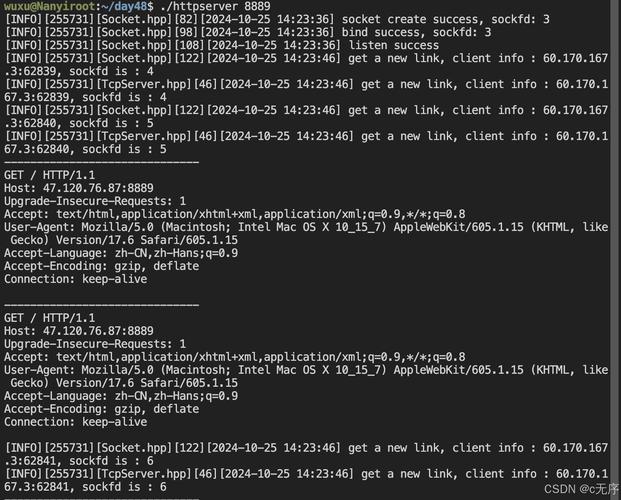
Expected Output:
You will see the raw HTTP response headers followed by the JSON body from httpbin.org.
Level 2: Using HttpURLConnection (The Standard Java Way)
Manually handling sockets is tedious and error-prone. Java provides a higher-level abstraction in java.net.HttpURLConnection for making HTTP requests. This is the standard way in core Java.
Key Concepts:
- URL: Represents a Uniform Resource Locator.
- HttpURLConnection: A URLConnection for HTTP. It simplifies the process by handling connection setup, request writing, and response reading.
Example: GET and POST Requests
import java.io.BufferedReader;
import java.io.DataOutputStream;
import java.io.InputStreamReader;
import java.net.HttpURLConnection;
import java.net.URL;
import java.nio.charset.StandardCharsets;
public class JavaHttpClient {
private static final String USER_AGENT = "Mozilla/5.0";
public static void main(String[] args) throws Exception {
// --- Example 1: GET Request ---
System.out.println("Sending GET request...");
String getUrl = "https://httpbin.org/get";
sendGet(getUrl);
// --- Example 2: POST Request ---
System.out.println("\n\nSending POST request...");
String postUrl = "https://httpbin.org/post";
String urlParameters = "param1=value1¶m2=value2¶m3=value3";
sendPost(postUrl, urlParameters);
}
// GET request method
private static void sendGet(String urlString) throws Exception {
URL obj = new URL(urlString);
HttpURLConnection con = (HttpURLConnection) obj.openConnection();
// Optional, but recommended
con.setRequestMethod("GET");
con.setRequestProperty("User-Agent", USER_AGENT);
con.setRequestProperty("Accept", "application/json"); // We expect JSON
int responseCode = con.getResponseCode();
System.out.println("GET Response Code: " + responseCode);
if (responseCode == HttpURLConnection.HTTP_OK) { // success
try (BufferedReader in = new BufferedReader(
new InputStreamReader(con.getInputStream(), StandardCharsets.UTF_8))) {
String inputLine;
StringBuilder response = new StringBuilder();
while ((inputLine = in.readLine()) != null) {
response.append(inputLine);
}
System.out.println("Response Body (GET): " + response.toString());
}
} else {
System.out.println("GET request failed");
}
}
// POST request method
private static void sendPost(String urlString, String urlParameters) throws Exception {
URL obj = new URL(urlString);
HttpURLConnection con = (HttpURLConnection) obj.openConnection();
// Set request method to POST
con.setRequestMethod("POST");
con.setRequestProperty("User-Agent", USER_AGENT);
con.setRequestProperty("Accept-Language", "en-US,en;q=0.5");
con.setRequestProperty("Content-Type", "application/x-www-form-urlencoded");
con.setRequestProperty("charset", "utf-8");
con.setRequestProperty("Content-Length", Integer.toString(urlParameters.getBytes(StandardCharsets.UTF_8).length));
con.setDoOutput(true); // This is crucial for POST requests
// Send POST request
try (DataOutputStream out = new DataOutputStream(con.getOutputStream())) {
out.write(urlParameters.getBytes(StandardCharsets.UTF_8));
out.flush();
}
int responseCode = con.getResponseCode();
System.out.println("POST Response Code: " + responseCode);
if (responseCode == HttpURLConnection.HTTP_OK) { // success
try (BufferedReader in = new BufferedReader(
new InputStreamReader(con.getInputStream(), StandardCharsets.UTF_8))) {
String inputLine;
StringBuilder response = new StringBuilder();
while ((inputLine = in.readLine()) != null) {
response.append(inputLine);
}
System.out.println("Response Body (POST): " + response.toString());
}
} else {
System.out.println("POST request failed");
}
}
}
Level 3: Using a Modern Library (OkHttp)
For any serious application, using a well-maintained third-party library is the best choice. OkHttp is the de-facto standard for HTTP clients on the JVM. It's efficient, easy to use, and handles many complexities like connection pooling, redirects, and modern protocols (HTTP/2).
Setup:
You need to add the OkHttp dependency to your project.
Maven (pom.xml):

<dependency>
    <groupId>com.squareup.okhttp3</groupId>
    <artifactId>okhttp</artifactId>
    <version>4.12.0</version> <!-- Use the latest version -->
</dependency>
Gradle (build.gradle):
implementation 'com.squareup.okhttp3:okhttp:4.12.0' // Use the latest version
Example: GET and POST Requests with OkHttp
import okhttp3.*;
import java.io.IOException;
public class OkHttpExample {
    private static final OkHttpClient client = new OkHttpClient();
    private static final String JSON = "application/json; charset=utf-8";
    public static void main(String[] args) throws IOException {
        // --- Example 1: GET Request ---
        System.out.println("Sending GET request with OkHttp...");
        String getUrl = "https://httpbin.org/get";
        String getResponse = runGet(getUrl);
        System.out.println("Response Body (GET): " + getResponse);
        // --- Example 2: POST Request with JSON ---
        System.out.println("\n\nSending POST request with OkHttp...");
        String postUrl = "https://httpbin.org/post";
        String jsonBody = "{\"name\":\"John Doe\", \"email\":\"john.doe@example.com\"}";
        String postResponse = runPost(postUrl, jsonBody);
        System.out.println("Response Body (POST): " + postResponse);
    }
    public static String runGet(String url) throws IOException {
        Request request = new Request.Builder()
                .url(url)
                .build();
        try (Response response = client.newCall(request).execute()) {
            if (!response.isSuccessful()) throw new IOException("Unexpected code " + response);
            // The response body is a stream. It's important to close it.
            return response.body().string();
        }
    }
    public static String runPost(String url, String jsonBody) throws IOException {
        // The RequestBody can be built from a string
        RequestBody body = RequestBody.create(jsonBody, MediaType.get(JSON));
        Request request = new Request.Builder()
                .url(url)
                .post(body)
                .build();
        try (Response response = client.newCall(request).execute()) {
            if (!response.isSuccessful()) throw new IOException("Unexpected code " + response);
            return response.body().string();
        }
    }
}
Summary and Comparison
| Feature | Raw Socket | HttpURLConnection |
OkHttp |
|---|---|---|---|
| Abstraction | Very Low | Medium | High |
| Ease of Use | Very Hard | Moderate | Very Easy |
| Boilerplate Code | High | Medium | Low |
| Features | Basic HTTP only | Basic HTTP | Advanced (HTTP/2, caching, connection pooling, websockets) |
| Dependencies | None (built-in) | None (built-in) | Requires external library |
| Best For | Learning the fundamentals. | Simple scripts, legacy code, or when you can't add dependencies. | Production applications and any new project. |
Recommendation:
- If you're a student learning networking, start with the Raw Socket example. It will give you a deep understanding of what's happening under the hood.
- For quick utility scripts or projects where you can't add libraries,
HttpURLConnectionis a viable, albeit clunky, option. - For any real-world, professional application, use OkHttp. It saves time, reduces bugs, and provides performance and feature benefits that are difficult to replicate yourself.