
Of course! Let's break down everything you need to know about using Python with MySQL, focusing on the most common and recommended libraries.
The term "mysql-python" can be a bit confusing, so I'll clarify it first.
What is "mysql-python"?
mysql-python (also known as MySQLdb) is one of the original Python libraries for connecting to MySQL.
- Status: It is now outdated and unmaintained.
- Python 3: It does not support Python 3.
- Installation: It can be difficult to install because it requires a C compiler and MySQL development headers (
libmysqlclient-devon Linux, MySQL Connector/C on Windows).
Because of these issues, you should avoid using mysql-python for any new project.
The Modern Alternatives: mysql-connector-python and PyMySQL
There are two excellent, modern, and actively maintained libraries for connecting Python to MySQL. Both are excellent choices.
| Feature | mysql-connector-python (Oracle) |
PyMySQL (Pure Python) |
|---|---|---|
| Developer | Oracle, the company behind MySQL. | A community of Python developers. |
| Language | A C extension, which can be faster. | Written entirely in Python. |
| Installation | Easier on most systems. | Very easy (pip install is usually enough). |
| Dependencies | Requires the MySQL client library (libmysqlclient). |
No external C libraries needed. |
| Best For | High-performance applications where speed is critical. | Simplicity, portability, and environments where you can't install C libraries. |
Recommendation: For most users, start with mysql-connector-python. It's the official driver and works seamlessly. If you run into installation issues, PyMySQL is a fantastic and reliable alternative.
How to Use mysql-connector-python (Recommended)
This is the officially recommended driver from Oracle.
Installation
First, install the library using pip:
pip install mysql-connector-python
Connecting to a MySQL Database
You'll need your database connection details:

- Hostname (e.g.,
localhostor an IP address) - Username
- Password
- Database name
import mysql.connector
from mysql.connector import Error
try:
    # Establish the connection
    connection = mysql.connector.connect(
        host='localhost',
        user='your_username',
        password='your_password',
        database='your_database'
    )
    if connection.is_connected():
        db_info = connection.get_server_info()
        print(f"Successfully connected to MySQL Server version {db_info}")
        cursor = connection.cursor()
        cursor.execute("SELECT database();")
        record = cursor.fetchone()
        print(f"You're connected to database: {record[0]}")
except Error as e:
    print(f"Error while connecting to MySQL: {e}")
finally:
    # Closing the connection
    if 'connection' in locals() and connection.is_connected():
        cursor.close()
        connection.close()
        print("MySQL connection is closed.")
Creating a Table and Inserting Data (CRUD Operations)
Here's a more complete example showing how to create a table, insert data, and retrieve it.
import mysql.connector
from mysql.connector import Error
def create_connection(host_name, user_name, user_password, db_name=None):
    """Create a database connection to a MySQL server."""
    connection = None
    try:
        connection = mysql.connector.connect(
            host=host_name,
            user=user_name,
            passwd=user_password,
            database=db_name
        )
        print("Connection to MySQL successful")
    except Error as e:
        print(f"The error '{e}' occurred")
    return connection
def execute_query(connection, query, data=None):
    """Execute a single query."""
    cursor = connection.cursor()
    try:
        if data:
            cursor.execute(query, data)
        else:
            cursor.execute(query)
        connection.commit()
        print("Query executed successfully")
    except Error as e:
        print(f"The error '{e}' occurred")
def execute_read_query(connection, query):
    """Execute a read query and fetch the results."""
    cursor = connection.cursor(dictionary=True) # dictionary=True gives column names as keys
    result = None
    try:
        cursor.execute(query)
        result = cursor.fetchall()
        return result
    except Error as e:
        print(f"The error '{e}' occurred")
# --- Main Execution ---
if __name__ == "__main__":
    # 1. Connect to the MySQL server (no specific database at first)
    conn = create_connection("localhost", "your_username", "your_password")
    # 2. Create a new database (if it doesn't exist)
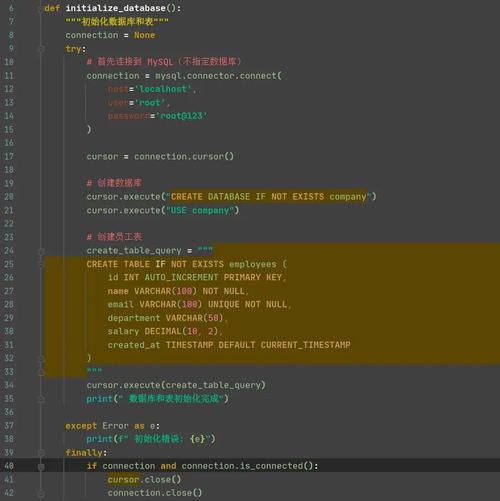
    create_db_query = "CREATE DATABASE IF NOT EXISTS python_mysql_db"
    execute_query(conn, create_db_query)
    # 3. Close the connection and reconnect to the specific database
    conn.close()
    conn = create_connection("localhost", "your_username", "your_password", "python_mysql_db")
    # 4. Create a table
    create_users_table = """
    CREATE TABLE IF NOT EXISTS users (
        id INT AUTO_INCREMENT PRIMARY KEY,
        name TEXT NOT NULL,
        email VARCHAR(100) NOT NULL UNIQUE,
        age INT
    );
    """
    execute_query(conn, create_users_table)
    # 5. Insert data into the table
    # Using parameterized queries to prevent SQL injection
    insert_user_query = "INSERT INTO users (name, email, age) VALUES (%s, %s, %s)"
    user_data = ("Alice", "alice@example.com", 30)
    execute_query(conn, insert_user_query, user_data)
    user_data_2 = ("Bob", "bob@example.com", 25)
    execute_query(conn, insert_user_query, user_data_2)
    # 6. Select data from the table
    select_users_query = "SELECT * FROM users"
    users = execute_read_query(conn, select_users_query)
    for user in users:
        print(user)
    # 7. Update data
    update_query = "UPDATE users SET age = %s WHERE name = %s"
    execute_query(conn, update_query, (31, "Alice"))
    # 8. Delete data
    delete_query = "DELETE FROM users WHERE name = %s"
    execute_query(conn, delete_query, ("Bob",))
    # 9. Verify deletion
    remaining_users = execute_read_query(conn, select_users_query)
    print("\nUsers after deletion:")
    for user in remaining_users:
        print(user)
    # 10. Close the connection
    conn.close()
How to Use PyMySQL (The Alternative)
If you prefer PyMySQL or run into issues with mysql-connector-python, it's just as easy to use.
Installation
pip install PyMySQL
Example Code
The API is very similar to mysql-connector-python.
import pymysql
from pymysql import MySQLError
# Connection details
db_config = {
    'host': 'localhost',
    'user': 'your_username',
    'password': 'your_password',
    'database': 'your_database',
    'cursorclass': pymysql.cursors.DictCursor  # This makes results dictionaries
}
try:
    # Establish the connection
    connection = pymysql.connect(**db_config)
    with connection.cursor() as cursor:
        # Create a table
        sql_create_table = """
        CREATE TABLE IF NOT EXISTS products (
            id INT AUTO_INCREMENT PRIMARY KEY,
            name VARCHAR(255) NOT NULL,
            price DECIMAL(10, 2)
        );
        """
        cursor.execute(sql_create_table)
        connection.commit()
        print("Table 'products' created or already exists.")
        # Insert data
        sql_insert = "INSERT INTO products (name, price) VALUES (%s, %s)"
        cursor.execute(sql_insert, ('Laptop', 1200.00))
        cursor.execute(sql_insert, ('Mouse', 25.50))
        connection.commit()
        print("Products inserted.")
        # Read data
        sql_select = "SELECT * FROM products"
        cursor.execute(sql_select)
        results = cursor.fetchall()
        print("\n--- Product List ---")
        for product in results:
            print(product)
except MySQLError as e:
    print(f"Error: {e}")
finally:
    if 'connection' in locals() and connection.open:
        connection.close()
        print("\nConnection closed.")
Best Practices & Security
-
NEVER Hardcode Credentials: Never put your username and password directly in your code. Use environment variables or a configuration file.
-
Using
python-dotenv:-
pip install python-dotenv -
Create a
.envfile in your project root:DB_HOST=localhost DB_USER=your_username DB_PASSWORD=your_password DB_NAME=your_database -
In your Python script:
import os
from dotenv import load_dotenv
load_dotenv() # Load variables from .env file
connection = mysql.connector.connect(
    host=os.getenv('DB_HOST'),
    user=os.getenv('DB_USER'),
    password=os.getenv('DB_PASSWORD'),
    database=os.getenv('DB_NAME')
)
-
-
-
Always Use Parameterized Queries: Notice in the examples we used
(%s, %s)and passed data separately. This is the most important security practice to prevent SQL Injection attacks. Never use f-strings or string concatenation to build queries with user input.# GOOD (Safe) query = "SELECT * FROM users WHERE name = %s" cursor.execute(query, (user_input,)) # BAD (Vulnerable to SQL Injection) query = f"SELECT * FROM users WHERE name = '{user_input}'" cursor.execute(query)


