Of course! This is a very common point of confusion for Java developers. Let's break it down clearly.
The Core Concept: UTF-8 is a Unicode Encoding
The most important thing to understand is that UTF-8 is not an alternative to Unicode; it's a way to encode Unicode characters.
Think of it like this:
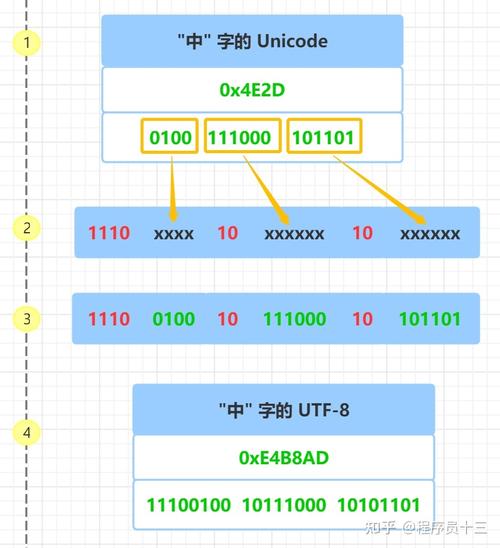
- Unicode: An international standard that assigns a unique number (a "code point") to every character in every language. This is like a giant, universal character map. For example, the character 'A' is assigned the number
U+0041, and the Chinese character '中' is assignedU+4E2D. This unique number is the code point. - UTF-8 (Unicode Transformation Format - 8-bit): A rule set for converting those Unicode code points into a sequence of one or more bytes. It's a variable-width encoding, meaning some characters take 1 byte, some 2, some 3, and some 4.
So, when you "convert from UTF-8 to Unicode" in Java, you are really doing one of two things:
- Reading a byte sequence that is encoded in UTF-8 and turning it into Java's internal
charorStringrepresentation, which is based on UTF-16 (another Unicode encoding). - Getting the integer code point value for a specific character.
Let's look at how to handle these scenarios in Java.
Scenario 1: Converting a UTF-8 Byte Sequence to a Java String
This is the most frequent task. You have a file, a network packet, or a byte array that you know contains text encoded in UTF-8, and you want to turn it into a Java String.
Method A: The Modern, Recommended Way (Java 7+)
Use the StandardCharsets enum. It's type-safe, clear, and avoids typos in charset names.
import java.nio.charset.StandardCharsets;
public class Utf8ToString {
    public static void main(String[] args) {
        // A byte array representing the UTF-8 encoded string "Hello 世界"
        // 'H' (1 byte), 'e' (1), 'l' (1), 'l' (1), 'o' (1)
        // ' ' (1)
        // '世' (3 bytes), '界' (3 bytes)
        byte[] utf8Bytes = {(byte) 0x48, (byte) 0x65, (byte) 0x6C, (byte) 0x6C, (byte) 0x6F, (byte) 0x20,
                            (byte) 0xE4, (byte) 0xB8, (byte) 0x96, (byte) 0xE7, (byte) 0x95, (byte) 0x8C};
        // Convert the byte array to a String using the UTF-8 charset
        String unicodeString = new String(utf8Bytes, StandardCharsets.UTF_8);
        System.out.println("The resulting string is: " + unicodeString);
        System.out.println("The string has a length of: " + unicodeString.length()); // Output: 8
    }
}
Output:
The resulting string is: Hello 世界
The string has a length of: 8
Method B: The Traditional Way (Pre-Java 7)
You can use the String constructor that takes a Charset object. This is better than using a string name like "UTF-8" because it prevents UnsupportedCharsetException.
import java.nio.charset.Charset;
public class Utf8ToStringTraditional {
    public static void main(String[] args) {
        byte[] utf8Bytes = {(byte) 0x48, (byte) 0x65, (byte) 0x6C, (byte) 0x6C, (byte) 0x6F, (byte) 0x20,
                            (byte) 0xE4, (byte) 0xB8, (byte) 0x96, (byte) 0xE7, (byte) 0x95, (byte) 0x8C};
        // Create a Charset object for UTF-8
        Charset utf8Charset = Charset.forName("UTF-8");
        // Convert the byte array to a String
        String unicodeString = new String(utf8Bytes, utf8Charset);
        System.out.println("The resulting string is: " + unicodeString);
    }
}
Reading from a File or Stream
When reading from files or network streams, you should always specify the character encoding. The default platform encoding can vary and is a common source of bugs.
Example with InputStreamReader:
import java.io.*;
import java.nio.charset.StandardCharsets;
public class ReadFileUtf8 {
    public static void main(String[] args) {
        // Assume "my-utf8-file.txt" contains the text "Hello 世界"
        try (InputStream inputStream = new FileInputStream("my-utf8-file.txt");
             InputStreamReader reader = new InputStreamReader(inputStream, StandardCharsets.UTF_8);
             BufferedReader bufferedReader = new BufferedReader(reader)) {
            String line;
            while ((line = bufferedReader.readLine()) != null) {
                System.out.println("Read from file: " + line);
            }
        } catch (IOException e) {
            e.printStackTrace();
        }
    }
}
Scenario 2: Getting the Unicode Code Point of a Character
Sometimes, you don't want a new String, but the actual integer code point value for a character. For this, you use the codePointAt() method.
This is useful for low-level character processing, validation, or understanding what a character actually is.
public class GetCodePoint {
    public static void main(String[] args) {
        String myString = "A中";
        // Get the code point of the first character ('A')
        int codePointA = myString.codePointAt(0);
        System.out.println("The code point for 'A' is: " + codePointA); // Output: 65 (or 0x0041)
        // Get the code point of the second character ('中')
        // Note: The index is 1, not 2. '中' is a single character, even though it's
        // represented by two Java 'char' values (a surrogate pair) in UTF-16.
        int codePointZhong = myString.codePointAt(1);
        System.out.println("The code point for '中' is: " + codePointZhong); // Output: 20013 (or 0x4E2D)
        // You can also get the code point from an array of chars
        char[] chars = myString.toCharArray();
        int codePointFromCharArray = Character.codePointAt(chars, 0);
        System.out.println("Code point from char array: " + codePointFromCharArray); // Output: 65
    }
}
Output:
The code point for 'A' is: 65
The code point for '中' is: 20013
Code point from char array: 65
The Reverse: Converting a Java String to UTF-8 Bytes
It's equally important to know how to go the other way.
import java.nio.charset.StandardCharsets;
public class StringToUtf8 {
    public static void main(String[] args) {
        String myString = "Hello 世界";
        // Convert the String to a UTF-8 byte array
        byte[] utf8Bytes = myString.getBytes(StandardCharsets.UTF_8);
        System.out.println("Original String: " + myString);
        System.out.println("UTF-8 Byte Array Length: " + utf8Bytes.length); // Output: 12
        // Print the bytes in hexadecimal for verification
        System.out.print("UTF-8 Bytes: ");
        for (byte b : utf8Bytes) {
            System.out.printf("%02X ", b);
        }
        System.out.println();
    }
}
Output:
Original String: Hello 世界
UTF-8 Byte Array Length: 12
UTF-8 Bytes: 48 65 6C 6C 6F 20 E4 B8 96 E7 95 8C
Summary Table
| Your Goal | Java Method(s) to Use | Key Takeaway |
|---|---|---|
Convert UTF-8 bytes to a Java String |
new String(byteArray, StandardCharsets.UTF_8) |
Always specify the encoding. Don't rely on defaults. |
| Get the Unicode integer for a character | myString.codePointAt(index) |
This gives you the official U+XXXX code point value. |
Convert a Java String to UTF-8 bytes |
myString.getBytes(StandardCharsets.UTF_8) |
Essential for writing text to files or sending over a network. |