Of course! Converting a Base64 encoded string to an image in Java is a common task, especially when dealing with data transferred over APIs or stored in text-based formats.
Here’s a comprehensive guide covering the core logic, a complete, runnable example, and best practices.
The Core Logic
The process involves three main steps:
- Decode the Base64 String: Convert the Base64 string back into its raw byte representation (
byte[]). - Prepare the Output File: Define the path and name of the image file you want to create.
- Write Bytes to File: Use Java's
Filesutility class to write the decoded byte array to a file.
Complete Runnable Example
This example includes a main method that you can run directly. It demonstrates converting a Base64 string (in this case, a simple 1x1 red pixel PNG) into a .png file.
import java.io.IOException;
import java.nio.file.Files;
import java.nio.file.Path;
import java.nio.file.Paths;
import java.util.Base64;
public class Base64ToImageConverter {
    public static void main(String[] args) {
        // 1. The Base64 encoded string of an image.
        // This is a 1x1 pixel red PNG image.
        String base64Image = "iVBORw0KGgoAAAANSUhEUgAAAAEAAAABCAQAAAC1HAwCAAAAC0lEQVR42mNkYAAAAAYAAjCB0C8AAAAASUVORK5CYII=";
        // 2. Define the output file path and name.
        // The "images" directory will be created in your project's root if it doesn't exist.
        String outputPath = "images/output.png";
        Path path = Paths.get(outputPath);
        try {
            // 3. Decode the Base64 string into a byte array.
            byte[] imageBytes = Base64.getDecoder().decode(base64Image);
            // 4. Create the directory if it doesn't exist.
            Files.createDirectories(path.getParent());
            // 5. Write the byte array to the specified file.
            Files.write(path, imageBytes);
            System.out.println("Image successfully created at: " + path.toAbsolutePath());
        } catch (IOException e) {
            System.err.println("Error writing image to file: " + e.getMessage());
            e.printStackTrace();
        } catch (IllegalArgumentException e) {
            System.err.println("Error decoding Base64 string: " + e.getMessage());
            e.printStackTrace();
        }
    }
}
How to Run the Example
- Save the code as
Base64ToImageConverter.java. - Compile it:
javac Base64ToImageConverter.java - Run it:
java Base64ToImageConverter - After running, a new directory named
imageswill be created in the same location, containing a file namedoutput.png.
Detailed Breakdown of the Code
The Base64 String
String base64Image = "iVBORw0KGgoAAAANSUhEUgAAAAEAAAABCAQAAAC1HAwCAAAAC0lEQVR42mNkYAAAAAYAAjCB0C8AAAAASUVORK5CYII=";
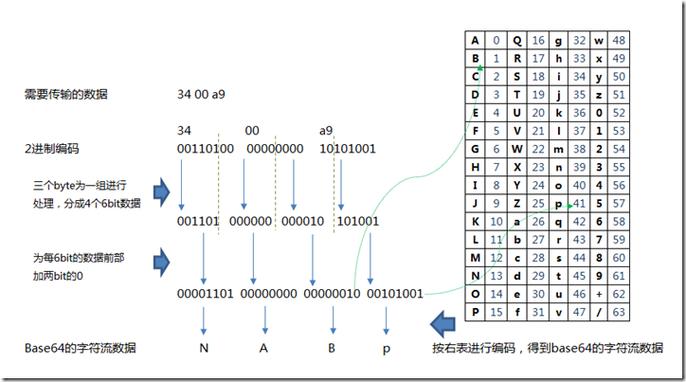
In a real-world application, this string would come from an API response, a database, or user input. Important: Base64 strings for images often have a data:image/png;base64, (or .jpg, etc.) prefix. You must remove this prefix before decoding.
Defining the Output Path
String outputPath = "images/output.png";
Path path = Paths.get(outputPath);
We use java.nio.file.Path and java.nio.file.Paths for modern, robust file system handling. It's good practice to create the parent directory to avoid IOException.
Decoding the String
byte[] imageBytes = Base64.getDecoder().decode(base64Image);
This is the core conversion step.
Base64.getDecoder(): Gets a standard decoder instance..decode(base64String): Takes the Base64 string and returns abyte[]array containing the raw image data.
Handling Potential Errors
} catch (IOException e) {
    // Handles file writing errors (e.g., no permissions, disk full)
} catch (IllegalArgumentException e) {
    // Handles Base64 decoding errors (e.g., string is not valid Base64)
}
It's crucial to handle these exceptions.
IOException: Thrown byFiles.createDirectories()orFiles.write()if there's a problem with the file system.IllegalArgumentException: Thrown byBase64.getDecoder().decode()if the input string is not a valid Base64 sequence.
Advanced: Handling Data URIs (with data:image/... prefix)
If your Base64 string includes the MIME type prefix (a "data URI"), you must first parse and clean it.

Here's a helper method to do that:
import java.util.Base64;
public class Base64Utils {
    /**
     * Removes the "data:image/...;base64," prefix from a Base64 data URI.
     *
     * @param base64WithUri The Base64 string that may include a data URI prefix.
     * @return The clean Base64 string.
     * @throws IllegalArgumentException if the string is not a valid data URI.
     */
    public static String cleanDataUri(String base64WithUri) {
        if (base64WithUri == null) {
            throw new IllegalArgumentException("Input string cannot be null.");
        }
        String prefix = "base64,";
        int commaIndex = base64WithUri.indexOf(prefix);
        if (commaIndex == -1) {
            // No prefix found, assume it's a clean Base64 string
            return base64WithUri;
        }
        return base64WithUri.substring(commaIndex + prefix.length());
    }
    public static void main(String[] args) {
        String dataUri = "data:image/png;base64,iVBORw0KGgoAAAANSUhEUgAAAAEAAAABCAQAAAC1HAwCAAAAC0lEQVR42mNkYAAAAAYAAjCB0C8AAAAASUVORK5CYII=";
        String cleanBase64 = cleanDataUri(dataUri);
        System.out.println("Cleaned Base64: " + cleanBase64);
        // Now you can use this clean string with the decoder from the first example
        byte[] imageBytes = Base64.getDecoder().decode(cleanBase64);
        // ... rest of the file writing logic
    }
}
Best Practices
- Always Sanitize Input: If the Base64 string comes from an external source (like a user or an API), validate it. Check for the correct prefix if you expect one, and ensure the decoded length makes sense for an image file.
- Handle Exceptions Gracefully: Never let
IOExceptionorIllegalArgumentExceptioncrash your application. Log the error and inform the user appropriately. - Use
try-with-resourcesfor Complex Streams: WhileFiles.write()is simple, if you were dealing with more complex I/O streams (e.g., from a network request), you should usetry-with-resourcesto ensure they are always closed. - Be Aware of Memory Usage: For very large images, decoding the entire Base64 string into a
byte[]array in memory can consume a lot of RAM. For extremely large files, consider streaming the data, but this is a more advanced scenario. For most web-sized images, thebyte[]approach is perfectly fine and efficient.