Of course! The java.math.BigDecimal class is a crucial part of Java for applications that require high-precision arithmetic, especially in financial and scientific domains. Here's a comprehensive guide covering its importance, how to use it, and best practices.
Why Not Use double or float?
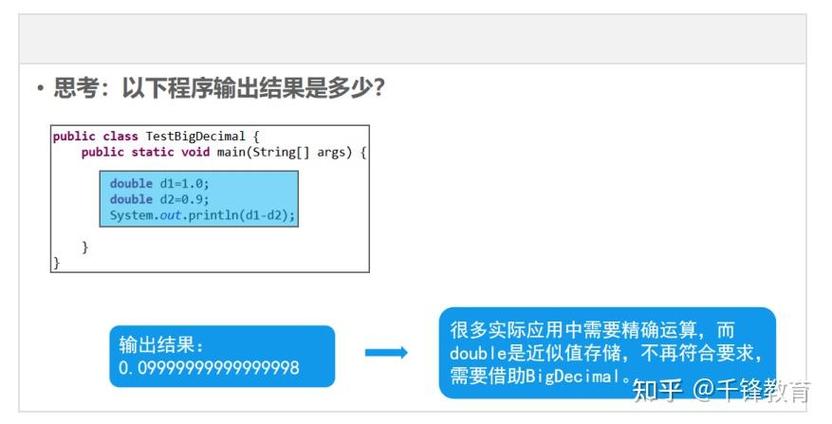
This is the most important question to answer. double and float are binary floating-point types. They are designed for a wide range of values and performance, but they cannot represent decimal fractions like 0.1 exactly.
Let's see the problem:
public class DoubleProblem {
    public static void main(String[] args) {
        double a = 0.1;
        double b = 0.2;
        // We expect 0.3, but...
        System.out.println(a + b); // Output: 0.30000000000000004
        // This can lead to catastrophic errors in financial calculations
        double price = 1.00;
        double tax = 0.1 * price; // tax is 0.10000000000000000555...
        double total = price + tax; // total is 1.1000000000000000888...
        System.out.println("Total: $" + total); // Output: Total: $1.1000000000000001
    }
}
This tiny inaccuracy is unacceptable for financial calculations where precision is paramount. BigDecimal solves this by representing numbers as an arbitrary-precision integer and a scale (a power of ten).
BigDecimal Basics
A BigDecimal consists of:
- An unscaled value: A 32-bit or 64-bit
BigInteger(effectively an integer). - A scale: A 32-bit
intrepresenting the number of digits to the right of the decimal point.
For example, the number 456 is represented internally as an unscaled value of 123456 and a scale of 3.
Creating and Initializing BigDecimal
⚠️ CRITICAL WARNING: Never use the BigDecimal(double) constructor.
The BigDecimal(double) constructor interprets the double's binary value exactly, which can lead to unexpected results. It's like putting polluted water into a pristine glass.
// BAD - AVOID THIS AT ALL COSTS
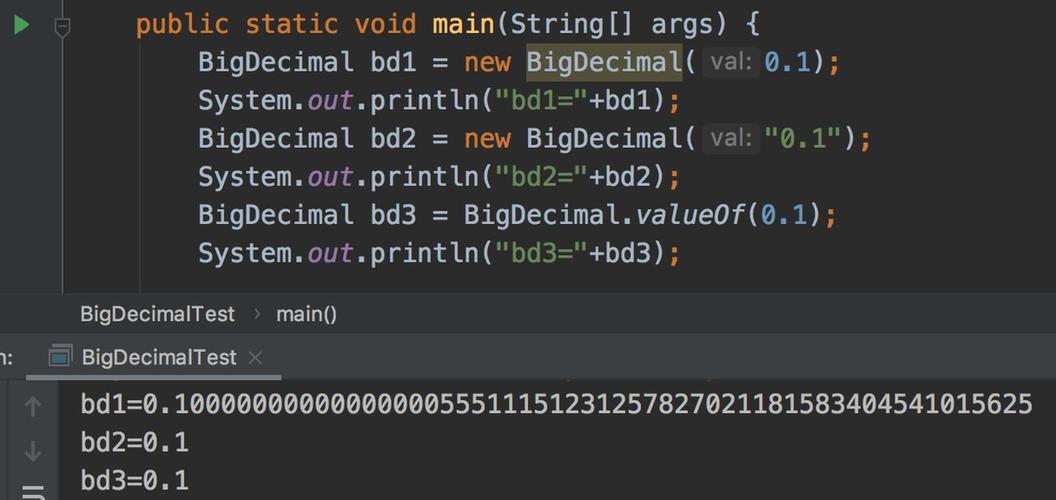
BigDecimal bd1 = new BigDecimal(0.1); // Creates a BigDecimal for the exact binary value of 0.1
System.out.println(bd1); // Output: 0.1000000000000000055511151231257827021181583404541015625
✅ Best Practices for Creation:
-
Use
BigDecimal(String): This is the most accurate way to create aBigDecimalfrom a decimal literal. The string is parsed directly.// GOOD - This is the preferred way BigDecimal bd2 = new BigDecimal("0.1"); System.out.println(bd2); // Output: 0.1 -
Use
BigDecimal.valueOf(double): This is a convenient and safe factory method. It converts thedoubleto itsStringrepresentation first, which avoids the precision issues of the constructor.// GOOD - Also a very safe and recommended approach BigDecimal bd3 = BigDecimal.valueOf(0.1); System.out.println(bd3); // Output: 0.1
Other constructors:
new BigDecimal(int): Exact.new BigDecimal(long): Exact.new BigDecimal(BigInteger): Exact.
Core Operations: add, subtract, multiply, divide
All arithmetic operations on BigDecimal are performed using instance methods. Crucially, these operations do not modify the existing BigDecimal object. Instead, they return a new BigDecimal object with the result.
public class BigDecimalOperations {
    public static void main(String[] args) {
        BigDecimal a = new BigDecimal("10.5");
        BigDecimal b = new BigDecimal("2.5");
        // Addition
        BigDecimal sum = a.add(b);
        System.out.println("Sum: " + sum); // Output: Sum: 13.0
        // Subtraction
        BigDecimal difference = a.subtract(b);
        System.out.println("Difference: " + difference); // Output: Difference: 8.0
        // Multiplication
        BigDecimal product = a.multiply(b);
        System.out.println("Product: " + product); // Output: Product: 26.250
        // Division
        BigDecimal quotient = a.divide(b);
        System.out.println("Quotient: " + quotient); // Output: Quotient: 4.2
    }
}
The divide() Method and Rounding
Division is the most complex operation because the result might have an infinite number of decimal places (e.g., 1 / 3). If you try to divide and the result is repeating, Java will throw an ArithmeticException.
// This will throw an ArithmeticException!
// BigDecimal result = new BigDecimal("1").divide(new BigDecimal("3"));
To handle this, you must provide a MathContext or specify a scale and RoundingMode.
scale: The number of digits you want after the decimal point.RoundingMode: How to round if the number is truncated (e.g.,HALF_UP,CEILING,FLOOR).
public class BigDecimalDivision {
    public static void main(String[] args) {
        BigDecimal one = new BigDecimal("1");
        BigDecimal three = new BigDecimal("3");
        // Option 1: Using MathContext (sets precision and rounding mode)
        MathContext mc = new MathContext(4, RoundingMode.HALF_UP); // 4 total digits, standard rounding
        BigDecimal result1 = one.divide(three, mc);
        System.out.println("Result with MathContext: " + result1); // Output: 0.3333
        // Option 2: Using scale and RoundingMode (more common for currency)
        // Scale of 2 means two decimal places (like cents)
        BigDecimal result2 = one.divide(three, 2, RoundingMode.HALF_UP);
        System.out.println("Result with scale 2: " + result2); // Output: 0.33
        // Example with a number that needs rounding
        BigDecimal ten = new BigDecimal("10");
        BigDecimal three2 = new BigDecimal("3");
        BigDecimal result3 = ten.divide(three2, 1, RoundingMode.HALF_UP);
        System.out.println("10 / 3 rounded to 1 decimal: " + result3); // Output: 3.3
    }
}
Comparison and Other Useful Methods
You cannot use >, <, with BigDecimal objects. You must use the compareTo() method.
a.compareTo(b):- Returns
-1ifa < b - Returns
0ifa == b - Returns
1ifa > b
- Returns
public class BigDecimalComparison {
    public static void main(String[] args) {
        BigDecimal price1 = new BigDecimal("99.99");
        BigDecimal price2 = new BigDecimal("100.00");
        if (price1.compareTo(price2) < 0) {
            System.out.println("price1 is less than price2.");
        }
        if (price1.compareTo(price2) > 0) {
            System.out.println("price1 is greater than price2.");
        }
        if (price1.compareTo(price1) == 0) {
            System.out.println("price1 is equal to price1.");
        }
    }
}
Other useful methods:
setScale(int newScale, RoundingMode roundingMode): Returns a newBigDecimalwith the specified scale, using the given rounding mode. This is essential for formatting currency.stripTrailingZeros(): Removes any trailing zeros from the decimal part. Useful for cleaning up output.toPlainString(): Returns theStringrepresentation without scientific notation. Very useful for displaying to users.intValue(),longValue(),doubleValue(): Convert to primitive types. Be aware of potential loss of precision or exceptions when converting.
Best Practices and Idioms
Formatting Currency (e.g., for two decimal places)
A common requirement is to round a number to two decimal places for display or storage, which is standard for currency.
public class CurrencyFormatting {
    public static void main(String[] args) {
        BigDecimal price = new BigDecimal("123.4567");
        // Correct way to round to 2 decimal places for currency
        BigDecimal roundedPrice = price.setScale(2, RoundingMode.HALF_UP);
        System.out.println("Rounded Price: " + roundedPrice); // Output: Rounded Price: 123.46
        // To display without trailing zeros
System.out.println("Plain String: " + roundedPrice.stripTrailingZeros().toPlainString()); // Output: Plain String: 123.46