Of course! This is a fundamental concept in Java that every developer should understand. Here’s a detailed breakdown of float and double in Java, covering their differences, when to use each, and best practices.

The Core Concept: Floating-Point Numbers
In programming, float and double are data types used to represent numbers with decimal points (e.g., 3.14, -99.88, 0.001). They are called "floating-point" because the decimal point can "float" to different positions within the number.
Think of it like scientific notation:
0can be written as5 x 10^3015can be written as5 x 10^-2
The "point" floats depending on the exponent.
The Fundamental Difference: Precision and Memory
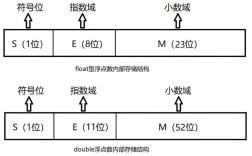
The key difference between float and double lies in how much memory they use and how precisely they can store numbers.

| Feature | float (Single-Precision) |
double (Double-Precision) |
|---|---|---|
| Keyword | float |
double |
| Size in Memory | 32 bits (4 bytes) | 64 bits (8 bytes) |
| Precision | Approximately 7 decimal digits | Approximately 15-17 decimal digits |
| Default Type | Not a literal default. You must append f or F. |
The default for decimal literals. |
Analogy: Imagine you have a ruler.
- A
floatis like a ruler with only millimeter marks. You can measure to the nearest millimeter, but you can't measure to the nearest tenth of a millimeter. - A
doubleis like a high-precision ruler with both millimeter and tenth-millimeter marks. It's much more accurate.
Because double uses more memory (64 bits vs. 32 bits), it can store a much wider range of values with much higher precision.
Declaration and Initialization
double (The Easy One)
double is the default. If you write a decimal number in your code, Java assumes it's a double.
// This is a double
double price = 19.99;
double pi = 3.1415926535;
// You can also use scientific notation
double largeNumber = 1.23e10; // 1.23 x 10^10 = 12300000000.0
float (Requires a Suffix)
Since double is the default, you must explicitly tell the compiler that you want a float. You do this by appending an f or F to the literal number.

// This is a float. The 'f' is REQUIRED.
float temperature = 98.6f;
float smallValue = 0.123456f;
// Using 'F' is also common and does the same thing
float anotherFloat = 1.5F;
If you forget the f, you will get a compilation error:
// COMPILE ERROR: incompatible types: possible lossy conversion from double to float
float wrong = 12.5;
The error message is telling you the truth: you're trying to fit a more precise double value (which uses 64 bits) into a less precise float variable (which only has 32 bits), and data could be lost.
When to Use Which?
This is the most important practical question.
Use double in almost all cases.
- Default Choice:
doubleis the standard for any general-purpose decimal arithmetic in Java. It's more precise and has a much larger range, which prevents errors in most applications. - Performance: On modern 64-bit processors,
doublecalculations are often just as fast asfloatcalculations because the CPU's native floating-point unit is designed for 64-bit operations. The performance advantage offloatis negligible or non-existent in most scenarios. - Libraries: The Java Math library (
java.lang.Math) and most scientific/engineering libraries usedoublefor all their methods. For example,Math.sin(),Math.sqrt(), etc., all take and returndouble.
Use float only when you have a specific reason.
- Memory Constraints: If you are working with a massive array of numbers (e.g., in graphics processing, large scientific datasets, or mobile apps where memory is extremely tight), using
floatinstead ofdoublecan cut your memory usage in half. For an array of one million numbers, that's 4MB vs. 8MB. - Interfacing with Other Languages/Libraries: Some low-level graphics APIs (like older OpenGL) or hardware specifications might exclusively use
floats. You would need to usefloatto match their data types.
Rule of Thumb: Start with double. Only switch to float if you've identified a specific memory bottleneck and have proven that using float solves it without introducing unacceptable precision errors.
A Critical Warning: Floating-Point Imprecision
Neither float nor double can store decimal numbers with perfect accuracy. They are stored in binary format, which can lead to small rounding errors. This is a fundamental characteristic of how computers handle floating-point numbers, not a specific flaw in Java.
Example:
double a = 0.1;
double b = 0.2;
System.out.println(a + b); // What do you expect? 0.3
// Output:
// 0.30000000000000004
This is a classic example. The result is not exactly 3 due to tiny representation errors.
How to handle this:
- Never use to compare floating-point numbers for equality. It will almost always fail.
- Instead, check if the numbers are "close enough" by checking if their absolute difference is very small.
double a = 0.1;
double b = 0.2;
double sum = a + b;
// DON'T DO THIS:
// if (sum == 0.3) { ... } // This will be false
// DO THIS:
double epsilon = 0.000001; // A very small number
if (Math.abs(sum - 0.3) < epsilon) {
    System.out.println("The numbers are effectively equal.");
}
This "epsilon" comparison is the standard and correct way to handle floating-point comparisons.
Summary Table
| Aspect | float |
double |
|---|---|---|
| Type | Single-Precision | Double-Precision |
| Size | 32 bits (4 bytes) | 64 bits (8 bytes) |
| Precision | ~7 decimal digits | ~15-17 decimal digits |
| Use Case | Memory-critical applications, specific APIs. | Default for all general-purpose use. |
| Literal Suffix | f or F is required. |
No suffix needed (it's the default). |
| Key Pitfall | Prone to significant rounding errors. | Also has rounding errors, but much smaller. |