
Of course! Here is a comprehensive guide to the Java Tutorial, structured to take you from a complete beginner to an intermediate-level developer.
This guide is broken down into logical sections, mirroring a typical learning path. I'll provide explanations, code examples, and links to the official Oracle documentation for each topic.
Part 1: The Absolute Basics (Setting Up Your First Program)
Before you can write code, you need to set up your environment.
What is Java?
Java is a high-level, class-based, object-oriented programming language designed to have as few implementation dependencies as possible. It's known for its "write once, run anywhere" (WORA) capability, thanks to the Java Virtual Machine (JVM).
- Key Features:
- Platform Independent: Java code is compiled into an intermediate form called "bytecode," which can then run on any device with a JVM.
- Object-Oriented: Everything in Java is an object (or a primitive type). It encourages modular and reusable code.
- Simple & Secure: It has a simple syntax and strong memory management (garbage collection) and security features.
- Robust & Multithreaded: Built-in error handling and the ability to handle multiple tasks simultaneously.
Setting Up Your Environment
You need two things:
- The Java Development Kit (JDK): The software you use to write, compile, and debug Java code. It includes the Java compiler (
javac) and the Java Virtual Machine (java). - An Integrated Development Environment (IDE): A code editor that makes writing code much easier. It provides features like syntax highlighting, auto-completion, and debugging.
- Recommended JDK: Adoptium (formerly AdoptOpenJDK) or Amazon Corretto. They are open-source, high-quality builds of the OpenJDK.
- Recommended IDEs:
- IntelliJ IDEA (Community Edition is free): The most popular and powerful IDE for Java.
- Eclipse IDE: A long-standing, free, and open-source favorite.
- VS Code with the Extension Pack for Java: A lightweight, fast option if you prefer a text-editor-like experience.
Your First Java Program: "Hello, World!"
Every programming journey starts here. Let's break down the simplest possible Java program.
// File: HelloWorld.java
public class HelloWorld {
    public static void main(String[] args) {
        System.out.println("Hello, World!");
    }
}
Explanation of the Code:
public class HelloWorld: Defines a class namedHelloWorld. In Java, all code must reside inside a class. The filename must match the class name (HelloWorld.java).public static void main(String[] args): This is the main method. It's the entry point of any Java application. The JVM looks for this specific method to start running the program.public: The method can be called from anywhere.static: The method belongs to the class, not an instance of the class. You can call it without creating an object.void: The method does not return any value.String[] args: This is an array of strings that can hold command-line arguments.
System.out.println("Hello, World!");: This line prints the text "Hello, World!" to the console.
How to Run It:
- Save the code in a file named
HelloWorld.java. - Open a terminal or command prompt.
- Navigate to the directory where you saved the file.
- Compile the code:
javac HelloWorld.java(this createsHelloWorld.class) - Run the compiled code:
java HelloWorld
Part 2: Core Java Syntax and Building Blocks
Now that you can run a program, let's learn how to write one.
Variables and Data Types
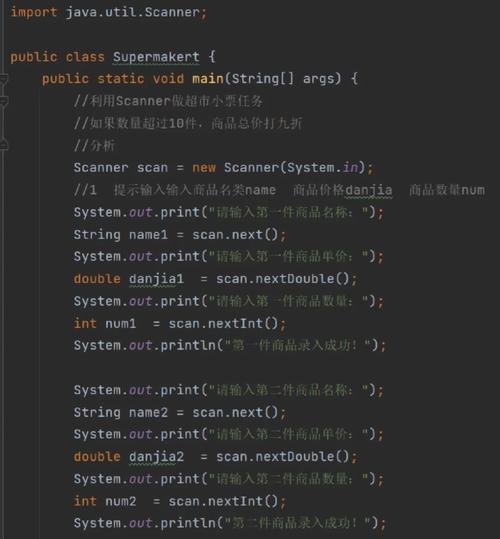
Variables are containers for storing data values. Java is a statically-typed language, meaning you must declare the type of a variable before using it.
| Data Type | Size | Description |
|---|---|---|
byte |
1 byte | Whole numbers (-128 to 127) |
short |
2 bytes | Whole numbers (-32,768 to 32,767) |
int |
4 bytes | Whole numbers (commonly used) |
long |
8 bytes | Whole numbers (very large values) |
float |
4 bytes | Floating-point numbers (decimal, e.g., 19.99) |
double |
8 bytes | Floating-point numbers (more precision, commonly used) |
char |
2 bytes | A single character (e.g., 'A', '7') |
boolean |
1 bit | Represents one of two values: true or false |
int age = 30;
double price = 19.99;
char grade = 'A';
boolean isJavaFun = true;
String greeting = "Hello"; // String is not a primitive type, it's a class
Operators
Operators are special symbols that perform operations on variables and values.
- Arithmetic Operators: , , , , (modulo)
- Assignment Operators: , , , etc.
- Comparison Operators: (equal to), (not equal to),
>,<,>=,<= - Logical Operators:
&&(AND), (OR), (NOT)
int x = 10;
int y = 5;
System.out.println(x + y); // 15
System.out.println(x > y); // true
System.out.println(x < y && y > 1); // true
Control Flow (Conditionals and Loops)
Control flow statements change the sequence of execution based on conditions.
-
if-elseStatements:int time = 20; if (time < 18) { System.out.println("Good day."); } else { System.out.println("Good evening."); } -
switchStatements:int day = 3; switch (day) { case 1: System.out.println("Monday"); break; case 2: System.out.println("Tuesday"); break; case 3: System.out.println("Wednesday"); break; default: System.out.println("Another day"); } -
Loops:
forloop: Used when you know how many times you want to loop.for (int i = 0; i < 5; i++) { System.out.println("Count is: " + i); }whileloop: Used when you want to loop as long as a condition is true.int i = 0; while (i < 5) { System.out.println("Count is: " + i); i++; }do-whileloop: Similar towhile, but the code block is executed at least once before checking the condition.int i = 0; do { System.out.println("Count is: " + i); i++; } while (i < 5);
Part 3: Object-Oriented Programming (OOP) in Java
This is the heart of Java. OOP is a programming paradigm based on the concept of "objects."
Classes and Objects
- Class: A blueprint for creating objects. It defines properties (fields/attributes) and behaviors (methods).
- Object: An instance of a class. It's a real-world entity with its own state (values of its fields) and behavior.
// 1. Create a Class (the blueprint)
class Car {
    // Fields (properties)
    String brand;
    String model;
    int year;
    // Method (behavior)
    void drive() {
        System.out.println("The " + brand + " is driving.");
    }
}
// 2. Create an Object (an instance of the class)
public class Main {
    public static void main(String[] args) {
        Car myCar = new Car(); // Create a Car object
        myCar.brand = "Ford"; // Set the brand
        myCar.model = "Mustang";
        myCar.year = 2025;
        System.out.println(myCar.brand + " " + myCar.model); // Ford Mustang
        myCar.drive(); // The Ford is driving.
    }
}
OOP Pillars
-
Encapsulation: Bundling data (fields) and methods that operate on the data into a single unit (a class) and restricting direct access to some of an object's components. This is typically done using
privatefields andpublic"getter" and "setter" methods.class Person { private String name; // Private field public String getName() { // Public getter return name; } public void setName(String newName) { // Public setter this.name = newName; } } -
Inheritance: A mechanism where a new class (subclass/child) derives from an existing class (superclass/parent). The "is-a" relationship. (e.g.,
Dogis anAnimal).class Animal { void eat() { System.out.println("This animal eats food."); } } class Dog extends Animal { void bark() { System.out.println("The dog barks."); } } -
Polymorphism: The ability of an object to take on many forms. It allows you to treat an object of a subclass as an object of its superclass. It's often achieved through method overriding.
class Animal { void makeSound() { System.out.println("Animal makes a sound"); } } class Cat extends Animal { @Override // Annotation to indicate we are overriding void makeSound() { System.out.println("Meow"); } } class Dog extends Animal { @Override void makeSound() { System.out.println("Bark"); } } // In the main method: Animal myCat = new Cat(); Animal myDog = new Dog(); myCat.makeSound(); // Output: Meow myDog.makeSound(); // Output: Bark -
Abstraction: Hiding complex implementation details and showing only the necessary features of the object. This is often achieved with abstract classes and interfaces.
Part 4: Working with Data Structures
Data structures are ways to organize and store data.
Arrays
A fixed-size, ordered collection of elements of the same type.
String[] cars = {"Volvo", "BMW", "Ford", "Mazda"};
System.out.println(cars[0]); // Access the first element: Volvo
cars[1] = "Opel"; // Change an element
ArrayList
A dynamic-size array (part of the Java Collections Framework). It's more flexible than a standard array.
import java.util.ArrayList;
ArrayList<String> colors = new ArrayList<String>();
colors.add("Red");
colors.add("Green");
colors.add("Blue");
System.out.println(colors.get(0)); // Red
colors.remove(1); // Remove "Green"
colors.add(1, "Yellow"); // Add "Yellow" at index 1
Other Key Collections
HashMap(Key-Value Pairs): Like a dictionary or lookup table.import java.util.HashMap; HashMap<String, String> capitalCities = new HashMap<String, String>(); capitalCities.put("England", "London"); capitalCities.put("Germany", "Berlin"); System.out.println(capitalCities.get("England")); // LondonHashSet(Unique Elements): A collection that cannot contain duplicate values.
Part 5: Advanced Topics
Once you're comfortable with the basics, you can explore these powerful features.
Exception Handling
Gracefully handle errors that occur during program execution using try, catch, and finally.
try {
    int[] numbers = {1, 2, 3};
    System.out.println(numbers[10]); // This will cause an error
} catch (ArrayIndexOutOfBoundsException e) {
    System.out.println("Something went wrong: " + e);
} finally {
    System.out.println("The 'try catch' is finished.");
}
File Handling
Read from and write to files using the java.io package (or the newer java.nio package).
import java.io.FileWriter;
import java.io.IOException;
try {
    FileWriter myWriter = new FileWriter("filename.txt");
    myWriter.write("Files in Java are tricky.");
    myWriter.close();
    System.out.println("Successfully wrote to the file.");
} catch (IOException e) {
    System.out.println("An error occurred.");
    e.printStackTrace();
}
Multithreading
Execute multiple threads (smaller programs) concurrently to improve performance.
public class MyThread extends Thread {
    public void run() {
        System.out.println("This thread is running.");
    }
}
public class Main {
    public static void main(String[] args) {
        MyThread t1 = new MyThread();
        t1.start(); // Start the thread
    }
}
Official Oracle Java Tutorials
The best resource is always the official documentation. It's comprehensive, accurate, and kept up-to-date.
How to use the official tutorial:
- Go to the link above.
- The left-hand navigation is your table of contents.
- Start with "Getting Started".
- Then move through the sections in order:
- Learning the Java Language
- Essential Java Classes
- Interfaces and Inheritance
- Collections
- Exceptions
- Concurrency
- And much more!
Recommended Learning Path
- Master the Basics: Variables, data types, operators, loops, conditionals.
- Understand OOP Deeply: Classes, objects, inheritance, polymorphism, encapsulation. Write lots of small programs using these concepts.
- Explore the Core APIs: Learn about Strings, I/O (file handling), and the Java Collections Framework (
ArrayList,HashMap, etc.). You will use these constantly. - Tackle Advanced Topics: Exception handling, multithreading, and annotations.
- Build Projects: The best way to learn is by doing. Try building a simple command-line application (e.g., a to-do list, a basic calculator) and then move to more complex projects.
Good luck, and happy coding










