
Of course! This is a fundamental concept in Python and a common point of confusion for developers coming from languages like C++ or Java.
Here’s a detailed breakdown of Python's float and the concept of a "double."
The Short Answer (TL;DR)
In Python, there is no separate double type. The single floating-point type, called float, is implemented as a double-precision binary floating-point number according to the IEEE 754 standard.
So, when you ask about a "double" in Python, you are simply talking about the standard float type.
The Detailed Explanation
The float Type in Python
In Python, the float type is used to represent real numbers (numbers with a decimal point). It's the default type for any number you write with a decimal.
# Creating float literals
a = 3.14
b = -10.5
c = 2.0  # This is a float, not an integer
# You can also use scientific notation
d = 1.23e-4 # This is 0.000123
# Checking the type
print(type(a))  # <class 'float'>
print(type(b))  # <class 'float'>
print(type(c))  # <class 'float'>
print(type(d))  # <class 'float'>
What is a "Double"?
The term "double" comes from older programming languages (like C, C++, Java) that had two different floating-point types:
float: A single-precision floating-point number.- Typically occupies 32 bits (4 bytes).
- Has about 7 decimal digits of precision.
double: A double-precision floating-point number.- Typically occupies 64 bits (8 bytes).
- Has about 15-17 decimal digits of precision.
- Offers greater precision and a much wider range of values than a
float.
Python's Choice: float is a double
Python's designers made a deliberate choice to simplify the language. They decided that the performance and memory savings of using 32-bit floats were not worth the hassle of having two types and the potential for precision errors.
Therefore, in Python:
- The
floattype is a 64-bit double-precision number. - There is no built-in, native 32-bit single-precision
floattype.
This means every floating-point number you use in Python has the higher precision of a "double."
How to See This in Practice
You can verify that Python's float uses 64 bits (8 bytes) using the sys module.
import sys
my_float = 123.456
print(f"The variable is: {my_float}")
print(f"Its type is: {type(my_float)}")
# The size of the float object in bytes
print(f"Its size in bytes is: {sys.getsizeof(my_float)} bytes")
# On most systems, this will output 24 bytes.
# Note: This includes the overhead of the Python object itself,
# not just the raw 8 bytes for the float data.
# The key takeaway is that it's much larger than an int,
# confirming it's a complex object holding a double-precision value.
The Underlying IEEE 754 Standard
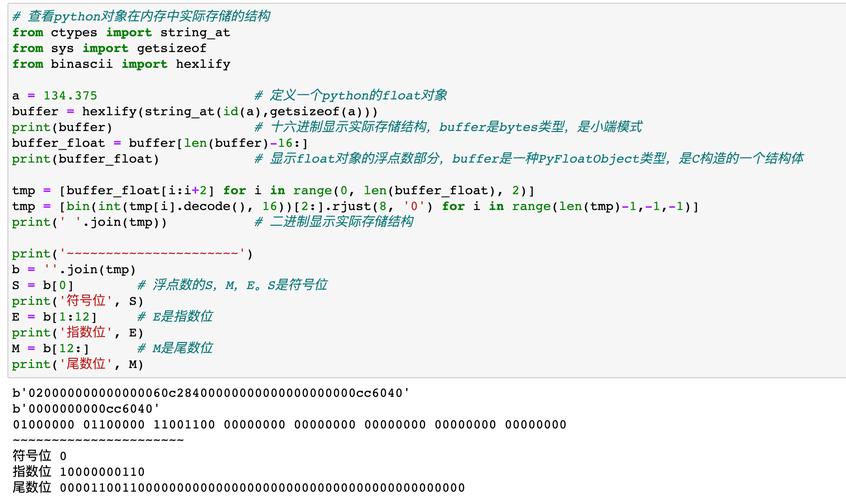
Python's float is an implementation of the IEEE 754 standard for double-precision binary floating-point numbers. This is crucial to understand because it explains the most famous "quirk" of floating-point numbers: precision errors.
Computers store numbers in binary (base-2), not decimal (base-10). Some simple decimal numbers cannot be represented exactly in binary.
Classic Example: 0.1
# This is not a Python bug; it's a fundamental limitation of binary floating-point arithmetic.
print(0.1 + 0.2)  # Output: 0.30000000000000004
# Why this happens:
# 0.1 in decimal is a repeating fraction in binary (0.000110011001100...)
# The computer stores the closest possible 64-bit approximation.
# When you add the approximations for 0.1 and 0.2, the result is not the exact
# binary representation of 0.3.
This is true for all languages that use IEEE 754 floats (which is almost all of them).
What if I Actually Need a 32-bit float?
Sometimes, especially in scientific computing, data analysis, or when interfacing with C libraries, you might need the smaller 32-bit float for memory efficiency or compatibility.
Python's array module provides a way to create arrays of C-style types, including 32-bit floats ('f').
import array
# Create an array of 32-bit floats
# It will use less memory than a list of Python floats
float_array = array.array('f', [1.1, 2.2, 3.3])
print(float_array)  # array('f', [1.100000023841858, 2.200000047683716, 3.299999952316284])
print(float_array.itemsize) # Output: 4 (4 bytes = 32 bits)
# Note: When you print the array, the numbers might look slightly different
# from Python's native floats because they are lower-precision 32-bit values.
Summary Table
| Feature | Python float |
C++ float |
C++ double |
|---|---|---|---|
| Type Name | float |
float |
double |
| Precision | Double (~15-17 digits) | Single (~7 digits) | Double (~15-17 digits) |
| Memory Size | 24 bytes (object overhead) | 4 bytes | 8 bytes |
| Standard | IEEE 754 Double | IEEE 754 Single | IEEE 754 Double |
| Python Equivalent | float |
N/A | float |
Key Takeaways
-
Python has one
floattype. It is a double-precision floating-point number. -
The terms "float" and "double" from C++/Java are not directly applicable. In Python,
floatis a double. -
Floating-point numbers are approximations. Due to the IEEE 754 standard, you should never use to compare floats for exact equality. Instead, check if they are "close enough."
# Good practice for comparing floats
import math
a = 0.1 + 0.2
b = 0.3
print(a == b)  # False
# Use math.isclose() for a safe comparison
print(math.isclose(a, b)) # True
-
Use the
arraymodule with the'f'type code if you specifically need 32-bit single-precision floats for performance or memory reasons.











