
Of course! The term "socket packet" can mean a few different things, so I'll break it down into the most common interpretations in Python networking.
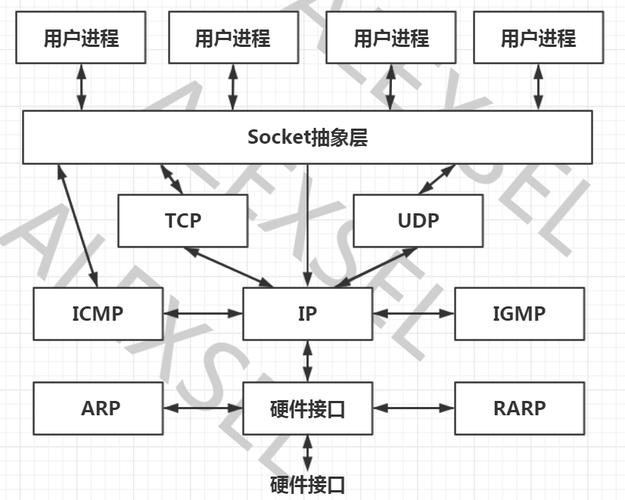
The Literal Meaning: A "Packet" as a Byte String
In the context of sockets, a "packet" is most often just a byte string that you send or receive. Sockets operate at a lower level than text, so all data must be converted to and from bytes.
- To send: You create your data (e.g., a string, a list, a dictionary), serialize it into a byte string, and send it.
- To receive: You receive a byte string from the socket and then deserialize it back into a usable Python object.
The key challenge is often ensuring that the receiver can correctly reassemble the data, especially if you send multiple packets at once or if a large packet gets split into multiple smaller ones during transmission (this is called packet fragmentation).
The Core Problem: Message Boundaries
When you use socket.send() and socket.recv(), you are dealing with a stream of bytes, not discrete packets. The operating system decides how and when to actually send the data over the network.
This leads to a common pitfall:
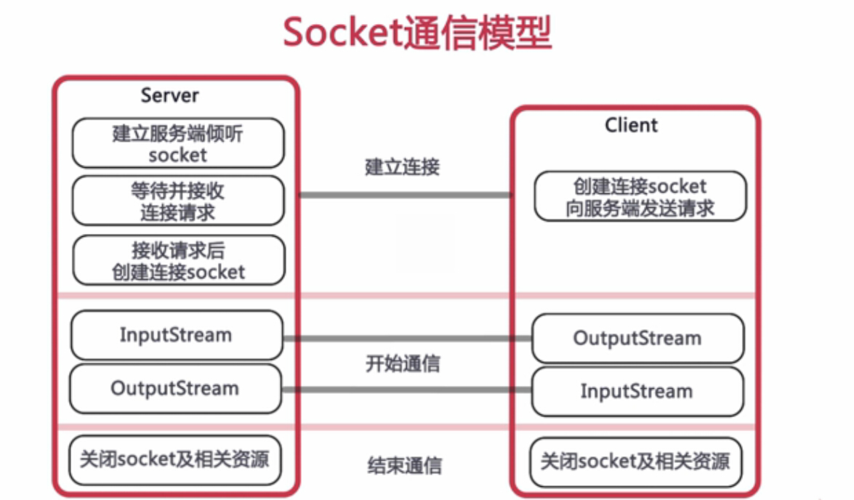
The "Hello World" Problem:
# Client sends two messages
client_socket.send(b"Hello")
client_socket.send(b" World")
# Server receives data
data = server_socket.recv(1024) # What's in data?
# It might be b"Hello"
# It might be b"Hello World"
# It might be b"Hello Wo" (if the first packet was split)
To solve this, you need a way to mark the end of one message and the beginning of the next. Here are the most common solutions.
Solutions for Reliable Message Handling
Solution 1: Fixed-Length Headers
The most robust and common method is to prefix your message with a header that specifies the length of the data to follow.
How it works:
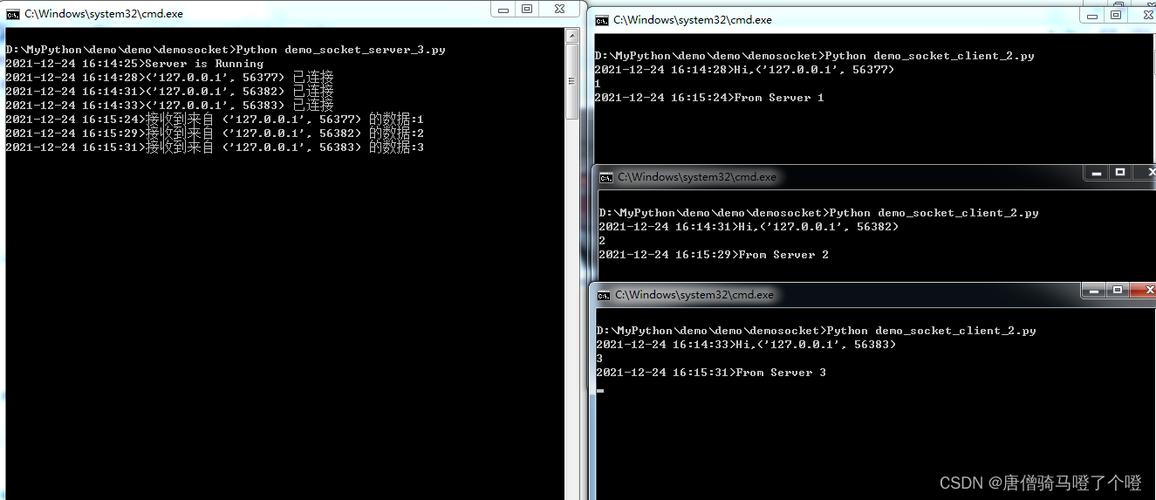
- Sender:
- Serialize your data (e.g.,
json.dumps()). - Get the length of the byte string.
- Create a fixed-size header (e.g., 10 bytes) that holds this length.
- Send the header, then send the actual data.
- Serialize your data (e.g.,
- Receiver:
- First, receive exactly the size of the header (e.g., 10 bytes).
- Unpack the header to find out the length
Nof the incoming data. - Keep calling
recv()in a loop until you have received exactlyNbytes. - Deserialize the
Nbytes you received.
Example Code:
import socket
import json
import struct
# --- Helper Functions ---
def send_msg(sock, msg):
    """Send a message with a fixed-length header."""
    # 1. Serialize the message to a JSON byte string
    msg_bytes = json.dumps(msg).encode('utf-8')
    # 2. Create a header: '!' means network byte order, 'I' is an unsigned int (4 bytes)
    #    The header will contain the length of the message.
    msg_len = len(msg_bytes)
    header = struct.pack('!I', msg_len)
    # 3. Send the header, then the message
    sock.sendall(header)
    sock.sendall(msg_bytes)
def recv_msg(sock):
    """Receive a message with a fixed-length header."""
    # 1. First, receive the 4-byte header to get the message length
    raw_header = recv_all(sock, 4)
    if not raw_header:
        return None # Connection closed
    # 2. Unpack the header to get the message length
    msg_len = struct.unpack('!I', raw_header)[0]
    # 3. Receive the full message based on the length
    raw_msg = recv_all(sock, msg_len)
    # 4. Deserialize the message from JSON
    msg = json.loads(raw_msg.decode('utf-8'))
    return msg
def recv_all(sock, n):
    """Helper function to receive exactly n bytes."""
    data = bytearray()
    while len(data) < n:
        packet = sock.recv(n - len(data))
        if not packet: # Connection closed
            return None
        data.extend(packet)
    return data
# --- Main Program ---
HOST = '127.0.0.1'
PORT = 65432
# Server
with socket.socket(socket.AF_INET, socket.SOCK_STREAM) as s:
    s.bind((HOST, PORT))
    s.listen()
    print("Server listening on", HOST, PORT)
    conn, addr = s.accept()
    with conn:
        print("Connected by", addr)
        # Receive a message
        data = recv_msg(conn)
        print(f"Server received: {data}")
        # Send a response
        response = {"status": "ok", "message": "Packet received!"}
        send_msg(conn, response)
        print("Server sent response.")
# Client
with socket.socket(socket.AF_INET, socket.SOCK_STREAM) as s:
    s.connect((HOST, PORT))
    print("Client connected to", HOST, PORT)
    # Send a packet (a dictionary)
    packet_to_send = {"type": "login", "username": "alice", "password": "secret123"}
    send_msg(s, packet_to_send)
    print("Client sent packet.")
    # Receive the response
    response = recv_msg(s)
    print(f"Client received response: {response}")
Solution 2: Delimiter-Based Framing
A simpler, but less robust, method is to use a special sequence of bytes to mark the end of a message.
How it works:
- Sender: Serialize your data and append the delimiter (e.g.,
b'\n'orb'ENDMSG'). - Receiver: Keep receiving data until you see the delimiter.
Example Code:
import socket
import json
DELIMITER = b'\n' # Using a newline as a simple delimiter
def send_delimited(sock, msg):
    """Send a message with a delimiter."""
    msg_bytes = json.dumps(msg).encode('utf-8') + DELIMITER
    sock.sendall(msg_bytes)
def recv_delimited(sock):
    """Receive a message until a delimiter is found."""
    buffer = bytearray()
    while True:
        chunk = sock.recv(4096)
        if not chunk:
            return None # Connection closed
        buffer.extend(chunk)
        # Check if the delimiter is in the buffer
        if DELIMITER in buffer:
            # Split the message from the buffer
            msg_bytes, buffer = buffer.split(DELIMITER, 1)
            return json.loads(msg_bytes.decode('utf-8'))
# --- Main Program (similar structure to the fixed-length example) ---
HOST = '127.0.0.1'
PORT = 65433
# Server
with socket.socket(socket.AF_INET, socket.SOCK_STREAM) as s:
    s.bind((HOST, PORT))
    s.listen()
    print("Delimiter server listening on", HOST, PORT)
    conn, addr = s.accept()
    with conn:
        print("Connected by", addr)
        data = recv_delimited(conn)
        print(f"Server received: {data}")
        response = {"status": "ok"}
        send_delimited(conn, response)
        print("Server sent response.")
# Client
with socket.socket(socket.AF_INET, socket.SOCK_STREAM) as s:
    s.connect((HOST, PORT))
    print("Client connected.")
    packet_to_send = {"type": "data", "value": 42}
    send_delimited(s, packet_to_send)
    print("Client sent packet.")
    response = recv_delimited(s)
    print(f"Client received response: {response}")
Pros of Delimiter: Simple to implement. Cons of Delimiter: What if your message contains the delimiter? You'd have to "escape" it, which adds complexity. Fixed-length headers are generally safer and more professional.
Higher-Level Abstractions: socketserver
For building more robust servers, Python's socketserver module is excellent. It handles the connection loop for you, allowing you to focus on the logic.
The most useful class is socketserver.ThreadingTCPServer, which handles each client connection in a separate thread.
import socketserver
import json
import struct
# We can reuse the send_msg and recv_msg functions from the fixed-length example
# (copied here for completeness)
def send_msg(sock, msg):
    msg_bytes = json.dumps(msg).encode('utf-8')
    msg_len = len(msg_bytes)
    header = struct.pack('!I', msg_len)
    sock.sendall(header)
    sock.sendall(msg_bytes)
def recv_msg(sock):
    raw_header = recv_all(sock, 4)
    if not raw_header: return None
    msg_len = struct.unpack('!I', raw_header)[0]
    raw_msg = recv_all(sock, msg_len)
    return json.loads(raw_msg.decode('utf-8'))
def recv_all(sock, n):
    data = bytearray()
    while len(data) < n:
        packet = sock.recv(n - len(data))
if 










