
Of course! In Python, there are several ways to format strings for printing. The modern and recommended approach is f-strings, but it's essential to know the other methods, especially when reading older code.
Here's a comprehensive guide, from the newest to the oldest methods.
f-strings (Formatted String Literals) - Recommended
This is the most popular and readable method in modern Python (3.6+). You simply prefix the string with an f and place your variables directly inside curly braces .
Basic Usage
name = "Alice"
age = 30
city = "New York"
print(f"Hello, my name is {name}.")
print(f"I am {age} years old and I live in {city}.")
Output:
Hello, my name is Alice.
I am 30 years old and I live in New York.
Formatting Numbers
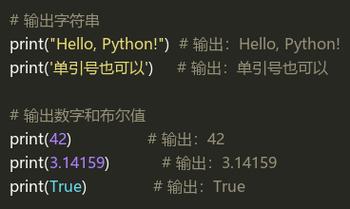
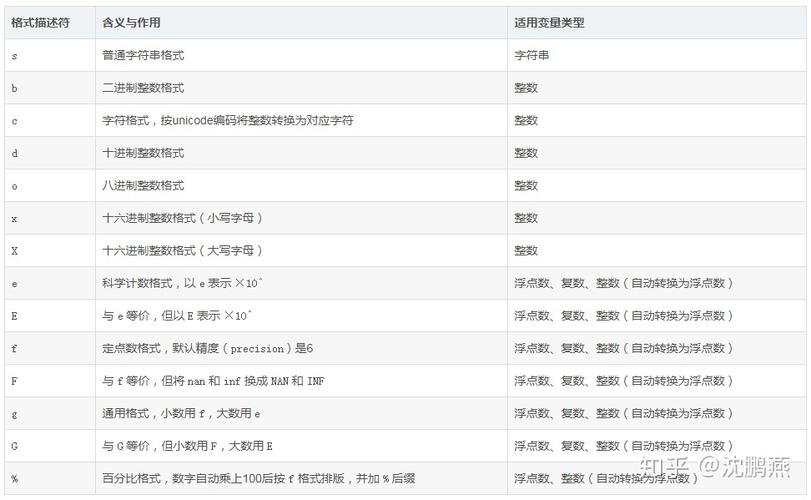
You can add formatting options inside the braces, like a colon .
-
Floating Point Numbers (
f): Control the number of decimal places.price = 99.9876 print(f"The price is ${price:.2f}") # .2f means 2 decimal placesOutput:
The price is $99.99 -
Comma Separators (``): Add commas as thousands separators.
population = 8000000
print(f"The city's population is {population:,}")
Output:
 (图片来源网络,侵删)
The city's population is 8,000,000 -
Percentage (): Multiply by 100 and add a percent sign.
score = 0.875
print(f"You scored {score:.0%}") # .0% rounds to the nearest whole number
print(f"You scored {score:.1%}") # .1% shows one decimal place
Output:
You scored 88% You scored 87.5% -
Padding and Alignment (
<,>,^): Useful for creating tables.<: Left-align>: Right-align^: Center-alignitem = "Apple" quantity = 10 price = 1.50
Use a number to specify the total width
print(f"{item:>10} | {quantity:>5} | ${price:>5.2f}") print(f"{item:<10} | {quantity:<5} | ${price:<5.2f}")
**Output:**Apple | 10 | $1.50Apple | 10 | $1.50
Calling Functions and Expressions
You can put any valid Python expression inside the braces.
import math
print(f"The value of pi is approximately {math.pi:.4f}.")
print(f"5 squared is {5**2}.")
Output:
The value of pi is approximately 3.1416.
5 squared is 25.
The str.format() Method
This was the standard way to format strings before f-strings were introduced (Python 2.6+ and 3.x). It's more powerful than the old formatting and is still widely used.
You use as placeholders in the string and then call the .format() method on the string, passing your variables as arguments.
Basic Usage
name = "Bob"
age = 25
print("Hello, my name is {}. I am {} years old.".format(name, age))
Output:
Hello, my name is Bob. I am 25 years old.Numbered and Keyword Arguments
You can control which variable goes where by using numbers (0-indexed) or keyword names inside the braces.
# Numbered arguments
print("First: {0}, Second: {1}".format("A", "B"))
# Keyword arguments
print("Name: {name}, Age: {age}".format(name="Charlie", age=40))
Output:
First: A, Second: B
Name: Charlie, Age: 40
Formatting Options
The formatting options (like .2f, ) are placed inside the braces after a colon.
price = 1234.5678
print("Price: ${:,.2f}".format(price))
Output:
Price: $1,234.57Old-Style String Formatting ( Operator)
This is the oldest method, inherited from C's printf. It's less readable and considered outdated, but you will still encounter it in older Python code.
You use a operator followed by a "format specifier" (like %s for string, %d for integer, %f for float).
Basic Usage
name = "David"
age = 35
print("Hello, my name is %s and I am %d years old." % (name, age))
Output:
Hello, my name is David and I am 35 years old.Common Format Specifiers
%s: String%d: Integer (signed decimal)%f: Floating-point number%.2f: Floating-point number with 2 decimal places%x: Hexadecimal number- A literal percent sign
pi = 3.14159
print("Pi is approximately %.2f" % pi)
print("The hex value of 255 is %x" % 255)
Output:
Pi is approximately 3.14
The hex value of 255 is ff
Summary and Recommendation
| Method | Example | Python Version | Recommendation |
|---|---|---|---|
| f-strings | f"Value: {x:.2f}" |
6+ | Highly Recommended. Most readable and modern. |
.format() |
"Value: {:.2f}".format(x) |
6+ / 3.x | Good. Still useful, especially for complex formatting or older codebases. |
| operator | "Value: %.2f" % x |
Legacy | Avoid. Use f-strings or .format() for new code. |
Final Advice: For any new Python code you write, use f-strings. They are fast, easy to read, and can handle almost all formatting needs. Learn the other methods so you can understand and modify existing code that uses them.











