
Of course. The Runtime.exec() method in Java is a powerful but often tricky way to execute external commands from within a Java application. It's a bridge between your Java code and the operating system's shell or command interpreter.
Here's a comprehensive guide covering everything from basic usage to advanced considerations and best practices.
The Basics: How to Use Runtime.exec()
There are six overloaded versions of the exec() method. The most common ones are:
exec(String command)exec(String[] cmdarray)exec(String command, String[] envp)exec(String[] cmdarray, String[] envp)
The key difference is between a single String and a String[].
exec(String command): The command is passed as a single string. The operating system's shell (likecmd.exeon Windows or/bin/shon Linux) is responsible for parsing this string into arguments. This can be a security risk if the command contains user-supplied input.exec(String[] cmdarray): The command and its arguments are passed as an array of strings. The JVM executes the program directly without involving a shell. This is safer and more reliable because you have full control over the arguments.
Example 1: Simple Command (Single String)
Let's execute the ls command on Linux/macOS or dir on Windows.
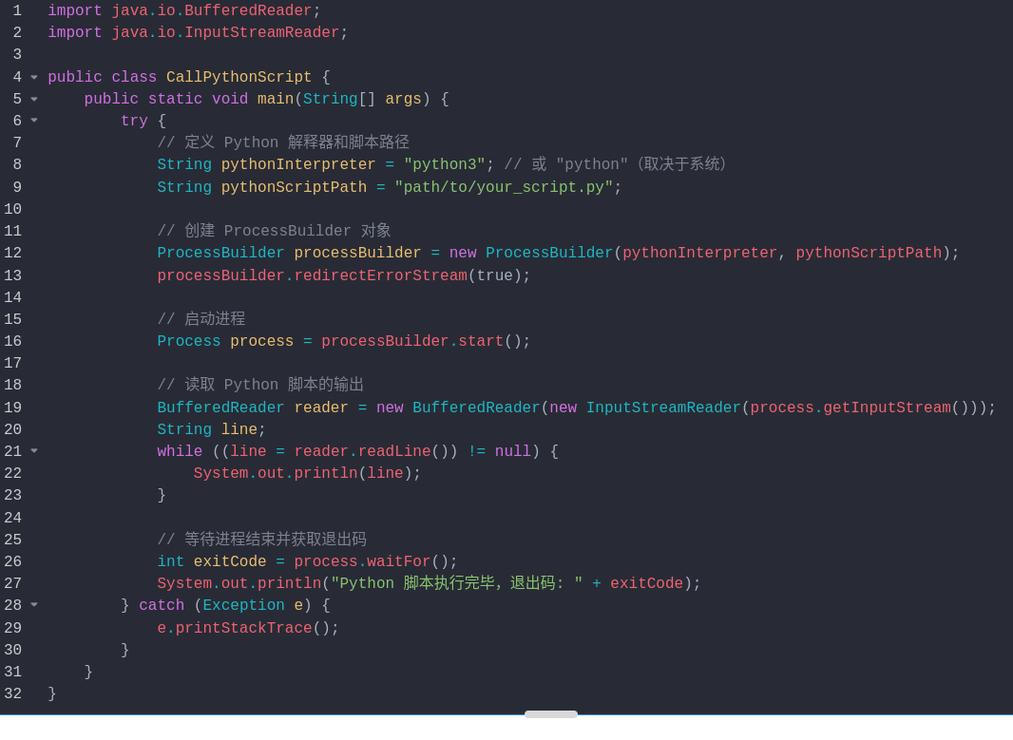
import java.io.IOException;
public class SimpleExec {
    public static void main(String[] args) {
        // Use 'dir' for Windows, 'ls' for Linux/macOS
        String command = "dir";
        try {
            Process process = Runtime.getRuntime().exec(command);
            // Wait for the process to finish
            int exitCode = process.waitFor();
            System.out.println("Process exited with code: " + exitCode);
        } catch (IOException e) {
            System.err.println("Error executing command: " + e.getMessage());
        } catch (InterruptedException e) {
            System.err.println("Process was interrupted: " + e.getMessage());
            Thread.currentThread().interrupt(); // Restore the interrupted status
        }
    }
}
Example 2: Command with Arguments (String Array)
This is the recommended approach. Let's run git log --oneline.
import java.io.IOException;
public class ArrayExec {
    public static void main(String[] args) {
        // Command and arguments as a separate array
        String[] command = {
            "git",
            "log",
            "--oneline"
        };
        try {
            Process process = Runtime.getRuntime().exec(command);
            int exitCode = process.waitFor();
            System.out.println("Process exited with code: " + exitCode);
        } catch (IOException e) {
            System.err.println("Error executing command: " + e.getMessage());
        } catch (InterruptedException e) {
            System.err.println("Process was interrupted: " + e.getMessage());
            Thread.currentThread().interrupt();
        }
    }
}
The Critical Problem: Streams and Deadlocks
This is the most common pitfall when using `Runtime.exec().
When you execute a process, it has three standard I/O streams:
- Standard Input (stdin): For sending data to the process.
- Standard Output (stdout): For reading data from the process's normal output.
- Standard Error (stderr): For reading data from the process's error output.
The Problem: If the process writes a large amount of data to stdout or stderr, and your Java program doesn't read from these streams, the OS buffer for that stream will fill up. The process will then block, waiting for the buffer to free up. Your Java program will also block, waiting for the process to finish. This results in a deadlock.
The Solution: Read the Streams!
You must consume the stdout and stderr streams of the subprocess, preferably concurrently.
Example 3: Correctly Handling Process Output
This example demonstrates how to read both stdout and stderr without causing a deadlock. The best practice is to use separate threads for reading each stream.
import java.io.BufferedReader;
import java.io.IOException;
import java.io.InputStream;
import java.io.InputStreamReader;
public class StreamHandling {
    public static void main(String[] args) {
        String[] command = {"ping", "-c", "5", "google.com"}; // For Linux/macOS
        // String[] command = {"ping", "-n", "5", "google.com"}; // For Windows
        try {
            Process process = Runtime.getRuntime().exec(command);
            // Read the output streams in separate threads
            Thread outputThread = new Thread(new StreamGobbler(process.getInputStream(), "OUTPUT"));
            Thread errorThread = new Thread(new StreamGobbler(process.getErrorStream(), "ERROR"));
            outputThread.start();
            errorThread.start();
            // Wait for the process to complete
            int exitCode = process.waitFor();
            outputThread.join(); // Wait for the output thread to finish
            errorThread.join(); // Wait for the error thread to finish
            System.out.println("\nProcess exited with code: " + exitCode);
        } catch (IOException | InterruptedException e) {
            System.err.println("An error occurred: " + e.getMessage());
            Thread.currentThread().interrupt();
        }
    }
    // Helper class to read from an InputStream
    static class StreamGobbler implements Runnable {
        private final InputStream inputStream;
        private final String streamType;
        public StreamGobbler(InputStream inputStream, String streamType) {
            this.inputStream = inputStream;
            this.streamType = streamType;
        }
        @Override
        public void run() {
            try (BufferedReader reader = new BufferedReader(new InputStreamReader(inputStream))) {
                String line;
                while ((line = reader.readLine()) != null) {
                    System.out.println("[" + streamType + "] " + line);
                }
            } catch (IOException e) {
                System.err.println("Error reading stream: " + e.getMessage());
            }
        }
    }
}
Modern Alternative: ProcessBuilder
Since Java 5, ProcessBuilder has been the recommended way to create processes. It offers several advantages over Runtime.exec():
- Clarity: It separates the command, the working directory, and the environment variables into different methods.
- Flexibility: You can easily redirect the process's input, output, and error streams.
- No Static Methods: It's an object-oriented approach, which is cleaner.
The ProcessBuilder constructor takes a List<String> or a String[] for the command, which avoids the shell-injection vulnerability.
Example 4: Using ProcessBuilder
This example is equivalent to the previous one but uses the modern ProcessBuilder API.
import java.io.BufferedReader;
import java.io.IOException;
import java.io.InputStream;
import java.io.InputStreamReader;
import java.util.List;
import java.util.concurrent.TimeUnit;
public class ProcessBuilderExample {
    public static void main(String[] args) {
        // Use ProcessBuilder
        ProcessBuilder pb = new ProcessBuilder("ping", "-c", "5", "google.com"); // For Linux/macOS
        // ProcessBuilder pb = new ProcessBuilder("ping", "-n", "5", "google.com"); // For Windows
        // Redirect error stream to output stream (optional, but useful)
        // pb.redirectErrorStream(true);
        try {
            Process process = pb.start();
            // The StreamGobbler class from the previous example can be reused here
            Thread outputThread = new Thread(new StreamGobbler(process.getInputStream(), "OUTPUT"));
            outputThread.start();
            // Wait for the process to finish with a timeout
            if (process.waitFor(10, TimeUnit.SECONDS)) {
                System.out.println("\nProcess finished successfully.");
            } else {
                System.out.println("\nProcess timed out. Forcing termination.");
                process.destroyForcibly();
            }
            outputThread.join();
            System.out.println("Process exited with code: " + process.exitValue());
        } catch (IOException | InterruptedException e) {
            System.err.println("An error occurred: " + e.getMessage());
            Thread.currentThread().interrupt();
        }
    }
    // Reusing the StreamGobbler class
    static class StreamGobbler implements Runnable {
        // ... (same as before)
    }
}
Security Considerations: Command Injection
If you build a command string from user input, you are vulnerable to command injection.
The Vulnerable Way (Bad!)
// DANGEROUS! DO NOT DO THIS!
public String listUserFiles(String username) throws IOException {
    // A malicious user could provide: "someuser; rm -rf /"
    String command = "ls -l /home/" + username;
    Process p = Runtime.getRuntime().exec(command);
    // ... rest of the code
    return "Done";
}
An attacker could provide a username like bob; rm -rf --no-preserve-root /, and your command would become ls -l /home/bob; rm -rf --no-preserve-root /, deleting your entire filesystem.
The Secure Way (Good!)
Using a String[] with ProcessBuilder completely mitigates this risk.
// SAFE!
public String listUserFiles(String username) throws IOException {
    // The username is just an argument, not part of the command itself.
    // It cannot be interpreted as a new command by the shell.
    ProcessBuilder pb = new ProcessBuilder("ls", "-l", "/home/" + username);
    Process p = pb.start();
    // ... rest of the code
    return "Done";
}
Summary and Best Practices
| Feature | Runtime.exec(String) |
Runtime.exec(String[]) / ProcessBuilder |
|---|---|---|
| Safety | Unsafe. Prone to command injection. | Safe. Arguments are passed directly. |
| Parsing | Relies on the OS shell. Can be unpredictable. | No shell involved. Arguments are taken literally. |
| Clarity | Clunky. Everything is one method call. | Clear. Separates command, directory, and environment. |
| Recommendation | Avoid. | Highly Recommended. |
Final Best Practice Checklist:
- Prefer
ProcessBuilderoverRuntime.exec(). - Always pass the command as a
String[]orList<String>to avoid shell parsing and injection attacks. - Always consume the
stdoutandstderrstreams of the subprocess to prevent deadlocks. Use separate threads for each stream. - Handle exceptions (
IOException,InterruptedException) gracefully. - Consider using timeouts (
process.waitFor(...)) to prevent your application from hanging indefinitely if the external process hangs.











