Of course! Here is a comprehensive guide to catching exceptions in Java, from the basic syntax to best practices and advanced concepts.
The Big Picture: Why Use Exceptions?
In programming, an exception is an event that disrupts the normal flow of a program's execution. It's an error that occurs during the runtime of a program. Instead of letting the program crash, Java provides a robust mechanism to handle these errors gracefully.
The core idea is "Separate Error Handling from Normal Code". This makes your code cleaner, more readable, and easier to maintain.
The try-catch Block: The Core Mechanism
This is the fundamental structure for handling exceptions. You "try" to execute a block of code that might throw an exception. If an exception occurs, you "catch" it and handle it.
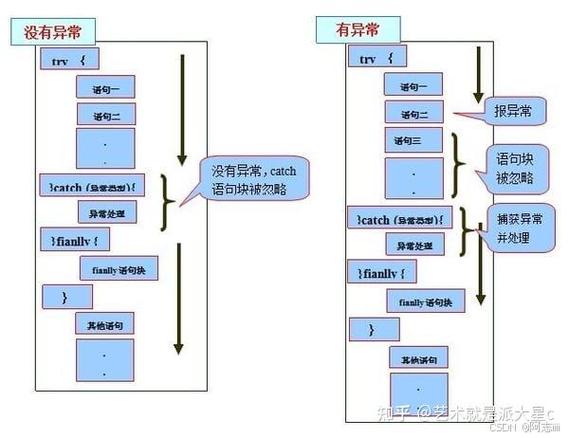
Syntax
try {
    // Code that might throw an exception
    // For example: reading a file, dividing by zero, etc.
} catch (ExceptionType1 e1) {
    // Code to handle ExceptionType1
} catch (ExceptionType2 e2) {
    // Code to handle ExceptionType2
} finally {
    // Code that will ALWAYS run, whether an exception occurred or not.
    // Used for cleanup (e.g., closing a file).
}
Example: ArithmeticException
Let's try to divide by zero, which throws an ArithmeticException.

public class CatchExceptionExample {
    public static void main(String[] args) {
        int numerator = 10;
        int denominator = 0;
        try {
            // This line will throw an ArithmeticException
            int result = numerator / denominator;
            System.out.println("The result is: " + result);
        } catch (ArithmeticException e) {
            // This block only executes if an ArithmeticException occurs
            System.out.println("Error: Cannot divide by zero!");
            // It's good practice to print the stack trace for debugging
            e.printStackTrace();
        }
        System.out.println("The program continues to run after the catch block.");
    }
}
Output:
Error: Cannot divide by zero!
java.lang.ArithmeticException: / by zero
    at CatchExceptionExample.main(CatchExceptionExample.java:8)
The program continues to run after the catch block.
Notice that the program did not crash. It caught the error, printed a user-friendly message, and continued execution.
The Hierarchy of Exceptions
Not all exceptions are created equal. Java organizes them into a hierarchy.
- Throwable: The superclass of all errors and exceptions in Java.
- Error: Represents serious problems that a reasonable application should not try to catch (e.g.,
OutOfMemoryError,StackOverflowError). You typically don't handle these. - Exception: Represents conditions that a reasonable application might want to catch. This is what we focus on.
- Checked Exceptions: These are exceptions that are checked at compile-time. The compiler forces you to handle them either with a
try-catchblock or by declaring them in the method's signature using thethrowskeyword. They represent conditions from which your code can recover (e.g.,IOException,SQLException). - Unchecked Exceptions (Runtime Exceptions): These are exceptions that are not checked at compile-time. They are subclasses of
RuntimeException. They usually indicate programming bugs (e.g., dividing by zero, null pointer access). The compiler does not force you to handle them, but you can if you want to.
- Checked Exceptions: These are exceptions that are checked at compile-time. The compiler forces you to handle them either with a
- Error: Represents serious problems that a reasonable application should not try to catch (e.g.,
Visual Hierarchy:
java.lang.Object
    java.lang.Throwable
        java.lang.Error
        java.lang.Exception
            java.lang.RuntimeException (and its subclasses)
                java.lang.NullPointerException
                java.lang.ArithmeticException
                java.lang.ArrayIndexOutOfBoundsException
            ... other checked exceptions ...
                java.io.IOException
                java.sql.SQLException
Handling Multiple Exceptions
A single try block can throw different types of exceptions. You can provide multiple catch blocks to handle them specifically.
Important Rule: More specific exception handlers must come before more general ones.
public class MultipleCatchExample {
    public static void main(String[] args) {
        String[] names = { "Alice", "Bob" };
        String name = null;
        try {
            // This might throw ArrayIndexOutOfBoundsException
            System.out.println(names[2]);
            // This might throw NullPointerException
            System.out.println(name.length());
        } catch (ArrayIndexOutOfBoundsException e) {
            System.out.println("Error: Array index is out of bounds.");
        } catch (NullPointerException e) {
            System.out.println("Error: Tried to access a null object.");
        } catch (Exception e) {
            // A general catch-all for any other unexpected exception
            System.out.println("An unexpected error occurred.");
        }
    }
}
Output:
Error: Array index is out of bounds.If you swap the order of the catch blocks, the code will not compile because NullPointerException is a subclass of Exception, making the catch (Exception e) block too broad to appear first.
The finally Block
The finally block is optional. It contains code that is guaranteed to execute, regardless of whether an exception was thrown or caught, or if the try block completed normally. It's typically used for resource cleanup (e.g., closing database connections, file handles, or network sockets).
import java.io.BufferedReader;
import java.io.FileReader;
import java.io.IOException;
public class FinallyExample {
    public static void main(String[] args) {
        BufferedReader reader = null;
        try {
            reader = new BufferedReader(new FileReader("my_file.txt"));
            String line = reader.readLine();
            System.out.println(line);
        } catch (IOException e) {
            System.out.println("Error reading the file: " + e.getMessage());
        } finally {
            // This block will ALWAYS run
            System.out.println("Finally block: Closing the file reader.");
            if (reader != null) {
                try {
                    reader.close(); // Important to release the resource
                } catch (IOException e) {
                    System.out.println("Error closing the file reader.");
                }
            }
        }
        System.out.println("Program finished.");
    }
}
Even if the file doesn't exist (causing an IOException), the finally block will still execute to close the reader.
The throws Keyword: Delegating Exception Handling
Sometimes, you don't want to handle an exception in the current method. You can delegate the responsibility to the method that calls your method using the throws keyword.
This is common for Checked Exceptions.
import java.io.IOException;
public class ThrowsExample {
    // This method declares that it might throw an IOException
    public void readFile() throws IOException {
        // Code that can throw IOException, e.g., reading a file
        // We don't handle it here; we pass the buck up.
        throw new IOException("File not found!");
    }
    public static void main(String[] args) {
        ThrowsExample example = new ThrowsExample();
        try {
            example.readFile(); // The caller must handle the exception
        } catch (IOException e) {
            System.out.println("Caught the exception in main: " + e.getMessage());
        }
        System.out.println("Program continues after handling the exception.");
    }
}
If the main method didn't have a try-catch block around example.readFile(), the program would not compile because IOException is a checked exception.
Best Practices
-
Be Specific: Catch the most specific exception possible. Don't just use
catch (Exception e)unless you have a very good reason. This makes your error handling more precise. -
Don't Swallow Exceptions: Avoid empty
catchblocks likecatch (Exception e) { }. If you catch an exception, you should do something with it—at a minimum, log it or inform the user. -
Use
finallyfor Cleanup: Always use thefinallyblock or try-with-resources to ensure that resources like files, database connections, and sockets are closed. -
Prefer
try-with-resources(Java 7+): This is the modern, preferred way to handle resources that need to be closed. It automatically closes the resource for you, even if exceptions occur.Example of
try-with-resources:try (BufferedReader reader = new BufferedReader(new FileReader("my_file.txt"))) { String line = reader.readLine(); System.out.println(line); } catch (IOException e) { System.out.println("Error reading the file: " + e.getMessage()); } // The reader is automatically closed here, no need for a finally block!