
Of course! The term "call function" in Python refers to the process of executing a function that has already been defined. You "call" it to make it run its code.
Let's break it down into a comprehensive guide, from the basics to more advanced topics.
The Basics: Defining and Calling a Function
First, you need to define a function using the def keyword. The definition tells Python what the function's name is and what it does.
Then, you "call" the function by using its name followed by parentheses .
Simple Example
# 1. Define the function
def greet():
    """This function prints a greeting message."""
    print("Hello, World!")
# 2. Call the function
greet()
Output:

Hello, World!Explanation:
def greet():defines a function namedgreet. The indicates it takes no arguments.print("Hello, World!")is the code that runs when the function is called.greet()is the function call. When Python sees this line, it jumps to thegreetfunction definition and executes the code inside it.
Functions with Parameters (Arguments)
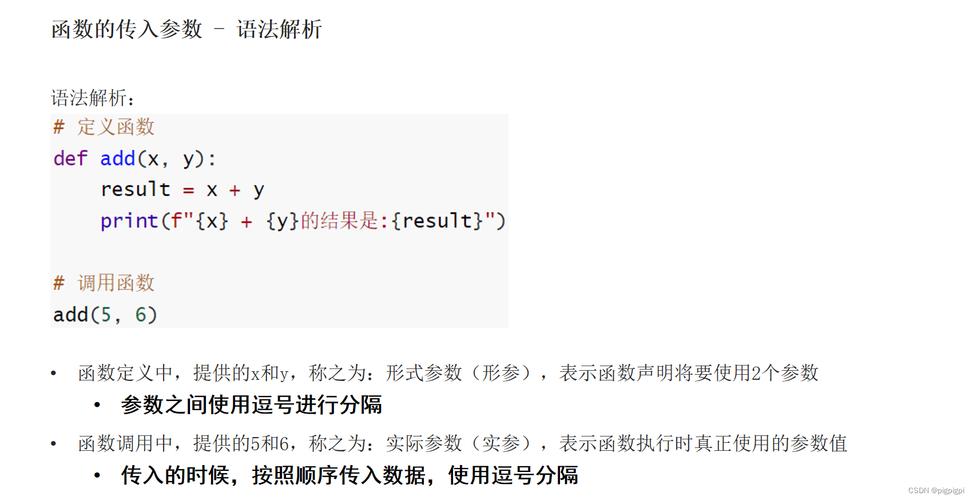
Functions can accept inputs, which are called parameters (in the definition) or arguments (in the call). This makes functions much more flexible.
Example with One Parameter
# Define a function that takes one parameter: name
def greet_person(name):
    """This function greets a specific person."""
    print(f"Hello, {name}!")
# Call the function with different arguments
greet_person("Alice")
greet_person("Bob")
Output:
Hello, Alice!
Hello, Bob!
Example with Multiple Parameters
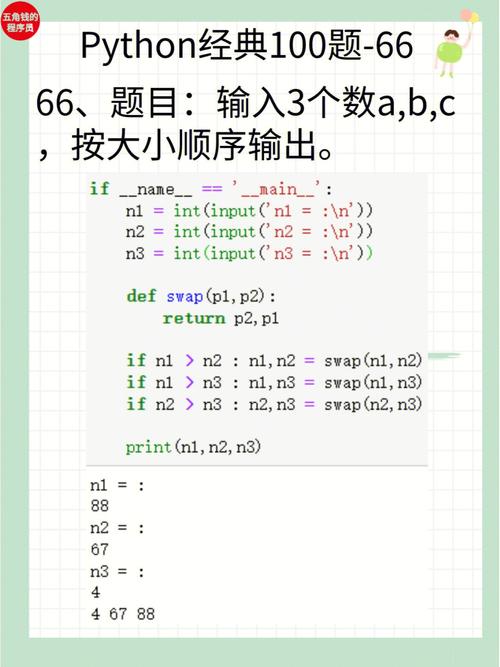
You can separate multiple parameters with a comma.
# Define a function with two parameters
def add_numbers(num1, num2):
    """This function adds two numbers and prints the result."""
    result = num1 + num2
    print(f"The sum of {num1} and {num2} is {result}")
# Call the function with two arguments
add_numbers(5, 10)
add_numbers(-3, 7)
Output:
The sum of 5 and 10 is 15
The sum of -3 and 7 is 4
Functions that return a Value
Sometimes you don't want a function to just print something; you want it to give you a value back to use in your code. This is done with the return statement.
A function that doesn't have a return statement implicitly returns None.
Example with return
# Define a function that returns a value
def add_and_return(num1, num2):
    """This function adds two numbers and returns the result."""
    return num1 + num2
# Call the function and store the returned value in a variable
sum1 = add_and_return(5, 10)
sum2 = add_and_return(100, 200)
# Now you can use the returned values
print(f"The first sum is: {sum1}")
print(f"The second sum is: {sum2}")
# You can even use the returned value directly in another expression
total_sum = sum1 + sum2
print(f"The total of both sums is: {total_sum}")
Output:
The first sum is: 15
The second sum is: 300
The total of both sums is: 315
Different Ways to Call a Function
You can call functions in various ways, especially those with multiple parameters.
A. Positional Arguments
This is the most common way. You pass arguments in the same order as the parameters are defined.
def describe_pet(animal_type, pet_name):
    """Display information about a pet."""
    print(f"\nI have a {animal_type}.")
    print(f"Its name is {pet_name.title()}.")
describe_pet("dog", "willie") # 'dog' maps to 'animal_type', 'willie' to 'pet_name'
Output:
I have a dog.
Its name is Willie.
B. Keyword Arguments
You can specify which parameter each argument should be assigned to by using the parameter_name=value syntax. This makes the code more readable and allows you to pass arguments in any order.
def describe_pet(animal_type, pet_name):
    """Display information about a pet."""
    print(f"\nI have a {animal_type}.")
    print(f"Its name is {pet_name.title()}.")
# Using keyword arguments
describe_pet(animal_type="hamster", pet_name="harry")
# The order doesn't matter with keywords
describe_pet(pet_name="harry", animal_type="hamster")
Output:
I have a hamster.
Its name is Harry.
I have a hamster.
Its name is Harry.
C. Default Argument Values
You can provide a default value for a parameter. If the caller doesn't provide an argument for that parameter, the default value is used.
def describe_pet(pet_name, animal_type="dog"):
    """Display information about a pet."""
    print(f"\nI have a {animal_type}.")
    print(f"Its name is {pet_name.title()}.")
# Call without providing animal_type (it uses the default "dog")
describe_pet("willie")
# Call by providing both arguments (the default is overridden)
describe_pet("harry", "hamster")
Output:
I have a dog.
Its name is Willie.
I have a hamster.
Its name is Harry.
Calling Functions from Other Modules
Python's power comes from its vast standard library and third-party packages. To use a function from another file (a module), you must first import the module.
Let's say you have a file named math_utils.py:
math_utils.py
def square(number):
    """Returns the square of a number."""
    return number * number
def cube(number):
    """Returns the cube of a number."""
    return number ** 3
Now, in your main script, you can call these functions:
main_script.py
# Import the entire module
import math_utils
# Call the functions using the module_name.function_name syntax
result1 = math_utils.square(7)
result2 = math_utils.cube(3)
print(f"The square of 7 is {result1}")
print(f"The cube of 3 is {result2}")
# You can also import specific functions directly
from math_utils import square, cube
# Now you can call them directly without the module prefix
result3 = square(5)
print(f"The square of 5 is {result3}")
Output:
The square of 7 is 49
The cube of 3 is 27
The square of 5 is 25
Key Things to Remember
- Parentheses are required for the call. Forgetting them is a very common mistake.
greetrefers to the function object itself, whilegreet()executes it. - Arguments must match the parameters. You need to provide the correct number and type of arguments that the function expects.
- Scope: Variables created inside a function (like
resultin theadd_numbersexample) are local to that function. They cannot be accessed from outside the function. - Docstrings: The triple-quoted string
"""This is a docstring."""is a best practice. It explains what the function does and can be viewed by callinghelp(function_name). For example:help(greet_person).











