
Of course! Let's dive deep into permutations in Python. We'll cover what permutations are, the different ways to generate them using Python's built-in modules, and how to choose the right method for your needs.
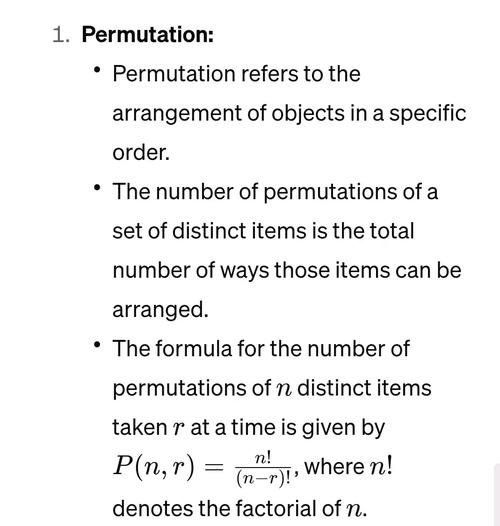
What is a Permutation?
A permutation is an arrangement of all or part of a set of objects, with regard to the order of the arrangement.
Example:
Consider the set of letters {A, B, C}.
-
Permutations of all 3 letters:
ABC,ACB,BAC,BCA,CAB,CBA- There are
3!(3 2 1 = 6) permutations.
-
Permutations of 2 letters (taken from the set of 3):
 (图片来源网络,侵删)
AB,AC,BA,BC,CA,CB- There are
3P2(3 * 2 = 6) permutations.
Notice that AB is different from BA because order matters.
Method 1: The Easy Way - itertools.permutations
For most use cases, the best and most efficient way is to use the itertools module, which is part of Python's standard library. It's highly optimized written in C.
itertools.permutations(iterable, r=None)
This function returns successive r length permutations of elements in the iterable.
iterable: The input sequence (e.g., a list, string, tuple).r: The length of the permutations to generate.- If
ris not specified (or isNone), it defaults to the length of theiterable, meaning it will generate permutations of all elements.
- If
Key Characteristics:
- Returns an Iterator: It doesn't generate all permutations in memory at once. Instead, it yields them one by one, which is very memory-efficient for large sets.
- Returns Tuples: Each permutation is returned as a tuple.
Examples with itertools.permutations
Example 1: Permutations of all elements (default r)
import itertools
letters = ['A', 'B', 'C']
# Generate all permutations of the full list (r is 3 by default)
all_perms = itertools.permutations(letters)
# To see the results, you need to iterate over the iterator
print("All permutations of ['A', 'B', 'C']:")
for p in all_perms:
    print(p)
# Expected Output:
# ('A', 'B', 'C')
# ('A', 'C', 'B')
# ('B', 'A', 'C')
# ('B', 'C', 'A')
# ('C', 'A', 'B')
# ('C', 'B', 'A')
Example 2: Permutations of a specific length (r)
Let's find all 2-letter permutations from our set of 3 letters.

import itertools
letters = ['A', 'B', 'C']
r = 2
# Generate permutations of length 2
perms_of_length_r = itertools.permutations(letters, r)
print(f"\nPermutations of length {r}:")
for p in perms_of_length_r:
    print(p)
# Expected Output:
# ('A', 'B')
# ('A', 'C')
# ('B', 'A')
# ('B', 'C')
# ('C', 'A')
# ('C', 'B')
Example 3: Permutations of a string
Since a string is also an iterable, this works perfectly.
import itertools
my_string = "ABC"
# Get all permutations of the string characters
string_perms = itertools.permutations(my_string)
# Join the tuples to form strings
print("\nPermutations of the string 'ABC':")
for p in string_perms:
    print(''.join(p))
# Expected Output:
# ABC
# ACB
# BAC
# BCA
# CAB
# CBA
Example 4: Getting a list of all permutations
If you need all the permutations stored in a list (e.g., for indexing or counting), you can simply pass the iterator to the list() constructor.
Warning: Be careful with large inputs! The number of permutations grows factorially (n!), so a list of all permutations can consume a huge amount of memory.
import itertools
numbers = [1, 2, 3]
# Get a list of all permutations
all_perms_list = list(itertools.permutations(numbers))
print(f"\nList of all permutations of {numbers}:")
print(all_perms_list)
# Output: [(1, 2, 3), (1, 3, 2), (2, 1, 3), (2, 3, 1), (3, 1, 2), (3, 2, 1)]
print(f"Total number of permutations: {len(all_perms_list)}")
# Output: Total number of permutations: 6
Method 2: The Manual Way - Recursive Backtracking
For learning purposes or for interviews, it's very common to be asked to implement permutations from scratch. The most intuitive way to do this is with recursion.
The idea is:
- Base Case: If you have selected all elements (i.e., your current path's length equals the input list's length), add a copy of the path to your results.
- Recursive Step: Iterate through the remaining elements. For each element:
- Add it to your current path.
- Recurse on the remaining elements (the ones not in your current path).
- Backtrack: Remove the element you just added so you can try the next one in the loop.
Here is a common implementation:
def find_permutations_recursive(nums):
    """
    Generates all permutations of a list of numbers using recursion.
    """
    results = []
    def backtrack(current_path, remaining_elements):
        # Base case: if no elements are left, we have a complete permutation
        if not remaining_elements:
            results.append(list(current_path))  # Append a copy of the path
            return
        # Recursive step: iterate through the remaining elements
        for i in range(len(remaining_elements)):
            # 1. Choose an element
            chosen_element = remaining_elements.pop(i)
            current_path.append(chosen_element)
            # 2. Recurse
            backtrack(current_path, remaining_elements)
            # 3. Backtrack: undo the choice
            current_path.pop()
            remaining_elements.insert(i, chosen_element)
    backtrack([], nums)
    return results
# --- Example Usage ---
my_nums = [1, 2, 3]
perms = find_permutations_recursive(my_nums)
print("\nPermutations generated manually:")
print(perms)
# Output: [[1, 2, 3], [1, 3, 2], [2, 1, 3], [2, 3, 1], [3, 1, 2], [3, 2, 1]]
Method 3: The Clever Way - Heap's Algorithm
Heap's algorithm is a highly efficient, non-recursive algorithm for generating all permutations. It works by swapping elements in place, which can be more memory-efficient than the recursive backtracking method that creates new lists for each call.
def find_permutations_heap(nums):
    """
    Generates all permutations of a list of numbers using Heap's algorithm.
    """
    results = []
    n = len(nums)
    # We'll work on a copy to avoid modifying the original list
    arr = list(nums)
    def generate(k, arr):
        # If k is 1, we have a permutation to add
        if k == 1:
            results.append(list(arr)) # Append a copy
        else:
            # Generate permutations for k-1 elements
            generate(k - 1, arr)
            # Generate permutations for kth element by swapping
            for i in range(k - 1):
                if k % 2 == 0:
                    # If k is even, swap the kth element with the first
                    arr[i], arr[k - 1] = arr[k - 1], arr[i]
                else:
                    # If k is odd, swap the kth element with the last
                    arr[0], arr[k - 1] = arr[k - 1], arr[0]
                generate(k - 1, arr)
    generate(n, arr)
    return results
# --- Example Usage ---
my_nums = [1, 2, 3]
perms_heap = find_permutations_heap(my_nums)
print("\nPermutations generated using Heap's algorithm:")
print(perms_heap)
# Output: [[1, 2, 3], [2, 1, 3], [3, 1, 2], [1, 3, 2], [2, 3, 1], [3, 2, 1]]
Note: Heap's algorithm produces permutations in a different order than the other methods.
Summary: Which Method Should You Use?
| Method | When to Use | Pros | Cons |
|---|---|---|---|
itertools.permutations |
Almost always. This is the standard, Pythonic way. | - Fastest and most memory-efficient. - Simple, one-line implementation. - Part of the standard library. |
- Returns tuples, not lists (easily fixed with list() or a comprehension). |
| Recursive Backtracking | For learning, coding interviews, or when you need to modify the generation logic (e.g., finding permutations that sum to a target). | - Excellent for understanding the core concept. - Easy to modify for more complex problems (e.g., subsets, combinations with constraints). |
- Slower and uses more memory than itertools due to recursion and list slicing/copying. |
| Heap's Algorithm | When you need a non-recursive, in-place algorithm. Good for performance-critical applications where itertools isn't an option. |
- Very efficient. - Non-recursive, avoids stack depth limits (in theory). |
- More complex to understand and implement correctly. - Less common in interviews than backtracking. |
Final Recommendation: Always start with itertools.permutations. It's the right tool for the job 99% of the time. Implementing it manually is a great exercise, but for production code, rely on the standard library.











