
Of course! Using Python with Elasticsearch is a very common and powerful combination, typically for building applications that need to search, analyze, and visualize large amounts of data.
Here's a comprehensive guide covering the essentials, from setup to advanced operations.
Prerequisites
Before you start, you need:
- Python: Installed on your system (version 3.6+ is recommended).
- Elasticsearch Instance: You need a running Elasticsearch cluster.
- Easy Option: Use Docker. Run this command to get a single-node cluster with Kibana (the UI for Elasticsearch) running on
http://localhost:9200andhttp://localhost:5601respectively.docker run -p 9200:9200 -p 5601:5601 -e "discovery.type=single-node" docker.elastic.co/elasticsearch/elasticsearch:8.11.0
- Cloud Option: Sign up for a free trial on Elastic Cloud. They provide a managed cluster for you.
- Easy Option: Use Docker. Run this command to get a single-node cluster with Kibana (the UI for Elasticsearch) running on
Installing the Python Client
The official and most widely used client is elasticsearch-py. You can install it using pip.
pip install elasticsearch
Connecting to Elasticsearch
The first step in any Python script is to establish a connection to your Elasticsearch cluster.
from elasticsearch import Elasticsearch
# By default, it tries to connect to localhost:9200
es = Elasticsearch()
# If your Elasticsearch is running on a different host/port or requires authentication:
# es = Elasticsearch(
#     hosts=["https://your-es-host:9243"],
#     basic_auth=("username", "password"),
#     # ca_certs="/path/to/ca.crt" # For SSL
# )
# Check if the connection is successful
if es.ping():
    print("Connected to Elasticsearch!")
else:
    print("Could not connect to Elasticsearch.")
Core Operations: Indexing, Searching, and Deleting
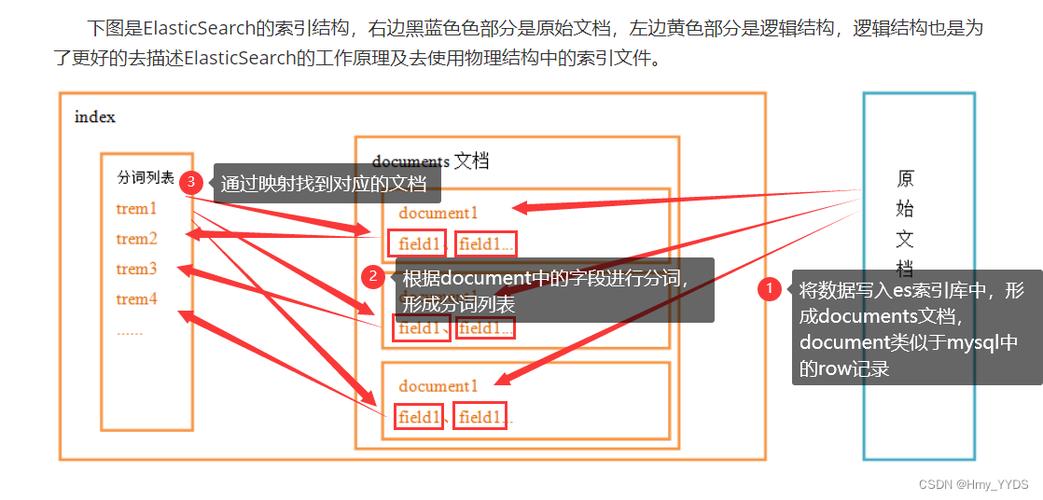
Elasticsearch stores data in indices (similar to tables in a database). Within an index, data is stored as documents (similar to rows in a database), which are JSON objects.
A. Indexing a Document (Adding/Updating Data)
To index a document, you provide an index name, a document ID (optional), and the document body.
# Define a document as a Python dictionary
doc = {
    "author": "John Doe",
    "text": "Elasticsearch is a powerful search engine built on Apache Lucene.",
    "timestamp": "2025-10-27T10:00:00"
}
# Index the document
# If the document ID already exists, it will be updated.
# If the index doesn't exist, it will be created automatically.
response = es.index(index="articles", id=1, body=doc)
print(f"Document indexed: {response['_id']}")
print(f"Version: {response['_version']}")
B. Getting a Document (Retrieving by ID)
If you know the document's ID, you can retrieve it directly.
# Get the document we just indexed
response = es.get(index="articles", id=1)
# The actual document is in the '_source' field
document = response['_source']
print("\nRetrieved Document:")
print(document)
C. Searching for Documents (The Core Feature)
This is where Elasticsearch shines. You use a Query DSL (Domain Specific Language) to define your search. The most common query is the bool query.
# A simple search for all documents in the 'articles' index
query_all = {
    "query": {
        "match_all": {}
    }
}
response = es.search(index="articles", body=query_all)
print(f"\nFound {response['hits']['total']['value']} documents:")
for hit in response['hits']['hits']:
    print(hit['_source'])
# A more specific search for text containing "search engine"
search_query = {
    "query": {
        "match": {
            "text": "search engine"
        }
    }
}
response = es.search(index="articles", body=search_query)
print(f"\nFound {response['hits']['total']['value']} documents matching 'search engine':")
for hit in response['hits']['hits']:
    print(hit['_source'])
D. Deleting a Document
# Delete the document with id=1
response = es.delete(index="articles", id=1)
print(f"\nDocument deleted: {response['result']}")
Working with Mappings (Schema Definition)
Mappings define the data type for each field in your documents (e.g., text, keyword, integer, date). This is crucial for correct search behavior and analysis. It's best practice to define your mapping before indexing data.
# Define the mapping for the 'articles' index
mapping = {
    "mappings": {
        "properties": {
            "author": {
                "type": "text"  # Analyzed for full-text search
            },
            "author_keyword": {
                "type": "keyword" # Not analyzed, used for exact matching (e.g., aggregations)
            },
            "text": {
                "type": "text"
            },
            "timestamp": {
                "type": "date"   # Elasticsearch will parse dates automatically
            }
        }
    }
}
# Create the index with the mapping
# If the index already exists, this will raise an error unless ignore=400
es.indices.create(index="articles", body=mapping, ignore=400)
print("\nIndex 'articles' created with mapping.")
A Complete, Practical Example
Let's put it all together in a script that creates an index with a mapping, indexes several documents, and then performs various searches.
from elasticsearch import Elasticsearch
from datetime import datetime
# --- 1. Connect ---
es = Elasticsearch()
if not es.ping():
    raise Exception("Could not connect to Elasticsearch!")
INDEX_NAME = "blog_posts"
# --- 2. Create Index with Mapping ---
mapping = {
    "mappings": {
        "properties": {
            "title": {"type": "text"},
            "author": {"type": "keyword"},
            "content": {"type": "text"},
            "publish_date": {"type": "date"}
        }
    }
}
# Delete index if it exists to start fresh
if es.indices.exists(index=INDEX_NAME):
    es.indices.delete(index=INDEX_NAME)
es.indices.create(index=INDEX_NAME, body=mapping)
print(f"Index '{INDEX_NAME} created with mapping.")
# --- 3. Index Multiple Documents ---
posts = [
    {
        "title": "Getting Started with Elasticsearch",
        "author": "Jane Smith",
        "content": "Elasticsearch is a distributed, RESTful search and analytics engine. It is built on top of Apache Lucene.",
        "publish_date": "2025-10-25"
    },
    {
        "title": "A Guide to Python Data Analysis",
        "author": "Peter Jones",
        "content": "Pandas and NumPy are essential libraries for any data scientist using Python. They provide powerful data structures.",
        "publish_date": "2025-10-26"
    },
    {
        "title": "Advanced Elasticsearch Features",
        "author": "Jane Smith",
        "content": "Beyond simple search, Elasticsearch offers aggregations, geospatial search, and powerful real-time analytics capabilities.",
        "publish_date": "2025-10-27"
    }
}
for i, post in enumerate(posts):
    es.index(index=INDEX_NAME, id=i+1, body=post)
print(f"Indexed {len(posts)} documents.")
# --- 4. Perform Searches ---
# a) Match All
print("\n--- All Posts ---")
response = es.search(index=INDEX_NAME, body={"query": {"match_all": {}}})
for hit in response['hits']['hits']:
    print(f"- {hit['_source']['title']} by {hit['_source']['author']}")
# b) Full-Text Search (match)
print("\n--- Posts about 'Elasticsearch' ---")
response = es.search(index=INDEX_NAME, body={
    "query": {
        "match": {
            "content": "Elasticsearch"
        }
    }
})
for hit in response['hits']['hits']:
    print(f"- {hit['_source']['title']}")
# c) Term Search (exact match on keyword field)
print("\n--- Posts by 'Jane Smith' ---")
response = es.search(index=INDEX_NAME, body={
    "query": {
        "term": {
            "author": "Jane Smith"
        }
    }
})
for hit in response['hits']['hits']:
    print(f"- {hit['_source']['title']}")
# d) Compound Query (bool query)
print("\n--- Posts by 'Jane Smith' OR about 'Python' ---")
response = es.search(index=INDEX_NAME, body={
    "query": {
        "bool": {
            "should": [
                {"match": {"author": "Jane Smith"}},
                {"match": {"content": "Python"}}
            ]
        }
    }
})
for hit in response['hits']['hits']:
    print(f"- {hit['_source']['title']}")
# --- 5. Clean Up ---
# es.indices.delete(index=INDEX_NAME)
# print(f"\nIndex '{INDEX_NAME}' deleted.")
High-Level Helpers (The helpers module)
For indexing large numbers of documents, using the standard es.index() in a loop is inefficient. The helpers module provides a bulk helper that is much faster.
from elasticsearch import helpers
# A large list of documents to index
large_bulk_data = [
    {"_index": "bulk_articles", "_id": i, "_source": {"text": f"This is document number {i}"}}
    for i in range(1000)
]
# Use the bulk helper to index them efficiently
success, failed = helpers.bulk(es, large_bulk_data)
print(f"\nSuccessfully indexed {success} documents.")
print(f"Failed to index {failed} documents.")
Further Learning
- Official Elasticsearch Client Documentation: https://elasticsearch-py.readthedocs.io/ - This is the ultimate source for all client features.
- Elasticsearch Query DSL: https://www.elastic.co/guide/en/elasticsearch/reference/current/query-dsl.html - Learn how to construct powerful search queries.
- Mapping Types: https://www.elastic.co/guide/en/elasticsearch/reference/current/mapping-types.html - Deep dive into data types and analysis.




