Of course! Let's dive deep into Java's String in switch statements. This feature was introduced in Java 7 and is a powerful way to make your code more readable and maintainable when you need to handle multiple string-based conditions.
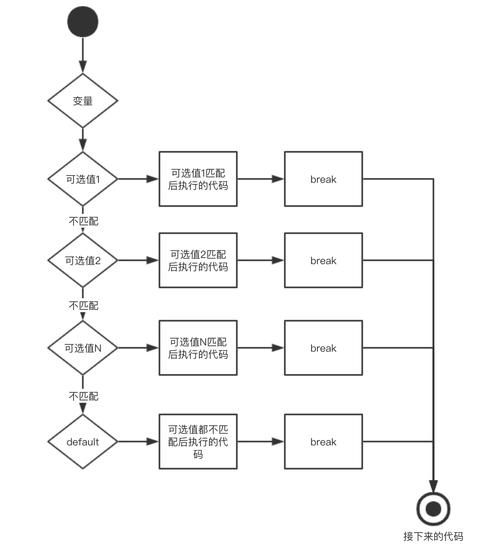
Here’s a complete guide covering how it works, its benefits, important considerations, and code examples.
The Basics: Syntax and How It Works
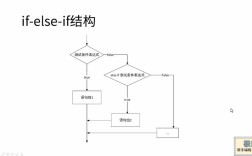
Before Java 7, switch statements only worked with primitive types like int, char, and their wrapper classes (Integer, Character). To handle strings, you had to use a series of if-else if-else statements, which could become verbose and hard to read.
// The OLD way (pre-Java 7)
String status = "PENDING";
if (status.equals("PENDING")) {
    // do something
} else if (status.equals("APPROVED")) {
    // do something else
} else if (status.equals("REJECTED")) {
    // do another thing
} else {
    // handle unknown status
}
With Java 7, you can now use a String directly in a switch statement.
// The NEW way (Java 7 and later)
String status = "PENDING";
switch (status) {
    case "PENDING":
        System.out.println("Processing request...");
        break;
    case "APPROVED":
        System.out.println("Request approved!");
        break;
    case "REJECTED":
        System.out.println("Request rejected.");
        break;
    default:
        System.out.println("Unknown status: " + status);
}
// Output: Processing request...
How It Works Under the Hood
The Java compiler cleverly translates the String switch into an efficient int-based switch. It does this by using the String.hashCode() method.
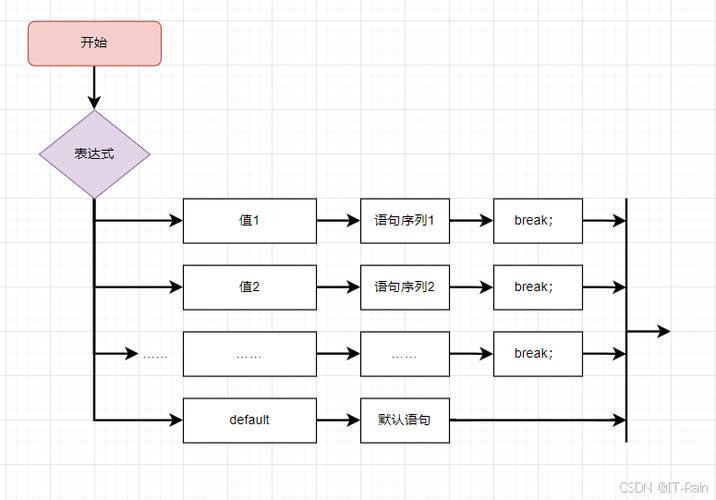
- Hashing: The compiler takes the
Stringexpression in theswitch(e.g.,status) and eachcaselabel (e.g.,"PENDING"). It callshashCode()on all of them. - Integer Switch: It then generates a
switchstatement that uses thesehashCodevalues. The first thing it does is check if the input string's hash code matches a case's hash code. - Equality Check (Crucial!): Because different strings can have the same hash code (a "hash collision"), the compiler must add an
equals()check to ensure the strings are truly identical, not just have the same hash.
So, the code you write is syntactically clean, but the compiled bytecode is efficient and robust.
Key Rules and Important Considerations
When using String in a switch, keep these rules in mind:
-
Null Check is Mandatory: You cannot use a
nullvalue in aStringswitch. It will throw aNullPointerException.String status = null; switch (status) { // COMPILE-TIME ERROR: Cannot switch on a value of type String for source level below 1.7 // ... } // If you run this, it will throw a NullPointerException at runtime.Solution: Always check for
nullfirst.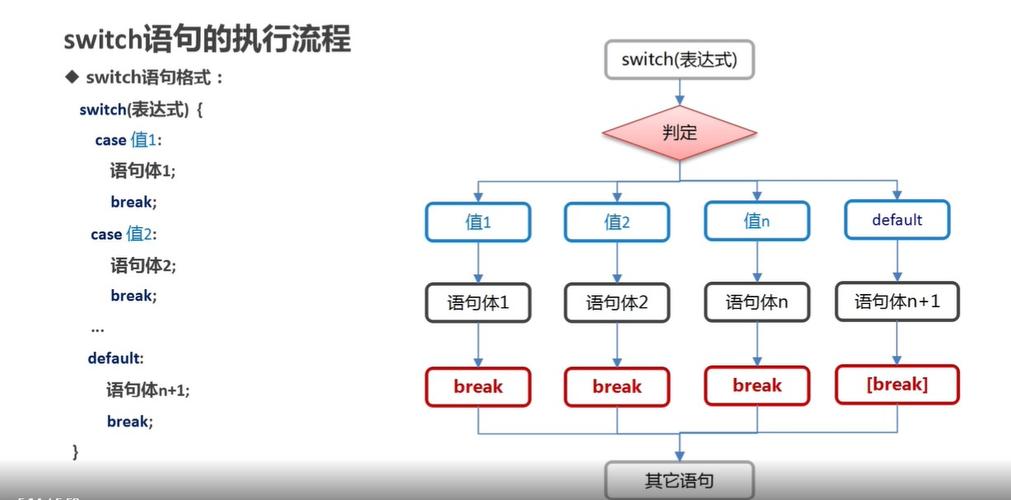 (图片来源网络,侵删)
String status = null; if (status == null) { System.out.println("Status cannot be null."); return; // or throw an exception } switch (status) { // ... } -
caseLabels Must be String Literals: The values for yourcaselabels must be compile-time constant string literals. You cannot use variables or method return values.String validStatus = "APPROVED"; String myStatus = "PENDING"; switch (myStatus) { case "PENDING": // ... break; case validStatus: // COMPILE-TIME ERROR: constant expression required // ... break; } -
breakis Still Essential: Just like with anyswitchstatement, if you omit abreak, the code will "fall through" to the nextcase.String command = "start"; switch (command) { case "start": System.out.println("Engine starting..."); // No break here! case "run": System.out.println("Engine running."); break; default: System.out.println("Unknown command."); } // Output: // Engine starting... // Engine running.This "fall-through" behavior is sometimes intentional but is often a source of bugs. Many IDEs will warn you about a missing
break. -
caseSensitivity: String comparisons in aswitchare case-sensitive.String fruit = "Apple"; switch (fruit) { case "Apple": // This will NOT match System.out.println("A red or green fruit."); break; case "apple": // This will match System.out.println("A delicious fruit."); break; } // Output: A delicious fruit.
Complete Example: HTTP Status Code Handler
Let's build a practical example. Imagine you're building a simple HTTP client and need to handle different status codes.
public class HttpResponseHandler {
    public static void handleResponse(String statusCode) {
        // 1. Handle the null case first
        if (statusCode == null) {
            System.out.println("Error: Status code cannot be null.");
            return;
        }
        System.out.println("Handling status: " + statusCode);
        // 2. Use the String switch
        switch (statusCode) {
            case "200":
                System.out.println("OK: Request successful.");
                break;
            case "201":
                System.out.println("Created: Resource created successfully.");
                break;
            case "301":
                System.out.println("Moved Permanently: Resource has a new, permanent URL.");
                break;
            case "400":
                System.out.println("Bad Request: The server cannot understand the request.");
                break;
            case "404":
                System.out.println("Not Found: The requested resource was not found.");
                break;
            case "500":
                System.out.println("Internal Server Error: The server encountered an unexpected condition.");
                break;
            default:
                // 3. Handle any other status codes
                System.out.println("Unknown status code: " + statusCode);
        }
    }
    public static void main(String[] args) {
        handleResponse("200");
        handleResponse("404");
        handleResponse("999");
        handleResponse(null);
    }
}
Output of the example:
Handling status: 200
OK: Request successful.
Handling status: 404
Not Found: The requested resource was not found.
Handling status: 999
Unknown status code: 999
Error: Status code cannot be null.
When to Use String Switch vs. if-else if
| Feature | String Switch |
if-else if Chain |
|---|---|---|
| Readability | Excellent for a fixed set of known string constants. Can become messy with many cases. | Good for a few conditions. Can become hard to read with many else ifs. |
| Performance | Generally very efficient due to hashing. Can be slightly slower than int switch due to the hashCode() and equals() overhead. |
Slightly slower for a large number of conditions due to sequential string comparisons (equals()). |
| Flexibility | Low. Cases must be string literals. | High. Cases can be complex expressions, method calls, or variables. |
| Null Safety | Unsafe. Throws NullPointerException. |
Safe. You can easily check if (myString == null) at the beginning. |
| Fall-through | Supports it (can be a pro or a con). | Does not support fall-through. Each if is independent. |
Conclusion:
- Use a
Stringswitch when you are dispatching logic based on a fixed, known set of string constants. It's clean, idiomatic, and efficient for this specific purpose. - Use an
if-else ifchain when your conditions are complex, involve variables, or when you need to handlenullvalues in a more integrated way. It's more flexible and verbose.