
Of course! Getting the current date and time in Python is a very common task, and the datetime module is the standard way to do it.
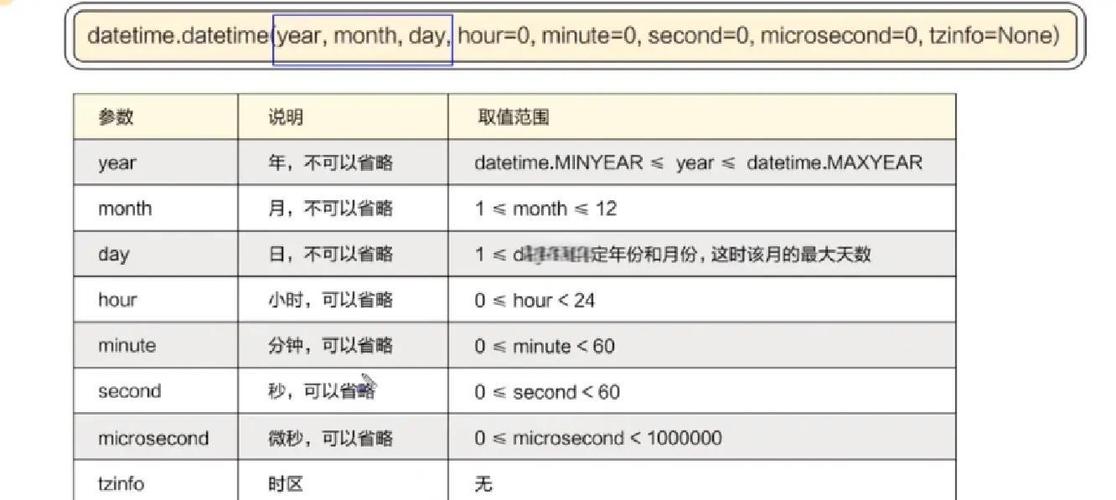
The most common function for this is datetime.datetime.now().
Here’s a complete guide, from the basics to more advanced usage.
The Basics: Getting the Current Date and Time
First, you need to import the datetime class from the datetime module.
from datetime import datetime
# Get the current local date and time
now = datetime.now()
# Print the result
print(now)
Example Output:
2025-10-27 10:30:55.123456This output is a datetime object that contains:
- Date: Year, Month, Day
- Time: Hour, Minute, Second, Microsecond
Getting Only the Current Date or Only the Current Time
Often, you'll need just the date or just the time. You can easily get these from the datetime.now() object.
Getting Only the Current Date
Use the .date() method.
from datetime import datetime
now = datetime.now()
current_date = now.date()
print(f"Full datetime: {now}")
print(f"Current date: {current_date}")
Example Output:
Full datetime: 2025-10-27 10:30:55.123456
Current date: 2025-10-27
Getting Only the Current Time
Use the .time() method.
from datetime import datetime
now = datetime.now()
current_time = now.time()
print(f"Full datetime: {now}")
print(f"Current time: {current_time}")
Example Output:
Full datetime: 2025-10-27 10:30:55.123456
Current time: 10:30:55.123456
Formatting the Output (Creating a String)
The default string representation isn't always what you want. You can format it into a more readable string using the .strftime() method (which stands for "string format time").
You use special format codes to define the output. Here are the most common ones:
| Code | Meaning | Example |
|---|---|---|
%Y |
Year with century as a decimal | 2025 |
%y |
Year without century as a decimal | 23 |
%m |
Month as a zero-padded decimal | 10 |
%B |
Full month name | October |
%b |
Abbreviated month name | Oct |
%d |
Day of the month as a zero-padded decimal | 27 |
%A |
Full weekday name | Friday |
%a |
Abbreviated weekday name | Fri |
%H |
Hour (24-hour clock) as a zero-padded decimal | 10 |
%I |
Hour (12-hour clock) as a zero-padded decimal | 10 |
%M |
Minute as a zero-padded decimal | 30 |
%S |
Second as a zero-padded decimal | 55 |
%p |
Locale’s equivalent of either AM or PM | AM or PM |
Examples of Formatting
from datetime import datetime
now = datetime.now()
# Format 1: YYYY-MM-DD
formatted_date_1 = now.strftime("%Y-%m-%d")
print(f"Standard Date: {formatted_date_1}")
# Format 2: MM/DD/YYYY
formatted_date_2 = now.strftime("%m/%d/%Y")
print(f"US Date: {formatted_date_2}")
# Format 3: Day, Month Date, Year
formatted_date_3 = now.strftime("%A, %B %d, %Y")
print(f"Long Date: {formatted_date_3}")
# Format 4: HH:MM:SS (24-hour clock)
formatted_time_1 = now.strftime("%H:%M:%S")
print(f"24-hour Time: {formatted_time_1}")
# Format 5: hh:MM:SS AM/PM (12-hour clock)
formatted_time_2 = now.strftime("%I:%M:%S %p")
print(f"12-hour Time: {formatted_time_2}")
# A common log format
log_format = now.strftime("%Y-%m-%d %H:%M:%S - ")
print(f"Log Entry: {log_format}User logged in.")
Example Output:
Standard Date: 2025-10-27
US Date: 10/27/2025
Long Date: Friday, October 27, 2025
24-hour Time: 10:30:55
12-hour Time: 10:30:55 AM
Log Entry: 2025-10-27 10:30:55 - User logged in.
Time Zones (Important!)
By default, datetime.now() returns the local time of the computer where the script is running. This can be problematic if your server is in one time zone and your users are in another.
The best practice for handling time zones is to use the pytz library or the built-in zoneinfo module (available in Python 3.9+).
Using zoneinfo (Recommended for Python 3.9+)
from datetime import datetime
from zoneinfo import ZoneInfo
# Get current time in New York
ny_time = datetime.now(ZoneInfo("America/New_York"))
print(f"New York Time: {ny_time}")
# Get current time in London
london_time = datetime.now(ZoneInfo("Europe/London"))
print(f"London Time: {london_time}")
# Convert a naive datetime to a timezone-aware one
naive_dt = datetime.now()
aware_dt = naive_dt.astimezone(ZoneInfo("Asia/Tokyo"))
print(f"Tokyo Time from naive: {aware_dt}")
Using pytz (Works on older Python versions)
First, you need to install it: pip install pytz
from datetime import datetime
import pytz
# Get current time in New York
ny_time = datetime.now(pytz.timezone("America/New_York"))
print(f"New York Time: {ny_time}")
# Get current time in London
london_time = datetime.now(pytz.timezone("Europe/London"))
print(f"London Time: {london_time}")
Summary: Key Takeaways
| Task | Code Example |
|---|---|
Get current datetime object |
from datetime import datetime; now = datetime.now() |
Get current date object |
from datetime import datetime; today = datetime.now().date() |
Get current time object |
from datetime import datetime; now_time = datetime.now().time() |
| Format as a string | now.strftime("%Y-%m-%d %H:%M:%S") |
| Get time in a specific timezone (Python 3.9+) | from zoneinfo import ZoneInfo; now = datetime.now(ZoneInfo("America/Los_Angeles")) |
| Get time in a specific timezone (older Python) | import pytz; now = datetime.now(pytz.timezone("America/Los_Angeles")) |


