RSA 加密核心概念
在开始编码前,理解几个关键概念非常重要:
(图片来源网络,侵删)
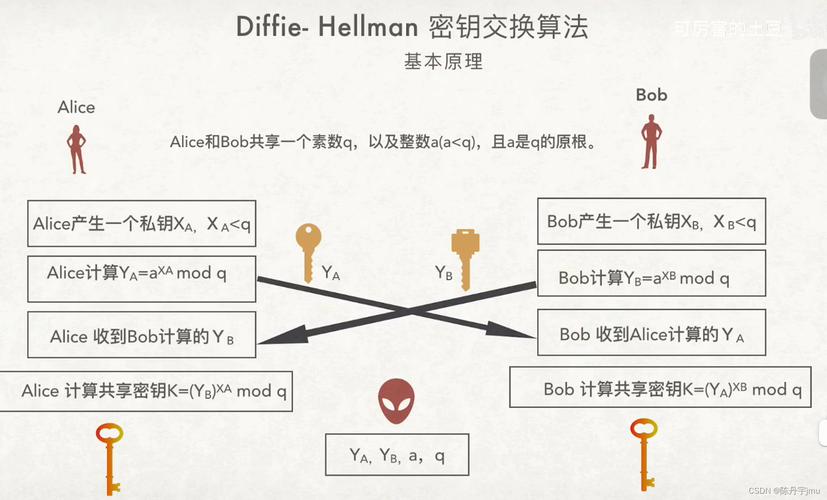
- 密钥对: RSA 算法使用一对密钥:公钥 和 私钥。
- 公钥: 用于加密数据,公钥可以公开给任何人,用它加密的数据只能用对应的私钥解密。
- 私钥: 用于解密数据,私钥必须严格保密,不能泄露,私钥也可以用于数字签名,而公钥用于验证签名。
- 加密与解密:
- 场景A (安全传输): 你想安全地向服务器发送数据,你用服务器的公钥加密数据,然后发送,服务器收到后,用它自己的私钥解密,这样,即使数据在传输过程中被截获,没有私钥也无法解密。
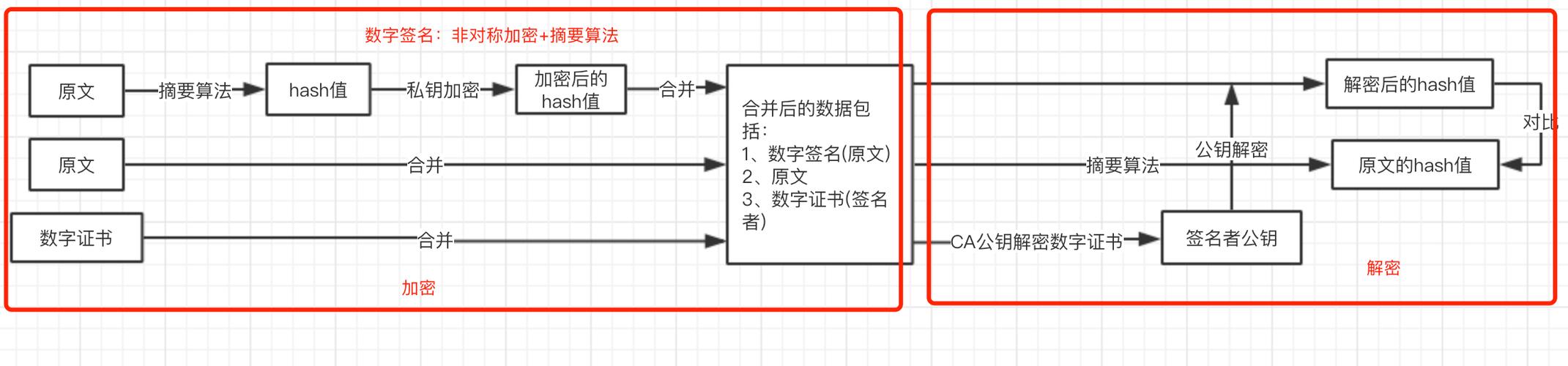
- 场景B (数字签名): 你想证明一条数据确实是你发的,且未被篡改,你用你自己的私钥对数据的哈希值进行加密(签名),然后将数据和签名一起发送,接收方用你的公钥解密签名,并与收到的数据重新计算哈希值对比,如果一致,则证明数据来源可信且完整。
- 填充: RSA 算法不能直接加密任意长度的数据,它需要一种“填充方案”来处理数据块,最常用的是 PKCS#1 v1.5 和 OAEP,在 Android 中,我们通常使用
PKCS1Padding。 - 数据长度限制: RSA 能加密的数据长度与密钥长度直接相关,对于 2048 位的密钥(最常用的长度),它能加密的数据块大小最大是 245 字节 (2048 bits / 8 - 11 padding bytes),如果数据超过这个长度,就需要进行分段加密。
实现步骤
我们将创建一个工具类 RSAUtils,包含以下功能:
- 生成 RSA 密钥对(通常在服务器端完成,客户端只需获取公钥)。
- 使用公钥加密字符串。
- 使用私钥解密字符串。
- 将密钥转换为
String或byte[]以便存储和传输。 - 从
String或byte[]还原密钥。
步骤 1: 添加依赖
RSA 相关功能主要来自 Java 标准库 java.security,所以通常不需要额外添加第三方库依赖。
步骤 2: 创建 RSA 工具类
下面是一个完整的 RSAUtils.java 实现,包含了详细的注释。
import android.util.Base64;
import android.util.Log;
import java.security.InvalidKeyException;
import java.security.KeyFactory;
import java.security.KeyPair;
import java.security.KeyPairGenerator;
import java.security.NoSuchAlgorithmException;
import java.security.PrivateKey;
import java.security.PublicKey;
import java.security.spec.InvalidKeySpecException;
import java.security.spec.PKCS8EncodedKeySpec;
import java.security.spec.X509EncodedKeySpec;
import javax.crypto.BadPaddingException;
import javax.crypto.Cipher;
import javax.crypto.IllegalBlockSizeException;
import javax.crypto.NoSuchPaddingException;
public class RSAUtils {
    private static final String TAG = "RSAUtils";
    private static final String ALGORITHM = "RSA"; // 加密算法
    private static final String TRANSFORMATION = "RSA/ECB/PKCS1Padding"; // 加密模式,ECB是块加密模式,PKCS1Padding是填充方式
    private static final int KEY_SIZE = 2048; // 密钥长度,2048位是当前推荐的最小长度
    /**
     * 生成 RSA 密钥对
     * 注意:此方法耗时,应在后台线程执行。
     *
     * @return KeyPair 密钥对
     */
    public static KeyPair generateKeyPair() {
        try {
            KeyPairGenerator keyPairGenerator = KeyPairGenerator.getInstance(ALGORITHM);
            keyPairGenerator.initialize(KEY_SIZE);
            return keyPairGenerator.generateKeyPair();
        } catch (NoSuchAlgorithmException e) {
            Log.e(TAG, "生成密钥对失败", e);
            return null;
        }
    }
    /**
     * 从字符串加载公钥
     *
     * @param publicKeyStr Base64 编码的公钥字符串
     * @return PublicKey 公钥对象
     */
    public static PublicKey getPublicKey(String publicKeyStr) {
        try {
            byte[] keyBytes = Base64.decode(publicKeyStr, Base64.DEFAULT);
            X509EncodedKeySpec spec = new X509EncodedKeySpec(keyBytes);
            KeyFactory keyFactory = KeyFactory.getInstance(ALGORITHM);
            return keyFactory.generatePublic(spec);
        } catch (NoSuchAlgorithmException | InvalidKeySpecException e) {
            Log.e(TAG, "从字符串加载公钥失败", e);
            return null;
        }
    }
    /**
     * 从字符串加载私钥
     *
     * @param privateKeyStr Base64 编码的私钥字符串
     * @return PrivateKey 私钥对象
     */
    public static PrivateKey getPrivateKey(String privateKeyStr) {
        try {
            byte[] keyBytes = Base64.decode(privateKeyStr, Base64.DEFAULT);
            PKCS8EncodedKeySpec spec = new PKCS8EncodedKeySpec(keyBytes);
            KeyFactory keyFactory = KeyFactory.getInstance(ALGORITHM);
            return keyFactory.generatePrivate(spec);
        } catch (NoSuchAlgorithmException | InvalidKeySpecException e) {
            Log.e(TAG, "从字符串加载私钥失败", e);
            return null;
        }
    }
    /**
     * 公钥加密
     *
     * @param data      待加密的原始数据
     * @param publicKey 公钥
     * @return Base64 编码的加密字符串
     */
    public static String encryptByPublicKey(String data, PublicKey publicKey) {
        try {
            Cipher cipher = Cipher.getInstance(TRANSFORMATION);
            cipher.init(Cipher.ENCRYPT_MODE, publicKey);
            // RSA 加密有长度限制,需要分段处理
            byte[] dataBytes = data.getBytes();
            int blockSize = KEY_SIZE / 8 - 11; // 245 for 2048 key
            int inputLen = dataBytes.length;
            int offSet = 0;
            byte[] cache = null;
            ByteArrayOutputStream out = new ByteArrayOutputStream();
            while (inputLen - offSet > 0) {
                if (inputLen - offSet > blockSize) {
                    cache = cipher.doFinal(dataBytes, offSet, blockSize);
                } else {
                    cache = cipher.doFinal(dataBytes, offSet, inputLen - offSet);
                }
                out.write(cache, 0, cache.length);
                offSet += blockSize;
            }
            byte[] encryptedData = out.toByteArray();
            out.close();
            return Base64.encodeToString(encryptedData, Base64.NO_WRAP);
        } catch (NoSuchAlgorithmException | NoSuchPaddingException | InvalidKeyException
                | IllegalBlockSizeException | BadPaddingException | IOException e) {
            Log.e(TAG, "公钥加密失败", e);
            return null;
        }
    }
    /**
     * 私钥解密
     *
     * @param encryptedData Base64 编码的加密数据
     * @param privateKey    私钥
     * @return 解密后的原始字符串
     */
    public static String decryptByPrivateKey(String encryptedData, PrivateKey privateKey) {
        try {
            Cipher cipher = Cipher.getInstance(TRANSFORMATION);
            cipher.init(Cipher.DECRYPT_MODE, privateKey);
            byte[] encryptedBytes = Base64.decode(encryptedData, Base64.NO_WRAP);
            // RSA 解密也有长度限制,需要分段处理
            int blockSize = KEY_SIZE / 8; // 256 for 2048 key
            int inputLen = encryptedBytes.length;
            int offSet = 0;
            byte[] cache = null;
            ByteArrayOutputStream out = new ByteArrayOutputStream();
            while (inputLen - offSet > 0) {
                if (inputLen - offSet > blockSize) {
                    cache = cipher.doFinal(encryptedBytes, offSet, blockSize);
                } else {
                    cache = cipher.doFinal(encryptedBytes, offSet, inputLen - offSet);
                }
                out.write(cache, 0, cache.length);
                offSet += blockSize;
            }
            byte[] decryptedData = out.toByteArray();
            out.close();
            return new String(decryptedData);
        } catch (NoSuchAlgorithmException | NoSuchPaddingException | InvalidKeyException
                | IllegalBlockSizeException | BadPaddingException | IOException e) {
            Log.e(TAG, "私钥解密失败", e);
            return null;
        }
    }
}
注意: 代码中使用了 ByteArrayOutputStream 来处理分段加密/解密,这是处理大数据块的正确方式。
(图片来源网络,侵删)
完整使用示例
场景:客户端使用服务器的公钥加密密码并发送
第1步:获取服务器的公钥
服务器需要将其 RSA 公钥(通常是 Base64 编码的字符串)提供给客户端,这可以通过 API 接口、硬编码(仅用于测试)或配置文件等方式实现。
// 假设这是从服务器获取到的公钥字符串 (Base64编码)
String serverPublicKeyStr = "MIIBIjANBgkqhkiG9w0BAQEFAAOCAQ8AMIIBCgKCAQEA..."; // 这里放一个真实的公钥
第2步:在 Android Activity/ViewModel 中使用
import android.os.Bundle;
import android.util.Log;
import android.widget.Button;
import android.widget.TextView;
import android.widget.Toast;
import androidx.appcompat.app.AppCompatActivity;
import java.security.PublicKey;
public class MainActivity extends AppCompatActivity {
    private static final String TAG = "MainActivity";
    private TextView tvResult;
    // 假设这是从服务器获取到的公钥字符串 (Base64编码)
    // 注意:实际项目中,公钥应由服务器动态提供,不要硬编码在客户端
    private String serverPublicKeyStr = "MIIBIjANBgkqhkiG9w0BAQEFAAOCAQ8AMIIBCgKCAQEA..."; // 替换为你的公钥
    @Override
    protected void onCreate(Bundle savedInstanceState) {
        super.onCreate(savedInstanceState);
        setContentView(R.layout.activity_main);
        tvResult = findViewById(R.id.tv_result);
        Button btnEncrypt = findViewById(R.id.btn_encrypt);
        btnEncrypt.setOnClickListener(v -> {
            // 1. 从字符串加载公钥
            PublicKey publicKey = RSAUtils.getPublicKey(serverPublicKeyStr);
            if (publicKey == null) {
                Toast.makeText(this, "加载公钥失败", Toast.LENGTH_SHORT).show();
                return;
            }
            // 2. 准备要加密的敏感数据
            String originalPassword = "mySuperSecretPassword123";
            // 3. 使用公钥加密
            String encryptedPassword = RSAUtils.encryptByPublicKey(originalPassword, publicKey);
            if (encryptedPassword != null) {
                // 4. 显示加密后的结果
                tvResult.setText("原始密码: " + originalPassword + "\n\n加密后: " + encryptedPassword);
                Log.d(TAG, "加密成功: " + encryptedPassword);
                // 在实际应用中,你会将 encryptedPassword 发送到服务器
                // serverApi.login(encryptedPassword);
            } else {
                Toast.makeText(this, "加密失败", Toast.LENGTH_SHORT).show;
            }
        });
    }
}
场景:服务器端解密
服务器端需要使用它自己的私钥来解密客户端发来的 encryptedPassword,服务器端可以使用任何语言(如 Java, Python, Node.js)实现,只要使用对应的私钥即可。
Java 服务器端解密示例:
(图片来源网络,侵删)
// 假设服务器端存储了私钥 (字符串形式)
String serverPrivateKeyStr = "MIIEvgIBADANBgkqhkiG9w0BAQEFAASCBKgwggSkAgEAAoIBAQC..."; // 替换为你的私钥
// 从字符串加载私钥
PrivateKey privateKey = RSAUtils.getPrivateKey(serverPrivateKeyStr); // 可以复用上面的工具类
// 接收到客户端发来的加密字符串
String receivedEncryptedPassword = "客户端发送过来的Base64加密字符串";
// 使用私钥解密
String decryptedPassword = RSAUtils.decryptByPrivateKey(receivedEncryptedPassword, privateKey);
System.out.println("解密后的密码: " + decryptedPassword); // 应该输出 "mySuperSecretPassword123"
重要注意事项
-
密钥管理:
- 私钥是最高机密:绝不能将私钥硬编码在客户端 App 中,一旦 App 被反编译,私钥就会泄露,私钥必须由服务器端安全保管。
- 公钥分发:客户端的公钥可以从服务器获取,为了防止中间人攻击,客户端最好能对收到的公钥进行“校验”,将公钥的指纹(SHA-256 哈希值)硬编码在 App 中,App 收到公钥后计算其指纹并与硬编码的指纹比对,确保公钥未被篡改。
-
性能问题:
- RSA 加密/解密速度非常慢,尤其是在移动设备上。
- 不要用 RSA 加解密大文件,正确的做法是:
- 生成一个临时的、对称的密钥(如 AES 密钥)。
- 用这个 AES 密钥加密大文件。
- 用 RSA 加密这个 AES 密钥。
- 将加密后的 AES 密钥和加密后的文件一起发送。 这种方式结合了对称加密(快)和非对称加密(安全交换密钥)的优点,是行业标准做法。
-
数据长度限制:
如前所述,2048 位 RSA 密钥一次最多加密 245 字节,我们的工具类已经处理了分段加密,但你必须知道这个限制的存在,如果你需要加密的数据非常短(比如一个 16 位的密码),则无需分段。
-
混淆与加固:
虽然私钥不能放在客户端,但你的代码逻辑(比如你是如何加密的)仍然可能被分析,对 App 进行代码混淆(如 ProGuard/R8)和加固,可以增加逆向工程的难度。
| 功能 | 客户端 (Android) | 服务器端 |
|---|---|---|
| 密钥持有 | 仅持有公钥 | 同时持有公钥和私钥 |
| 主要操作 | 从服务器获取公钥。 用公钥加密敏感数据(如密码)。 将加密数据发送给服务器。 |
将公钥分发给客户端。 用私钥解密收到的数据。 处理原始数据。 |
| 安全要点 | 保护好公钥的来源,防止中间人攻击。 | 严格保护私钥,绝不泄露。 |
希望这个详细的指南能帮助你在 Android 项目中顺利实现 RSA 加密!