
Of course! Selecting stocks using Python is a powerful and popular application of data science and financial analysis. It allows you to backtest strategies, analyze fundamentals, and screen for stocks based on specific criteria.
This guide will walk you through a comprehensive, step-by-step process for building a Python-based stock selection system, covering everything from data retrieval to strategy implementation.
Core Concepts in Python Stock Selection
Before we dive into code, let's understand the main approaches:
- Fundamental Analysis: Analyzing a company's financial health (e.g., P/E ratio, debt-to-equity, revenue growth). This is about finding "good companies."
- Technical Analysis: Analyzing historical price and volume data (e.g., moving averages, RSI, MACD). This is about finding "good timing" to enter/exit a trade.
- Quantitative Screening: Defining a set of rules (e.g., "find all stocks with a P/E ratio below 15 and a dividend yield above 3%") and letting the program find the matches. This is the most common and practical approach for beginners.
We will focus on Quantitative Screening using both Fundamental and Technical data.
Step 1: Setting Up Your Environment
First, you need to install the necessary Python libraries. Open your terminal or command prompt and run:
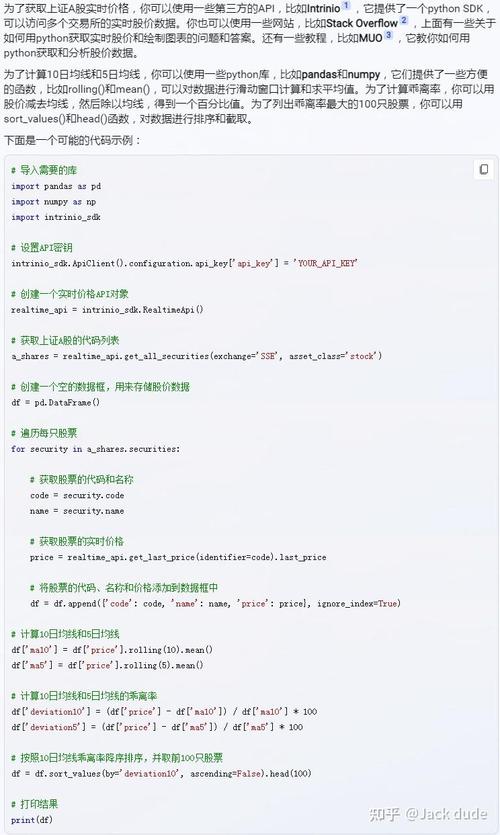
pip install yfinance pandas numpy matplotlib
yfinance: A fantastic library to download historical market data from Yahoo! Finance.pandas: The cornerstone of data analysis in Python. We'll use it to handle and manipulate our stock data.numpy: A library for numerical operations, often used alongside pandas.matplotlib: For plotting charts to visualize our data.
Step 2: Getting Stock Data
Let's start by downloading the historical price data for a single stock, like Apple (AAPL).
import yfinance as yf
import pandas as pd
# Download historical data for Apple
ticker = 'AAPL'
data = yf.download(ticker, start='2025-01-01', end='2025-12-31')
print(data.head())
This will give you a pandas DataFrame with daily Open, High, Low, Close, and Volume data.
Step 3: Building a Fundamental Stock Screener
A fundamental screener filters stocks based on their financial statements. We can get this data using the yfinance library as well.
Let's create a function to get key financial metrics for a list of tickers.
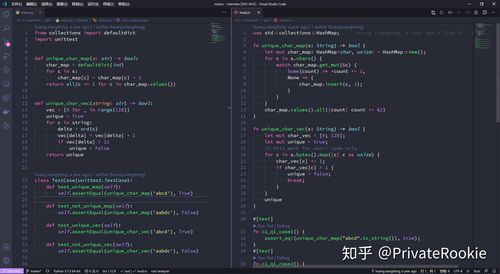
def get_financial_metrics(tickers):
    """
    Fetches key financial metrics for a list of stock tickers.
    """
    metrics = {}
    for ticker in tickers:
        try:
            stock = yf.Ticker(ticker)
            # Get financial info
            info = stock.info
            # Get key metrics
            metrics[ticker] = {
                'P/E Ratio': info.get('trailingPE'),
                'Forward P/E': info.get('forwardPE'),
                'PEG Ratio': info.get('pegRatio'),
                'Price to Book': info.get('priceToBook'),
                'Dividend Yield': info.get('dividendYield'),
                'Debt to Equity': info.get('debtToEquity'),
                'Return on Equity (ROE)': info.get('returnOnEquity'),
                'Market Cap': info.get('marketCap')
            }
        except Exception as e:
            print(f"Could not retrieve data for {ticker}: {e}")
            metrics[ticker] = None
    return pd.DataFrame(metrics).T
# Define a list of tickers to screen
tickers_to_screen = ['AAPL', 'MSFT', 'GOOGL', 'AMZN', 'TSLA', 'META', 'JPM', 'JNJ', 'PG', 'KO']
# Get the metrics
fundamental_df = get_financial_metrics(tickers_to_screen)
# Display the data
print(fundamental_df)
Applying Screening Criteria
Now, let's define our rules. For example, we want to find stocks that:
- Have a Price-to-Earnings (P/E) ratio below 25.
- Have a positive Return on Equity (ROE).
- Are part of the S&P 500 (we can check this via the
yfinanceinfodictionary).
# Define our screening criteria
def screen_stocks(df):
    # Create a boolean mask for each condition
    mask_pe = df['P/E Ratio'] < 25
    mask_roe = df['Return on Equity (ROE)'] > 0.10 # ROE > 10%
    # Combine the masks
    screened_stocks = df[mask_pe & mask_roe]
    return screened_stocks
# Apply the screen
screened_df = screen_stocks(fundamental_df)
print("\n--- Screened Stocks ---")
print(screened_df)
You now have a list of stocks that meet your fundamental criteria!
Step 4: Building a Technical Analysis Screener
This type of screener uses price and volume data to find stocks based on technical indicators. Let's build a simple one that finds stocks trading above their 50-day moving average.
def get_technical_signal(ticker, start_date='2025-01-01'):
    """
    Calculates the 50-day moving average and checks if the current price is above it.
    """
    try:
        data = yf.download(ticker, start=start_date, progress=False)
        if data.empty:
            return None
        # Calculate the 50-day moving average
        data['MA50'] = data['Close'].rolling(window=50).mean()
        # Get the latest data point
        latest = data.iloc[-1]
        # Check condition
        signal = latest['Close'] > latest['MA50']
        return {
            'Ticker': ticker,
            'Price': latest['Close'],
            'MA50': latest['MA50'],
            'Signal': 'Buy' if signal else 'Hold'
        }
    except Exception as e:
        print(f"Error processing {ticker}: {e}")
        return None
# Let's screen our previously selected fundamental stocks
technical_signals = []
for ticker in screened_df.index:
    signal = get_technical_signal(ticker)
    if signal:
        technical_signals.append(signal)
# Convert to DataFrame for easy viewing
technical_df = pd.DataFrame(technical_signals)
print("\n--- Technical Analysis Signals for Screened Stocks ---")
print(technical_df)
Step 5: Combining Fundamental and Technical Screens (The Complete Strategy)
The most robust strategies combine both approaches. You first filter for fundamentally sound companies and then apply a technical filter for timing your entry.
Here is a complete, runnable script that does this.
import yfinance as yf
import pandas as pd
# --- 1. DATA FETCHING ---
def get_financial_metrics(tickers):
    """Fetches key financial metrics for a list of stock tickers."""
    metrics = {}
    for ticker in tickers:
        try:
            stock = yf.Ticker(ticker)
            info = stock.info
            metrics[ticker] = {
                'P/E Ratio': info.get('trailingPE'),
                'ROE': info.get('returnOnEquity'),
                'Market Cap': info.get('marketCap')
            }
        except Exception as e:
            print(f"Could not retrieve data for {ticker}: {e}")
            metrics[ticker] = None
    return pd.DataFrame(metrics).T
def get_technical_signal(ticker, start_date='2025-01-01'):
    """Checks if a stock is trading above its 50-day MA."""
    try:
        data = yf.download(ticker, start=start_date, progress=False)
        if data.empty or len(data) < 50:
            return None
        data['MA50'] = data['Close'].rolling(window=50).mean()
        latest = data.iloc[-1]
        signal = latest['Close'] > latest['MA50']
        return {
            'Ticker': ticker,
            'Price': latest['Close'],
            'MA50': latest['MA50'],
            'Signal': 'Buy' if signal else 'Hold'
        }
    except Exception as e:
        print(f"Error processing {ticker}: {e}")
        return None
# --- 2. SCREENING LOGIC ---
def run_stock_screening(ticker_list):
    """Runs the full screening process."""
    print("--- Step 1: Fundamental Analysis ---")
    fundamental_df = get_financial_metrics(ticker_list)
    print(f"\nFetched data for {len(fundamental_df)} stocks.")
    print(fundamental_df)
    # Define fundamental criteria
    # Note: We handle potential NaN values in the screening function
    screened_fundamental = fundamental_df[
        (fundamental_df['P/E Ratio'] < 25) &
        (fundamental_df['ROE'] > 0.15) & # ROE > 15%
        (fundamental_df['Market Cap'] > 1e11) # Market Cap > $100B
    ]
    print("\n--- Step 2: Fundamental Screen Results ---")
    print("Stocks with P/E < 25, ROE > 15%, and Market Cap > $100B:")
    print(screened_fundamental)
    # --- 3. TECHNICAL ANALYSIS ON SCREENED STOCKS ---
    print("\n--- Step 3: Technical Analysis on Screened Stocks ---")
    technical_signals = []
    for ticker in screened_fundamental.index:
        signal = get_technical_signal(ticker)
        if signal:
            technical_signals.append(signal)
    technical_df = pd.DataFrame(technical_signals)
    print("\n--- Final Watchlist ---")
    if not technical_df.empty:
        final_watchlist = technical_df[technical_df['Signal'] == 'Buy']
        if not final_watchlist.empty:
            print("Found 'Buy' signals based on technical analysis:")
            print(final_watchlist[['Ticker', 'Price', 'MA50']])
        else:
            print("No 'Buy' signals found based on technical analysis.")
    else:
        print("Could not perform technical analysis on screened stocks.")
# --- 4. EXECUTION ---
if __name__ == '__main__':
    # Define a universe of large-cap tech and financial stocks to screen
    universe_tickers = [
        'AAPL', 'MSFT', 'GOOGL', 'AMZN', 'META', 'TSLA', 'NVDA', # Tech
        'JPM', 'BAC', 'WFC', 'GS', 'MS', 'BLK', # Financials
        'JNJ', 'PFE', 'UNH', 'ABBV', 'PG', 'KO', 'PEP' # Healthcare & Consumer
    ]
    run_stock_screening(universe_tickers)
Next Steps and Advanced Topics
This is a great starting point. To take your stock selection to the next level, consider these advanced topics:
-
More Sophisticated Libraries:
TA-Lib: A powerful library for calculating almost any technical indicator you can imagine (RSI, MACD, Bollinger Bands, etc.). It requires installation from source, which can be tricky, but is worth it for serious TA.pandas-ta: A pure Python library that is easier to install and integrates directly with pandas DataFrames.
-
Backtesting a Strategy:
- A screen is just a list. A backtest simulates buying and selling based on your strategy's rules over historical data to see if it would have been profitable.
- Libraries like
BacktraderandZiplineare designed for this. You define your strategy (e.g., "buy when the 50-day MA crosses above the 200-day MA"), and the engine runs it against historical data, calculating performance metrics like total return, Sharpe ratio, and maximum drawdown.
-
Web Scraping for Data:
- Yahoo Finance is convenient, but its data can be unreliable or incomplete. For more robust fundamental data, you might need to scrape it directly from company investor relations pages or financial data providers like Fidelity or MarketWatch using libraries like
BeautifulSoupandrequests.
- Yahoo Finance is convenient, but its data can be unreliable or incomplete. For more robust fundamental data, you might need to scrape it directly from company investor relations pages or financial data providers like Fidelity or MarketWatch using libraries like
-
Machine Learning:
Use ML models (like Random Forests or Gradient Boosting) to predict stock movements. You would train a model on a vast set of features (fundamental ratios, technical indicators, sentiment analysis from news, etc.) to predict whether a stock's price will go up or down in the next N days.
-
Automation:
- Use
scheduleorAPSchedulerto run your screening script automatically every day or week. You can then send the results to your email using thesmtpliblibrary.
- Use
Disclaimer: This information is for educational purposes only and should not be considered financial advice. Stock market investing involves significant risk, and you should always do your own research (DYOR) before making any investment decisions.











