
- 传统方式:使用
web.xml配置(Servlet 3.0 及以下版本推荐) - 现代方式:使用
@WebServlet和@WebServlet注解(Servlet 3.0 及以上版本推荐)
这两种方式都是声明式的,意味着你不需要在 Java 代码中写 try-catch 来处理异常然后手动跳转,Web 容器(如 Tomcat)会根据你的配置,在发生特定错误或异常时,自动将请求转发到你指定的错误页面。
下面我将详细讲解这两种方式,并提供完整的示例。
使用 web.xml 配置(最传统、最通用)
这是最经典的方法,适用于所有支持 Servlet 的容器,它通过在 web.xml 中配置 <error-page> 标签来实现。
核心配置标签
在 web.xml 中,你需要一个或多个 <error-page> 标签,每个标签可以包含以下子元素:
<error-code>:指定一个 HTTP 状态码,404(Not Found),500(Internal Server Error)。<exception-type>:指定一个 Java 异常类的全限定名,java.lang.NullPointerException。<location>:指定要跳转到的错误页面的路径。注意:这个路径是相对于 Web 应用根目录(webapp)的。
工作原理
当 Servlet 容器捕获到一个异常或返回一个特定的 HTTP 状态码时,它会检查 web.xml 中的 <error-page> 配置,如果找到匹配项,容器会清除响应状态码和头信息,然后使用 RequestDispatcher 将请求转发到 <location> 指定的页面。

重要提示:
- 跳转是服务器端转发,浏览器的地址栏不会改变。
- 错误页面只能使用
request作用域来传递数据,不能使用session或application,因为response已经被提交了。 - 你可以在错误页面中使用 Servlet API 提供的预定义变量:
request.getAttribute("javax.servlet.error.status_code"):获取错误状态码。request.getAttribute("javax.servlet.error.exception_type"):获取异常类型。request.getAttribute("javax.servlet.error.message"):获取错误信息。request.getAttribute("javax.servlet.error.request_uri"):获取发生错误的请求 URI。request.getAttribute("javax.servlet.error.exception"):获取异常对象(如果发生的是异常)。
完整示例(web.xml 方式)
项目结构:
my-web-app/
├── src/
│   └── main/
│       ├── java/
│       │   └── com/
│       │       └── example/
│       │           └── MyServlet.java
│       └── webapp/
│           ├── WEB-INF/
│           │   └── web.xml
│           ├── error/
│           │   ├── 404.html
│           │   └── 500.html
│           └── index.html
配置 web.xml
<?xml version="1.0" encoding="UTF-8"?>
<web-app xmlns="http://xmlns.jcp.org/xml/ns/javaee"
         xmlns:xsi="http://www.w3.org/2001/XMLSchema-instance"
         xsi:schemaLocation="http://xmlns.jcp.org/xml/ns/javaee http://xmlns.jcp.org/xml/ns/javaee/web-app_4_0.xsd"
         version="4.0">
    <!-- 配置 404 错误 -->
    <error-page>
        <error-code>404</error-code>
        <location>/error/404.html</location>
    </error-page>
    <!-- 配置 500 错误 -->
    <error-page>
        <error-code>500</error-code>
        <location>/error/500.html</location>
    </error-page>
    <!-- 配置特定异常 -->
    <error-page>
        <exception-type>java.lang.ArithmeticException</exception-type>
        <location>/error/500.html</location>
    </error-page>
    <!-- 可以配置一个默认的错误页面,处理所有未明确配置的错误 -->
    <!-- <error-page>
        <location>/error/generic.html</location>
    </error-page> -->
</web-app>
创建错误页面
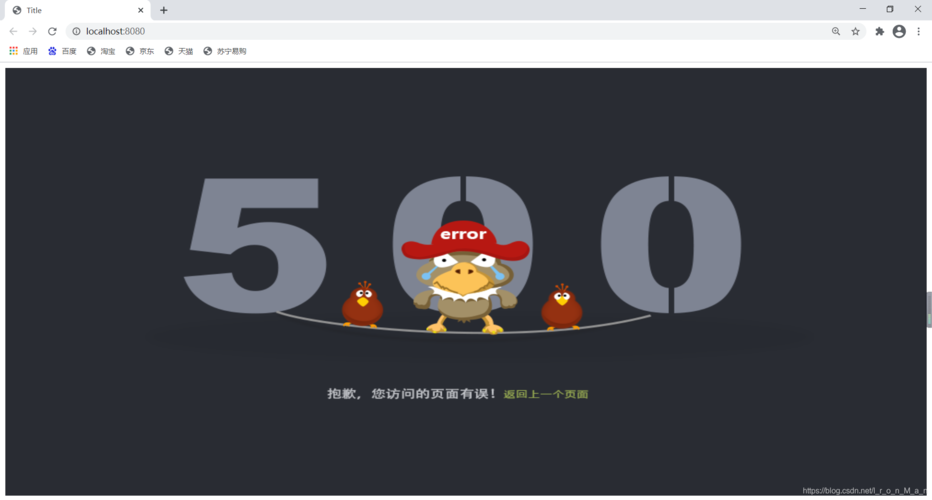
error/404.html
<!DOCTYPE html>
<html lang="zh-CN">
<head>
    <meta charset="UTF-8">404 - 页面未找到</title>
    <style>
        body { font-family: Arial, sans-serif; text-align: center; padding-top: 50px; }
        h1 { color: #d9534f; }
    </style>
</head>
<body>
    <h1>404 - 抱歉,您访问的页面不存在!</h1>
    <p>错误状态码: <span id="status-code"></span></p>
    <p>请求路径: <span id="request-uri"></span></p>
    <script>
        // 使用 JavaScript 从 request 属性中获取值并显示
        document.getElementById("status-code").innerText = "<%= request.getAttribute("javax.servlet.error.status_code") %>";
        document.getElementById("request-uri").innerText = "<%= request.getAttribute("javax.servlet.error.request_uri") %>";
    </script>
</body>
</html>
error/500.html
<!DOCTYPE html>
<html lang="zh-CN">
<head>
    <meta charset="UTF-8">500 - 服务器内部错误</title>
    <style>
        body { font-family: Arial, sans-serif; text-align: center; padding-top: 50px; }
        h1 { color: #d9534f; }
    </style>
</head>
<body>
    <h1>500 - 抱歉,服务器出错了!</h1>
    <p>错误信息: <span id="error-message"></span></p>
    <p>异常类型: <span id="exception-type"></span></p>
    <script>
        document.getElementById("error-message").innerText = "<%= request.getAttribute("javax.servlet.error.message") %>";
        document.getElementById("exception-type").innerText = "<%= request.getAttribute("javax.servlet.error.exception_type") %>";
    </script>
</body>
</html>
创建一个会触发错误的 Servlet
src/main/java/com/example/MyServlet.java
package com.example;
import javax.servlet.ServletException;
import javax.servlet.annotation.WebServlet;
import javax.servlet.http.HttpServlet;
import javax.servlet.http.HttpServletRequest;
import javax.servlet.http.HttpServletResponse;
import java.io.IOException;
@WebServlet("/causeError") // 使用注解映射,与 web.xml 无关
public class MyServlet extends HttpServlet {
    @Override
    protected void doGet(HttpServletRequest req, HttpServletResponse resp) throws ServletException, IOException {
        // 模拟一个算术异常,会触发 500 错误页面
        int a = 10;
        int b = 0;
        int c = a / b; // 这里会抛出 ArithmeticException
    }
}
使用注解(Servlet 3.0+)
从 Servlet 3.0 开始,引入了 @WebServlet 等注解,使得配置更加简洁。错误页面的配置仍然需要 web.xml,目前没有纯注解的方式来配置全局错误页面。
最佳实践是:
- Servlet 映射:使用
@WebServlet。 - 错误页面配置:仍然使用
web.xml。
如果你完全不想使用 web.xml,那么你就失去了声明式错误页面跳转的能力,必须在代码中手动处理。
完整示例(注解 + web.xml 方式)
这种方式和方式一几乎完全一样,只是 Servlet 的定义方式改为了注解。
项目结构: (与方式一相同)
web.xml 配置 (与方式一完全相同)
<!-- ... 与上面方式一的 web.xml 内容相同 ... -->
错误页面 (与方式一完全相同)
error/404.html 和 error/500.html 的内容与上面相同。
创建 Servlet (使用注解)
src/main/java/com/example/MyServlet.java
package com.example;
import javax.servlet.ServletException;
import javax.servlet.annotation.WebServlet;
import javax.servlet.http.HttpServlet;
import javax.servlet.http.HttpServletRequest;
import javax.servlet.http.HttpServletResponse;
import java.io.IOException;
// 使用 @WebServlet 注解来映射 URL
@WebServlet("/causeError")
public class MyServlet extends HttpServlet {
    @Override
    protected void doGet(HttpServletRequest req, HttpServletResponse resp) throws ServletException, IOException {
        // 访问 /causeError 时,重定向到一个不存在的页面,触发 404
        resp.sendRedirect("/this-page-does-not-exist.html");
    }
    @Override
    protected void doPost(HttpServletRequest req, HttpServletResponse resp) throws ServletException, IOException {
        // 模拟一个算术异常,会触发 500 错误页面
        int a = 10;
        int b = 0;
        int c = a / b;
    }
}
总结与对比
| 特性 | web.xml 配置 |
注解 (@WebServlet) |
|---|---|---|
| Servlet 映射 | 使用 <servlet> 和 <servlet-mapping> |
使用 @WebServlet 注解,更简洁 |
| 错误页面配置 | 必须使用 <error-page> |
仍然必须使用 <error-page> |
| 适用版本 | 所有 Servlet 版本 | Servlet 3.0+ |
| 优点 | 传统、稳定、配置集中 | Servlet 映射更简洁,无需修改 web.xml |
| 缺点 | 配置繁琐,XML 文件可读性有时不如注解 | 错误页面配置仍依赖 web.xml |
最终建议:
对于现代项目(Servlet 3.0+),推荐采用 “注解 + web.xml” 的混合模式。
- 使用
@WebServlet等注解来定义 Servlet、Filter、Listener,因为这些配置是应用特有的。 - 仍然在
web.xml中配置<error-page>,因为这是全局的、与部署描述相关的配置,且目前没有更好的替代方案,这既保持了代码的简洁性,又能实现强大的全局错误处理功能。











