Of course! Converting a String to an XML structure in Java is a common task. The best approach depends on whether the XML is well-formed (valid) or just a string that looks like XML.
Here’s a comprehensive guide covering the most common scenarios, from simple parsing to handling namespaces and validation.
Summary of Approaches
| Method | When to Use | Pros | Cons |
|---|---|---|---|
DocumentBuilder (DOM) |
Standard, simple parsing. The go-to for most cases. | Simple, standard, easy to navigate the tree. | High memory usage for large XML files. |
SAXParser (SAX) |
For very large XML files where memory is a concern. | Very low memory usage, fast. | More complex, event-driven, not easy to modify the tree. |
JAXB (Data Binding) |
When you have a predefined Java class structure to map to. | Automatically maps XML to Java objects (POJOs). | Requires schema/annotations, more setup. |
StAX (Streaming API) |
A good middle-ground between DOM and SAX. | Memory efficient, allows for both reading and writing. | More complex than DOM, more flexible than SAX. |
The Standard Approach: DocumentBuilder (DOM - Document Object Model)
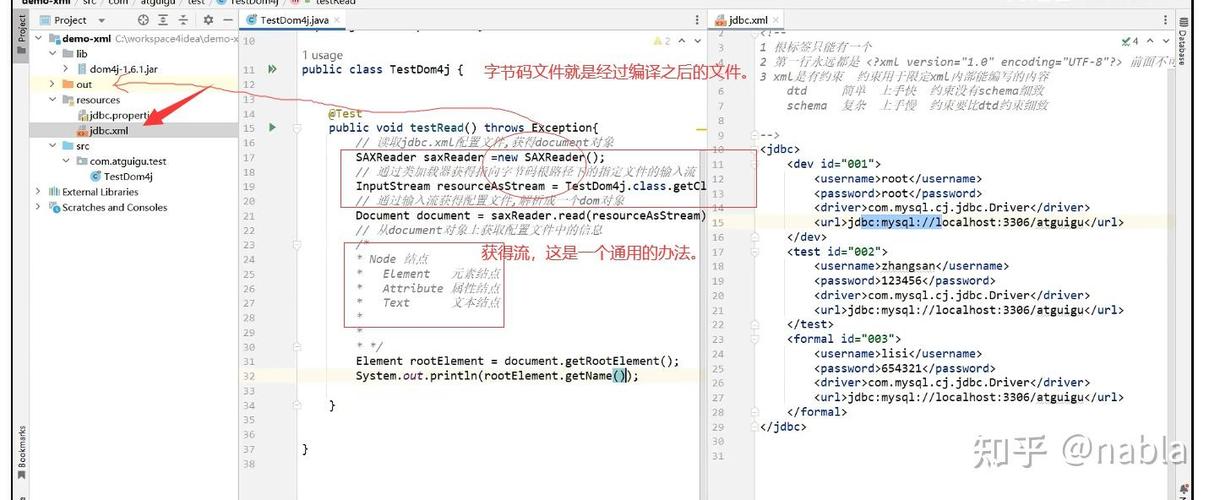
This is the most common and straightforward method. It parses the entire XML string into an in-memory tree structure (Document), which you can then easily navigate and manipulate.
Step-by-Step Example
Create a Java Class
import org.w3c.dom.Document;
import org.w3c.dom.Element;
import org.w3c.dom.Node;
import org.w3c.dom.NodeList;
import javax.xml.parsers.DocumentBuilder;
import javax.xml.parsers.DocumentBuilderFactory;
import java.io.ByteArrayInputStream;
public class StringToXmlConverter {
    public static void main(String[] args) {
        // 1. Your XML String
        String xmlString = "<library>\n" +
                "  <book id=\"101\">\n" +
                "    <title>Java Programming</title>\n" +
                "    <author>John Doe</author>\n" +
                "  </book>\n" +
                "  <book id=\"102\">\n" +
                "    <title>Effective Java</title>\n" "    <author>Joshua Bloch</author>\n" +
                "  </book>\n" +
                "</library>";
        try {
            // 2. Create a DocumentBuilderFactory
            DocumentBuilderFactory factory = DocumentBuilderFactory.newInstance();
            // 3. Create a DocumentBuilder
            DocumentBuilder builder = factory.newDocumentBuilder();
            // 4. Parse the XML string
            // We use a ByteArrayInputStream to turn the String into a stream that the parser can read.
            Document document = builder.parse(new ByteArrayInputStream(xmlString.getBytes()));
            // 5. Optional: Normalize the XML structure (e.g., combine adjacent text nodes)
            document.getDocumentElement().normalize();
            // 6. Work with the Document object
            System.out.println("Root element: " + document.getDocumentElement().getNodeName());
            // Get all book elements
            NodeList nodeList = document.getElementsByTagName("book");
            for (int i = 0; i < nodeList.getLength(); i++) {
                Node node = nodeList.item(i);
                if (node.getNodeType() == Node.ELEMENT_NODE) {
                    Element element = (Element) node;
                    // Get the 'id' attribute
                    String id = element.getAttribute("id");
                    System.out.println("\nCurrent Element: " + element.getNodeName());
                    System.out.println("Book ID: " + id);
                    // Get child elements
                    NodeList titleList = element.getElementsByTagName("title");
                    Element titleElement = (Element) titleList.item(0);
                    System.out.println("Title: " + titleElement.getTextContent());
                    NodeList authorList = element.getElementsByTagName("author");
                    Element authorElement = (Element) authorList.item(0);
                    System.out.println("Author: " + authorElement.getTextContent());
                }
            }
        } catch (Exception e) {
            e.printStackTrace();
        }
    }
}
How to Run This Code
You need to include a library that provides the XML parsing API. Since Java 6, this is included in the standard library (javax.xml). However, if you're using a build tool like Maven or Gradle, you should declare it.
Maven (pom.xml):
<dependencies>
    <dependency>
        <groupId>javax.xml</groupId>
        <artifactId>jaxp-api</artifactId>
        <version>1.4.2</version> <!-- Or a more recent version -->
    </dependency>
</dependencies>
Gradle (build.gradle):
implementation 'javax.xml:jaxp-api:1.4.2' // Or a more recent version
Handling Namespaces
If your XML uses namespaces, you must tell the parser about them.
// ... (setup is the same as above)
String xmlWithNamespace = "<ns:library xmlns:ns=\"http://example.com/library\">\n" +
        "  <ns:book id=\"101\">\n" +
        "    <ns:title>Java Programming</ns:title>\n" +
        "  </ns:book>\n" +
        "</ns:library>";
try {
    DocumentBuilderFactory factory = DocumentBuilderFactory.newInstance();
    // IMPORTANT: Enable namespace awareness
    factory.setNamespaceAware(true);
    DocumentBuilder builder = factory.newDocumentBuilder();
    Document document = builder.parse(new ByteArrayInputStream(xmlWithNamespace.getBytes()));
    document.getDocumentElement().normalize();
    // Now you must use the full namespace URI in getElementsByTagNameNS
    // First argument is the namespace URI, second is the local name
    NodeList nodeList = document.getElementsByTagNameNS("http://example.com/library", "book");
    // ... rest of the code is similar, but elements will have their full names
    for (int i = 0; i < nodeList.getLength(); i++) {
        Element element = (Element) nodeList.item(i);
        System.out.println("Found book with ID: " + element.getAttribute("id"));
        NodeList titleList = element.getElementsByTagNameNS("http://example.com/library", "title");
        System.out.println("Title: " + titleList.item(0).getTextContent());
    }
} catch (Exception e) {
    e.printStackTrace();
}
Alternative: Using JAXB (Java Architecture for XML Binding)
JAXB is ideal when you want to directly convert XML into Java objects (POJOs) and vice-versa. This is often called "data binding".
Define Java Classes that match the XML structure.
// Library.java
import javax.xml.bind.annotation.XmlElement;
import javax.xml.bind.annotation.XmlRootElement;
import java.util.ArrayList;
import java.util.List;
@XmlRootElement(name = "library")
public class Library {
    private List<Book> books = new ArrayList<>();
    @XmlElement(name = "book")
    public List<Book> getBooks() {
        return books;
    }
    public void setBooks(List<Book> books) {
        this.books = books;
    }
}
// Book.java
import javax.xml.bind.annotation.XmlAttribute;
import javax.xml.bind.annotation.XmlElement;
public class Book {
    private String id;
    private String title;
    private String author;
    @XmlAttribute
    public String getId() {
        return id;
    }
    public void setId(String id) {
        this.id = id;
    }
    @XmlElement
    public String getTitle() {
        return title;
    }
    public void setTitle(String title) {
        this.title = title;
    }
    @XmlElement
    public String getAuthor() {
        return author;
    }
    public void setAuthor(String author) {
        this.author = author;
    }
}
Create a JAXB Context and unmarshal the string.
import javax.xml.bind.JAXBContext;
import javax.xml.bind.Unmarshaller;
import java.io.StringReader;
public class JaxbExample {
    public static void main(String[] args) {
        String xmlString = "<library>\n" +
                "  <book id=\"101\">\n" +
                "    <title>Java Programming</title>\n" +
                "    <author>John Doe</author>\n" +
                "  </book>\n" +
                "</library>";
        try {
            // 1. Create a JAXBContext for the root class
            JAXBContext jaxbContext = JAXBContext.newInstance(Library.class);
            // 2. Create an Unmarshaller
            Unmarshaller jaxbUnmarshaller = jaxbContext.createUnmarshaller();
            // 3. Unmarshal the XML string into a Library object
            // We use a StringReader to turn the String into a stream.
            Library library = (Library) jaxbUnmarshaller.unmarshal(new StringReader(xmlString));
            // 4. Work with the Java object
            System.out.println("Library has " + library.getBooks().size() + " book(s).");
            for (Book book : library.getBooks()) {
                System.out.println("Book ID: " + book.getId() + ", Title: " + book.getTitle());
            }
        } catch (Exception e) {
            e.printStackTrace();
        }
    }
}
Maven/Gradle Dependency for JAXB:
- Java 9 and below:
javax.xml.bind:jaxb-api - Java 10 and above: JAXB is included in the standard library, but you might need the API if you're using a build tool.
When to Use Other APIs
-
SAXParser: Use this for huge XML gigabytes files. It doesn't load the whole file into memory. Instead, it fires events (
startElement,endElement,characters) as it reads the file sequentially. You write a handler class to react to these events. It's very fast but not suitable for modifying the XML. -
StAX (Streaming API for XML): This is a modern, pull-based API. You control the parsing loop, asking the parser for the "next event" (e.g.,
next(),nextTag()). It's more flexible and often easier to use than SAX while still being memory-efficient. It's great for both reading and writing large XML files.