Of course! Here's a comprehensive guide on how to throw exceptions in Java, covering the syntax, best practices, and examples.
The throw Keyword
In Java, the throw keyword is used to explicitly throw an exception from a method or a block of code. This is called "throwing an exception manually" or "creating an exception."
The basic syntax is:
throw new ExceptionType("Error message");
Key points:
throw: The keyword that signals an exception is being thrown.new ExceptionType(...): You create an instance of an exception class.- This can be a built-in exception (like
IllegalArgumentException,IOException). - Or it can be a custom exception class you create (which should extend
Exceptionor one of its subclasses).
- This can be a built-in exception (like
"Error message": A descriptive string that explains the problem. This message is passed to the exception's constructor and can be retrieved later usinge.getMessage().
When to Throw an Exception
You should throw an exception when a method encounters an error situation that it cannot handle itself and needs to notify the calling code about the problem.

Common scenarios include:
- Invalid Input: A method receives arguments that are not in the expected range or format.
- Example: A method that calculates a square root should throw an
IllegalArgumentExceptionif the number is negative.
- Example: A method that calculates a square root should throw an
- Failed Precondition: A required state or condition is not met.
- Example: A method that processes a file expects the file to exist. If it doesn't, it should throw an
FileNotFoundException.
- Example: A method that processes a file expects the file to exist. If it doesn't, it should throw an
- Business Logic Violation: An operation violates a business rule.
- Example: A method to withdraw money from a bank account should throw an
InsufficientFundsExceptionif the withdrawal amount is greater than the balance.
- Example: A method to withdraw money from a bank account should throw an
- Resource Not Available: A required resource (like a database connection or network socket) cannot be obtained.
The throws Keyword vs. throw
This is a very common point of confusion. They are related but serve different purposes.
| Keyword | Purpose | Location | Example |
|---|---|---|---|
throw |
Creates and propagates an exception object. | Inside a method body. | throw new IOException("File not found"); |
throws |
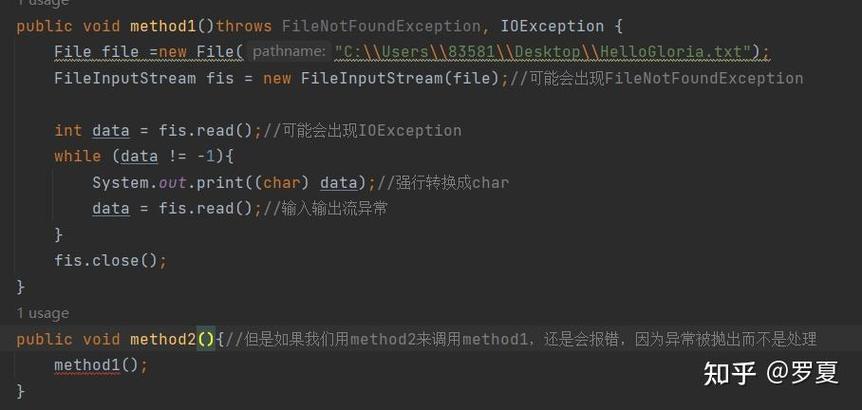
Declares that a method might throw a specific exception. It delegates the handling responsibility to the caller. | In the method signature, after the parameter list. | public void readFile() throws IOException { ... } |
In short:
- You use
throwto signal an error has occurred. - You use
throwsto warn the caller that your method might signal an error.
Code Examples
Let's see throw in action with different scenarios.
Example 1: Throwing a Built-in Exception
This method checks if a user's age is valid. If not, it throws an IllegalArgumentException.
public class AgeValidator {
    /**
     * Validates that the age is a positive number.
     * @param age The age to validate.
     * @throws IllegalArgumentException if the age is not positive.
     */
    public void validateAge(int age) {
        if (age <= 0) {
            // Create and throw an exception with a descriptive message
            throw new IllegalArgumentException("Age must be a positive number. Received: " + age);
        }
        System.out.println("Age is valid: " + age);
    }
    public static void main(String[] args) {
        AgeValidator validator = new AgeValidator();
        // This will work fine
        validator.validateAge(25);
        // This line will cause the exception to be thrown
        try {
            validator.validateAge(-5);
        } catch (IllegalArgumentException e) {
            System.out.println("Caught an exception: " + e.getMessage());
        }
    }
}
Output:
Age is valid: 25
Caught an exception: Age must be a positive number. Received: -5
Example 2: Throwing a Custom Exception
Sometimes, you need to throw an exception that is specific to your application's domain. Let's create a custom exception.
Step 1: Create the custom exception class.
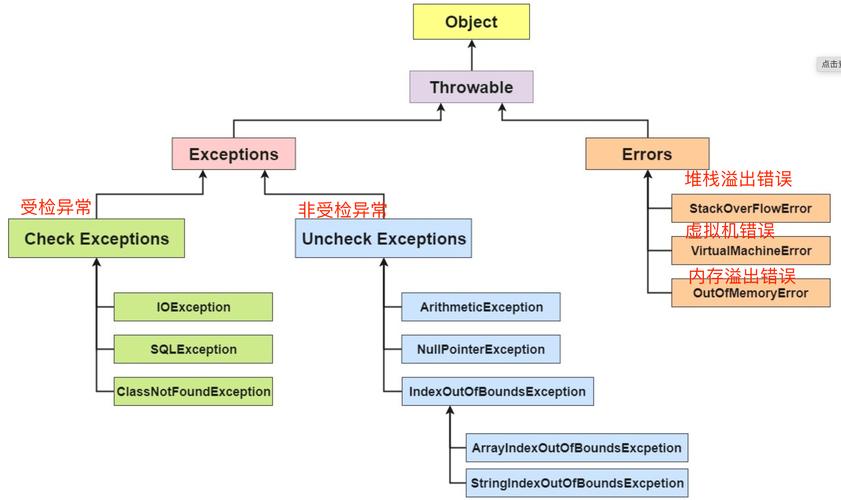
It's good practice to make it a RuntimeException (unchecked) if the condition is a programming error, or a regular Exception (checked) if it's a recoverable condition that the caller must handle.
// Custom unchecked exception
public class InsufficientFundsException extends RuntimeException {
    public InsufficientFundsException(String message) {
        super(message);
    }
}
Step 2: Use the custom exception in a method.
public class BankAccount {
    private double balance;
    public BankAccount(double initialBalance) {
        if (initialBalance < 0) {
            throw new IllegalArgumentException("Initial balance cannot be negative.");
        }
        this.balance = initialBalance;
    }
    /**
     * Withdraws money from the account.
     * @param amount The amount to withdraw.
     * @throws InsufficientFundsException if the withdrawal amount is greater than the balance.
     */
    public void withdraw(double amount) {
        if (amount <= 0) {
            throw new IllegalArgumentException("Withdrawal amount must be positive.");
        }
        if (amount > balance) {
            throw new InsufficientFundsException("Cannot withdraw $" + amount + ". Balance is only $" + balance);
        }
        balance -= amount;
        System.out.println("Withdrew $" + amount + ". New balance: $" + balance);
    }
    public static void main(String[] args) {
        BankAccount account = new BankAccount(100.0);
        try {
            account.withdraw(50.0); // This will work
            account.withdraw(100.0); // This will fail
        } catch (InsufficientFundsException e) {
            System.err.println("Transaction failed: " + e.getMessage());
        }
    }
}
Output:
Withdrew $50.0. New balance: $50.0
Transaction failed: Cannot withdraw $100.0. Balance is only $50.0
Best Practices for Throwing Exceptions
-
Be Specific: Throw the most specific exception type possible. Throwing
RuntimeExceptionis less informative than throwingNullPointerExceptionorIllegalArgumentException. -
Provide a Clear Message: The exception message should clearly describe the problem. A good message helps developers debug the issue quickly.
-
Document Exceptions: Use
@throwsin your JavaDoc to declare which exceptions your method can throw. This is crucial for API design./** * Divides two numbers. * @param a The numerator. * @param b The denominator. * @return The result of a / b. * @throws ArithmeticException if b is zero. */ public double divide(int a, int b) { if (b == 0) { throw new ArithmeticException("Cannot divide by zero."); } return (double) a / b; } -
Don't Catch and Re-throw Blindly: If you catch an exception and immediately re-throw it, you often lose valuable stack trace information. If you must re-throw, wrap it in a new, more specific exception or re-throw the original one.
// Bad practice - loses context try { // some code } catch (IOException e) { throw e; // Just re-throwing } // Better practice - wrap it with more context try { // some code } catch (IOException e) { throw new MyApplicationException("Failed to process user data", e); } -
Use Unchecked Exceptions for Recoverable Errors: For programming errors (like passing
nullwhere it's not expected), use unchecked exceptions (RuntimeExceptionand its subclasses). For conditions that a client should anticipate and recover from (like a file not found), use checked exceptions. Modern Java trends favor using unchecked exceptions more often to reduce "exception clutter" in code.