
Of course! The combination of Java, MySQL, and String handling is a fundamental task in almost every Java application that interacts with a database. This topic covers several critical areas:
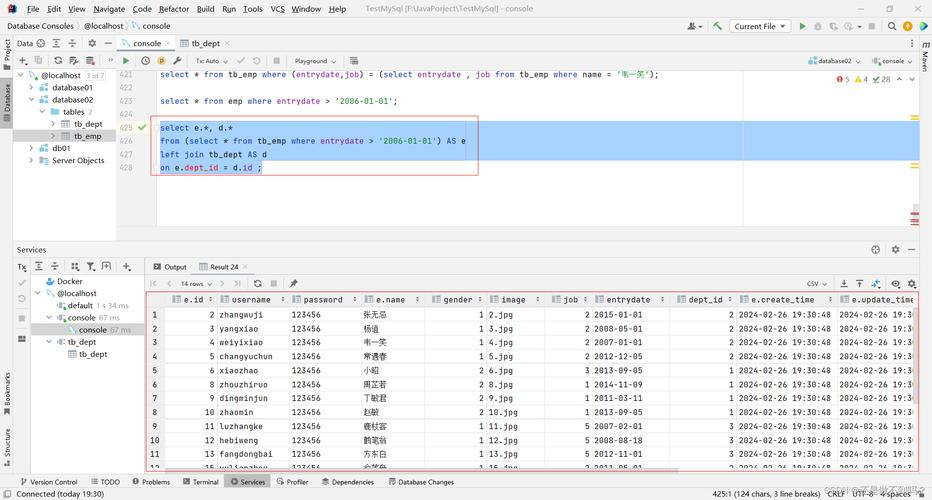
- Connecting Java to MySQL: Establishing a connection using a JDBC URL.
- Executing Queries: Sending SQL (which are strings) from Java to MySQL.
- Handling Data Retrieval: Getting string data from the database result set.
- Security: The most important part—preventing SQL Injection by using
PreparedStatement. - Best Practices: Using modern
try-with-resourcesand connection pooling.
Let's break it down step-by-step.
Prerequisites: Setting Up Your Project
Before you start, you need the MySQL JDBC driver (also called Connector/J).
For Maven Projects:
Add this dependency to your pom.xml file. This is the recommended approach as it manages the driver version for you.
<dependencies>
    <!-- MySQL Connector/J -->
    <dependency>
        <groupId>com.mysql</groupId>
        <artifactId>mysql-connector-j</artifactId>
        <version>8.0.33</version> <!-- Use the latest version -->
    </dependency>
</dependencies>
For Gradle Projects:
Add this to your build.gradle file.
dependencies {
    // MySQL Connector/J
    implementation 'com.mysql:mysql-connector-j:8.0.33' // Use the latest version
}
For Manual Projects:
- Download the driver from the MySQL Connector/J download page.
- Add the downloaded
.jarfile to your project's classpath.
Establishing a Connection (The JDBC URL)
The connection to the database is established using a java.sql.Connection object. The key is the JDBC URL, which is a special string that tells the JDBC driver how to connect to your MySQL database.
URL Format: jdbc:mysql://[host][:port]/[database][?property1=value1][&property2=value2]
host: The server address (e.g.,localhost,0.0.1, or a remote IP).port: The MySQL port (default is3306).database: The name of the database you want to connect to.properties: Optional settings for the connection.
Example URL Strings:
// Standard connection to a local database
String url = "jdbc:mysql://localhost:3306/mydatabase";
// Connection with specific properties (recommended)
// - useSSL=false: For older versions of MySQL. Newer versions (8.0+) handle this automatically.
// - allowPublicKeyRetrieval=true: Helps with certificate-based authentication.
// - serverTimezone=UTC: Sets the timezone for the connection to avoid warnings.
String urlWithProperties = "jdbc:mysql://localhost:3306/mydatabase?useSSL=false&allowPublicKeyRetrieval=true&serverTimezone=UTC";
Complete Connection Code:
import java.sql.Connection;
import java.sql.DriverManager;
import java.sql.SQLException;
public class MySqlConnectionExample {
    // Replace with your database details
    private static final String DB_URL = "jdbc:mysql://localhost:3306/mydatabase?useSSL=false&allowPublicKeyRetrieval=true&serverTimezone=UTC";
    private static final String USER = "root";
    private static final String PASS = "yourpassword";
    public static void main(String[] args) {
        // The try-with-resources statement ensures the connection is closed automatically.
        try (Connection conn = DriverManager.getConnection(DB_URL, USER, PASS)) {
            if (conn != null) {
                System.out.println("Connected to the database successfully!");
            }
        } catch (SQLException e) {
            System.err.println("Connection failed! Check output console");
            e.printStackTrace();
        }
    }
}
Executing Queries and Handling Strings
Once connected, you can execute SQL queries. There are two main ways to do this:
A. Statement (The Dangerous Way - Prone to SQL Injection)
You create a SQL query as a Java string and execute it. This is highly discouraged for queries that take user input.
import java.sql.*;
public class StatementExample {
    private static final String DB_URL = "jdbc:mysql://localhost:3306/mydatabase?useSSL=false&allowPublicKeyRetrieval=true&serverTimezone=UTC";
    private static final String USER = "root";
    private static final String PASS = "yourpassword";
    public static void main(String[] args) {
        String sql = "SELECT id, name, email FROM users WHERE name = 'John Doe'";
        try (Connection conn = DriverManager.getConnection(DB_URL, USER, PASS);
             Statement stmt = conn.createStatement();
             ResultSet rs = stmt.executeQuery(sql)) {
            System.out.println("Users named John Doe:");
            // Loop through the result set and print string data
            while (rs.next()) {
                // Retrieve by column name is safer and more readable
                int id = rs.getInt("id");
                String name = rs.getString("name");
                String email = rs.getString("email");
                System.out.println("ID: " + id + ", Name: " + name + ", Email: " + email);
            }
        } catch (SQLException e) {
            e.printStackTrace();
        }
    }
}
The SQL Injection Problem: Imagine you get the name from a user input field.
// VULNERABLE CODE - DO NOT DO THIS!
String userInput = "John Doe'; DROP TABLE users; --";
String sql = "SELECT * FROM users WHERE name = '" + userInput + "'";
// The final SQL string becomes: SELECT * FROM users WHERE name = 'John Doe'; DROP TABLE users; --'
// This could delete your entire users table!
B. PreparedStatement (The Safe and Recommended Way)
A PreparedStatement pre-compiles the SQL query. You then use as placeholders for parameters and set the actual values using methods like setString(). This completely prevents SQL injection.
import java.sql.*;
public class PreparedStatementExample {
    private static final String DB_URL = "jdbc:mysql://localhost:3306/mydatabase?useSSL=false&allowPublicKeyRetrieval=true&serverTimezone=UTC";
    private static final String USER = "root";
    private static final String PASS = "yourpassword";
    public static void main(String[] args) {
        // The SQL query with a placeholder (?)
        String sql = "SELECT id, name, email FROM users WHERE name = ?";
        // Using try-with-resources for Connection, PreparedStatement, and ResultSet
        try (Connection conn = DriverManager.getConnection(DB_URL, USER, PASS);
             PreparedStatement pstmt = conn.prepareStatement(sql)) {
            // Set the value for the first placeholder (?)
            // The first parameter is the index of the placeholder (starting from 1).
            // The second parameter is the value to set.
            pstmt.setString(1, "Jane Smith");
            System.out.println("Executing query for user: Jane Smith");
            // Execute the query and get the result set
            try (ResultSet rs = pstmt.executeQuery()) {
                while (rs.next()) {
                    int id = rs.getInt("id");
                    String name = rs.getString("name");
                    String email = rs.getString("email");
                    System.out.println("ID: " + id + ", Name: " + name + ", Email: " + email);
                }
            }
        } catch (SQLException e) {
            e.printStackTrace();
        }
    }
}
Inserting String Data into the Database
Using PreparedStatement is just as easy for INSERT statements.
import java.sql.*;
public class InsertStringExample {
    private static final String DB_URL = "jdbc:mysql://localhost:3306/mydatabase?useSSL=false&allowPublicKeyRetrieval=true&serverTimezone=UTC";
    private static final String USER = "root";
    private static final String PASS = "yourpassword";
    public static void main(String[] args) {
        String sql = "INSERT INTO users (name, email) VALUES (?, ?)";
        try (Connection conn = DriverManager.getConnection(DB_URL, USER, PASS);
             PreparedStatement pstmt = conn.prepareStatement(sql)) {
            // Set the string values for the placeholders
            pstmt.setString(1, "Peter Jones");
            pstmt.setString(2, "peter.jones@example.com");
            // Use executeUpdate() for INSERT, UPDATE, or DELETE
            int rowsAffected = pstmt.executeUpdate();
            System.out.println(rowsAffected + " row(s) inserted successfully.");
        } catch (SQLException e) {
            e.printStackTrace();
        }
    }
}
Complete Example: All-in-One
Here is a full example that creates a table, inserts data, and retrieves it, demonstrating all the concepts.
import java.sql.*;
public class CompleteExample {
    private static final String DB_URL = "jdbc:mysql://localhost:3306/mydatabase?useSSL=false&allowPublicKeyRetrieval=true&serverTimezone=UTC";
    private static final String USER = "root";
    private static final String PASS = "yourpassword";
    public static void main(String[] args) {
        // Step 1: Create table (if it doesn't exist)
        createTable();
        // Step 2: Insert some data
        insertData();
        // Step 3: Retrieve and display the data
        fetchData();
    }
    private static void createTable() {
        String createTableSQL = "CREATE TABLE IF NOT EXISTS employees ("
                              + "id INT AUTO_INCREMENT PRIMARY KEY, "
                              + "name VARCHAR(100) NOT NULL, "
                              + "position VARCHAR(100) NOT NULL"
                              + ")";
        try (Connection conn = DriverManager.getConnection(DB_URL, USER, PASS);
             Statement stmt = conn.createStatement()) {
            stmt.execute(createTableSQL);
            System.out.println("Table 'employees' is ready.");
        } catch (SQLException e) {
            System.err.println("Error creating table: " + e.getMessage());
        }
    }
    private static void insertData() {
        // Using try-with-resources for PreparedStatement
        String insertSQL = "INSERT INTO employees (name, position) VALUES (?, ?)";
        try (Connection conn = DriverManager.getConnection(DB_URL, USER, PASS);
             PreparedStatement pstmt = conn.prepareStatement(insertSQL)) {
            // Insert first employee
            pstmt.setString(1, "Alice Williams");
            pstmt.setString(2, "Software Engineer");
            pstmt.executeUpdate();
            // Insert second employee
            pstmt.setString(1, "Bob Brown");
            pstmt.setString(2, "Project Manager");
            pstmt.executeUpdate();
            System.out.println("Data inserted successfully.");
        } catch (SQLException e) {
            System.err.println("Error inserting data: " + e.getMessage());
        }
    }
    private static void fetchData() {
        String selectSQL = "SELECT id, name, position FROM employees";
        System.out.println("\n--- Employee List ---");
        try (Connection conn = DriverManager.getConnection(DB_URL, USER, PASS);
             Statement stmt = conn.createStatement();
             ResultSet rs = stmt.executeQuery(selectSQL)) {
            while (rs.next()) {
                // Retrieve by column name is robust
                int id = rs.getInt("id");
                String name = rs.getString("name");
                String position = rs.getString("position");
                System.out.printf("ID: %d, Name: %s, Position: %s%n", id, name, position);
            }
        } catch (SQLException e) {
            System.err.println("Error fetching data: " + e.getMessage());
        }
    }
}
Key Takeaways and Best Practices
- Always Use
PreparedStatement: It is the industry standard for preventing SQL injection, which is a critical security vulnerability. - Use
try-with-resources: This construct (try (Connection conn = ...)) automatically closes yourConnection,Statement, andResultSetobjects, preventing resource leaks. - Retrieve Data by Column Name: Instead of
rs.getInt(1), users.getInt("id"). It's more readable, less error-prone if the column order changes, and provides better performance in some JDBC drivers. - Use Connection Pooling: For real-world applications, never create a new connection for every request. Use a connection pool (like HikariCP, which is excellent) to manage a cache of database connections.
- Store Credentials Securely: Never hardcode database credentials directly in your source code. Use environment variables, a configuration file (e.g.,
config.properties), or a secrets management system.











