Of course! Let's break down Java, Sessions, and Cookies. This is a fundamental concept in web development, especially for building stateful applications with Java technologies like Servlets and JSP.
The Core Problem: HTTP is Stateless
First, it's crucial to understand that the HTTP protocol is stateless. This means that every single request a browser makes to a web server is completely independent. The server doesn't automatically know that two consecutive requests are from the same user.
Imagine a shopping cart:
- You add an item to your cart. The server stores this information.
- You click "View Cart." The server has no idea who you are, so it can't show you your cart. It sees this as a brand new request.
To solve this, we need a way to "remember" a user across multiple requests. This is where Sessions and Cookies come in. They work together to create a stateful experience from a stateless protocol.
Cookies: The "Post-it Note"
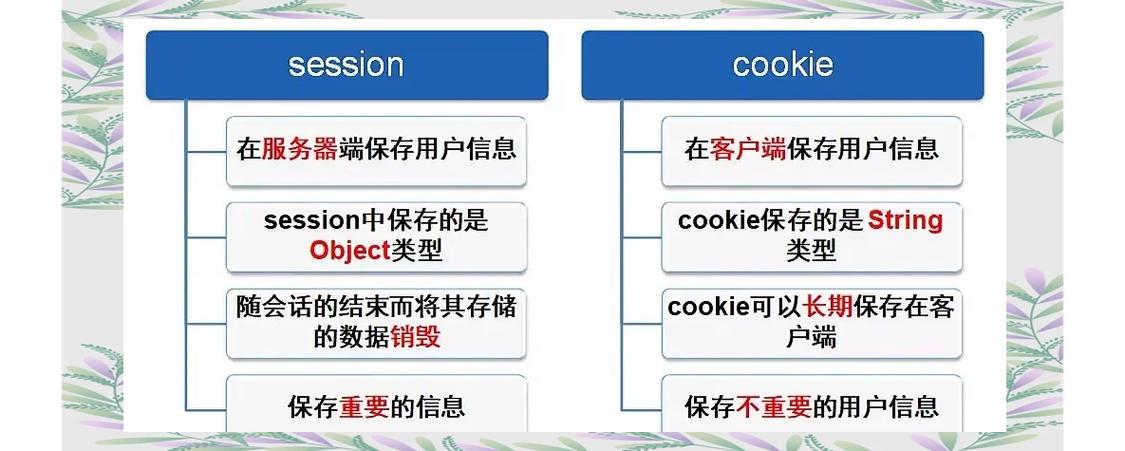
A Cookie is a small piece of data (a text file) that a server sends to a user's web browser. The browser then stores it and includes it in every subsequent request to the same server.
- Analogy: A server gives you a numbered post-it note (the cookie) and says, "Please show me this note with every request you make from now on."
- Characteristics:
- Stored on the Client: The cookie is saved on the user's machine.
- Size Limit: Typically small (around 4KB).
- Data: Simple key-value pairs.
- Security: Can be marked as
HttpOnly(not accessible by JavaScript) andSecure(only sent over HTTPS) to improve security.
Sessions: The "Filing Cabinet" on the Server
A Session is a mechanism to store data on the server side that is specific to a particular user. The server needs a way to associate a session with a specific user. This is where the cookie comes back in.
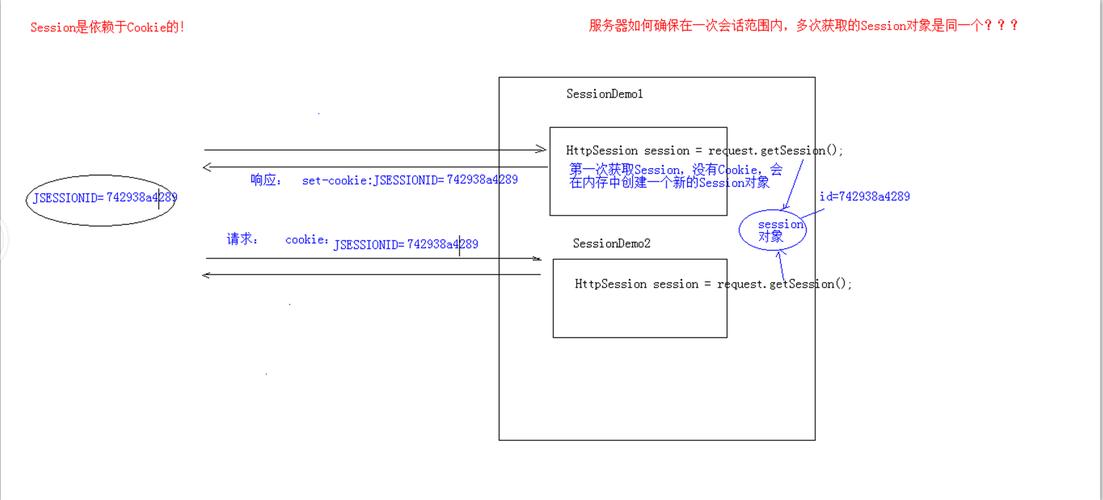
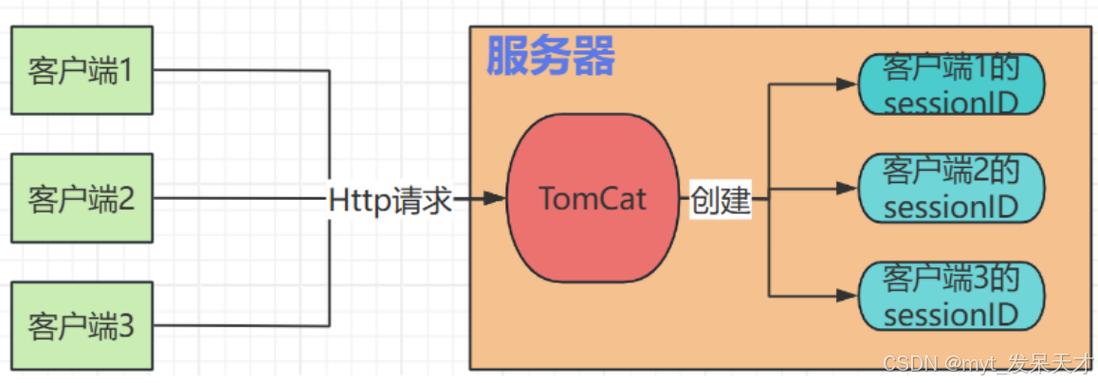
- Analogy: The server has a large filing cabinet (the session store). It creates a new folder (a session) for a new user and puts the user's information inside. It then writes the folder's ID number on the post-it note (the cookie) and gives it back to the user. On the next request, the user shows the post-it note, and the server looks up the folder with that ID to retrieve the user's data.
- Characteristics:
- Stored on the Server: The actual session data is kept on the web server. This is more secure as sensitive data never leaves the server.
- Managed by the Server: The server handles the creation, maintenance, and destruction of sessions.
- Unique ID: Each session has a unique ID (a
JSESSIONIDin Java's case).
How They Work Together: The Handshake
Here is the step-by-step process of how Sessions and Cookies work in a typical Java web application (Servlet/JSP):
-
User's First Request: A user visits your website for the first time.
- The server receives the request. It has no session information for this user.
- The server creates a new
HttpSessionobject in memory. This is the "folder" in our analogy. - The server generates a unique ID for this session (e.g.,
A9B8C7D6E5F4G3H2). - The server creates a cookie named
JSESSIONIDwith this unique ID as its value. - The server adds this
JSESSIONIDcookie to the HTTP response header (Set-Cookie: JSESSIONID=A9B8C7D6E5F4G3H2; Path=/). - The server can now store data in the session object, e.g.,
request.getSession().setAttribute("username", "john_doe");.
-
User's Subsequent Requests: The user clicks a link or refreshes the page.
 (图片来源网络,侵删)
- The browser automatically sees the
JSESSIONIDcookie it received earlier and includes it in the new HTTP request header (Cookie: JSESSIONID=A9B8C7D6E5F4G3H2). - The server's servlet container (like Tomcat) receives the request and sees the
JSESSIONIDcookie. - The container looks up its session store and finds the session object that corresponds to that ID.
- The container makes this session object available to the servlet via
request.getSession(). - The servlet can now retrieve the data stored in the session:
String username = (String) request.getSession().getAttribute("username");. It will get"john_doe".
- The browser automatically sees the
-
Session Timeout: If the user is inactive for a certain period (e.g., 30 minutes), the server will automatically destroy the session object to free up memory.
Code Examples in Java (Servlets)
Setting Session Data (Writing to the "Filing Cabinet")
import javax.servlet.ServletException;
import javax.servlet.annotation.WebServlet;
import javax.servlet.http.HttpServlet;
import javax.servlet.http.HttpServletRequest;
import javax.servlet.http.HttpServletResponse;
import javax.servlet.http.HttpSession;
import java.io.IOException;
@WebServlet("/login")
public class LoginServlet extends HttpServlet {
    protected void doPost(HttpServletRequest request, HttpServletResponse response) throws ServletException, IOException {
        // 1. Get username from the form
        String username = request.getParameter("username");
        // 2. Get or create the session object
        // This will create a new session if one doesn't exist for this user,
        // or it will retrieve the existing one.
        HttpSession session = request.getSession();
        // 3. Store data in the session
        // This data is stored on the server, associated with the session ID.
        session.setAttribute("username", username);
        session.setAttribute("loginTime", System.currentTimeMillis());
        // 4. Send a response
        response.getWriter().write("Welcome, " + username + "! Your session has been created.");
    }
}
Getting Session Data (Reading from the "Filing Cabinet")
import javax.servlet.ServletException;
import javax.servlet.annotation.WebServlet;
import javax.servlet.http.HttpServlet;
import javax.servlet.http.HttpServletRequest;
import javax.servlet.http.HttpServletResponse;
import javax.servlet.http.HttpSession;
import java.io.IOException;
@WebServlet("/profile")
public class ProfileServlet extends HttpServlet {
    protected void doGet(HttpServletRequest request, HttpServletResponse response) throws ServletException, IOException {
        // 1. Get the existing session
        // IMPORTANT: If you use request.getSession(true) or just request.getSession(),
        // it will create a NEW session if one doesn't exist.
        // If you want to ensure you are only working with an existing session, use:
        HttpSession session = request.getSession(false); // Returns null if no session exists
        // 2. Check if the session exists and contains the data we need
        if (session != null && session.getAttribute("username") != null) {
            String username = (String) session.getAttribute("username");
            long loginTime = (long) session.getAttribute("loginTime");
            response.getWriter().write("<h1>Welcome to your Profile, " + username + "!</h1>");
            response.getWriter().write("<p>You logged in at: " + new java.util.Date(loginTime) + "</p>");
        } else {
            // 3. If no session or user data, redirect to login
            response.sendRedirect("login.html");
        }
    }
}
Invalidating a Session (Closing the "Folder")
import javax.servlet.ServletException;
import javax.servlet.annotation.WebServlet;
import javax.servlet.http.HttpServlet;
import javax.servlet.http.HttpServletRequest;
import javax.servlet.http.HttpServletResponse;
import javax.servlet.http.HttpSession;
import java.io.IOException;
@WebServlet("/logout")
public class LogoutServlet extends HttpServlet {
    protected void doGet(HttpServletRequest request, HttpServletResponse response) throws ServletException, IOException {
        // 1. Get the current session
        HttpSession session = request.getSession(false);
        // 2. Invalidate the session
        // This removes the session from the server and invalidates the JSESSIONID cookie.
        if (session != null) {
            session.invalidate();
        }
        // 3. Inform the user
        response.getWriter().write("You have been logged out successfully.");
    }
}
Important Considerations
Session Tracking without Cookies (URL Rewriting)
What if a user has cookies disabled? The server needs another way to track the session ID. This is done through URL Rewriting.
The server automatically modifies every URL link on the page to include the session ID.
- Original Link:
<a href="profile">My Profile</a> - Rewritten Link:
<a href="profile;jsessionid=A9B8C7D6E5F4G3H2">My Profile</a>
In Java, you can enable this by setting the configuration in your web.xml:
<session-config>
    <tracking-mode>URL</tracking-mode>
</session-config>
Or programmatically in a servlet:
response.encodeURL("somepage"); // For links
response.encodeRedirectURL("somepage"); // For redirects
Security: HttpOnly and Secure
To prevent Cross-Site Scripting (XSS) attacks, you should configure your session cookie