Of course! Let's dive into the topic of Java Properties in a web application context. This is a fundamental concept for managing configuration in a clean, maintainable way.
What are Java Properties Files?
In Java, a properties file is a simple text file with a .properties extension. It's used to store configuration data, such as database credentials, API keys, feature flags, and other settings that might change between environments (development, testing, production).
Key Characteristics:
- Key-Value Pairs: The content is structured as key-value pairs, separated by an equals sign () or a colon ().
- Comments: Lines starting with a hash () or an exclamation mark () are treated as comments and ignored.
- Encoding: They are typically encoded in ISO-8859-1 (Latin-1). For other characters (like Unicode), you can use the escape sequence
\uXXXX.
Example: application.properties
# Database Configuration
db.url=jdbc:mysql://localhost:3306/my_app_db
db.username=admin
db.password=secret_password
db.pool.size=10
# Application Settings
app.name=My Awesome Web App
app.version=1.2.0
feature.new-dashboard.enabled=true
Why Use Properties Files in Web Applications?
Hardcoding configuration values directly into your Java code is a bad practice. Using properties files offers several major advantages:
- Separation of Concerns: Your code (business logic) is separated from your configuration. You don't need to recompile your application when a configuration value changes.
- Environment Management: You can have different properties files for different environments (e.g.,
application-dev.properties,application-prod.properties) and easily switch between them without changing your code. - Security: Sensitive information like database passwords and API keys can be stored outside of your source code, making them easier to secure and manage.
- Maintainability: It's much easier for system administrators and DevOps teams to manage configuration without touching the application's codebase.
How to Load and Use Properties in a Web App
The standard way to manage configuration in a modern Java web application (especially with Spring Boot) is through the application.properties or application.yml file. However, it's crucial to understand the underlying mechanisms.
The Traditional Way: java.util.Properties
This is the core Java API for loading properties files. It's not specific to web apps but is the foundation.
Example: Loading a file from the classpath
Let's say you have config.properties in your src/main/resources directory.
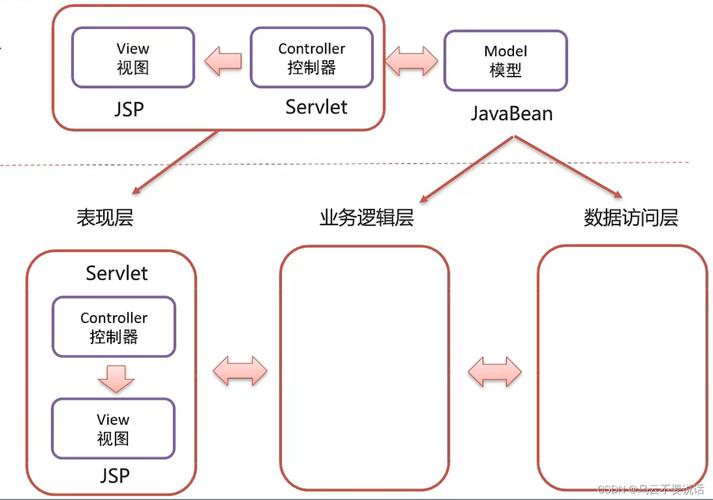
import java.io.InputStream;
import java.util.Properties;
public class PropertyLoader {
    public static void main(String[] args) {
        Properties props = new Properties();
        // Use try-with-resources to ensure the stream is closed automatically
        try (InputStream input = PropertyLoader.class.getClassLoader().getResourceAsStream("config.properties")) {
            if (input == null) {
                System.out.println("Sorry, unable to find config.properties");
                return;
            }
            props.load(input);
            // Get properties and print them
            String dbUrl = props.getProperty("db.url");
            String username = props.getProperty("db.username");
            String password = props.getProperty("db.password");
            System.out.println("Database URL: " + dbUrl);
            System.out.println("Username: " + username);
            System.out.println("Password: " + password);
        } catch (Exception ex) {
            ex.printStackTrace();
        }
    }
}
Important for Web Apps: In a web application (like one running on Tomcat), the classpath includes WEB-INF/classes/. Placing your properties file in src/main/resources ensures it gets copied to WEB-INF/classes/ at build time, making it available on the classpath.
The Modern Way: Spring Boot (The Recommended Approach)
Spring Boot revolutionizes configuration management. It automatically loads application.properties (or .yml) from the following locations, in a specific order (higher in the list overrides lower ones):
- Classpath:
/configsubdirectory of the classpath. - Classpath: The root of the classpath.
- Filesystem:
/configsubdirectory of the current directory. - Filesystem: The current directory.
Accessing Properties in Spring
You can access these properties in several ways:
a) Using @Value Annotation (for individual properties)
This is the simplest way to inject a single property value into a Spring-managed bean (like a @Service, @Controller, etc.).
import org.springframework.beans.factory.annotation.Value;
import org.springframework.stereotype.Service;
@Service
public class MyService {
    @Value("${app.name}") // SpEL syntax to read from properties
    private String appName;
    @Value("${db.url}")
    private String dbUrl;
    public void printConfig() {
        System.out.println("Application Name from @Value: " + appName);
        System.out.println("Database URL from @Value: " + dbUrl);
    }
}
b) Creating a @ConfigurationProperties Bean (for a group of related properties)
This is the best practice for structured configuration. You create a dedicated class to hold a group of related properties.
Step 1: Define the properties in application.properties
# application.properties
app.name=My Awesome App
app.version=1.2.0
db.url=jdbc:mysql://localhost:3306/mydb
db.username=admin
db.password=secret
Step 2: Create a properties class
import org.springframework.boot.context.properties.ConfigurationProperties;
import org.springframework.stereotype.Component;
@Component
@ConfigurationProperties // Binds all properties with matching prefixes
public class AppProperties {
    // The prefix 'app' will map to app.name and app.version
    private String name;
    private String version;
    // The prefix 'db' will map to db.url, db.username, etc.
    private Database database;
    // Nested static class for the 'db' properties
    public static class Database {
        private String url;
        private String username;
        private String password;
        // Getters and Setters for all fields are required!
        public String getUrl() { return url; }
        public void setUrl(String url) { this.url = url; }
        public String getUsername() { return username; }
        public void setUsername(String username) { this.username = username; }
        public String getPassword() { return password; }
        public void setPassword(String password) { this.password = password; }
    }
    // Getters and Setters for AppProperties fields are required!
    public String getName() { return name; }
    public void setName(String name) { this.name = name; }
    public String getVersion() { return version; }
    public void setVersion(String version) { this.version = version; }
    public Database getDatabase() { return database; }
    public void setDatabase(Database database) { this.database = database; }
}
Step 3: Use the properties bean
import org.springframework.stereotype.Service;
@Service
public class MyConfigurableService {
    private final AppProperties appProperties;
    // Constructor injection is the recommended way
    public MyConfigurableService(AppProperties appProperties) {
        this.appProperties = appProperties;
    }
    public void displayAllConfig() {
        System.out.println("--- Using @ConfigurationProperties ---");
        System.out.println("App Name: " + appProperties.getName());
        System.out.println("App Version: " + appProperties.getVersion());
        System.out.println("DB URL: " + appProperties.getDatabase().getUrl());
        System.out.println("DB User: " + appProperties.getDatabase().getUsername());
    }
}
Environment-Specific Configuration in Spring Boot
This is a killer feature. You can create multiple properties files for different environments.
application.properties: Contains common/default properties.application-dev.properties: Contains properties for the development environment.application-prod.properties: Contains properties for the production environment.
You then activate the correct profile using a command-line argument when you start your application:
# For development
java -jar my-web-app.jar --spring.profiles.active=dev
# For production
java -jar my-web-app.jar --spring.profiles.active=prod
Spring Boot will load application.properties and then merge it with the properties from the active profile file (application-dev.properties or application-prod.properties). The profile-specific properties will override the default ones.
Best Practices and Security
- NEVER Commit Sensitive Data: Do not commit files containing passwords, API keys, or other secrets to your version control system (like Git).
- Use Environment Variables for Secrets: For production, the best practice is to inject secrets via environment variables. Spring Boot automatically maps environment variables to properties, converting them to
camelCaseand uppercasing them.- Environment variable
DB_PASSWORDwill map to the propertydb.password. - You can then set the password in your deployment environment (e.g., Docker, Kubernetes, cloud services) without ever putting it in a file.
- Environment variable
- Use
@ConfigurationPropertiesfor Structured Data: It's type-safe, IDE-friendly (autocompletion), and groups related configuration