Of course! This is a fundamental and crucial topic in Python when working with databases. Let's break down SQL parameters in Python, focusing on the "right" way and the dangerous way.
The Core Problem: SQL Injection
Imagine you have a login form. A user enters their username and password. You want to check if they exist in your database.
The Dangerous Way: String Formatting (DO NOT DO THIS)
You might be tempted to build the SQL query string directly from user input.
# DANGEROUS - VULNERABLE TO SQL INJECTION
username = input("Enter username: ")
password = input("Enter password: ")
# Building the query by inserting variables directly into the string
query = f"SELECT * FROM users WHERE username = '{username}' AND password = '{password}'"
# This is how you might execute it (using a hypothetical database library)
# db.execute(query)
Why is this dangerous?
What if a malicious user enters this as their username?
' OR '1'='1
Your final SQL query becomes:
SELECT * FROM users WHERE username = '' OR '1'='1' AND password = 'some_password'
The condition '1'='1' is always true. This query will return the first user in the database, effectively bypassing the login check. This is called an SQL Injection attack, and it can be used to steal, delete, or corrupt all your data.
The Safe Way: SQL Parameters (The Right Way)
The solution is to use SQL parameters. Instead of embedding user data directly into the SQL string, you use placeholders. Then, you provide the data separately. The database driver is responsible for safely combining them.
The key benefit is that user data is always treated as data, never as part of the SQL command. This completely prevents SQL injection.
How to Use Parameters in Python (with sqlite3)
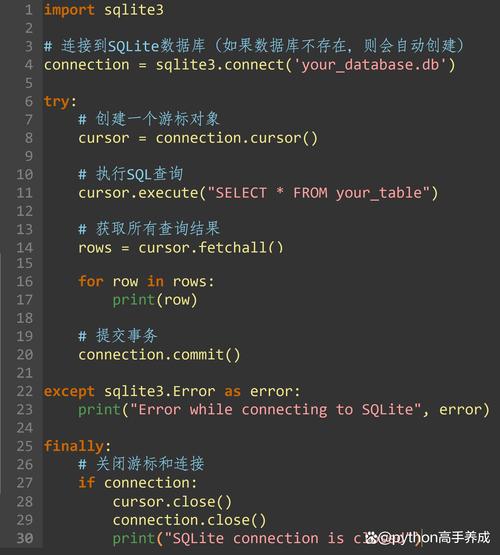
Python's built-in sqlite3 library is a great way to learn this. The placeholder syntax is .
import sqlite3
# --- Setup a sample database (for demonstration) ---
conn = sqlite3.connect(':memory:') # Creates a temporary in-memory database
cursor = conn.cursor()
cursor.execute('''
    CREATE TABLE users (
        id INTEGER PRIMARY KEY,
        username TEXT NOT NULL,
        password TEXT NOT NULL
    )
''')
cursor.execute("INSERT INTO users (username, password) VALUES ('alice', 'secret123')")
cursor.execute("INSERT INTO users (username, password) VALUES ('bob', 'password456')")
conn.commit()
# --- End setup ---
# 1. Get user input (this could be anything)
username_to_find = input("Enter username to find: ")
# Let's try the malicious input: ' OR '1'='1
# username_to_find = "' OR '1'='1"
# 2. Define the query with a placeholder (?)
query = "SELECT * FROM users WHERE username = ?"
# 3. Execute the query, passing the data as a tuple in the `params` argument
#    The comma after username_to_find is crucial to make it a tuple: (value,)
cursor.execute(query, (username_to_find,))
# 4. Fetch the results
found_user = cursor.fetchone()
if found_user:
    print(f"User found: {found_user}")
else:
    print("User not found.")
conn.close()
What happens when you run the malicious input?
The cursor.execute call becomes:
cursor.execute("SELECT * FROM users WHERE username = ?", ("' OR '1'='1",))
The database driver sees the placeholder and the data "' OR '1'='1". It correctly interprets the data as a literal string to be matched, not as part of the SQL syntax. The query will simply look for a user whose username is literally ' OR '1'='1, which doesn't exist, so it correctly reports "User not found."
Different Placeholder Syntaxes
Different database libraries use different placeholder syntaxes. It's important to know which one your library uses.
| Placeholder Style | Library Example | Syntax in Query | Data Format |
|---|---|---|---|
qmark |
sqlite3 |
A tuple: (val1, val2) |
|
format |
psycopg2 (PostgreSQL) |
%s |
A tuple: (val1, val2) |
numeric |
cx_Oracle |
1, 2, etc. |
A tuple: (val1, val2) |
named |
psycopg2 (optional), pymysql |
%(name)s |
A dictionary: {'name': 'value'} |
pyformat |
mysql.connector, psycopg2 |
%(name)s |
A dictionary: {'name': 'value'} |
Example: psycopg2 (PostgreSQL) with %s
import psycopg2
# Assume you have a connection 'conn' and a cursor 'cur'
cur = conn.cursor()
# Use %s as the placeholder, even for numbers!
query = "SELECT id, name FROM products WHERE price > %s AND category = %s"
params = (100, 'Electronics') # Data is passed as a tuple
cur.execute(query, params)
results = cur.fetchall()
Example: pymysql (MySQL) with Named Placeholders
Named placeholders can make your code more readable.
import pymysql
# Assume you have a connection 'conn' and a cursor 'cur'
cur = conn.cursor()
# Use %(name)s as the placeholder
query = "SELECT * FROM users WHERE username = %(username)s AND is_active = %(is_active)s"
params = {
    'username': 'charlie',
    'is_active': True
} # Data is passed as a dictionary
cur.execute(query, params)
results = cur.fetchall()
Key Best Practices
- ALWAYS Use Parameters. Never use ,
.format(), or f-strings to insert variables into your SQL strings. - Use the Correct Syntax. Check your database driver's documentation to see if it uses ,
%s,name, etc. - Pass Data as a Tuple or Dictionary. The second argument to
execute()must be a sequence (like a tuple) for positional placeholders or a mapping (like a dictionary) for named placeholders. A single value needs a trailing comma:(value,). - Use Connection Pools. For web applications, don't create a new database connection for every request. Use a connection pool (like
psycopg2.poolor third-party libraries) to manage connections efficiently. - Use an ORM (Optional but Recommended). For larger applications, consider an Object-Relational Mapper (ORM) like SQLAlchemy or Django ORM. ORMs provide a high-level, Pythonic way to interact with the database and handle parameterization automatically, further reducing the risk of errors and injection attacks.
# Example using SQLAlchemy ORM
from sqlalchemy import create_engine, select
# ... (setup engine and User model)
# stmt = select(User).where(User.username == username_to_find)
# result = session.execute(stmt)
# found_user = result.scalar_one_or_none()