在 Java 中,判断一个字符串是否为数字有多种方法,每种方法都有其适用场景和优缺点,下面我将为你详细介绍几种主流的方法,并提供代码示例和最佳实践建议。
使用 Double.parseDouble() 或 Integer.parseInt() (最常用)
这是最直接、最常用的方法,尝试将字符串转换为数字类型,如果转换失败,说明字符串不是数字。
原理:
Integer.parseInt(String s):尝试将字符串解析为int类型。Double.parseDouble(String s):尝试将字符串解析为double类型。
优点:
- 简单直接,一行代码就能搞定。
- 性能较好。
缺点:
- 会抛出异常:如果字符串不是有效的数字格式(如 "abc", "12.3.4", ""),会抛出
NumberFormatException,异常处理会带来一定的性能开销,如果字符串大多不是数字,可能会影响效率。 - 有范围限制:
Integer.parseInt只能解析int范围内的整数(-2,147,483,648 到 2,147,483,647),超出范围会抛出异常。Double.parseDouble可以解析科学计数法(如 "1.23e4"),但对于非常大的数字(如Long.MAX_VALUE),可能会因为精度问题导致解析失败或结果不准确。
代码示例:
public class NumberUtils {
    /**
     * 判断字符串是否为整数
     * @param str 要检查的字符串
     * @return 如果是整数返回 true,否则返回 false
     */
    public static boolean isInteger(String str) {
        if (str == null || str.isEmpty()) {
            return false;
        }
        try {
            Integer.parseInt(str);
            return true;
        } catch (NumberFormatException e) {
            return false;
        }
    }
    /**
     * 判断字符串是否为浮点数
     * @param str 要检查的字符串
     * @return 如果是浮点数返回 true,否则返回 false
     */
    public static boolean isDouble(String str) {
        if (str == null || str.isEmpty()) {
            return false;
        }
        try {
            Double.parseDouble(str);
            return true;
        } catch (NumberFormatException e) {
            return false;
        }
    }
    public static void main(String[] args) {
        System.out.println("判断整数:");
        System.out.println(isInteger("123"));      // true
        System.out.println(isInteger("-456"));     // true
        System.out.println(isInteger("0"));        // true
        System.out.println(isInteger("12.3"));    // false
        System.out.println(isInteger("abc"));      // false
        System.out.println(isInteger(""));         // false
        System.out.println(isInteger(null));       // false
        System.out.println("\n判断浮点数:");
        System.out.println(isDouble("123.45"));    // true
        System.out.println(isDouble("-78.90"));    // true
        System.out.println(isDouble("1.23e4"));   // true (科学计数法)
        System.out.println(isDouble("123"));       // true (整数也是浮点数)
        System.out.println(isDouble("abc"));       // false
        System.out.println(isDouble("12.3.4"));    // false
    }
}
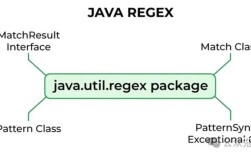
使用正则表达式 (最灵活)
正则表达式提供了最强大的模式匹配能力,可以精确地定义“数字”的格式。
原理:
使用 String.matches() 方法,该方法会尝试将整个字符串与指定的正则表达式进行匹配。
优点:
- 非常灵活:可以自定义数字格式,例如是否允许正负号、小数点、科学计数法、前导零等。
- 不会抛出异常:匹配失败会返回
false,性能更稳定,尤其是在输入多为非数字字符串时。
缺点:
- 正则表达式写起来可能比较复杂,对于不熟悉正则的开发者来说,可读性较差。
- 如果正则表达式写得不好,性能可能不如
parseDouble。
代码示例:
import java.util.regex.Pattern;
public class RegexNumberUtils {
    // 预编译正则表达式,提高性能
    private static final Pattern INTEGER_PATTERN = Pattern.compile("-?\\d+");
    private static final Pattern DOUBLE_PATTERN = Pattern.compile("-?\\d+(\\.\\d+)?");
    /**
     * 使用正则判断是否为整数
     */
    public static boolean isIntegerByRegex(String str) {
        if (str == null) {
            return false;
        }
        return INTEGER_PATTERN.matcher(str).matches();
    }
    /**
     * 使用正则判断是否为浮点数
     */
    public static boolean isDoubleByRegex(String str) {
        if (str == null) {
            return false;
        }
        return DOUBLE_PATTERN.matcher(str).matches();
    }
    public static void main(String[] args) {
        System.out.println("判断整数:");
        System.out.println(isIntegerByRegex("123"));      // true
        System.out.println(isIntegerByRegex("-456"));     // true
        System.out.println(isIntegerByRegex("0"));        // true
        System.out.println(isIntegerByRegex("12.3"));    // false
        System.out.println(isIntegerByRegex("abc"));      // false
        System.out.println(isIntegerByRegex(""));         // false
        System.out.println("\n判断浮点数:");
        System.out.println(isDoubleByRegex("123.45"));    // true
        System.out.println(isDoubleByRegex("-78.90"));    // true
        System.out.println(isDoubleByRegex("123"));       // true
        System.out.println(isDoubleByRegex("abc"));       // false
        System.out.println(isDoubleByRegex("12.3.4"));    // false
    }
}
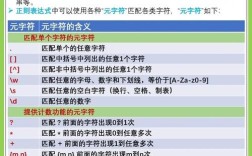
正则表达式解析:
- 号出现 0 次或 1 次(表示可选的正负号)。
\\d+:一个或多个数字(\\d是数字的转义字符)。(\\.\\d+)?:一个可选的组,由小数点和至少一个数字组成,这个组整体出现 0 次或 1 次。
使用 NumberUtils (Apache Commons Lang / Spring)
如果你已经在使用 Apache Commons Lang 或 Spring 框架,可以直接使用它们提供的工具类,这些方法经过了充分测试,非常可靠。
Apache Commons Lang
需要添加依赖:
<dependency>
    <groupId>org.apache.commons</groupId>
    <artifactId>commons-lang3</artifactId>
    <version>3.12.0</version> <!-- 使用最新版本 -->
</dependency>
代码示例:
import org.apache.commons.lang3.math.NumberUtils;
public class CommonsLangExample {
    public static void main(String[] args) {
        System.out.println(NumberUtils.isCreatable("123"));      // true
        System.out.println(NumberUtils.isCreatable("-456"));     // true
        System.out.println(NumberUtils.isCreatable("12.34"));   // true
        System.out.println(NumberUtils.isCreatable("1.23e4"));   // true
        System.out.println(NumberUtils.isCreatable("abc"));      // false
        System.out.println(NumberUtils.isCreatable(""));         // false
        System.out.println(NumberUtils.isCreatable(null));       // false
        // NumberUtils.isParsable 也是一个好用的方法
        System.out.println(NumberUtils.isParsable("123"));      // true
        System.out.println(NumberUtils.isParsable("1.23e4"));   // true
        // 注意:isParsable 不支持像 "0x10" (十六进制) 这样的格式
        System.out.println(NumberUtils.isParsable("0x10"));      // false
    }
}
Spring Framework
Spring 的 org.springframework.util.NumberUtils 也提供了类似功能。
需要添加 Spring 依赖:
<dependency>
    <groupId>org.springframework</groupId>
    <artifactId>spring-core</artifactId>
    <version>5.3.23</version> <!-- 使用与你的项目兼容的版本 -->
</dependency>
代码示例:
import org.springframework.util.NumberUtils;
public class SpringExample {
    public static void main(String[] args) {
        // Spring 的 parseNumber 会抛出异常,所以通常配合 try-catch 使用
        // 但 NumberUtils 本身也提供了一些静态工具方法
        // 判断是否为标准的数字格式(如 Integer, Long, Double 等)
        System.out.println(NumberUtils.isNumber("123"));      // true
        System.out.println(NumberUtils.isNumber("123.45"));   // true
        System.out.println(NumberUtils.isNumber("1.23e4"));   // true
        System.out.println(NumberUtils.isNumber("abc"));      // false
    }
}
使用 Character.isDigit() (适用于纯数字)
如果需求非常简单,只想判断字符串是否完全由数字字符组成(不允许负号、小数点等),可以使用 Character.isDigit()。
原理: 遍历字符串的每一个字符,检查是否都是数字字符。
优点:
- 逻辑简单,不依赖任何外部库。
缺点:
- 功能非常局限:无法处理负数、小数、空字符串或
null。
代码示例:
public class CharDigitExample {
    public static boolean isAllDigits(String str) {
        if (str == null || str.isEmpty()) {
            return false;
        }
        for (int i = 0; i < str.length(); i++) {
            if (!Character.isDigit(str.charAt(i))) {
                return false;
            }
        }
        return true;
    }
    public static void main(String[] args) {
        System.out.println(isAllDigits("12345"));    // true
        System.out.println(isAllDigits("0"));        // true
        System.out.println(isAllDigits("-123"));     // false (因为 '-' 不是数字)
        System.out.println(isAllDigits("12.3"));     // false (因为 '.' 不是数字)
        System.out.println(isAllDigits(""));         // false
    }
}
总结与最佳实践
| 方法 | 优点 | 缺点 | 适用场景 |
|---|---|---|---|
parseDouble/parseInt |
简单、常用、性能好 | 抛出异常、有范围限制 | 通用场景,特别是确定字符串是大概率数字时。 |
| 正则表达式 | 灵活、强大、不抛异常 | 正则复杂、性能可能稍差 | 需要严格定义数字格式(如手机号、身份证号中的数字部分)。 |
| Apache Commons/Spring | 可靠、功能全面、经过测试 | 需要引入第三方库 | 项目中已使用这些库时,推荐使用,代码更健壮。 |
Character.isDigit() |
无依赖、逻辑简单 | 功能极其有限 | 仅判断字符串是否由纯数字组成,无任何其他符号。 |
如何选择?
-
首选
try-catch(parseDouble):对于绝大多数情况,这是最简单、最直接、性能也最好的选择,即使输入多为非数字,现代 JVM 对异常处理也做了大量优化,其性能差异通常可以忽略不计。public static boolean isNumber(String str) { try { Double.parseDouble(str); return true; } catch (NumberFormatException e) { return false; } } -
需要严格格式时用正则:如果业务要求非常严格(不允许科学计数法,必须指定位数的小数),正则表达式是不二之选。
-
在大型项目中用工具类:如果你的项目已经依赖了 Apache Commons Lang 或 Spring,直接使用它们的
NumberUtils是最佳实践,因为这些库经过了大量测试和优化。 -
避免使用
Character.isDigit():除非你的需求就是“只检查纯数字”,否则它无法满足大多数场景。