Of course! This is a great question because it touches on a very common and powerful architectural pattern: a Java backend communicating with a PHP frontend (or vice-versa) using sockets.
Let's break this down into three parts:
- The Core Concepts: What are sockets and why use them in this context?
- Java as a Socket Server: The most common use case. Java is excellent for creating robust, high-performance backend services.
- PHP as a Socket Client: How PHP connects to the Java server and communicates.
Core Concepts: Sockets
A socket is one endpoint of a two-way communication link between two programs running on the network. Think of it like a phone for your applications.
- IP Address: The phone number (e.g.,
0.0.1for localhost, or a server's public IP). - Port: The extension number (e.g.,
8080). - Protocol: The language they speak to each other. For this, we'll use TCP, which is reliable and connection-oriented (like a phone call). We'll also briefly mention UDP.
Why Java + PHP with Sockets?
- Java's Strengths: Excellent for building multi-threaded, high-performance, and long-running server applications. It's the perfect choice for a backend that needs to handle many connections simultaneously (e.g., a game server, a financial data feed, a chat application).
- PHP's Strengths: Dominant in web development. It's easy to use and has a massive ecosystem (like Laravel, Symfony). Using PHP as a client allows you to trigger actions on your powerful Java backend from a standard web request (e.g., a user clicking a button on a website).
Common Scenarios:
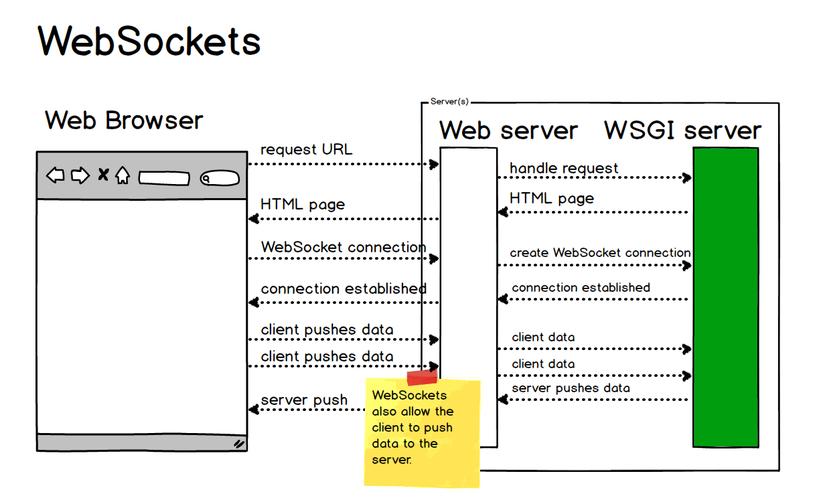
- PHP Frontend -> Java Backend: A PHP web application needs to perform a complex calculation or access a legacy system that only has a Java socket interface.
- Java Backend -> PHP Frontend: A Java-based game server needs to push real-time updates to a PHP-based web dashboard for players to see.
- Microservices: A Java microservice exposes a socket API for another PHP microservice to consume.
Java as a Socket Server
The server's job is to listen for incoming connections, accept them, and then read/write data to the client. We'll use Java's built-in ServerSocket and Socket classes. This example will be multi-threaded to handle multiple clients at once.
JavaServer.java
import java.io.BufferedReader;
import java.io.IOException;
import java.io.InputStreamReader;
import java.io.PrintWriter;
import java.net.ServerSocket;
import java.net.Socket;
public class JavaServer {
    // The port the server will listen on
    private static final int PORT = 8080;
    public static void main(String[] args) {
        try (ServerSocket serverSocket = new ServerSocket(PORT)) {
            System.out.println("Java Server is listening on port " + PORT);
            // The server runs indefinitely
            while (true) {
                // Wait for a client to connect. This is a blocking call.
                Socket clientSocket = serverSocket.accept();
                System.out.println("New client connected: " + clientSocket.getInetAddress().getHostAddress());
                // Create a new thread to handle this client.
                // This allows the server to accept new connections while others are being processed.
                new ClientHandler(clientSocket).start();
            }
        } catch (IOException e) {
            System.err.println("Server exception: " + e.getMessage());
            e.printStackTrace();
        }
    }
}
/**
 * A separate thread to handle communication with a single client.
 */
class ClientHandler extends Thread {
    private final Socket clientSocket;
    public ClientHandler(Socket socket) {
        this.clientSocket = socket;
    }
    @Override
    public void run() {
        try (
            // Input stream to read data from the client
            BufferedReader in = new BufferedReader(new InputStreamReader(clientSocket.getInputStream()));
            // Output stream to send data to the client
            PrintWriter out = new PrintWriter(clientSocket.getOutputStream(), true)
        ) {
            String inputLine;
            // Read data from the client until the client closes the connection
            while ((inputLine = in.readLine()) != null) {
                System.out.println("Received from PHP client: " + inputLine);
                // Process the message and create a response
                String response = processRequest(inputLine);
                System.out.println("Sending to PHP client: " + response);
                // Send the response back to the client
                out.println(response);
            }
        } catch (IOException e) {
            System.err.println("Error handling client: " + e.getMessage());
        } finally {
            try {
                clientSocket.close();
            } catch (IOException e) {
                System.err.println("Could not close client socket: " + e.getMessage());
            }
            System.out.println("Client disconnected.");
        }
    }
    private String processRequest(String request) {
        // This is where you put your business logic.
        // For this example, we'll just uppercase the request.
        if (request.equalsIgnoreCase("hello")) {
            return "Hello from Java Server!";
        } else if (request.startsWith("calculate ")) {
            try {
                String[] parts = request.split(" ");
                int num = Integer.parseInt(parts[1]);
                return "The square of " + num + " is " + (num * num);
            } catch (NumberFormatException | ArrayIndexOutOfBoundsException e) {
                return "Invalid calculation request.";
            }
        }
        return "Server received: " + request;
    }
}
How to Run the Java Server
- Save the code as
JavaServer.java. - Compile it:
javac JavaServer.java - Run it:
java JavaServer - You will see the message:
Java Server is listening on port 8080. It's now waiting for connections.
PHP as a Socket Client
The client's job is to connect to the server, write data, and read the response. We'll use PHP's stream socket functions, which are simple and effective.
php_client.php
<?php
// The server's IP address and port
$host = '127.0.0.1'; // Use 'localhost' or the server's IP
$port = 8080;
// Create a TCP socket stream
$socket = @stream_socket_client("tcp://$host:$port", $errno, $errstr, 10);
if ($socket === false) {
    die("Error: Could not connect to server: [$errno] $errstr");
}
echo "Successfully connected to Java server.\n";
// --- Send and receive data ---
// Example 1: Send a simple greeting
fwrite($socket, "hello\n"); // IMPORTANT: Use \n for line-based communication
echo "Sent: hello\n";
// Read the server's response
$response = fread($socket, 1024); // Read up to 1024 bytes
echo "Received: " . trim($response) . "\n\n";
// Example 2: Send a calculation request
fwrite($socket, "calculate 15\n");
echo "Sent: calculate 15\n";
$response = fread($socket, 1024);
echo "Received: " . trim($response) . "\n\n";
// Example 3: Send another request
fwrite($socket, "what is this?\n");
echo "Sent: what is this?\n";
$response = fread($socket, 1024);
echo "Received: " . trim($response) . "\n";
// Close the connection
fclose($socket);
echo "\nConnection closed.";
How to Run the PHP Client
- Make sure your Java server is running.
- Save the code as
php_client.php. - Run it from your terminal:
php php_client.php
Expected Output
In your PHP terminal:
Successfully connected to Java server.
Sent: hello
Received: Hello from Java Server!
Sent: calculate 15
Received: The square of 15 is 225
Sent: what is this?
Received: Server received: what is this?
Connection closed.
In your Java server terminal, you will see:
Java Server is listening on port 8080
New client connected: 127.0.0.1
Received from PHP client: hello
Sending to PHP client: Hello from Java Server!
Received from PHP client: calculate 15
Sending to PHP client: The square of 15 is 225
Received from PHP client: what is this?
Sending to PHP client: Server received: what is this?
Client disconnected.
Important Considerations & Best Practices
-
Data Serialization (The "How" of Communication):
- Line-based (as in our example): Simple for text-based commands. Use
\nto delimit messages. This is good for simple protocols. - Binary/JSON/XML: For complex data structures, you should serialize your data into a format like JSON before sending it over the socket.
- PHP:
json_encode($data)to send,json_decode($json_string)to receive. - Java: Use a library like Gson or Jackson.
new Gson().toJson(myObject)to send,new Gson().fromJson(jsonString, MyClass.class)to receive.
- PHP:
- Length-Prefixed: A more robust method for binary data. You first send the length of the message (e.g., 4 bytes), then the message itself. This prevents the "read until connection closes" problem.
- Line-based (as in our example): Simple for text-based commands. Use
-
Error Handling: Both the Java and PHP code should have robust
try-catch(Java) andtry-catch/if ($socket === false)(PHP) blocks to handle network issues like connection drops or timeouts. -
Concurrency (Java): Our Java server uses multi-threading. For a high-load production system, you might consider more advanced models like NIO (
java.nio.channels) which uses a smaller number of threads to manage many connections more efficiently. -
Security: If this communication goes over a public network, always use SSL/TLS. Java supports this with
SSLServerSocketandSSLSocket. PHP can usestream_socket_clientwithssl://and a context. This encrypts the data, preventing eavesdropping. -
Alternatives to Raw Sockets:
- REST/HTTP APIs: This is the most common and recommended way for PHP to communicate with a Java backend. The Java server can be a simple web service (using a framework like Spring Boot), and PHP can use
cURLor a library like Guzzle to makeGETorPOSTrequests. It's much easier to debug, integrates with firewalls, and is a standard web practice. - Message Queues (RabbitMQ, Kafka): For decoupled, asynchronous communication. PHP can produce a "message," and the Java service can consume it. This is ideal for background tasks.
- REST/HTTP APIs: This is the most common and recommended way for PHP to communicate with a Java backend. The Java server can be a simple web service (using a framework like Spring Boot), and PHP can use
In summary, raw sockets are a powerful and low-level way to connect Java and PHP, but they require careful handling of the data format and network issues. For most web-based applications, a REST API is a higher-level and often more practical choice.