Of course! Choosing a Python IDE (Integrated Development Environment) on Windows is a key step for any developer, from beginner to expert. The "best" choice depends heavily on your needs, such as whether you're a beginner, a data scientist, a web developer, or a professional programmer.
Here’s a comprehensive breakdown of the best Python IDEs for Windows, categorized to help you find the perfect fit.
Quick Recommendations: Who Should Use What?
| If you are... | Best Choice | Runner-Up |
|---|---|---|
| A Complete Beginner | Thonny | VS Code (with extensions) |
| A Web Developer (Django/Flask) | PyCharm Professional | VS Code |
| A Data Scientist / ML Engineer | PyCharm Professional or VS Code | Spyder |
| A Professional Python Coder | PyCharm Professional | VS Code |
| A Versatile "Swiss Army Knife" User | VS Code | PyCharm Community |
| Preferring a Minimalist Approach | Sublime Text | Vim / Neovim |
Detailed Breakdown of Each IDE
Visual Studio Code (VS Code)
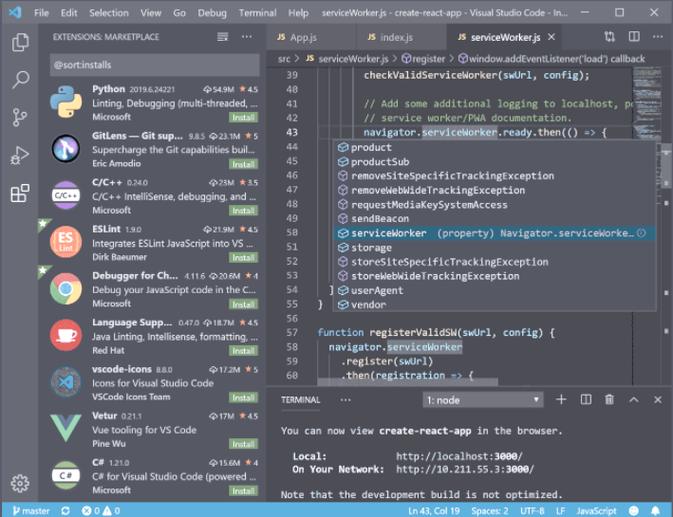
VS Code has become the most popular and widely-used editor/IDE in the Python community. It's a lightweight, free, and incredibly powerful code editor that can be turned into a full-fledged IDE with extensions.
-
Best for: Everyone. It's the most versatile option, suitable for web development, data science, scripting, and more.
-
Price: Free
 (图片来源网络,侵删)
 -
Key Features:
- Lightning Fast: Starts up quickly and runs smoothly even on less powerful machines.
- Massive Extension Ecosystem: The secret to its power. You can add extensions for Python linting (Pylance), debugging, testing, Docker, Git, and virtually any other tool you can imagine.
- Integrated Terminal: Run Python scripts and manage your project's environment (like Conda or virtualenv) without leaving the editor.
- Git Integration: Excellent built-in source control management.
- IntelliSense: Advanced autocompletion, code navigation, and intelligent suggestions powered by Pylance.
- Highly Customizable: Change the theme, keyboard shortcuts, and layout to suit your workflow.
-
Setup on Windows:
- Download and install VS Code from the official website: code.visualstudio.com
- Open the Extensions view (Ctrl+Shift+X).
- Search for and install the Python extension by Microsoft. This single extension provides language support, linting, debugging, and more.
- (Optional but recommended) Install the Pylance extension for a much better IntelliSense experience.
-
Pros:
- Free and cross-platform.
- Extremely flexible and customizable.
- Huge community and extensive documentation.
- Great performance.
-
Cons:
- Can become cluttered with many extensions.
- Not as tightly integrated for specific tasks (like Django) as a dedicated IDE.
PyCharm
PyCharm is a dedicated, full-featured IDE developed by JetBrains, the company behind IntelliJ IDEA. It's designed specifically for Python and is considered the gold standard for professional Python development.
-
Best for: Professional Python developers, web developers (especially Django/Flask), and large projects.
-
Price:
- Community Edition: Free (Excellent for pure Python development, scientific computing, and web frameworks).
- Professional Edition: Paid (Required for advanced web frameworks, databases, scientific tools, and remote development).
-
Key Features:
- Intelligent Refactoring: Powerful tools to safely rename variables, extract methods, and restructure code.
- Deep Framework Support: Unmatched support for Django, Flask, Pyramid, and other web frameworks.
- Built-in Debugger: A top-tier graphical debugger for setting breakpoints, inspecting variables, and stepping through code.
- Integrated Testing: Full support for Python's
unittest,pytest, andNoseframeworks. - Scientific Tools (Pro): Integration with Jupyter notebooks, scientific visualization (Matplotlib, Plotly), and database tools.
-
Pros:
- The most powerful and feature-rich Python IDE.
- Excellent code analysis and refactoring tools.
- Superior project and dependency management.
- Streamlines complex workflows (like web development).
-
Cons:
- Can be resource-intensive (slower on older machines).
- The Professional version is expensive.
- Might feel overly complex for simple scripts or beginners.
Thonny
Thonny is an IDE designed specifically for beginners. It focuses on simplicity and clarity, making it an excellent choice for learning Python without being overwhelmed by features.
-
Best for: Absolute beginners, children, and educators teaching introductory programming.
-
Price: Free
-
Key Features:
- Simple Interface: A clean, uncluttered layout that's easy to navigate.
- Variable Explorer: See the current value of all your variables in a dedicated window, which is great for understanding how data changes.
- Step-by-Step Debugger: Simple buttons to execute code one line or one expression at a time, which is invaluable for learning.
- Built-in Interpreter: Comes with its own Python interpreter, which simplifies setup.
- Clear Error Messages: Presents errors in a more user-friendly way.
-
Pros:
- Extremely easy to learn and use.
- Perfect for understanding fundamental programming concepts.
- Zero configuration required.
-
Cons:
- Lacks the advanced features and power needed for professional development.
- Not suitable for large projects or complex applications.
Spyder
Spyder is an IDE specifically built for scientific and data analysis work in Python. It's part of the Anaconda distribution, which makes it a go-to tool for scientists and engineers.
-
Best for: Data scientists, engineers, and researchers performing numerical computing and data analysis.
-
Price: Free
-
Key Features:
- Variable Explorer: Similar to Thonny, it allows you to view, edit, and plot your variables directly within the IDE.
- Interactive Console: Execute code line-by-line and see results immediately, similar to a Jupyter notebook.
- Editor with Advanced Features: Syntax highlighting, code completion, and integration with version control.
- Built-in Plot Viewer: View your Matplotlib and Plotly plots directly in the IDE without needing to save them as image files.
- Deep Integration with Anaconda: Seamlessly works with Conda environments and scientific libraries like NumPy, Pandas, and SciPy.
-
Pros:
- Excellent for data analysis workflows.
- All-in-one environment for coding, debugging, and visualizing data.
- Comes pre-packaged with the popular Anaconda distribution.
-
Cons:
- Can feel clunky and slow compared to VS Code or PyCharm.
- Not well-suited for general-purpose or web development.
Sublime Text
Sublime Text is a highly minimalist and lightning-fast text editor that can be turned into a powerful IDE with packages. It's known for its speed and simplicity.
-
Best for: Developers who prioritize speed and a minimalistic interface, often for web development or scripting.
-
Price: Free to evaluate, but requires a license for continued use (you can use it indefinitely without a purchase nag).
-
Key Features:
- Blazing Fast: Launches instantly and handles very large files with ease.
- Powerful Search and Navigation: "Goto Anything" feature lets you jump to files, symbols, or lines with just a few keystrokes.
- Customizable: Almost every aspect of the editor can be customized via JSON files.
- Package Control: A simple package manager to install extensions for Python, linting, Git, etc.
-
Pros:
- Unmatched speed and performance.
- Clean, distraction-free interface.
- Highly efficient for experienced users who know their shortcuts.
-
Cons:
- Not an "IDE" out of the box; requires manual configuration to get advanced features.
- The interface is highly unconventional and has a steep learning curve.
- The license model can be confusing for some.
Summary Table
| IDE | Price | Learning Curve | Primary Use Case | Windows Performance |
|---|---|---|---|---|
| VS Code | Free | Moderate | Versatile (Web, Data, General) | Excellent |
| PyCharm | Free / Paid | Steep | Professional, Web Dev, Large Projects | Good (Can be heavy) |
| Thonny | Free | Very Easy | Beginners, Education | Excellent |
| Spyder | Free | Easy | Data Science, Scientific Computing | Good |
| Sublime Text | Freemium | Moderate to Steep | Speed-focused, Web Dev | Excellent |
Final Recommendation
- Start with VS Code: It's the modern standard. It's free, powerful, and will grow with you from your first script to complex applications. You can't go wrong.
- If you're teaching a child or an absolute beginner: Start with Thonny. It removes the friction of learning and lets them focus on the logic of programming.
- If you're serious about web development (Django/Flask) or professional coding: PyCharm Professional is the investment that will pay for itself in time saved and increased productivity. Start with the free Community Edition to see if you like it.