下面我将从传统方式和Spring Boot 方式两个方面,为你详细讲解如何配置和使用 properties 文件。
传统 Java 项目方式 (不使用框架)
这种方式适用于标准的 Java SE 项目,没有依赖 Spring 等框架。
创建 properties 文件
在你的项目 src/main/resources 目录下(如果使用 Maven 或 Gradle,这是标准位置),创建一个 config.properties 文件。
src/main/resources/config.properties
# Database Configuration
db.url=jdbc:mysql://localhost:3306/mydatabase
db.username=root
db.password=secret
db.driver=com.mysql.cj.jdbc.Driver
# Application Configuration
app.name=My Awesome Application
app.version=1.0.0
feature.new.enabled=true
在 Java 代码中读取 properties 文件
Java 提供了 java.util.Properties 类来读取 .properties 文件,最推荐的方式是通过 ClassLoader 来读取,因为它能正确处理资源路径,并且可以打包成 JAR 后依然能正常读取。
ConfigReader.java
import java.io.IOException;
import java.io.InputStream;
import java.util.Properties;
public class ConfigReader {
    private Properties properties;
    public ConfigReader() {
        // 1. 创建 Properties 对象
        properties = new Properties();
        // 2. 通过 ClassLoader 获取输入流
        //    "config.properties" 是 resources 目录下的文件路径
        try (InputStream input = getClass().getClassLoader().getResourceAsStream("config.properties")) {
            if (input == null) {
                System.out.println("Sorry, unable to find config.properties");
                return;
            }
            // 3. 加载 properties 文件
            properties.load(input);
        } catch (IOException ex) {
            ex.printStackTrace();
        }
    }
    // 4. 提供方法来获取配置值
    public String getProperty(String key) {
        return properties.getProperty(key);
    }
    public String getProperty(String key, String defaultValue) {
        return properties.getProperty(key, defaultValue);
    }
    public static void main(String[] args) {
        ConfigReader reader = new ConfigReader();
        // 读取配置
        String dbUrl = reader.getProperty("db.url");
        String appVersion = reader.getProperty("app.version");
        String featureFlag = reader.getProperty("feature.new.enabled");
        System.out.println("Database URL: " + dbUrl);
        System.out.println("App Version: " + appVersion);
        System.out.println("New Feature Enabled: " + featureFlag);
        // 读取一个不存在的配置,并提供默认值
        String nonExistentConfig = reader.getProperty("non.existent.key", "default_value");
        System.out.println("Non-existent Config: " + nonExistentConfig);
    }
}
代码解析:
Properties properties = new Properties();:创建一个Properties实例。getClass().getClassLoader().getResourceAsStream("config.properties"):这是关键一步,它告诉 JVM 从类路径(classpath)中查找config.properties文件并返回一个输入流,使用try-with-resources语句可以确保InputStream在使用后被自动关闭,避免资源泄漏。properties.load(input);:将输入流中的内容加载到Properties对象中。properties.getProperty(key):根据键获取对应的值,如果键不存在,返回null。properties.getProperty(key, defaultValue):根据键获取值,如果键不存在,则返回指定的默认值,这是一种更健壮的做法。
Spring Boot 项目方式
Spring Boot 极大地简化了配置管理,支持 properties 和 yml/yaml 格式,它提供了自动配置和类型安全的绑定功能。
使用 application.properties
这是 Spring Boot 默认的配置文件名。
src/main/resources/application.properties
# Server Configuration
server.port=8081
# Database Configuration
spring.datasource.url=jdbc:mysql://localhost:3306/mydatabase
spring.datasource.username=root
spring.datasource.password=secret
spring.datasource.driver-class-name=com.mysql.cj.jdbc.Driver
# Custom Application Configuration
myapp.name=My Spring Boot App
myapp.feature.enabled=true
通过 @Value 注入单个值
这是最简单直接的方式,适用于获取少量配置。
MyService.java
import org.springframework.beans.factory.annotation.Value;
import org.springframework.stereotype.Service;
@Service
public class MyService {
    @Value("${myapp.name}")
    private String appName;
    @Value("${server.port}")
    private int serverPort;
    @Value("${myapp.feature.enabled:false}") // 可以提供默认值
    private boolean featureEnabled;
    public void printConfig() {
        System.out.println("App Name from @Value: " + appName);
        System.out.println("Server Port from @Value: " + serverPort);
        System.out.println("Feature Enabled from @Value: " + featureEnabled);
    }
}
@Value 注解说明:
- 是 SpEL (Spring Expression Language) 的语法,用于引用配置文件中的属性。
- 如果配置项不存在,注入会失败并抛出异常,可以通过 提供默认值,如
@Value("${key:default_value}")。
通过 @ConfigurationProperties 绑定整个配置块(推荐)
当配置项很多时,使用 @Value 会很繁琐。@ConfigurationProperties 可以将一组相关的配置自动绑定到一个 Java 对象(POJO)中,这是更推荐、更类型安全的方式。
AppProperties.java
import org.springframework.boot.context.properties.ConfigurationProperties;
import org.springframework.stereotype.Component;
// 1. 使用 @Component 将其注册为 Spring Bean
// 2. 使用 @ConfigurationProperties 指定配置前缀
@Component
@ConfigurationProperties(prefix = "myapp")
public class AppProperties {
    // 3. 字段名需要与 properties 文件中的 key(去除前缀后)保持一致或遵循驼峰命名规则
    private String name;
    private Feature feature; // 可以嵌套对象
    // 4. 必须提供 getter 和 setter
    public String getName() {
        return name;
    }
    public void setName(String name) {
        this.name = name;
    }
    public Feature getFeature() {
        return feature;
    }
    public void setFeature(Feature feature) {
        this.feature = feature;
    }
    // 内部静态类,用于映射嵌套的配置
    public static class Feature {
        private boolean enabled;
        // getter and setter
        public boolean isEnabled() {
            return enabled;
        }
        public void setEnabled(boolean enabled) {
            this.enabled = enabled;
        }
    }
}
MyService.java (修改后)
import org.springframework.beans.factory.annotation.Autowired;
import org.springframework.stereotype.Service;
@Service
public class MyService {
    private final AppProperties appProperties;
    // 通过构造器注入 AppProperties
    @Autowired
    public MyService(AppProperties appProperties) {
        this.appProperties = appProperties;
    }
    public void printConfig() {
        System.out.println("App Name from @ConfigurationProperties: " + appProperties.getName());
        System.out.println("Feature Enabled from @ConfigurationProperties: " + appProperties.getFeature().isEnabled());
    }
}
@ConfigurationProperties 优势:
- 类型安全:直接映射到 Java 类型(如
String,int,boolean)。 - IDE 支持:IDE 可以提供自动补全,减少拼写错误。
- 分组管理:可以将所有相关配置组织在一个类中。
- 校验:可以结合
@Validated和 JSR-303 注解(如@NotNull,@Email)对配置进行校验。
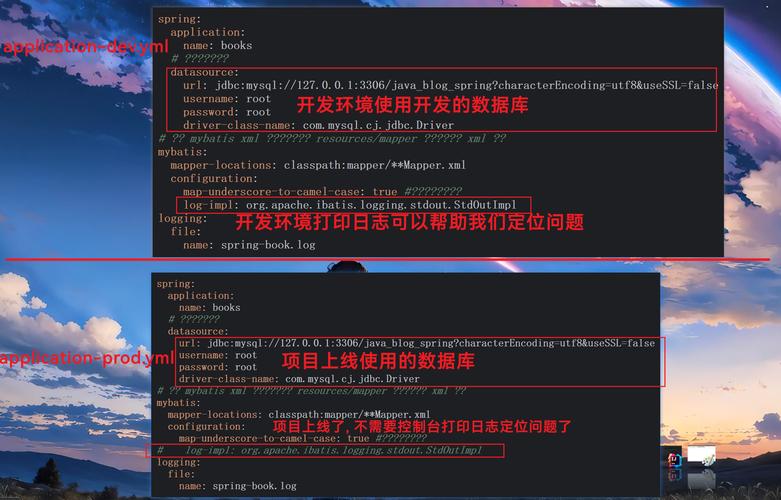
使用 application.yml (YAML 格式)
YAML 是一种更人性化的数据序列化语言,非常适合配置文件,Spring Boot 同时支持 properties 和 yml 文件,如果两个文件同时存在,application.properties 的优先级更高。
src/main/resources/application.yml
server:
  port: 8082
spring:
  datasource:
    url: jdbc:mysql://localhost:3306/mydatabase
    username: root
    password: secret
    driver-class-name: com.mysql.cj.jdbc.Driver
myapp:
  name: My Spring Boot App (YAML)
  feature:
    enabled: true
使用 @ConfigurationProperties 的代码完全不变,因为它会自动适配 YAML 的层级结构。
总结与对比
| 特性 | 传统方式 (java.util.Properties) |
Spring Boot (@Value) |
Spring Boot (@ConfigurationProperties) |
|---|---|---|---|
| 适用场景 | Java SE 项目,小型应用 | 快速获取少量配置 | 获取大量、结构化的配置,推荐在 Spring Boot 中使用 |
| 配置文件 | 任意 .properties 文件 |
application.properties 或 application.yml |
application.properties 或 application.yml |
| 配置读取 | 手动加载 InputStream |
通过 @Value 注解注入字段 |
通过绑定到 POJO 类 |
| 类型安全 | 手动转换 String 到目标类型 |
不安全,所有值都是 String |
完全类型安全,自动转换 |
| 结构化 | 扁平结构,无嵌套 | 扁平结构 | 支持嵌套,通过 POJO 对象组织 |
| IDE 支持 | 较弱,无自动补全 | 较好,有提示 | 非常好,有完整的代码提示和重构支持 |
| 默认值 | Properties.getProperty(key, default) |
@Value("${key:default}") |
在 POJO 中设置字段默认值 |
最佳实践建议:
- 在 Spring Boot 项目中:
- 优先使用
application.yml,因为它更清晰。 - 除非只是获取一两个简单的值,否则强烈推荐使用
@ConfigurationProperties,它能让你写出更干净、更易于维护的代码。
- 优先使用
- 在纯 Java SE 项目中:
- 使用
java.util.Properties类和ClassLoader是标准做法,确保将配置文件放在resources目录下。
- 使用