
Of course! Converting a Python list to a JSON string is a very common task, and Python's built-in json module makes it straightforward.
Here’s a complete guide, from the basics to more advanced scenarios.
The Short and Sweet Answer
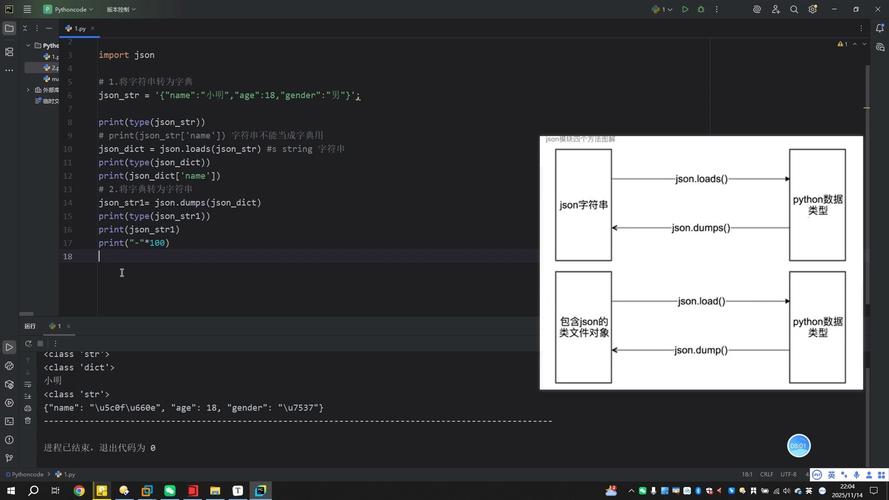
The core of the task is the json.dumps() function (which stands for "dump string").
import json
# Your Python list
python_list = ["apple", "banana", 3, True, None]
# Convert the list to a JSON string
json_string = json.dumps(python_list)
print(f"Python List: {python_list}")
print(f"JSON String: {json_string}")
# The result is a string, not a list
print(f"Type of result: {type(json_string)}")
Output:
Python List: ['apple', 'banana', 3, True, None]
JSON String: ["apple", "banana", 3, true, null]
Type of result: <class 'str'>
Key Details and Options
The json.dumps() function has several useful parameters to control the output.
Pretty-Printing (Indentation)
By default, the JSON string is compact. To make it human-readable (pretty-printed), use the indent parameter.
import json
data = {
    "name": "John Doe",
    "age": 30,
    "isStudent": False,
    "courses": ["History", "Math"],
    "address": {
        "street": "123 Main St",
        "city": "Anytown"
    }
}
# Compact JSON
compact_json = json.dumps(data)
print("--- Compact JSON ---")
print(compact_json)
# Pretty-printed JSON with an indent of 4 spaces
pretty_json = json.dumps(data, indent=4)
print("\n--- Pretty-Printed JSON ---")
print(pretty_json)
Output:
--- Compact JSON ---
{"name": "John Doe", "age": 30, "isStudent": false, "courses": ["History", "Math"], "address": {"street": "123 Main St", "city": "Anytown"}}
--- Pretty-Printed JSON ---
{
    "name": "John Doe",
    "age": 30,
    "isStudent": false,
    "courses": [
        "History",
        "Math"
    ],
    "address": {
        "street": "123 Main St",
        "city": "Anytown"
    }
}
Sorting Keys
To ensure the keys in your JSON objects are always in a predictable order (e.g., alphabetical), use the sort_keys parameter.
import json
data = {"b": 2, "a": 1, "c": 3}
# Unsorted keys
unsorted_json = json.dumps(data)
print("--- Unsorted Keys ---")
print(unsorted_json)
# Sorted keys
sorted_json = json.dumps(data, sort_keys=True)
print("\n--- Sorted Keys ---")
print(sorted_json)
Output:
--- Unsorted Keys ---
{"b": 2, "a": 1, "c": 3}
--- Sorted Keys ---
{"a": 1, "b": 2, "c": 3}
Handling Special Data Types
The json module has a specific mapping for Python types to JSON types. This is crucial to understand.
| Python Type | JSON Type | Example |
|---|---|---|
dict |
object | {"key": "value"} |
list, tuple |
array | [1, 2, "a"] |
str |
string | "hello" |
int, float |
number | 123, 67 |
True |
true |
true |
False |
false |
false |
None |
null |
null |
What about other types? If you try to serialize a type not in this table (like a datetime object), you'll get a TypeError.
Example with a tuple:
A tuple in Python is automatically converted to a JSON array (list).
import json
python_tuple = (1, 2, "hello", True)
json_from_tuple = json.dumps(python_tuple)
print(f"Python Tuple: {python_tuple}")
print(f"JSON from Tuple: {json_from_tuple}") # Note the square brackets []
Output:
Python Tuple: (1, 2, 'hello', True)
JSON from Tuple: [1, 2, "hello", true]
Handling Custom Objects (Advanced)
What if you have a list of your own custom class instances? By default, json.dumps() will fail.
Let's say you have a Person class:
import json
import datetime
class Person:
    def __init__(self, name, age, birth_date):
        self.name = name
        self.age = age
        self.birth_date = birth_date
# Create an instance of our custom class
p1 = Person("Alice", 30, datetime.date(1993, 10, 25))
# This will FAIL with a TypeError
try:
    json.dumps(p1)
except TypeError as e:
    print(f"Error: {e}")
Output:
Error: Object of type Person is not JSON serializableTo fix this, you need to provide a custom serialization function. The easiest way is to use the default argument of json.dumps().
Solution 1: Using the default argument
You can pass a function that tells the json module how to handle objects it doesn't recognize.
import json
import datetime
class Person:
    def __init__(self, name, age, birth_date):
        self.name = name
        self.age = age
        self.birth_date = birth_date
# This function will be called for any object that json can't serialize
def convert_to_serializable(obj):
    if isinstance(obj, Person):
        # Return a dictionary representation of the Person object
        return {
            "name": obj.name,
            "age": obj.age,
            "birth_date": obj.birth_date.isoformat() # Convert date to string
        }
    # This is important! If you don't know how to handle the object,
    # you should raise a TypeError to let the caller know.
    raise TypeError(f"Object of type {type(obj).__name__} is not JSON serializable")
p1 = Person("Alice", 30, datetime.date(1993, 10, 25))
p2 = Person("Bob", 25, datetime.date(1998, 5, 15))
people_list = [p1, p2]
# Use the custom function via the 'default' argument
json_string = json.dumps(people_list, default=convert_to_serializable, indent=4)
print(json_string)
Output:
[
    {
        "name": "Alice",
        "age": 30,
        "birth_date": "1993-10-25"
    },
    {
        "name": "Bob",
        "age": 25,
        "birth_date": "1998-05-15"
    }
]
Solution 2: Using a to_dict() method (Cleaner)
A more "Pythonic" approach is to add a method to your class that converts itself to a dictionary.
import json
import datetime
class Person:
    def __init__(self, name, age, birth_date):
        self.name = name
        self.age = age
        self.birth_date = birth_date
    def to_dict(self):
        """Returns a dictionary representation of the object."""
        return {
            "name": self.name,
            "age": self.age,
            "birth_date": self.birth_date.isoformat()
        }
p1 = Person("Alice", 30, datetime.date(1993, 10, 25))
p2 = Person("Bob", 25, datetime.date(1998, 5, 15))
people_list = [p1, p2]
# Use a lambda function to call to_dict() on each object
json_string = json.dumps(people_list, default=lambda p: p.to_dict(), indent=4)
print(json_string)
This produces the same output but keeps the serialization logic neatly encapsulated within the Person class.
Writing JSON Directly to a File
If you don't need the JSON as a string in your program and want to write it directly to a file, use json.dump() (without the 's').
import json
data = {
    "users": [
        {"id": 1, "name": "Alice"},
        {"id": 2, "name": "Bob"}
    ],
    "status": "active"
}
# Use 'with' for safe file handling
with open('data.json', 'w') as f:
    # json.dump writes the Python object directly to the file
    json.dump(data, f, indent=4)
print("JSON data has been written to data.json")
This will create a file named data.json with the following content:
{
    "users": [
        {
            "id": 1,
            "name": "Alice"
        },
        {
            "id": 2,
            "name": "Bob"
        }
    ],
    "status": "active"
}
Summary
| Task | Function | Example |
|---|---|---|
| Convert list to JSON string | json.dumps() |
json_str = json.dumps(my_list) |
| Convert list to JSON file | json.dump() |
json.dump(my_list, file_object) |
| Make JSON readable (pretty-print) | indent param |
json.dumps(my_list, indent=4) |
| Sort JSON object keys | sort_keys |
json.dumps(my_dict, sort_keys=True) |
| Handle custom objects | default param |
json.dumps(my_list, default=my_serializer_function) |


