Of course! This is a fantastic topic. Using Python with sockets on Linux is a fundamental skill for network programming. I'll guide you through it, starting from the basics and moving to a more practical, real-world example.
What is a Socket?
Think of a socket as an endpoint for sending or receiving data across a computer network. To communicate, you need a pair of sockets: one on the client side and one on the server side. They connect to each other, and data flows between them.
The most common type of socket used on the internet is the TCP socket. It's reliable, connection-oriented, and ensures that all data arrives in order. We'll focus on this first.
The Core Idea: Client-Server Model
- Server: A program that waits for incoming connections from clients. It listens on a specific IP address and port.
- Client: A program that initiates a connection to a server.
Key Analogy:
- IP Address: The street address of a building (e.g.,
168.1.10). - Port: The apartment number within that building (e.g.,
8080). - Socket: The specific apartment door where communication happens.
The Server's Lifecycle (TCP)
A TCP server follows a predictable sequence of steps:
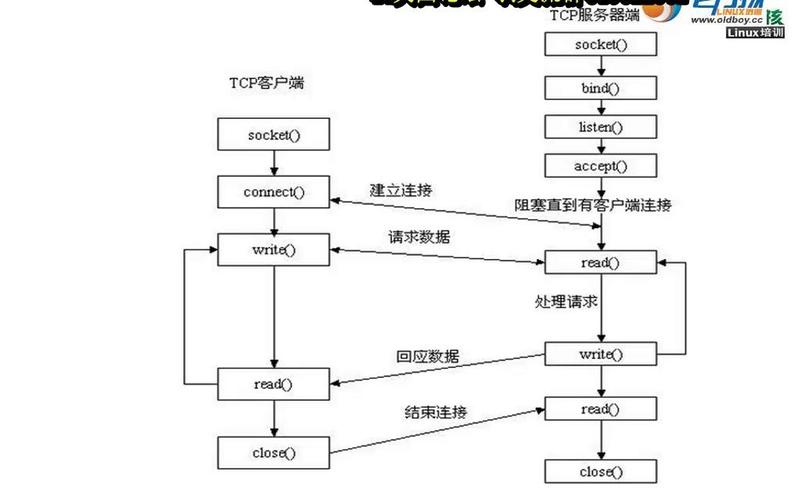
socket(): Create a new socket object.bind(): Associate the socket with a specific IP address and port. This tells the OS, "Hey, any data coming to this IP and port should be sent to this socket."listen(): Put the socket into "listening mode," ready to accept incoming connections.accept(): Block (wait) and accept an incoming connection. This returns a new socket object specifically for communication with the client, plus the client's address.recv()/send(): Use the new client socket to receive data from or send data to the client.close(): Close the sockets.
The Client's Lifecycle (TCP)
A client's process is simpler:
socket(): Create a new socket object.connect(): Attempt to connect to the server's IP address and port. This call blocks until the connection is established or fails.send()/recv(): Use the connected socket to send data to or receive data from the server.close(): Close the socket.
Example 1: A Simple "Echo" Server and Client
This is the "Hello, World!" of socket programming. The server will receive a message from the client and send it back.
The Server (server.py)
This script will listen on localhost (which means "this machine") on port 65432.
# server.py
import socket
# Use 'with' statements to ensure sockets are closed automatically
with socket.socket(socket.AF_INET, socket.SOCK_STREAM) as s:
    # AF_INET is the Internet address family for IPv4.
    # SOCK_STREAM is the socket type for TCP.
    # Bind the socket to the address and port
    # '' means listen on all available interfaces on this machine
    HOST = ''  # Symbolic name meaning all available interfaces
    PORT = 65432        # Port to listen on (non-privileged ports are > 1023)
    s.bind((HOST, PORT))
    print(f"Server listening on {HOST}:{PORT}")
    # Enable the server to accept connections
    # It's a backlog of how many connections to queue up
    s.listen()
    print("Waiting for a connection...")
    # accept() blocks execution and waits for an incoming connection.
    # When a client connects, it returns a new socket object 'conn'
    # to send/receive data, and the 'addr' of the client.
    conn, addr = s.accept()
    # Use another 'with' block for the connection socket
    with conn:
        print(f"Connected by {addr}")
        while True:
            # Receive data from the client. 1024 is the buffer size.
            data = conn.recv(1024)
            if not data:
                # If recv() returns an empty object, the client has closed the connection
                break
            print(f"Received from client: {data.decode('utf-8')}")
            # Echo the data back to the client
            conn.sendall(data)
            print("Echoed back to client")
print("Server closed.")
The Client (client.py)
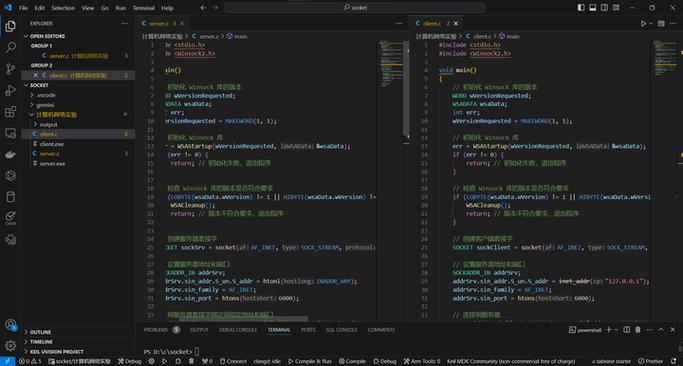
This script will connect to the server and send a message.
# client.py
import socket
HOST = '127.0.0.1'  # The server's hostname or IP address
PORT = 65432        # The port used by the server
with socket.socket(socket.AF_INET, socket.SOCK_STREAM) as s:
    s.connect((HOST, PORT))
    print(f"Connected to server at {HOST}:{PORT}")
    message = b'Hello, server! This is a test message.'
    print(f"Sending: {message.decode('utf-8')}")
    s.sendall(message)
    # Look for the response
    data = s.recv(1024)
print(f"Received from server: {data.decode('utf-8')}")
How to Run It
-
Open two terminal windows.
-
In the first terminal, run the server:
python3 server.py
You will see:
Server listening on :65432 Waiting for a connection... -
In the second terminal, run the client:
python3 client.py
You will see:
Connected to server at 127.0.0.1:65432 Sending: Hello, server! This is a test message. Received from server: Hello, server! This is a test message. -
Go back to the server's terminal. You will see:
Connected by ('127.0.0.1', 54321)  # Port number will vary
Received from client: Hello, server! This is a test message.
Echoed back to client
Server closed.
Important Considerations for Real-World Applications
The simple example above works, but a real server needs to handle multiple clients. Here are the key concepts:
Handling Multiple Clients: Threading
The s.accept() and conn.recv() calls are blocking. This means the server will wait at these lines and cannot do anything else, like accept a second client connection.
The most common way to solve this is with threading. The main thread's only job is to accept connections. For each new connection, it spawns a new thread to handle that specific client.
Here's how you'd modify the server to be multi-threaded:
# threaded_server.py
import socket
import threading
# This function will handle communication with a single client
def handle_client(conn, addr):
    print(f"[NEW CONNECTION] {addr} connected.")
    with conn:
        while True:
            data = conn.recv(1024)
            if not data:
                break
            print(f"[{addr}] Received: {data.decode('utf-8')}")
            conn.sendall(data)
    print(f"[CONNECTION CLOSED] {addr} disconnected.")
def start_server():
    SERVER = socket.gethostbyname(socket.gethostname())
    PORT = 65432
    ADDR = (SERVER, PORT)
    server = socket.socket(socket.AF_INET, socket.SOCK_STREAM)
    server.bind(ADDR)
    server.listen()
    print(f"[LISTENING] Server is listening on {SERVER}")
    while True:
        conn, addr = server.accept()
        # Create a new thread for each new connection
        thread = threading.Thread(target=handle_client, args=(conn, addr))
        thread.start()
        print(f"[ACTIVE CONNECTIONS] {threading.active_count() - 1}")
if __name__ == "__main__":
    start_server()
Using try...except for Robustness
Networks are unreliable. Connections can drop unexpectedly. Always wrap socket operations in try...except blocks to handle errors gracefully (e.g., ConnectionResetError, socket.timeout).
Sending and Receiving Complex Data (Serialization)
You can't just send Python objects like lists or dictionaries over a socket. You must first serialize them into a byte format. The most common library for this is json.
Example: Sending a dictionary
import json
data_to_send = {"name": "Linux", "type": "OS", "version": 5.15}
# Serialize the dictionary to a JSON formatted string, then encode to bytes
serialized_data = json.dumps(data_to_send).encode('utf-8')
# Send the data
conn.sendall(serialized_data)
# On the receiving end:
# Receive the data
received_data = conn.recv(1024)
# Decode from bytes and deserialize from JSON
original_data = json.loads(received_data.decode('utf-8'))
print(original_data)  # Output: {'name': 'Linux', 'type': 'OS', 'version': 5.15}
What about UDP?
UDP (User Datagram Protocol) is different. It's connectionless, unreliable, and faster. It's used for things like video streaming or DNS lookups where speed is more important than perfect reliability.
The API is simpler because there's no listen() or accept().
UDP Server (udp_server.py)
import socket
HOST = '127.0.0.1'  # Standard loopback interface address (localhost)
PORT = 65432        # Port to listen on (non-privileged ports are > 1023)
with socket.socket(socket.AF_INET, socket.SOCK_DGRAM) as s:
    s.bind((HOST, PORT))
    print(f"UDP Server listening on {HOST}:{PORT}")
    while True:
        data, addr = s.recvfrom(1024)  # Buffer size is 1024 bytes
        print(f"Received from {addr}: {data.decode('utf-8')}")
        s.sendto(data, addr) # Echo back the data to the sender
UDP Client (udp_client.py)
import socket
HOST = '127.0.0.1'  # The server's hostname or IP address
PORT = 65432        # The port used by the server
with socket.socket(socket.AF_INET, socket.SOCK_DGRAM) as s:
    message = b'Hello, UDP server!'
    s.sendto(message, (HOST, PORT))
    data, addr = s.recvfrom(1024)
print(f"Received from {addr}: {data.decode('utf-8')}")
Summary: Key Linux/Python Socket Commands
| Function | Description |
|---|---|
socket() |
Creates a socket. socket.AF_INET for IPv4, socket.SOCK_STREAM for TCP. |
bind() |
Binds the socket to an IP address and port. s.bind(('127.0.0.1', 80)). |
listen() |
Puts the socket into listening mode for TCP servers. |
accept() |
Accepts a TCP connection (blocking), returns a new conn socket. |
connect() |
Initiates a TCP connection to a remote address (blocking). |
send() |
Sends data over a connected socket. May not send all bytes. |
sendall() |
Sends data over a connected socket. Keeps sending until all data is sent. |
recv() |
Receives data from a socket. Returns an empty bytes object on disconnect. |
close() |
Closes the socket. |
setsockopt() |
A powerful function to set socket options (e.g., SO_REUSEADDR to prevent "Address already in use" errors). |