
Of course! This is an excellent question that gets to the heart of how Python's socket library works.
The short answer is: You cannot "flush" a socket in the same way you flush a file buffer, because sockets don't have a user-level output buffer in the same way.
Let's break down why this is and what you should do instead.
The Core Concept: Sockets vs. Files
When you work with a file object (like one opened with open()), you are dealing with several layers:
- Your Python Code: Writes data to a file object.
- Python's I/O Buffer: Python holds the data in memory in a buffer for efficiency. It waits until the buffer is full or you explicitly call
flush()before sending it to the operating system. - Operating System (OS) Buffer: The OS also has its own kernel-level buffer.
- Disk/Network: The data is finally written to the disk or sent over the network.
A socket.socket object, however, is more direct. When you call a send method (like send() or sendall()), your data is passed down to the operating system's network stack with minimal delay. There is no large, persistent, user-level buffer that you can "flush" because the data is designed to be sent immediately.
Why "Flushing" is a Misleading Concept for Sockets
The term "flush" implies forcing data out of a buffer. With sockets, the methods you use to send data are already designed to be as "flush-like" as possible.
socket.send(data): Tries to send the data. It returns the number of bytes actually sent. It's possible that not all data was sent (e.g., the OS send buffer was full), so you must handle the return value and resend the remaining data.socket.sendall(data): This is the more common method. It's a loop that keeps callingsend()until all the data in thedataargument has been sent or an error occurs. This function effectively performs a "send and wait until it's all gone" operation, which is often what people thinkflush()does.
The Real "Flush" Equivalent: socket.sendall()
If your goal is to ensure that a block of data is completely sent before you move on to the next step, you should use socket.sendall().
Example: Sending a message and ensuring it's fully transmitted
import socket
HOST = '127.0.0.1'  # Standard loopback interface address (localhost)
PORT = 65432        # Port to listen on (non-privileged ports are > 1023)
# --- Server Side ---
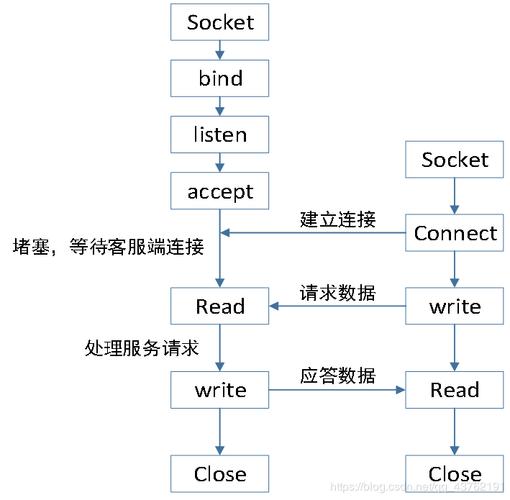
with socket.socket(socket.AF_INET, socket.SOCK_STREAM) as s:
    s.bind((HOST, PORT))
    s.listen()
    print("Server listening on", (HOST, PORT))
    conn, addr = s.accept()
    with conn:
        print('Connected by', addr)
        while True:
            data = conn.recv(1024)
            if not data:
                break
            print(f"Received from client: {data.decode('utf-8')}")
            # Echo the message back to the client
            response = "Message received."
            # Use sendall to ensure the entire response is sent
            conn.sendall(response.encode('utf-8'))
# --- Client Side ---
import socket
HOST = '127.0.0.1'  # The server's hostname or IP address
PORT = 65432        # The port used by the server
with socket.socket(socket.AF_INET, socket.SOCK_STREAM) as s:
    s.connect((HOST, PORT))
    message = "Hello, Server!"
    # Use sendall to ensure the entire message is sent
    s.sendall(message.encode('utf-8'))
    print(f"Sent: {message}")
    # Now, wait for the server's response
    data = s.recv(1024)
    print(f"Received from server: {data.decode('utf-8')}")
In this client example, s.sendall(message.encode('utf-8')) will block until the entire message has been successfully sent to the server's operating system buffer. This is the closest you'll get to a "flush" operation for sending data.
What About Receiving? Do I Need to "Flush" Input?
No, you don't flush the input. The recv() method is your way of reading data that has already arrived and is waiting in the OS's receive buffer. You call recv() to pull that data into your application.
The One Exception: socket.makefile()
You can, in fact, get a file-like object from a socket, and that object can be flushed.
import socket
HOST = '127.0.0.1'
PORT = 65433
# --- Server Side ---
with socket.socket(socket.AF_INET, socket.SOCK_STREAM) as s:
    s.bind((HOST, PORT))
    s.listen()
    conn, addr = s.accept()
    with conn:
        print('Connected by', addr)
        # Get a file-like object for the socket
        file_socket = conn.makefile('w', encoding='utf-8') # 'w' for writing
        file_socket.write("This is a line from the server.\n")
        print("Wrote a line, but it's not sent yet.")
        # Now, we explicitly flush the file buffer
        file_socket.flush()
        print("Flushed the file buffer. The line is now sent.")
        file_socket.write("This is another line, sent automatically on close or next write.")
        # The file object will be closed when the 'with' block ends,
        # which also triggers a flush.
Why would you do this?
This is useful if you want to use high-level file I/O operations (like loops using print() or write()) on a socket. However, for most network programming, it's simpler and more direct to use sendall() and recv().
Summary: What to Do Instead of flush()
| Your Goal | The Correct Python Socket Method | Why? |
|---|---|---|
| Send a block of data and ensure it's fully transmitted. | socket.sendall(data) |
It's designed for this. It internally loops to send all data, handling partial sends for you. |
| Send data and don't care if it's fully sent immediately. | socket.send(data) |
It returns the number of bytes sent. You must handle the case where not all data was sent. |
| Read incoming data. | socket.recv(buffer_size) |
This pulls data from the OS's receive buffer into your application. No "flush" is needed. |
Use high-level file I/O (print, write) on a socket. |
sock.makefile() then file.flush() |
You get a file object with a buffer. You can then call .flush() on that file object. |
Final Takeaway: Forget about flush() for sockets. Focus on using sendall() for reliable sending and recv() for receiving. This is the idiomatic and correct way to handle data transmission with Python's socket module.











