
Of course! It looks like you're asking about how to use a for loop with the print() function in Python. This is a fundamental and very common task.
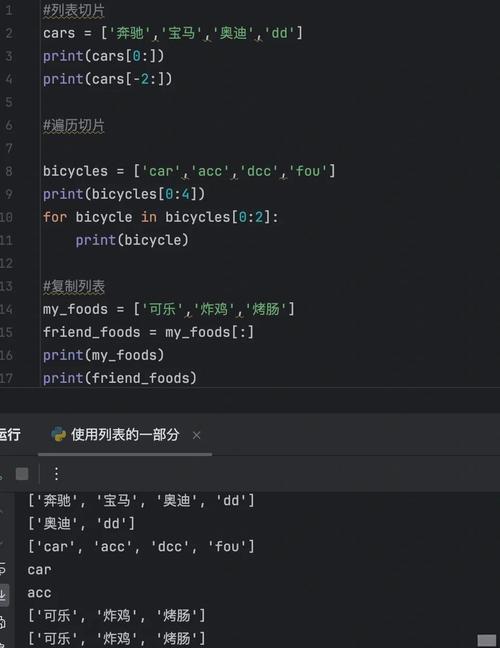
Let's break it down from the simplest case to more practical examples.
The Basic Concept: Looping and Printing
A for loop in Python is used to iterate over a sequence (like a list, a tuple, a string, or a range of numbers) and perform an action for each item in that sequence. The most common action is printing that item.
The basic structure is:
for item in my_list_of_things:
    print(item)
for item in ...: This is the loop header. It says, "For eachitemin the following collection..."my_list_of_things: This is the collection you want to loop through (e.g., a list of names).print(item): This is the indented code block that runs inside the loop. Theprint()function is called with the currentitemon each iteration.
Common Examples
Here are the most frequent scenarios you'll encounter.
Example A: Looping through a List of Strings
This is the most straightforward case. You have a list of items and you want to print each one on a new line.
fruits = ["apple", "banana", "cherry"]
for fruit in fruits:
    print(fruit)
Output:
apple
banana
cherry
Example B: Looping through a String
In Python, a string is a sequence of characters. You can loop through it to get each character.
for character in "hello":
    print(character)
Output:
h
e
l
l
o
Example C: Looping with range()
Often, you don't have a list of items but you want to repeat an action a specific number of times. The range() function is perfect for this.
range(5) generates a sequence of numbers from 0 up to (but not including) 5.
# Print "Hello World!" 5 times
for i in range(5):
    print("Hello World!")
Output:
Hello World!
Hello World!
Hello World!
Hello World!
Hello World!
You can also specify a start and end number: range(start, stop). For example, range(2, 6) generates 2, 3, 4, 5.
# Print the numbers from 2 to 5
for number in range(2, 6):
    print(number)
Output:
2
3
4
5
Advanced Printing in a Loop
Often, you want to do more than just print the item itself. Here are some common patterns.
Printing an Index and the Item
What if you want to print a counter (like "1:", "2:", etc.) along with the item? The enumerate() function is your best friend. It gives you both the index and the item.
fruits = ["apple", "banana", "cherry"]
for index, fruit in enumerate(fruits):
    print(f"{index}: {fruit}")
Output:
0: apple
1: banana
2: cherry
(Note: Python lists are 0-indexed, so the count starts at 0. If you want it to start at 1, you can add a second argument to enumerate(): enumerate(fruits, start=1))
Printing Multiple Items on the Same Line
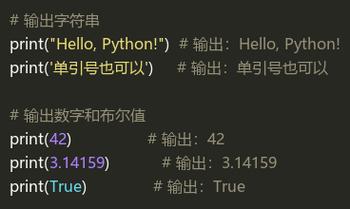
By default, print() adds a newline character (\n) at the end, which moves the cursor to the next line. To keep it on the same line, you can use the end argument.
A common use case is creating a progress bar or printing comma-separated values.
fruits = ["apple", "banana", "cherry"]
for fruit in fruits:
    print(fruit, end=" ")  # The end=" " tells print to add a space instead of a newline
Output:
apple banana cherry (Notice the trailing space at the end. You can handle this with more advanced techniques if needed.)
Printing with Custom Formatting
You can use f-strings (the f"..." syntax) to create beautifully formatted output inside your loop.
students = [
    {"name": "Alice", "score": 95},
    {"name": "Bob", "score": 88},
    {"name": "Charlie", "score": 92}
]
for student in students:
    # Print a formatted string for each student
    print(f"Student: {student['name']:<10} | Score: {student['score']}")
Output:
Student: Alice      | Score: 95
Student: Bob        | Score: 88
Student: Charlie    | Score: 92
(The <10 in the f-string formats the name to be left-aligned within a space of 10 characters, making the output neat.)
Putting It All Together: A Practical Example
Let's say you have a list of temperatures and you want to print a report for each day.
temperatures_celsius = [22, 25, 19, 30, 27, 23]
print("--- Daily Temperature Report ---")
for i, temp_c in enumerate(temperatures_celsius):
    # Convert Celsius to Fahrenheit
    temp_f = (temp_c * 9/5) + 32
    # Print a formatted line for each day
    print(f"Day {i+1}: {temp_c}°C is equal to {temp_f:.1f}°F")
print("--- Report End ---")
Output:
--- Daily Temperature Report ---
Day 1: 22°C is equal to 71.6°F
Day 2: 25°C is equal to 77.0°F
Day 3: 19°C is equal to 66.2°F
Day 4: 30°C is equal to 86.0°F
Day 5: 27°C is equal to 80.6°F
Day 6: 23°C is equal to 73.4°F
--- Report End ---
Summary
| Goal | Code Example |
|---|---|
| Print each item in a list | for item in my_list: print(item) |
| Print each character in a string | for char in my_string: print(char) |
| Repeat an action N times | for i in range(N): print("action") |
| Print the index and the item | for i, item in enumerate(my_list): print(i, item) |
| Print items on the same line | for item in my_list: print(item, end=" ") |
| Print formatted output | for item in my_list: print(f"Info: {item}") |











