Of course! Here is a comprehensive guide to building a RESTful API using Python and Tornado.
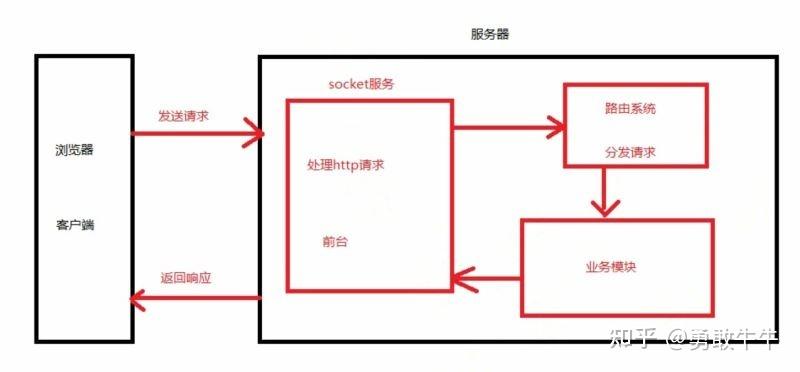
What is Tornado?
Tornado is a Python web framework and asynchronous networking library. It's known for its high performance, especially for applications that require handling many concurrent connections, such as:
- Real-time web services (WebSockets)
- Long-polling APIs
- Chat applications
- APIs for mobile or IoT backends
Its key feature is asynchronous I/O, which allows it to handle thousands of simultaneous connections on a single thread without the need for a multi-process server. This is achieved using Python's asyncio library.
Why Use Tornado for an API?
- High Performance: Ideal for I/O-bound applications (network requests, database calls).
- Scalability: Can handle a large number of concurrent connections efficiently.
- Asynchronous: Built from the ground up for
async/await, making modern non-blocking code clean and easy to write. - Lightweight: It's a framework, not a full-stack framework like Django. It gives you the tools to build exactly what you need.
- Self-Contained: Includes its own HTTP server, so you don't need to configure a separate server like Gunicorn or uWSGI (though you can).
Step-by-Step Guide to a Tornado API
Let's build a simple REST API to manage a list of "tasks".
Step 1: Project Setup
First, you'll need to install Tornado.
pip install tornado
Step 2: A Basic "Hello World" API
Let's start with the simplest possible API to understand the core components.
Create a file named main.py:
import tornado.ioloop
import tornado.web
class MainHandler(tornado.web.RequestHandler):
    def get(self):
        self.write("Hello, Tornado API!")
if __name__ == "__main__":
    app = tornado.web.Application([
        (r"/", MainHandler),
    ])
    app.listen(8888)
    print("Server running on http://localhost:8888")
    tornado.ioloop.IOLoop.current().start()
Run it:
python main.py
Now, open your browser or use curl to http://localhost:8888.
Key Components Explained:
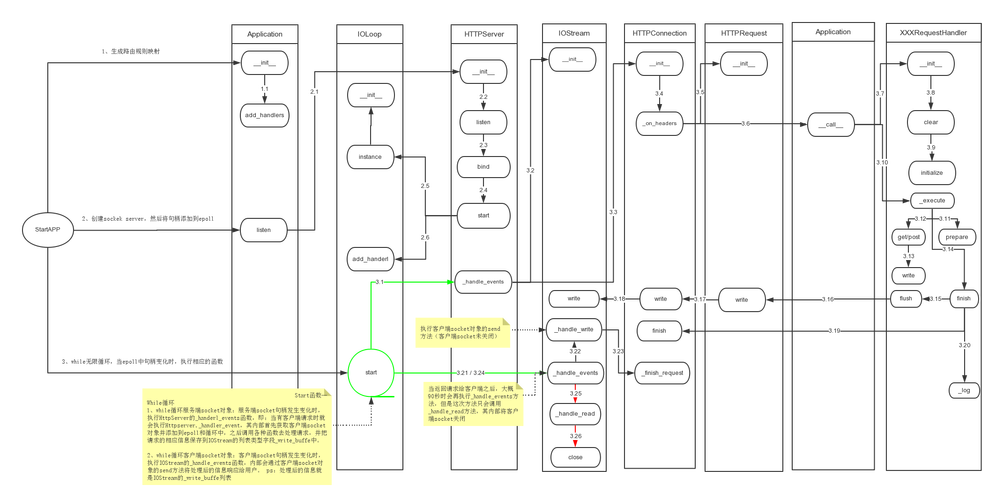
tornado.web.RequestHandler: This is the base class for all your request handlers. You create a subclass for each endpoint or set of endpoints.get(self),post(self), etc.: These methods correspond to HTTP methods. When a GET request hits , Tornado calls theget()method ofMainHandler.self.write(...): This method writes the response body that the client will receive.tornado.web.Application: This is the main application object. You pass it a list of URL routing rules.(r"/", MainHandler): This is a routing rule. The regular expressionr"/"matches the root URL, andMainHandleris the class that will handle requests to it.app.listen(8888): This tells the application to listen for incoming HTTP requests on port 8888.tornado.ioloop.IOLoop.current().start(): This starts Tornado's I/O event loop, which is the heart of its asynchronous engine.
Step 3: Building a RESTful API for Tasks
Now, let's build a more complete API for managing tasks with GET, POST, PUT, and DELETE methods. We'll use simple in-memory data storage for this example.
File: main.py
import tornado.ioloop
import tornado.web
import tornado.httpserver
import json
# In-memory "database"
tasks_db = []
next_task_id = 1
class TaskHandler(tornado.web.RequestHandler):
    # Helper method to parse JSON body
    def get_json_body(self):
        try:
            return json.loads(self.request.body)
        except json.JSONDecodeError:
            raise tornado.web.HTTPError(400, "Invalid JSON")
    # GET /tasks - Get all tasks
    def get(self):
        self.set_header("Content-Type", "application/json")
        self.write(json.dumps(tasks_db))
    # POST /tasks - Create a new task
    def post(self):
        data = self.get_json_body()
        if 'text' not in data:
            raise tornado.web.HTTPError(400, "Missing 'text' field")
        global next_task_id
        new_task = {
            "id": next_task_id,
            "text": data['text'],
            "completed": False
        }
        tasks_db.append(new_task)
        next_task_id += 1
        self.set_status(201) # Created
        self.set_header("Content-Type", "application/json")
        self.write(json.dumps(new_task))
class TaskDetailHandler(tornado.web.RequestHandler):
    # Helper to find a task by ID
    def find_task(self, task_id):
        for task in tasks_db:
            if task['id'] == task_id:
                return task
        return None
    # GET /tasks/<task_id> - Get a single task
    def get(self, task_id):
        task_id = int(task_id)
        task = self.find_task(task_id)
        if not task:
            raise tornado.web.HTTPError(404, "Task not found")
        self.set_header("Content-Type", "application/json")
        self.write(json.dumps(task))
    # PUT /tasks/<task_id> - Update a task
    def put(self, task_id):
        task_id = int(task_id)
        task = self.find_task(task_id)
        if not task:
            raise tornado.web.HTTPError(404, "Task not found")
        data = self.get_json_body()
        if 'text' in data:
            task['text'] = data['text']
        if 'completed' in data:
            task['completed'] = bool(data['completed'])
        self.set_header("Content-Type", "application/json")
        self.write(json.dumps(task))
    # DELETE /tasks/<task_id> - Delete a task
    def delete(self, task_id):
        task_id = int(task_id)
        task = self.find_task(task_id)
        if not task:
            raise tornado.web.HTTPError(404, "Task not found")
        tasks_db.remove(task)
        self.set_status(204) # No Content
        self.finish()
# Set up the application routes
app = tornado.web.Application([
    (r"/tasks", TaskHandler),
    (r"/tasks/(\d+)", TaskDetailHandler),
])
if __name__ == "__main__":
    app.listen(8888)
    print("Server running on http://localhost:8888")
    tornado.ioloop.IOLoop.current().start()
Step 4: Testing the API
Use a tool like curl or Postman to interact with your API.
Create a new task (POST)
curl -X POST -H "Content-Type: application/json" -d '{"text": "Learn Tornado"}' http://localhost:8888/tasks
Response:
{"completed": false, "id": 1, "text": "Learn Tornado"}
Create another task (POST)
curl -X POST -H "Content-Type: application/json" -d '{"text": "Build an API"}' http://localhost:8888/tasks
Response:
{"completed": false, "id": 2, "text": "Build an API"}
Get all tasks (GET)
curl http://localhost:8888/tasks
Response:
[
  {"completed": false, "id": 1, "text": "Learn Tornado"},
  {"completed": false, "id": 2, "text": "Build an API"}
]
Get a single task (GET)
curl http://localhost:8888/tasks/1
Response:
{"completed": false, "id": 1, "text": "Learn Tornado"}
Update a task (PUT)
curl -X PUT -H "Content-Type: application/json" -d '{"completed": true}' http://localhost:8888/tasks/1
Response:
{"completed": true, "id": 1, "text": "Learn Tornado"}
Delete a task (DELETE)
curl -X DELETE http://localhost:8888/tasks/2
Response: (No content, status code 204)
Verify deletion (GET all)
curl http://localhost:8888/tasks
Response:
[
  {"completed": true, "id": 1, "text": "Learn Tornado"}
]
Going Further: Asynchronous Operations
The real power of Tornado shines when you need to perform slow, non-blocking operations like database queries or calling other APIs. Let's make our POST request asynchronous using async/await.
First, you'll need an async database driver. For this example, we'll simulate a database call with asyncio.sleep.
Modify the post method in TaskHandler:
import asyncio # Add this import
class TaskHandler(tornado.web.RequestHandler):
    # ... (other methods) ...
    async def post(self):
        # Simulate a slow database operation
        await asyncio.sleep(1)
        data = self.get_json_body()
        if 'text' not in data:
            raise tornado.web.HTTPError(400, "Missing 'text' field")
        global next_task_id
        new_task = {
            "id": next_task_id,
            "text": data['text'],
            "completed": False
        }
        tasks_db.append(new_task)
        next_task_id += 1
        self.set_status(201)
        self.set_header("Content-Type", "application/json")
        self.write(json.dumps(new_task))
Now, when you make a POST request, the I/O loop is not blocked. It can continue handling other requests while waiting for the asyncio.sleep to complete. This is the essence of Tornado's performance.
Production Considerations
For a production environment, you should consider:
- WSGI Server: Tornado's HTTP server is good, but for production, it's common to run it behind a more robust reverse proxy like Nginx. Nginx can handle static files, SSL termination, and load balancing, and then forward requests to your Tornado app.
- Process Management: Use a process manager like systemd or supervisor to run multiple Tornado processes and ensure they restart if they crash.
- Database: Replace the in-memory list with a real database (like PostgreSQL, MySQL, or MongoDB) and use an asynchronous driver (e.g.,
aiopg,motor). - Configuration: Don't hardcode settings like port numbers. Use a configuration file or environment variables.
- Logging: Implement proper logging instead of just using
print(). - Error Handling: Create a custom error handler to format JSON error responses consistently.