Of course! This is a fundamental topic in Java. Let's break down Set, List, and Map, the three main interfaces in the Java Collections Framework. We'll cover their purpose, key characteristics, common implementations, and when to use each.
The Big Picture: The Java Collections Framework
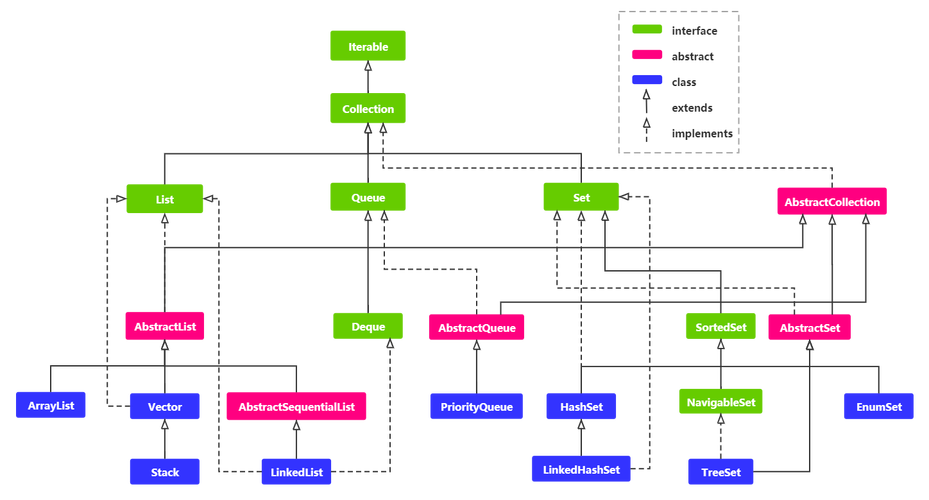
First, it's helpful to know where these fit in. The Collections Framework is a set of classes and interfaces in java.util for storing and manipulating groups of objects. The core interfaces are:
Collection: The root interface.ListandSetextendCollection.Mapis a separate branch because it stores key-value pairs, not just a collection of objects.List: An ordered collection (also known as a sequence).Set: A collection that cannot contain duplicate elements.Map: An object that maps keys to values. A map cannot contain duplicate keys.
List - An Ordered Collection
A List is a collection that maintains the insertion order of its elements. You can have duplicate elements, and you can access elements by their position (index).
Key Characteristics:
- Ordered: Elements are stored in the order they are added.
- Allows Duplicates: You can add the same object multiple times.
- Indexed: You can access elements via an integer index (like an array), e.g.,
list.get(0). - Allows Nulls: Most
Listimplementations allownullelements.
Common Implementations:
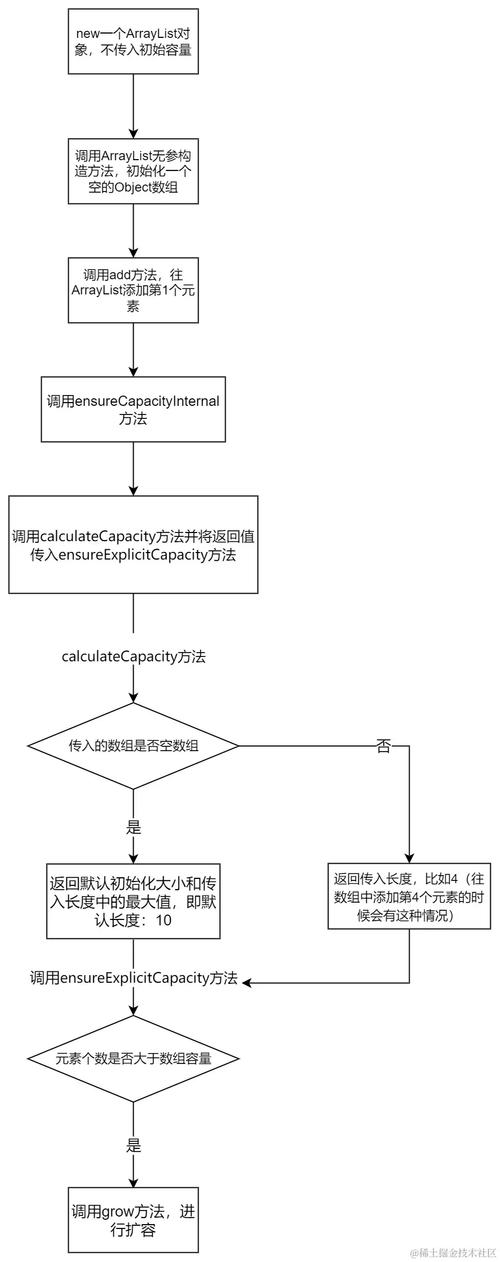
| Implementation | Description | Key Features | When to Use |
|---|---|---|---|
ArrayList |
A resizable-array implementation. | - Fast random access (get/set). - Slower for adding/removing elements in the middle. - Generally the most common and versatile List. |
When you need fast access by index and don't frequently add/remove from the middle of the list. This is the default choice. |
LinkedList |
A doubly-linked list implementation. | - Fast for adding/removing elements at the beginning or end. - Slower for random access (must traverse the list). - Implements Queue and Deque interfaces. |
When you frequently add or remove elements from the ends of the list (like a queue or stack) and rarely need random access. |
Vector |
A legacy resizable-array class. | - Similar to ArrayList but synchronized (thread-safe).- Slower due to synchronization overhead. |
Rarely used today. If you need a thread-safe list, use CopyOnWriteArrayList or use Collections.synchronizedList(new ArrayList<>()). |
Code Example:
import java.util.ArrayList;
import java.util.List;
public class ListExample {
    public static void main(String[] args) {
        // Using ArrayList
        List<String> fruits = new ArrayList<>();
        // Add elements (duplicates are allowed)
        fruits.add("Apple");
        fruits.add("Banana");
        fruits.add("Orange");
        fruits.add("Apple"); // Duplicate
        System.out.println("Initial List: " + fruits); // [Apple, Banana, Orange, Apple]
        // Access an element by index
        String firstFruit = fruits.get(0);
        System.out.println("First Fruit: " + firstFruit); // Apple
        // Remove an element by value
        fruits.remove("Banana");
        System.out.println("After removing Banana: " + fruits); // [Apple, Orange, Apple]
        // Check if an element exists
        boolean hasOrange = fruits.contains("Orange");
        System.out.println("Has Orange? " + hasOrange); // true
    }
}
Set - A Collection of Unique Elements
A Set is a collection that models the mathematical concept of a set. Its main rule is that it cannot contain duplicate elements.
Key Characteristics:
- No Duplicates: If you try to add an element that's already in the set, the add operation is ignored.
- Not Ordered (in general): The most common implementation,
HashSet, does not maintain insertion order. However, other implementations likeLinkedHashSetandTreeSetdo. - No Nulls (in general): Most
Setimplementations allow onenullelement, except forTreeSet(if it's using a natural comparator that doesn't allow nulls).
Common Implementations:
| Implementation | Description | Key Features | When to Use |
|---|---|---|---|
HashSet |
Implemented using a hash table. | - Very fast for add, remove, and contains (average O(1) time). - Does not maintain any order. |
When you need to store a collection of unique items and don't care about the order. This is the default choice for a Set. |
LinkedHashSet |
A HashSet that maintains a linked list of entries. |
- Almost as fast as HashSet.- Maintains insertion order. |
When you need a set of unique items but also need to preserve the order in which they were added. |
TreeSet |
Implemented using a tree structure (Red-Black Tree). | - Elements are stored in sorted order (natural order or a custom Comparator).- Slower for add/remove/contains (O(log n) time). - Does not allow null elements (if using natural ordering). |
When you need a set of unique items that must always be in a specific sorted order. |
Code Example:
import java.util.HashSet;
import java.util.LinkedHashSet;
import java.util.Set;
import java.util.TreeSet;
public class SetExample {
    public static void main(String[] args) {
        // HashSet: No guaranteed order
        Set<String> hashSet = new HashSet<>();
        hashSet.add("Apple");
        hashSet.add("Banana");
        hashSet.add("Orange");
        hashSet.add("Apple"); // Duplicate, will be ignored
        System.out.println("HashSet (no order): " + hashSet); // e.g., [Orange, Apple, Banana]
        // LinkedHashSet: Maintains insertion order
        Set<String> linkedHashSet = new LinkedHashSet<>();
        linkedHashSet.add("Apple");
        linkedHashSet.add("Banana");
        linkedHashSet.add("Orange");
        linkedHashSet.add("Apple");
        System.out.println("LinkedHashSet (insertion order): " + linkedHashSet); // [Apple, Banana, Orange]
        // TreeSet: Maintains sorted order
        Set<String> treeSet = new TreeSet<>();
        treeSet.add("Apple");
        treeSet.add("Banana");
        treeSet.add("Orange");
        treeSet.add("Apple");
        System.out.println("TreeSet (sorted order): " + treeSet); // [Apple, Banana, Orange]
    }
}
Map - Key-Value Pairs
A Map is an object that maps keys to values. Each key can map to at most one value. It's like a dictionary.
Key Characteristics:
- Key-Value Storage: Stores data as pairs.
- Keys Must Be Unique: You cannot have two entries with the same key.
- Values Can Be Duplicated: Multiple keys can map to the same value.
- Not Ordered (in general): The most common implementation,
HashMap, does not maintain insertion order.
Common Implementations:
| Implementation | Description | Key Features | When to Use |
|---|---|---|---|
HashMap |
Implemented using a hash table. | - Very fast for get, put, and remove (average O(1) time). - Does not maintain any order. - Allows one null key and multiple null values. |
When you need to store key-value pairs and don't care about the order. This is the default choice for a Map. |
LinkedHashMap |
A HashMap that maintains a linked list of entries. |
- Almost as fast as HashMap.- Maintains insertion order (or access order, if configured). |
When you need a map of key-value pairs and need to preserve the order in which they were added. |
TreeMap |
Implemented using a tree structure (Red-Black Tree). | - Keys are stored in sorted order (natural order or a custom Comparator).- Slower for get/put/remove (O(log n) time). - Does not allow null keys (if using natural ordering). |
When you need a map where keys must always be in a specific sorted order. |
Hashtable |
A legacy class. | - Similar to HashMap but synchronized (thread-safe).- Does not allow null keys or values.- Slower due to synchronization. |
Rarely used. Use ConcurrentHashMap for modern thread-safe maps. |
Code Example:
import java.HashMap;
import java.LinkedHashMap;
import java.Map;
import java.TreeMap;
public class MapExample {
    public static void main(String[] args) {
        // HashMap: No guaranteed order
        Map<Integer, String> hashMap = new HashMap<>();
        hashMap.put(1, "One");
        hashMap.put(2, "Two");
        hashMap.put(3, "Three");
        hashMap.put(1, "New One"); // Key 1 already exists, value is updated
        System.out.println("HashMap (no order): " + hashMap); // e.g., {1=New One, 2=Two, 3=Three}
        // LinkedHashMap: Maintains insertion order
        Map<Integer, String> linkedHashMap = new LinkedHashMap<>();
        linkedHashMap.put(1, "One");
        linkedHashMap.put(2, "Two");
        linkedHashMap.put(3, "Three");
        System.out.println("LinkedHashMap (insertion order): " + linkedHashMap); // {1=One, 2=Two, 3=Three}
        // TreeMap: Maintains sorted order by key
        Map<Integer, String> treeMap = new TreeMap<>();
        treeMap.put(3, "Three");
        treeMap.put(1, "One");
        treeMap.put(2, "Two");
        System.out.println("TreeMap (sorted by key): " + treeMap); // {1=One, 2=Two, 3=Three}
    }
}
Summary Table: When to Use Which?
| Use Case | Recommended Interface | Recommended Implementation |
|---|---|---|
| I need a list of items, order matters, and I might have duplicates. | List |
ArrayList |
| I need to store a collection of unique items, and order doesn't matter. | Set |
HashSet |
| I need to store unique items and must preserve the order I added them. | Set |
LinkedHashSet |
| I need to store unique items that must always be in a sorted order. | Set |
TreeSet |
| I need to store key-value pairs for fast lookup, order doesn't matter. | Map |
HashMap |
| I need to store key-value pairs and must preserve the order I added them. | Map |
LinkedHashMap |
| I need to store key-value pairs where keys must always be in a sorted order. | Map |
TreeMap |
| I need a "last-in, first-out" (LIFO) stack. | List (using LinkedList) |
LinkedList |
| I need a "first-in, first-out" (FIFO) queue. | Queue (extends List) |
LinkedList or ArrayDeque |
How to Choose: A Quick Decision Flow
- Do you need to store key-value pairs?
- YES -> Use a
Map. - NO -> Go to question 2.
- YES -> Use a
- Do you need to allow duplicate elements?
- YES -> Use a
List. - NO -> Use a
Set.
- YES -> Use a
- (For List) Do you need fast access by index?
- YES -> Use
ArrayList. - NO -> Use
LinkedList.
- YES -> Use
- (For Set) Do you need to preserve insertion order?
- YES -> Use
LinkedHashSet. - NO -> Use
HashSet.
- YES -> Use
- (For Map) Do you need to preserve insertion order?
- YES -> Use
LinkedHashMap. - NO -> Use
HashMap.
- YES -> Use