Of course! Here is a comprehensive guide on how to work with JSON in a Java Servlet, covering everything from basic concepts to complete, runnable examples.
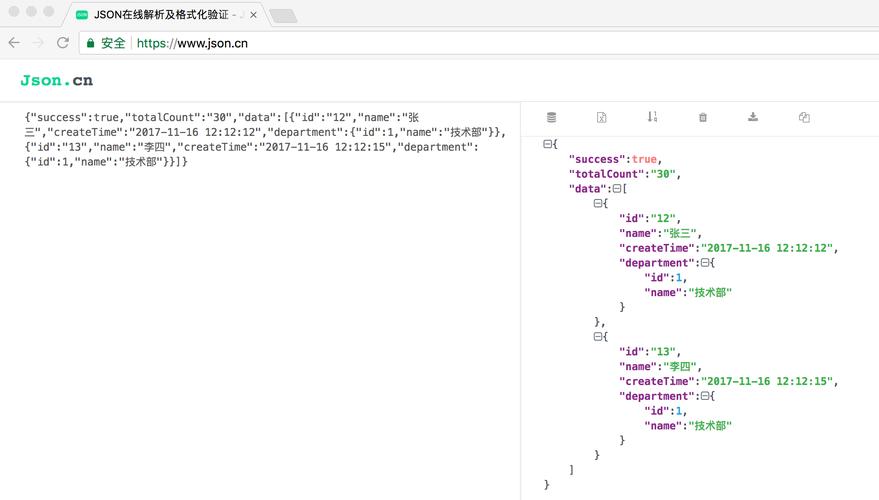
What is JSON in the Context of Servlets?
JSON (JavaScript Object Notation) is a lightweight data-interchange format. It's easy for humans to read and write, and easy for machines to parse and generate. In Java Servlets, JSON is primarily used for:
- API Responses: Sending data from a server to a client (like a web or mobile app). The client expects a structured data format, not an HTML page.
- API Requests: Receiving data from a client. The client sends data in a JSON format, and the servlet needs to read and process it.
Core Concepts
To handle JSON in a servlet, you need two main things:
-
A JSON Library: To convert Java objects to JSON (a process called Serialization or Marshalling) and vice-versa (Deserialization or Unmarshalling).
- Popular Choices:
- Jackson: The de-facto standard in the Java ecosystem. It's fast, feature-rich, and widely used (it's the default in Spring Boot).
- Gson: Google's library. Very easy to use and a great alternative.
- org.json: A simpler, lightweight library. Good for basic use cases but less powerful than Jackson or Gson.
- Popular Choices:
-
Content-Type Header: This HTTP header tells the client what kind of data the response contains. For JSON, you must set it to
application/json. (图片来源网络,侵删)
Scenario 1: Sending JSON Data from a Servlet (GET Request)
This is the most common use case. A client requests data, and the servlet responds with a JSON object.
Step 1: Add a Dependency
You need to add a JSON library to your project. Let's use Jackson as it's the most common.
Maven (pom.xml):
<dependency>
    <groupId>com.fasterxml.jackson.core</groupId>
    <artifactId>jackson-databind</artifactId>
    <version>2.15.2</version> <!-- Use the latest version -->
</dependency>
Gradle (build.gradle):
implementation 'com.fasterxml.jackson.core:jackson-databind:2.15.2' // Use the latest version
Step 2: Create a Simple POJO (Plain Old Java Object)
Create a Java class that represents the structure of your JSON data. Jackson will automatically map the fields of this object to JSON keys.
// User.java
public class User {
    private int id;
    private String name;
    private String email;
    // Jackson requires a no-arg constructor
    public User() {}
    public User(int id, String name, String email) {
        this.id = id;
        this.name = name;
        this.email = email;
    }
    // Getters and Setters are essential!
    public int getId() { return id; }
    public void setId(int id) { this.id = id; }
    public String getName() { return name; }
    public void setName(String name) { this.name = name; }
    public String getEmail() { return email; }
    public void setEmail(String email) { this.email = email; }
    @Override
    public String toString() {
        return "User{" +
                "id=" + id +
                ", name='" + name + '\'' +
                ", email='" + email + '\'' +
                '}';
    }
}
Step 3: Write the Servlet Code
In your doGet or doPost method, you will:
- Create an object of your POJO.
- Set the
Content-Typeresponse header. - Get the
ObjectMapperfrom Jackson. - Use
objectMapper.writeValue(response.getWriter(), yourObject)to write the JSON to the response output stream.
// UserServlet.java
import com.fasterxml.jackson.databind.ObjectMapper;
import jakarta.servlet.ServletException;
import jakarta.servlet.annotation.WebServlet;
import jakarta.servlet.http.HttpServlet;
import jakarta.servlet.http.HttpServletRequest;
import jakarta.servlet.http.HttpServletResponse;
import java.io.IOException;
@WebServlet("/api/user")
public class UserServlet extends HttpServlet {
    // ObjectMapper is thread-safe, so it's best to create it once as a static final field.
    private static final ObjectMapper objectMapper = new ObjectMapper();
    @Override
    protected void doGet(HttpServletRequest req, HttpServletResponse resp) throws ServletException, IOException {
        // 1. Create a user object
        User user = new User(1, "John Doe", "john.doe@example.com");
        // 2. Set the response content type to JSON
        resp.setContentType("application/json");
        resp.setCharacterEncoding("UTF-8");
        // 3. Write the JSON to the response body
        // objectMapper.writeValue() automatically serializes the User object to a JSON string.
        objectMapper.writeValue(resp.getWriter(), user);
    }
}
Expected JSON Output:
When you access http://localhost:8080/your-app/api/user, the browser will display:
{"id":1,"name":"John Doe","email":"john.doe@example.com"}
Scenario 2: Receiving JSON Data in a Servlet (POST Request)
Now, let's say a client sends a JSON object to our servlet, and we need to read it.
Step 1: Create a POJO (same as before)
You'll use the same User.java class. Jackson will map the incoming JSON keys to the fields of this object.
Step 2: Write the Servlet Code
In your doPost method, you will:
- Get the
ObjectMapperfrom Jackson. - Use
objectMapper.readValue(request.getInputStream(), User.class)to read the request body and convert it into aUserobject.
// CreateUserServlet.java
import com.fasterxml.jackson.databind.ObjectMapper;
import jakarta.servlet.ServletException;
import jakarta.servlet.annotation.WebServlet;
import jakarta.servlet.http.HttpServlet;
import jakarta.servlet.http.HttpServletRequest;
import jakarta.servlet.http.HttpServletResponse;
import java.io.IOException;
@WebServlet("/api/users")
public class CreateUserServlet extends HttpServlet {
    private static final ObjectMapper objectMapper = new ObjectMapper();
    @Override
    protected void doPost(HttpServletRequest req, HttpServletResponse resp) throws ServletException, IOException {
        // 1. Set the request content type (optional, but good practice)
        req.setContentType("application/json");
        // 2. Read the JSON from the request body and deserialize it into a User object
        User newUser = objectMapper.readValue(req.getInputStream(), User.class);
        // 3. Now you have a Java object! You can process it.
        // For example, save it to a database.
        System.out.println("Received new user: " + newUser);
        // 4. Send a success response back to the client
        resp.setContentType("application/json");
        resp.setStatus(HttpServletResponse.SC_CREATED); // 201 Created
        resp.getWriter().write("{\"message\":\"User created successfully!\"}");
    }
}
How to Test This:
You can use a tool like Postman or curl to send a POST request.
Using curl:
curl -X POST http://localhost:8080/your-app/api/users \
-H "Content-Type: application/json" \
-d '{"id": 2, "name": "Jane Doe", "email": "jane.doe@example.com"}'
Your server console will print:
Received new user: User{id=2, name='Jane Doe', email='jane.doe@example.com'}
Advanced: Using JacksonFeature with Jakarta EE 10+
If you are using a modern Jakarta EE 10 server (like Payara, WildFly, or Tomcat 10+), you can use the standard jakarta.json.stream.JsonParser or configure Jackson as a built-in feature.
For a more integrated approach, you can use the JAX-RS API (like RESTEasy or Jersey), which is designed specifically for building REST APIs and has much cleaner annotations (@GET, @POST, @Produces, @Consumes).
However, for pure servlets, the manual approach with ObjectMapper is standard and works everywhere.
Summary & Best Practices
- Use a JSON Library: Don't manually build JSON strings. Use Jackson, Gson, or
org.json. - Use POJOs: Create simple Java classes to represent your data structures. This makes your code type-safe and readable.
- Reuse
ObjectMapper:ObjectMapperis expensive to create and is thread-safe. Declare it as astatic finalfield in your servlet or a dedicated utility class. - Always Set
Content-Type: Always setresp.setContentType("application/json");when sending JSON. Always checkreq.getContentType()when receiving it to ensure it's JSON. - Handle Exceptions: In a real application, wrap
objectMapper.readValue()in atry-catchblock to handleJsonProcessingException(for bad JSON) and other potential errors. You should then send an appropriate HTTP error response (e.g.,400 Bad Requestor500 Internal Server Error).