Of course! This is a fantastic combination of technologies, often used together to build powerful, scalable, and high-performance applications. Let's break down each one and then explore how they work together.

Here's a complete guide covering:
- What is Python? (The glue)
- What is MongoDB? (The flexible database)
- What is Redis? (The ultra-fast data structure server)
- How They Work Together: A Common Architecture
- Code Examples (Connecting each to Python)
- When to Use Which (and why all three?)
What is Python?
Think of Python as the "brain" or "glue" of your application. It's a high-level, versatile programming language known for its simple syntax and readability.
- Role: It contains your application's logic. It handles user requests, processes data, and decides what to do with that data (e.g., save it to MongoDB, fetch a temporary result from Redis).
- Key Libraries:
pymongo: To interact with MongoDB.redis-py: To interact with Redis.FlaskorDjango: To build web APIs that users interact with.
What is MongoDB?
Think of MongoDB as a "flexible filing cabinet" for your data. It's a NoSQL, document-oriented database.
- Core Concept: Documents
- Instead of storing data in rigid rows and columns (like in a traditional SQL database), MongoDB stores data in JSON-like documents. These documents are flexible and can have varying structures.
- Why use it?
- Schema Flexibility: You don't need to define a strict table structure beforehand. This is great for applications where data structures evolve.
- Scalability: It's designed to scale out horizontally by adding more servers (sharding).
- Developer-Friendly: Data is stored in a format (BSON, a binary version of JSON) that maps almost directly to objects in Python, making it easy to work with.
Example Document in MongoDB:
{
  "_id": ObjectId("..."),
  "name": "Alice",
  "email": "alice@example.com",
  "age": 30,
  "interests": ["hiking", "coding", "photography"],
  "address": {
    "street": "123 Python Lane",
    "city": "Codeville"
  }
}
What is Redis?
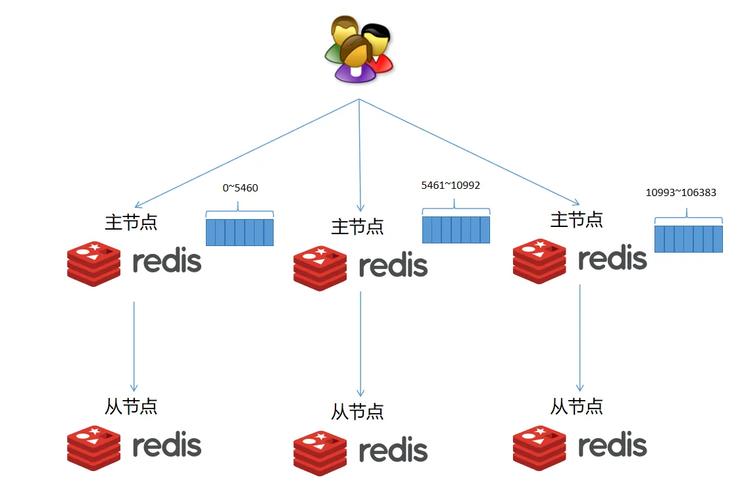
Think of Redis as a "super-fast scratchpad" or "short-term memory" for your application. It's an in-memory data structure store.
- Core Concept: Speed & Volatility
- Redis stores all its data in RAM (memory), which makes it incredibly fast for read and write operations—often orders of magnitude faster than databases like MongoDB that store data on disk.
- Because it's in-memory, it's typically used for data that is temporary or can be rebuilt if lost. It also supports persistence, saving data to disk periodically.
- Why use it?
- Caching: Store the results of expensive database queries or complex computations in Redis. The next time the same data is requested, you can serve it instantly from Redis instead of re-computing it.
- Session Management: Store user session data for web applications.
- Real-time Features: Leaderboards, chat applications, real-time analytics (using its Pub/Sub capabilities).
- Rate Limiting: Limit how many times a user can perform an action in a given time frame.
Common Data Structures in Redis:
- Strings: Simple key-value pairs (e.g.,
"session:123"->"{\"user_id\": 456, \"role\": \"admin\"}"). - Hashes: Maps between field and string values (e.g.,
user:456->{name: "Bob", email: "bob@example.com"}). - Lists: Ordered collections of strings (e.g., a queue of tasks).
- Sets: Unordered collections of unique strings (e.g., a list of users who liked a post).
- Sorted Sets: Sets with an associated score (e.g., a leaderboard with scores).
How They Work Together: A Common Architecture
This is where the magic happens. A typical modern web application uses all three to leverage their strengths.
Here is a common request flow:

- User Request: A user sends a request to your Python web server (e.g., "Get the profile for user 123").
- Python (The Brain): Your Python application receives the request. It first checks the fastest possible place for the data: Redis.
- Python Code Logic:
if redis.get("profile:123") is not None:
- Python Code Logic:
- Cache Hit (Redis):
- If the data exists in Redis (a "cache hit"), Python gets the data instantly from Redis.
- It formats the data and sends the response back to the user. Done! This is extremely fast.
- Cache Miss (Redis -> MongoDB):
- If the data does not exist in Redis (a "cache miss"), Python knows it needs to get the data from the "main database," MongoDB.
- Python Code Logic:
else: profile_data = db.profiles.find_one({"_id": 123})
- Database Query (MongoDB):
Python queries MongoDB to find the user's profile. This is slower than Redis because it involves reading from a disk.
- Update Cache (Redis):
- Once Python gets the data from MongoDB, it doesn't just send it to the user. It also stores it in Redis for the next request.
- Python Code Logic:
redis.set("profile:123", json.dumps(profile_data), ex=3600)(Store for 1 hour)
- Send Response:
Python sends the data to the user.
Diagram of the Flow:
      User Request (Get Profile 123)
                |
                v
      +---------------------+
      |   Python App        |
      |   (Flask/Django)    |
      +---------------------+
                |
      +---------------------+
      |   Is data in Redis? |  <--- Check Redis (Cache)
      +---------------------+
                /   \
             Yes     No
              /       \
        (Cache Hit)  (Cache Miss)
             /           \
            v             v
    Return Data      Query MongoDB
 (from Redis)      (Slow, from Disk)
            \             /
             \           /
              v         v
        Store Data in Redis
        (for next time)
                |
                v
           Return Data
           to User
Python Code Examples
A. Connecting to MongoDB
First, install the library: pip install pymongo
import pymongo
from pymongo import MongoClient
# 1. Connect to MongoDB (assuming it's running on localhost:27017)
try:
    client = MongoClient('mongodb://localhost:27017/')
    print("Successfully connected to MongoDB!")
    # 2. Select a database (it will be created if it doesn't exist)
    db = client['my_app_db']
    # 3. Select a collection (like a table in SQL)
    users_collection = db['users']
    # 4. Insert a document
    new_user = {
        "name": "Charlie",
        "email": "charlie@example.com",
        "age": 25,
        "is_active": True
    }
    insert_result = users_collection.insert_one(new_user)
    print(f"Inserted document with id: {insert_result.inserted_id}")
    # 5. Find a document
    found_user = users_collection.find_one({"name": "Charlie"})
    print(f"Found user: {found_user}")
    # 6. Close the connection
    client.close()
except pymongo.errors.ConnectionFailure as e:
    print(f"Could not connect to MongoDB: {e}")
B. Connecting to Redis
First, install the library: pip install redis
import redis
import json
import time
# 1. Connect to Redis (assuming it's running on localhost:6379)
try:
    r = redis.Redis(host='localhost', port=6379, db=0, decode_responses=True)
    print("Successfully connected to Redis!")
    # 2. Set a simple key-value pair (expires in 10 seconds)
    r.set("message", "Hello from Redis!", ex=10)
    print(f"Set key 'message' to: {r.get('message')}")
    # 3. Use a hash to store user session data
    session_data = {
        "user_id": "user_abc123",
        "username": "testuser",
        "login_time": int(time.time())
    }
    # The `hset` command sets multiple fields in a hash
    r.hset("session:user_abc123", mapping=session_data)
print(f"Stored session data: {r.hgetall('session:user